1. Utangulizi
This manual provides essential information for the installation, operation, maintenance, and troubleshooting of your PNY RTX 4000 Ada Generation 20GB DDR6 Quadro Graphics Card. This professional graphics card is designed for demanding applications such as 3D rendering, CAD/CAM, scientific simulations, and AI workflows, leveraging the NVIDIA Ada Lovelace architecture.
Key features include 6,144 CUDA cores, 48 RT Cores, 192 Tensor Cores, and 20GB of GDDR6 ECC memory, all within a single-slot, 130W design. It supports up to four 4K monitors or two 8K monitors via DisplayPort 1.4a.

Figure 1: PNY RTX 4000 Ada Generation Graphics Card overview, showing the single-slot design and an illustrative power connector icon.
2. Taarifa za Usalama
Please read and follow all safety instructions carefully to prevent damage to the product or personal injury.
- Daima ondoa nishati kutoka kwa kompyuta yako kabla ya kusakinisha au kuondoa vipengele vyovyote.
- Vaa kamba ya kifundo cha mkono isiyotulia au gusa mara kwa mara kitu cha chuma kilichotulia ili kutoa umeme tuli kabla ya kushughulikia kadi ya michoro.
- Hakikisha uingizaji hewa mzuri ndani ya kipochi cha kompyuta yako ili kuzuia joto kupita kiasi.
- Usiwaachie kadi ya michoro kwenye unyevu au halijoto kali.
- Handle the card by its edges; avoid touching the gold-plated connectors or components on the PCB.
3. Yaliyomo kwenye Kifurushi
Thibitisha kuwa bidhaa zote zipo kwenye kifurushi chako cha bidhaa:
- PNY RTX 4000 Ada Generation Graphics Card (VCNRTX4000ADA-PB)
- Documentation (this manual, quick start guide, etc.)
Note: Additional accessories such as display adapters or power cables may be sold separately or included depending on your region/retailer.
4. Kuweka
4.1. Ufungaji wa Kimwili
- Tayarisha Mfumo Wako: Power off your computer and disconnect the power cable from the wall outlet. Open your computer case.
- Pata Nafasi ya PCIe: Identify an available PCI Express x16 slot on your motherboard. The RTX 4000 Ada Generation is a single-slot card.
- Ondoa Vifuniko vya Slot: Ondoa kifuniko cha nafasi ya chuma kutoka nyuma ya kisanduku cha kompyuta yako kinacholingana na nafasi ya PCIe iliyochaguliwa.
- Weka Kadi ya Michoro: Panga kadi ya michoro kwa uangalifu na nafasi ya PCIe na ubonyeze chini kwa nguvu hadi ikae vizuri. Hakikisha klipu ya kuhifadhi kwenye nafasi ya PCIe inajifunga mahali pake.
- Unganisha Nguvu: The RTX 4000 Ada Generation requires an 8-pin PCIe power connector from your power supply. Connect this cable to the power connector on the top edge of the graphics card. Ensure a secure connection.
- Linda Kadi: Use a screw to fasten the graphics card's mounting bracket to the computer case.
- Close Case and Connect Displays: Close your computer case. Connect your display monitor(s) to the DisplayPort outputs on the graphics card.
4.2. Ufungaji wa Dereva
- Washa: Reconnect the power cable to your computer and power it on. Your system may boot with a basic display driver.
- Pakua Viendeshaji: Navigate to the official PNY or NVIDIA website to download the latest drivers for the RTX 4000 Ada Generation. It is recommended to download drivers directly from the manufacturer's webtovuti kwa utendaji bora na utulivu.
- Msaada wa PNY: www.pny.com/support
- Viendeshaji vya NVIDIA: www.nvidia.com/dereva
- Sakinisha Viendeshaji: Endesha kisakinishi cha kiendeshi kilichopakuliwa na ufuate maagizo yaliyo kwenye skrini. Kuanzisha upya mfumo kunaweza kuhitajika baada ya usakinishaji.
- Thibitisha Usakinishaji: After restarting, open the NVIDIA Control Panel or NVIDIA Settings to confirm that the graphics card is recognized and operating correctly.

Figure 2: Display output section of the PNY RTX 4000 Ada Generation, showing four DisplayPort 1.4a connectors.
5. Kuendesha Kadi ya Michoro
5.1. Operesheni ya Msingi
Once installed and drivers are updated, your PNY RTX 4000 Ada Generation graphics card will automatically handle graphics processing for your system. Applications that benefit from GPU acceleration will utilize the card's capabilities.
- Jopo la Kudhibiti la NVIDIA: Use the NVIDIA Control Panel (Windows) or NVIDIA Settings (Linux) to adjust display settings, manage 3D application profiles, and monitor GPU status.
- Utangamano wa Programu: Ensure your professional applications (e.g., CAD, rendering software) are updated to versions that support NVIDIA Ada Lovelace architecture for optimal performance.
5.2. Usanidi wa Vidhibiti vingi
The RTX 4000 Ada Generation supports up to four DisplayPort 1.4a outputs, allowing for flexible multi-monitor configurations.
- Connect your monitors to the available DisplayPort outputs on the graphics card.
- Access your operating system's display settings (e.g., Windows Display Settings) or the NVIDIA Control Panel to configure display arrangement, resolution, and refresh rates.
- The card supports resolutions up to 4K on four monitors simultaneously, or two 8K monitors.
6. Matengenezo
6.1. Kusafisha
Regular cleaning helps maintain optimal performance and extends the lifespan of your graphics card.
- Zima umeme: Zima kompyuta yako kila wakati na uikate kutoka kwa chanzo cha umeme kabla ya kusafisha.
- Uondoaji wa vumbi: Use compressed air to gently blow dust from the heatsink fins and fan blades. Hold the fan blades in place while blowing to prevent over-spinning and potential damage to the fan bearings.
- Usafishaji wa nje: Wipe the exterior of the card with a soft, dry, lint-free cloth. Do not use liquid cleaners directly on the card.
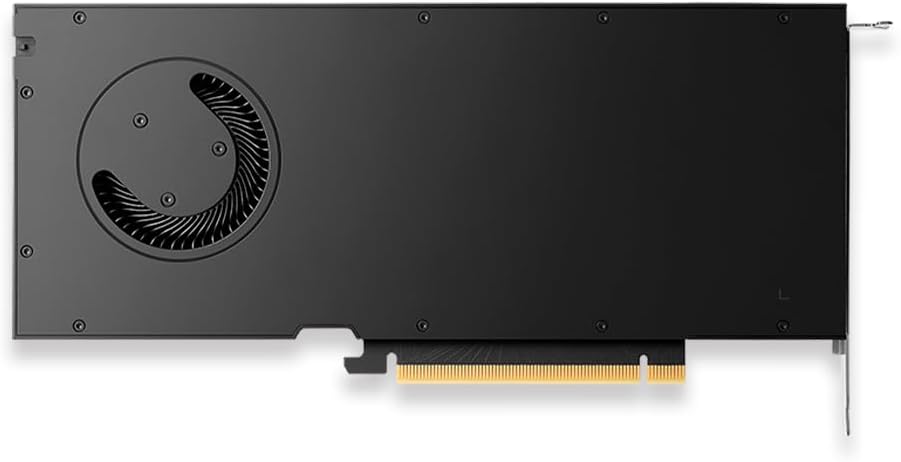
Kielelezo cha 3: Nyuma view of the PNY RTX 4000 Ada Generation, highlighting the cooling fan for maintenance reference.
6.2. Hifadhi
If storing the graphics card, place it in an anti-static bag and store it in a cool, dry environment away from direct sunlight and extreme temperatures.
7. Utatuzi wa shida
Sehemu hii inashughulikia masuala ya kawaida ambayo unaweza kukutana nayo.
- Hakuna Toleo la Kuonyesha:
- Ensure the monitor is powered on and connected to the graphics card, not the motherboard's integrated graphics.
- Verify the graphics card is fully seated in the PCIe slot and the power cable is securely connected.
- Jaribu kebo tofauti ya kuonyesha au kifuatiliaji.
- Check your BIOS/UEFI settings to ensure the primary display output is set to PCIe graphics.
- Masuala ya Ufungaji wa Dereva:
- Uninstall any previous graphics drivers using a utility like Display Driver Uninstaller (DDU) in Safe Mode, then attempt a fresh installation of the latest drivers.
- Ensure you downloaded the correct drivers for your operating system and graphics card model.
- Kutokuwa na utulivu wa mfumo au ajali:
- Hakikisha kitengo chako cha usambazaji wa umeme (PSU) kinakidhi kiwango cha chini cha watitage requirements for your system, including the graphics card.
- Monitor GPU temperatures using software utilities. Excessive heat can cause instability. Ensure proper case airflow.
- Verify that your operating system and motherboard BIOS are up to date.
8. Vipimo
| Kipengele | Maelezo |
|---|---|
| Chapa | PNY |
| Nambari ya Mfano | VCNRTX4000ADA-PB |
| Graphics Coprocessor | Kizazi cha Ada cha NVIDIA Quadro RTX 4000 |
| Usanifu | NVIDIA Ada Lovelace |
| Misingi ya CUDA | 6,144 |
| Viini vya RT | 48 (3rd Generation) |
| Viini vya Tensor | 192 (4th Generation) |
| Graphics Ukubwa wa RAM | 20 GB GDDR6 ECC |
| Kiolesura cha Kumbukumbu | 160-bit |
| Kipimo cha Kumbukumbu | 360 GB/s |
| Kasi ya Saa ya GPU | 2220 MHz (Kiongeza) |
| Kasi ya Kumbukumbu | 2250 MHz |
| Utendaji wa FP32 | Up to 26.7 TFLOPS |
| Ray Tracing Performance | 61.8 KUPANDA |
| AI Performance (FP8) | 327.6 KUPANDA |
| Kiolesura cha Pato la Video | 4x DisplayPort 1.4a |
| Ubora wa Juu wa Skrini | 3840x2160 (4K) per display, up to 4 displays; 8K on 2 displays |
| Matumizi ya Nguvu | 130W |
| Kipengele cha Fomu | Slot moja |
| Vipimo vya Bidhaa (LxWxH) | Inchi 14.65 x 8.55 x 0.1 |
| Uzito wa Kipengee | Pauni 1.85 |
9. Taarifa za Udhamini
PNY products are covered by a manufacturer's warranty. The specific terms and duration of the warranty may vary by region and product type. Please refer to the official PNY website or your product's packaging for detailed warranty information.
For warranty claims or to register your product, visit: www.pny.com/support/warranty
10. Msaada wa Kiufundi
If you encounter issues that cannot be resolved using the troubleshooting steps in this manual, or require further assistance, please contact PNY Technical Support.
- Msaada wa PNY Webtovuti: www.pny.com/support
- msaada website provides FAQs, driver downloads, and contact information for technical assistance.