
1. Utangulizi
This manual provides essential instructions for the safe and effective operation of your Fujifilm S4500 and S4530 Compact Digital Camera. Please read this manual thoroughly before using the camera and keep it in a safe place for future reference. The Fujifilm S4500/S4530 is equipped with a 14MP CCD sensor, a 30x optical zoom Fujinon lens, and is capable of recording 720p HD movies.
2. Bidhaa Imeishaview
Familiarize yourself with the main components of your camera.
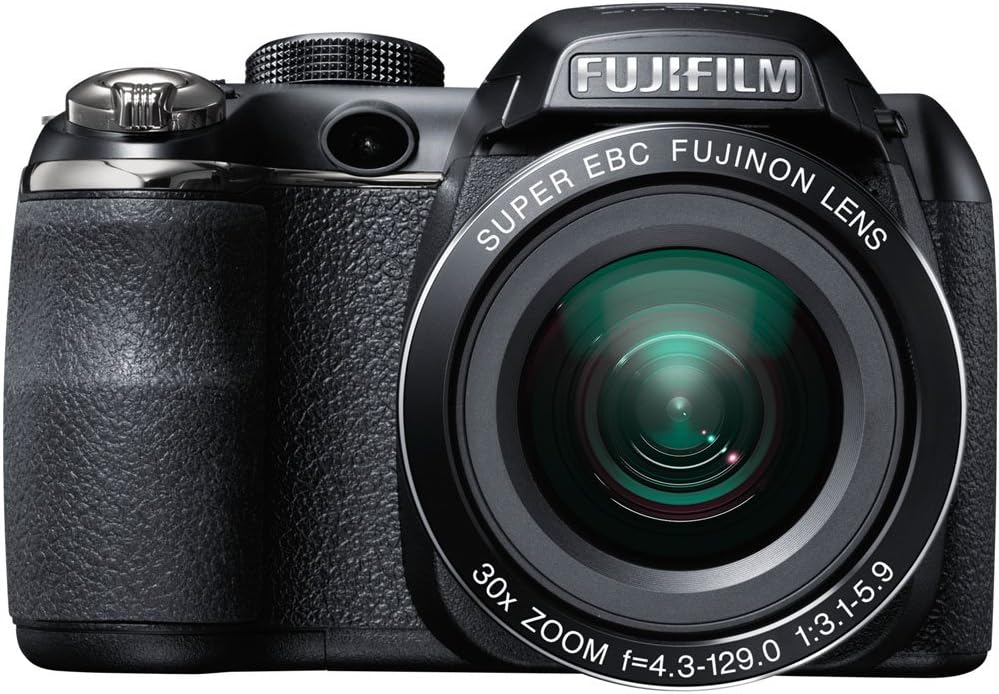
Kielelezo cha 2.1: Mbele view of the Fujifilm S4500/S4530 camera with the built-in flash in the raised position, showcasing the Fujinon 30x optical zoom lens.

Kielelezo cha 2.2: Mbele view of the Fujifilm S4500/S4530 camera with the built-in flash in the lowered position, highlighting the lens barrel and grip.

Kielelezo cha 2.3: Upande view of the Fujifilm S4500/S4530 camera, showing the ergonomic grip and control layout.
Vipengele Muhimu:
- Lenzi: Fujinon 30x Optical Zoom Lens (24-720mm equivalent).
- Mweko: Flash iliyojengewa ndani ibukizi.
- Onyesho la LCD: 3-inch, 230,000-dot screen for viewurambazaji wa ing na menyu.
- Viewmpataji: Kielektroniki Viewmtafutaji (EVF).
- Piga simu: For selecting shooting modes.
- Kitufe cha Kufunga: To capture photos.
- Kuza Lever: Hudhibiti ukuzaji wa macho na dijitali.
3. Kuweka
3.1. Kuingiza Betri
- Fungua kifuniko cha sehemu ya betri kilicho chini ya kamera.
- Ingiza betri nne (4) za alkali za AA, ukihakikisha polarity sahihi (+/-) kama inavyoonyeshwa ndani ya sehemu.
- Funga kifuniko cha sehemu ya betri kwa usalama.
3.2. Kuweka Kadi ya Kumbukumbu
- Fungua kifuniko cha nafasi ya kadi ya kumbukumbu, kwa kawaida huwa upande au chini ya kamera.
- Ingiza kadi ya kumbukumbu ya SD, SDHC, au SDXC huku lebo ikiangalia mwelekeo sahihi hadi itakapobofya mahali pake.
- Funga kifuniko cha nafasi ya kadi ya kumbukumbu kwa usalama.
3.3. Mipangilio ya Awali ya Kuwasha na Tarehe/Saa
- Bonyeza kwa WASHA/ZIMWA kifungo kwa nguvu kwenye kamera.
- The first time you power on, you will be prompted to set the date and time. Use the directional buttons to navigate and the MENU / Sawa kitufe cha kuthibitisha.
- Fuata maagizo kwenye skrini ili kukamilisha usanidi wa kwanza.
4. Maagizo ya Uendeshaji
4.1. Kupiga Picha
- Washa kamera.
- Select a shooting mode using the mode dial (e.g., AUTO for automatic settings).
- Weka fremu kwenye picha yako kwa kutumia skrini ya LCD au kielektroniki viewmpataji.
- Tumia lever ya kukuza ili kurekebisha urefu wa fokasi.
- Bonyeza kitufe cha kufunga katikati ya chini ili kulenga. Sura ya kuzingatia itageuka kijani wakati kuzingatia kunapatikana.
- Bonyeza kitufe cha kufunga chini kabisa ili kupiga picha.
4.2. Kurekodi Video
- Turn the mode dial to the movie recording setting (often indicated by a film camera icon).
- Weka mada yako katika mpangilio.
- Bonyeza kitufe maalum cha kurekodi filamu (ikiwa kinapatikana) au kitufe cha kufunga ili kuanza kurekodi.
- Press the button again to stop recording. The camera records in 720p HD resolution.
4.3. Uchezaji
- Bonyeza kwa CHEZA kitufe cha kuingiza hali ya kucheza tena.
- Tumia vitufe vya mwelekeo ili kusogeza picha na video zako.
- Bonyeza MENU / Sawa kwa view chaguo za picha/video iliyochaguliwa.
4.4. Hali za Mweko
The camera offers various flash modes, including Auto and Red Eye Reduction. To change the flash mode, press the flash button (often indicated by a lightning bolt icon) and use the directional buttons to select your desired mode from the on-screen menu.
5. Matengenezo
5.1. Kusafisha Kamera
- Lenzi: Tumia kitambaa laini, kisicho na rangi au brashi ya lenzi ili kuondoa vumbi kwa upole. Kwa uchafu, tumia suluhisho maalum la kusafisha lenzi lililowekwa kwenye kitambaa, si moja kwa moja kwenye lenzi.
- Onyesho la LCD: Wipe gently with a soft, dry cloth. Avoid pressing too hard.
- Mwili wa Kamera: Use a soft, dry cloth to wipe away dust and fingerprints. Do not use organic solvents or strong cleaning agents.
5.2. Utunzaji wa Betri
- Ondoa betri wakati kamera haitatumika kwa muda mrefu ili kuzuia uvujaji.
- Hifadhi betri mahali pa baridi, kavu.
- Replace all four AA batteries at the same time with new ones for optimal performance.
5.3. Hifadhi
When storing the camera, ensure it is turned off, and the lens cap is attached. Store in a dry, well-ventilated area away from direct sunlight, high temperatures, and humidity.
6. Utatuzi wa shida
| Tatizo | Suluhisho |
|---|---|
| Kamera haiwashi. | Check if batteries are inserted correctly and are fully charged. Replace with new AA batteries if necessary. |
| Picha ni ukungu. | Ensure the lens is clean. Press the shutter button halfway to allow the camera to focus before taking the shot. Check if the camera is in a suitable shooting mode for the lighting conditions. |
| Flash haina moto. | Check the flash mode settings. Ensure the flash is raised if it is a pop-up type. The flash may not fire if the battery level is low. |
| Hitilafu ya kadi ya kumbukumbu. | Ensure the memory card is inserted correctly. Try formatting the card (this will erase all data). If the problem persists, try a different memory card. |
| Haiwezi kurekodi video. | Ensure the camera is in video recording mode. Check if there is sufficient space on the memory card. |
7. Vipimo
| Kipengele | Maelezo |
|---|---|
| Jina la Mfano | Fujifilm S4500 / S4530 |
| Sensor ya Picha | CCD ya Megapixel 14 yenye inchi 1/2.3 |
| Lenzi | Fujinon 30x Optical Zoom (24-720mm equivalent) |
| Zoom ya dijiti | Hadi 6.7x |
| Uimarishaji wa Picha | Udhibiti wa Picha ya Dijiti |
| Onyesho la LCD | Inchi 3.0, nukta 230,000 |
| Kurekodi Video | 720p HD (MP4 format) |
| Vyombo vya Habari vya Uhifadhi | SD / SDHC / SDXC memory cards |
| Unyeti wa ISO | Auto, 100, 200, 400, 800, 1600, 3200, 6400 (expanded to 51200) |
| Kasi ya Kufunga | Sekunde 8 hadi sekunde 1/2000 |
| Ugavi wa Nguvu | 4x Betri za alkali za AA |
| Muunganisho | HDMI, USB |
| Vipimo (takriban.) | 1.2 Pounds (Item Weight) |
8. Udhamini na Msaada
This Fujifilm S4500/S4530 camera typically comes with a 90-day limited warranty. Please refer to your purchase documentation for specific warranty terms and conditions. For technical support or service inquiries, please contact Fujifilm customer service or the retailer from whom the product was purchased.