
SSV Works 240-X32-PHZ4V
SSV Works Can-Am Maverick X3 / X3 Maxx Phase-4 V-Spec Audio System
Model: 240-X32-PHZ4V - Instruction Manual
Utangulizi
This manual provides detailed instructions for the installation, operation, and maintenance of your SSV Works Phase-4 V-Spec Audio System for Can-Am Maverick X3 and X3 Maxx vehicles. This system includes an MR3 radio, 6.5" dash speakers, 6.5" rear cage speakers, a 10" subwoofer, and amplifiers, delivering a total of 1650 watts of power. Please read this manual thoroughly before installation and use to ensure proper function and longevity of your audio system.
Taarifa za Usalama
- Daima tenganisha betri ya gari kabla ya kuanza usakinishaji wowote wa umeme.
- Hakikisha miunganisho yote ya nyaya iko salama na ina insulation ipasavyo ili kuzuia saketi fupi.
- Do not operate the audio system at excessively high volumes for extended periods, as this may cause hearing damage.
- Verify that all mounting hardware is tightened securely to prevent components from becoming loose during vehicle operation.
- Wasiliana na kisakinishi kitaalamu ikiwa huna uhakika kuhusu sehemu yoyote ya mchakato wa usakinishaji.
- This system is designed for off-road use. Ensure all components are protected from extreme elements as specified.
Yaliyomo kwenye Kifurushi
Thibitisha kuwa bidhaa zote zilizoorodheshwa hapa chini zimejumuishwa kwenye kifurushi chako:
- Redio ya JVC MR3
- Dash Panels (for 6.5" speakers)
- Rear Cage Speaker Pods (for 6.5" speakers)
- (4) 6.5" Speakers
- 10" Subwoofer with Enclosure
- Amplifiers (800W 4-channel and 850W mono)
- Plug-and-Play Wiring Kit
- Mounting Hardware (various screws, brackets, etc.)
- RGB Controller (if applicable to your specific kit)
Kuweka na Kuweka
The SSV Works Phase-4 V-Spec Audio System is designed for a plug-and-play installation. Follow these steps carefully.
1. Tayarisha Gari
- Park the Can-Am Maverick X3 on a level surface and engage the parking brake.
- Tenganisha sehemu hasi ya betri ya gari ili kuzuia kaptura za umeme kukatika wakati wa usakinishaji.
- Remove any existing audio components or trim panels as required to access the installation locations.
2. Install the JVC MR3 Radio
Mount the JVC MR3 radio into the designated dash location. Ensure all connections are secure and the radio is firmly seated.
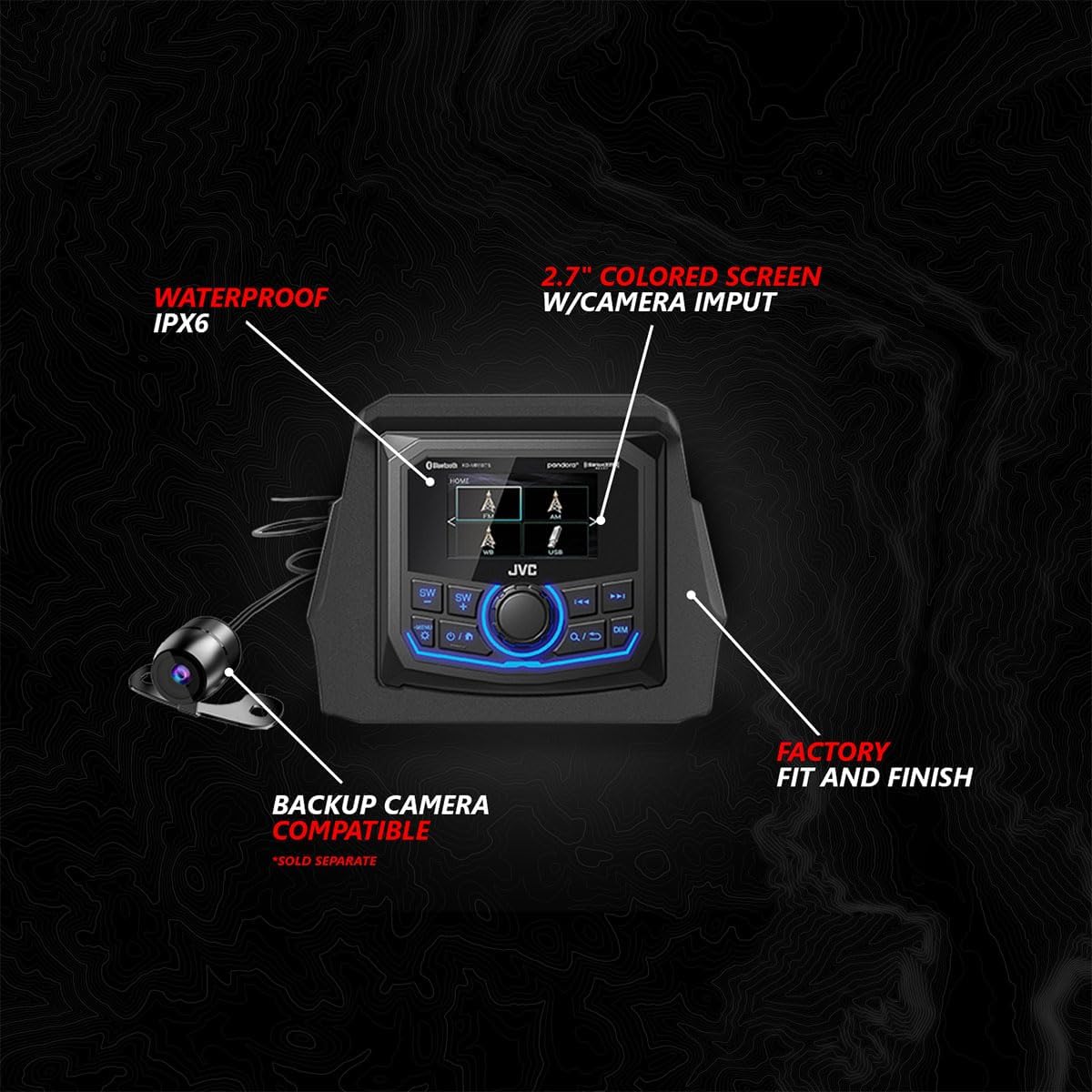
Image: JVC MR3 Radio. This unit features an IPX6 waterproof rating, a 2.7-inch colored screen with camera input, and is compatible with a backup camera (sold separately). It is designed for a factory fit and finish.
3. Install Dash Speakers
Mount the 6.5" SSV Works speakers into the provided dash panels. Secure the panels in the vehicle's dash, ensuring the weatherproof EPDM dual-lock gasket creates a tight seal.

Image: Dash Speaker Assembly. Features 6.5-inch / 160W SSV Works speakers with 1.1-inch tweeters, a weatherproof EPDM dual-lock gasket, and a factory fit. Includes a Smart-Shox brain relocation mount.
4. Install Rear Cage Speakers
Attach the 6.5" SSV Works speakers into the rear cage speaker pods. Mount these pods securely to the rear cage of your Can-Am Maverick X3. Connect the plug-and-play wiring.

Image: Rear Cage Speaker Pods. These pods house 6.5-inch / 160W SSV Works speakers with 1.1-inch tweeters, feature RGB lighting, and utilize plug-and-play connections.
5. Install the 10" Subwoofer
Place the 10" subwoofer with its enclosure in the designated location within the vehicle. Ensure a factory fit and that the weatherproof EPDM dual-lock gasket is properly seated.

Image: 10-inch Subwoofer. This 1000-watt SSV Works subwoofer comes in a factory-fit enclosure with a weatherproof EPDM dual-lock gasket.
6. Sakinisha Ampwaokoaji
Mount the 800W 4-channel amplifier and the 850W mono amplifier in a secure, dry location, typically under the dash or seats. These amplifiers are pretuned for your specific audio kit and vehicle and feature an IP67 weatherproof rating.

Image: 800W 4-Channel Powersports Amplifier. This Kicker amplifier is pretuned for your audio kit and vehicle, featuring plug-and-play connections and an IP67 weatherproof rating.
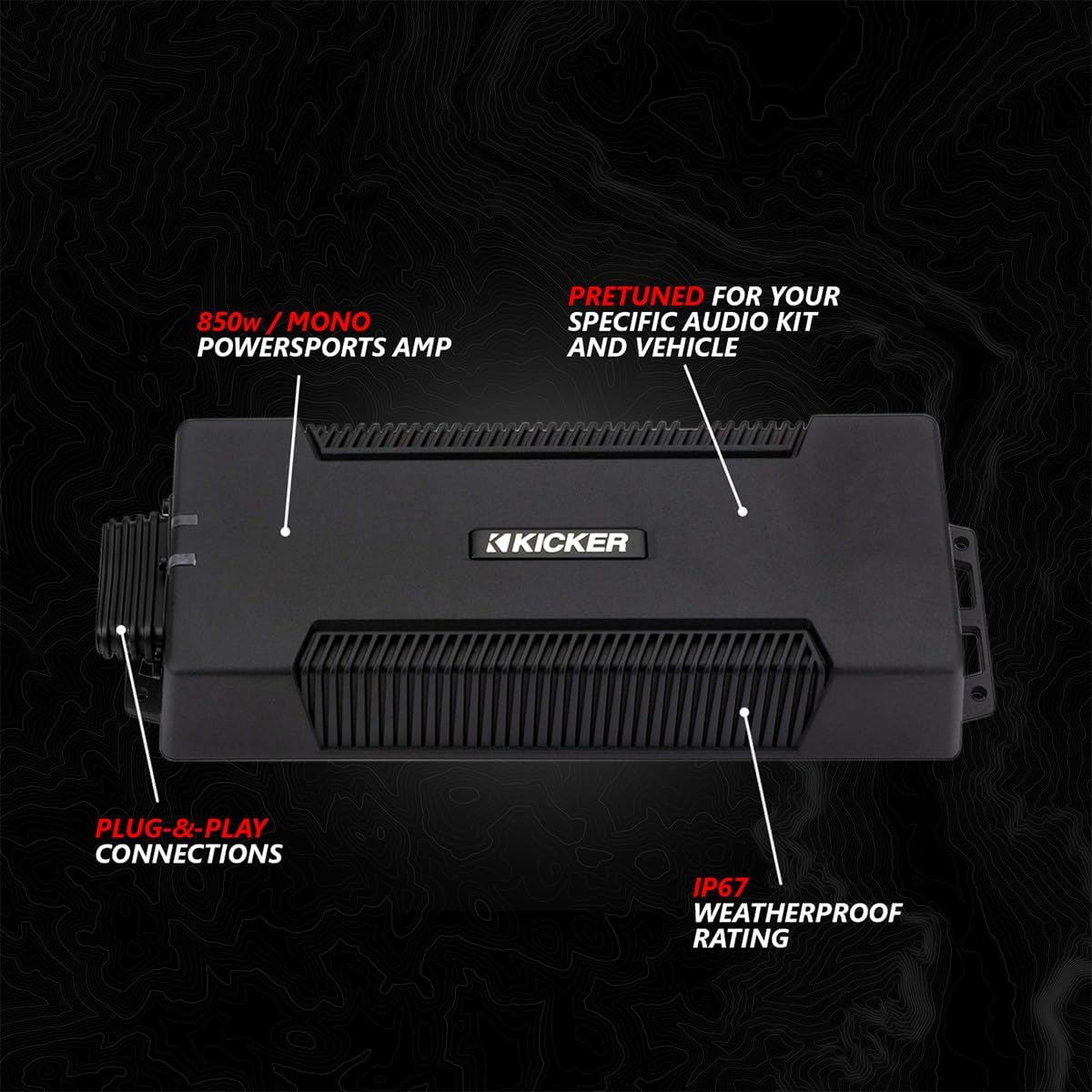
Image: 850W Mono Powersports Amplifier. This Kicker amplifier is pretuned for your audio kit and vehicle, featuring plug-and-play connections and an IP67 weatherproof rating.
7. Connect Wiring Harnesses
Utilize the provided plug-and-play wiring kit to connect all components. Ensure all connections are weatherproof and sealed to protect against the elements.

Image: Weatherproof Sealed Connections. Illustrates the plug-and-play connections designed to be weatherproof and sealed for durability in off-road conditions.
8. Install RGB Controller (if applicable)
If your system includes an RGB controller for speaker lights, rock lights, or other accessories, install it in an accessible location and connect it using the plug-and-play connections.

Image: RGB Controller. This controller features three 5-amp outputs for controlling speaker lights, rock lights, whips, or other RGB accessories. It offers various modes including solid color, strobe, color change, and glow.
9. Reconnect Battery and Test
- Once all components are installed and wired, reconnect the negative terminal of the vehicle's battery.
- Washa gari na ujaribu utendaji kazi wa mfumo wa sauti.
- Ensure all speakers, the subwoofer, and the radio are working correctly.
- Test all RGB lighting functions if an RGB controller is installed.
Maagizo ya Uendeshaji
JVC MR3 Radio Operation
Refer to the separate JVC MR3 Radio user manual for detailed instructions on specific radio functions, including tuning, source selection, and settings adjustments. Key features include:
- Washa/Zima: Bonyeza kitufe cha kuwasha/kuzima ili kuwasha au kuzima kitengo.
- Udhibiti wa Sauti: Use the rotary knob or designated buttons to adjust the volume.
- Uteuzi wa Chanzo: Cycle through available audio sources (Bluetooth, USB, AM/FM radio) using the MODE button.
- Onyesha: The 2.7" colored screen provides information on current source, track, and settings.
Muunganisho wa Bluetooth
- Hakikisha kuwa Bluetooth imewashwa kwenye kifaa chako cha mkononi.
- On the MR3 radio, select Bluetooth as the audio source.
- Tafuta available devices on your mobile device and select "JVC MR3" (or similar name) to pair.
- Ukishaoanishwa, unaweza kutiririsha sauti bila waya kutoka kwenye kifaa chako hadi kwenye mfumo wa sauti.
Uchezaji wa USB
Connect a USB storage device containing audio files to the USB port on the MR3 radio. The radio will automatically detect the device and begin playback or allow you to browse files.
RGB Controller Operation (if installed)
Use the RGB controller to customize the lighting effects of your speakers and other connected accessories. Common modes include:
- Rangi imara: Select a static color.
- Nguo: Athari ya kuwaka.
- Mabadiliko ya Rangi: Colors cycle automatically.
- Mwangaza: Gradual color transitions.
Matengenezo
- Kusafisha: Tumia laini, damp cloth to clean the surfaces of the radio, speakers, and enclosures. Avoid harsh chemicals or abrasive cleaners.
- Viunganisho: Periodically check all wiring connections to ensure they remain secure and free from corrosion, especially after exposure to water or mud.
- Gaskets: Inspect the weatherproof gaskets on speakers and the subwoofer enclosure for any signs of wear or damage. Replace if necessary to maintain water resistance.
- Hifadhi: If the vehicle is stored for an extended period, ensure the audio system is clean and dry. Disconnecting the battery may be advisable.
Kutatua matatizo
No Power to System
- Check the vehicle's battery connections.
- Verify all power and ground wires are securely connected to the amplifiers and radio.
- Inspect inline fuses for the system; replace if blown.
Hakuna Sauti kutoka kwa Spika
- Ensure the radio is powered on and an audio source is selected.
- Check volume levels on both the radio and your connected device (if using Bluetooth/USB).
- Verify all speaker wires are correctly connected to the amplifiers na wasemaji.
- Thibitisha amplifier power and remote turn-on connections are secure.
Sauti Iliyopotoka
- Punguza sauti ili kuona kama upotoshaji unapungua.
- Check for loose speaker wires or damaged speaker cones.
- Hakikisha amplifier gain settings are not set too high.
Masuala ya Muunganisho wa Bluetooth
- Ensure your device is within range of the radio.
- Try unpairing and re-pairing the device with the radio.
- Restart both your mobile device and the MR3 radio.
Vipimo
| Kipengele | Maelezo |
|---|---|
| Nambari ya Mfano | 240-X32-PHZ4V |
| Jumla ya Nguvu ya Mfumo | Wati 1650 (Kilele) |
| Kitengo cha Redio | JVC MR3 (IPX6 Waterproof, 2.7" Color Screen, Camera Input) |
| Dashi Spika | (2) 6.5" SSV Works V-Spec, 160W Max, 1.1" Tweeter |
| Rear Cage Speakers | (2) 6.5" SSV Works V-Spec, 160W Max, 1.1" Tweeter, RGB Lighting |
| Subwoofer | 10" SSV Works, 1000W Max, with Enclosure |
| Ampwaokoaji | 800W 4-Channel Powersports Amp, 850W Mono Powersports Amp (IP67 Weatherproof, Pretuned) |
| Muunganisho | Bluetooth, USB |
| Nyenzo ya Uzio | Metal or UV-resistant Plastic |
| Kiwango cha Upinzani wa Maji | Water Resistant (IPX6 for radio, IP67 for amps) |
| Aina ya Gari Inayolingana | Can-Am Maverick X3 / X3 Maxx UTVs |
Udhamini na Msaada
SSV Works provides a limited warranty for its products. Please review maelezo yafuatayo:
- Elektroniki: Udhamini mdogo wa Mwaka 1.
- Panels and Pods: Udhamini Mdogo wa Maisha.
For technical support, warranty claims, or further assistance, please contact SSV Works customer service. You can find contact information on the official SSV Works website or through your authorized dealer. When contacting support, please have your product model number (240-X32-PHZ4V) and proof of purchase available.
Rasilimali za Mtandaoni: Kwa maelezo zaidi, Maswali Yanayoulizwa Mara kwa Mara, na usajili wa bidhaa, tembelea SSV Works Store on Amazon or the official SSV Works webtovuti.
Nyaraka Zinazohusiana - 240-X32-PHZ4V
 |
Mwongozo wa Usakinishaji wa Kifaa cha Sauti cha SSV Inafanya kazi X32-PHZ3V kwa Can-Am Maverick X3 Mwongozo wa kina wa usakinishaji wa SSV Works X32-PHZ3V 1650 Watt Audio Kit, iliyoundwa kwa ajili ya Can-Am Maverick X3 ya 2017-2023. Inajumuisha orodha ya sehemu, zana, na maagizo ya hatua kwa hatua. |
 |
SSV Works X32-PHZ2A 4-Speaker Audio Kit Installation Guide for Can-Am Maverick X3 Detailed installation guide for the SSV Works X32-PHZ2A 4-speaker audio kit, featuring the JVC MR1, for 2017-2024 Can-Am Maverick X3 models. Includes parts list, tools required, and step-by-step instructions for panel disassembly, dash kit, speaker panels, and rear cage pods. |
 |
SSV Works X32-PHZ4A 800W Audio Kit Installation Guide for Can-Am Maverick X3 (2017-2024) Comprehensive installation guide for the SSV Works X32-PHZ4A 800W Audio Kit with JVC MR1, designed for the 2017-2024 Can-Am Maverick X3. Includes parts list, tools needed, and step-by-step instructions for panel disassembly, dash speaker installation, amplifier mounting, wiring, subwoofer enclosure, and rear cage pod setup. |
 |
Mwongozo wa Usakinishaji wa Mfumo wa SSV wa MAVR-PHZ4VTD 2024-Up Can Am Maverick R 5 Spika Sauti/RGB Mwongozo kamili wa usakinishaji wa Mfumo wa Sauti/RGB wa Spika wa SSV Works MAVR-PHZ4VTD 5 kwa ajili ya Can Am Maverick R ya 2024-Up. Unajumuisha orodha ya vipuri, utenganishaji, uunganishaji, na maelekezo ya nyaya. |
 |
SSV Works MAVR-PHZ4ATD 5-Speaker System Installation Guide for Can-Am Maverick R Comprehensive installation guide for the SSV Works MAVR-PHZ4ATD Phase 6 A-Spec 5-Speaker System for 2024-Up Can-Am Maverick R. Includes parts list, disassembly, wiring, and assembly instructions. |
 |
Mwongozo wa Usakinishaji wa Kifaa cha Sauti cha SSV Hufanya Kazi X32-PHZ1A kwa Can Am Maverick X3 This document provides comprehensive installation instructions for the SSV Works X32-PHZ1A 2-Speaker Audio Kit with JVC MR1, designed for 2017-2024 Can Am Maverick X3 models. It includes a parts list, disassembly procedures, and step-by-step assembly and wiring guidance. |
Ask a question about this manual
Ask about setup, troubleshooting, compatibility, parts, safety, or missing instructions. Manuals+ will review the question and use this page’s manual context to help answer it.