
1. Taarifa Muhimu za Usalama
Please read these instructions carefully before using your VonHaus Pedestal Fan. Keep this manual for future reference.
- Hakikisha feni imewekwa kwenye uso thabiti, ulio sawa.
- Usiingize vidole au vitu vya kigeni kwenye grille ya feni.
- Weka feni mbali na maji au vimiminika vingine.
- Ondoa feni kutoka kwenye soketi ya umeme kabla ya kusafisha au kutengeneza.
- Kifaa hiki hakikusudiwa kutumiwa na watu (pamoja na watoto) walio na uwezo mdogo wa kimwili, hisi au kiakili, au wasio na uzoefu na ujuzi, isipokuwa wamepewa usimamizi au maagizo kuhusu matumizi ya kifaa na mtu anayehusika na usalama wao.
- Watoto wanapaswa kusimamiwa ili kuhakikisha kwamba hawachezi na kifaa.
2. Yaliyomo kwenye Kifurushi
Hakikisha vipengele vyote vipo kabla ya kuviunganisha.
- Fan Head Assembly (with 5 blades)
- Grille za Mbele na Nyuma
- Pedestal Pole (Adjustable Height)
- Msingi
- Kidhibiti cha Mbali (na betri)
- Mwongozo wa Mtumiaji
3. Kuweka na Kukusanya
Follow these steps to assemble your VonHaus Pedestal Fan.
- Ambatanisha Msingi: Securely attach the pedestal pole to the base using the provided screws.
- Assemble the Fan Head:
- Place the rear grille onto the motor housing, aligning the notches.
- Attach the fan blades to the motor shaft, ensuring they are firmly in place.
- Secure the front grille to the rear grille using the clips or screws provided, ensuring it is tightly closed.
- Mount Fan Head to Pedestal: Attach the assembled fan head to the top of the pedestal pole. Ensure it clicks into place or is secured with the locking mechanism.
- Rekebisha Urefu: Loosen the height adjustment knob on the pedestal pole, extend or retract the pole to your desired height (up to 128 cm), and then tighten the knob securely.

Image: This diagram illustrates the adjustable features of the fan, including its height range of 110-128 cm, a tilting range of +7 to -15 degrees, and an 80-degree left/right oscillation capability. The fan base is 42 cm wide.
4. Maagizo ya Uendeshaji
Your VonHaus Pedestal Fan offers multiple settings for personalized comfort.
Jopo la Kudhibiti na Udhibiti wa Mbali
The fan can be operated using the touch-sensitive LED display on the unit or the included remote control.

Image: This image displays the fan's LED touch panel, which includes controls for power, speed, mode, timer, and oscillation. It also shows the remote control, which allows for convenient adjustment of all fan functions from a distance.
Washa/Zima
Bonyeza kwa Nguvu kitufe kwenye paneli ya kudhibiti au rimoti ili kuwasha au kuzima feni.
Mipangilio ya Kasi
The fan features Kasi 24 zinazoweza kubadilishwa. Tumia + na - buttons on the control panel or remote to increase or decrease the airflow intensity.

Image: This image highlights the fan's powerful DC motor and its capability to provide 24 different airflow speeds, allowing users to select their desired cooling level. It also references a 15-hour timer function.
Njia za Uendeshaji
Chagua kutoka 3 programmed modes to suit your preference:
- Hali ya Faraja: Provides a steady, consistent airflow.
- Hali ya Asili: Huiga upepo wa asili kwa kubadilisha kasi ya feni.
- Hali ya Usiku: Operates at a lower speed with reduced noise (minimum 35 dB) and dims the LED display for undisturbed sleep.

Image: This image depicts the fan in a bedroom, illustrating its three programmed modes: Comfort, Natural, and Night. It emphasizes that the digital display dims in Night mode and the fan operates at a minimum noise level of 35 dB.
Kufutwa
Bonyeza kwa Kufutwa button to activate or deactivate the 80° left-to-right oscillation feature, distributing air across a wider area.
Kazi ya Kipima saa
The fan includes a Kipima muda cha saa 15. Bonyeza kwa Kipima muda button repeatedly to set the desired operating duration in 1-hour increments. The fan will automatically turn off after the set time.
Tilt inayoweza kubadilishwa
Manually adjust the fan head's vertical tilt within a range of +7° to -15° to direct airflow precisely where needed.
5. Matengenezo
Regular cleaning and maintenance will ensure optimal performance and longevity of your fan.
Kusafisha
- Daima chomoa feni kabla ya kusafisha.
- Tumia laini, damp kitambaa cha kuifuta nyuso za nje. Usitumie visafishaji au viyeyusho vya kukwaruza.
- To clean the fan blades, carefully remove the front grille (refer to assembly instructions for reverse steps). Wipe the blades with a damp cloth. Ensure blades are dry before reattaching the grille.
- Usitumbukize feni kwenye maji au kuruhusu maji yadondoke kwenye nyumba ya injini.
Hifadhi
Ikiwa haitumiki kwa muda mrefu, hifadhi feni mahali pakavu na penye baridi, ikiwezekana katika kifungashio chake cha asili, ili kuilinda kutokana na vumbi na uharibifu.
6. Utatuzi wa shida
If you encounter any issues with your fan, refer to the following common problems and solutions.
- Fani haiwashi:
- Angalia ikiwa kamba ya umeme imechomekwa kwa usalama kwenye plagi ya umeme inayofanya kazi.
- Hakikisha kitufe cha kuwasha/kuzima kimebonyezwa.
- Thibitisha kwamba betri ya udhibiti wa mbali haijaisha.
- Upepo wa hewa dhaifu:
- Ongeza mpangilio wa kasi.
- Ensure the fan grilles and blades are clean and free from dust buildup.
- Check for any obstructions blocking the airflow.
- Shabiki ana kelele:
- Ensure the fan is on a stable, level surface.
- Check if any parts are loose or vibrating. Tighten if necessary.
- Clean the fan blades and grilles to remove any debris that might cause imbalance.
- Udhibiti wa mbali haufanyi kazi:
- Badilisha betri kwenye kidhibiti cha mbali.
- Hakikisha hakuna vizuizi kati ya rimoti na kipokezi cha feni.
- Point the remote directly at the fan's control panel.
If the problem persists after trying these solutions, please contact VonHaus customer support.
7. Vipimo
| Kipengele | Maelezo |
|---|---|
| Nambari ya Mfano | 8100085 |
| Chapa | VonHaus |
| Vipimo (L x W x H) | 42 x 42 x 128 cm |
| Uzito | 6.22 kg |
| Nguvu | 50 Watts |
| Idadi ya Kasi | 24 |
| Njia za Uendeshaji | 3 (Comfort, Natural, Night) |
| Kufutwa | 80° (Left/Right) |
| Marekebisho ya Tilt | +7° / -15° |
| Kipima muda | Hadi saa 15 |
| Njia ya Kudhibiti | Kidhibiti cha Mbali, Jopo la Kugusa |
| Idadi ya Blades | 5 |
| Nyenzo | Chuma |
| Rangi | Nyeupe |
| Matumizi ya Ndani/Nje | Ndani |
| Vipengee vilivyojumuishwa | Udhibiti wa Kijijini |
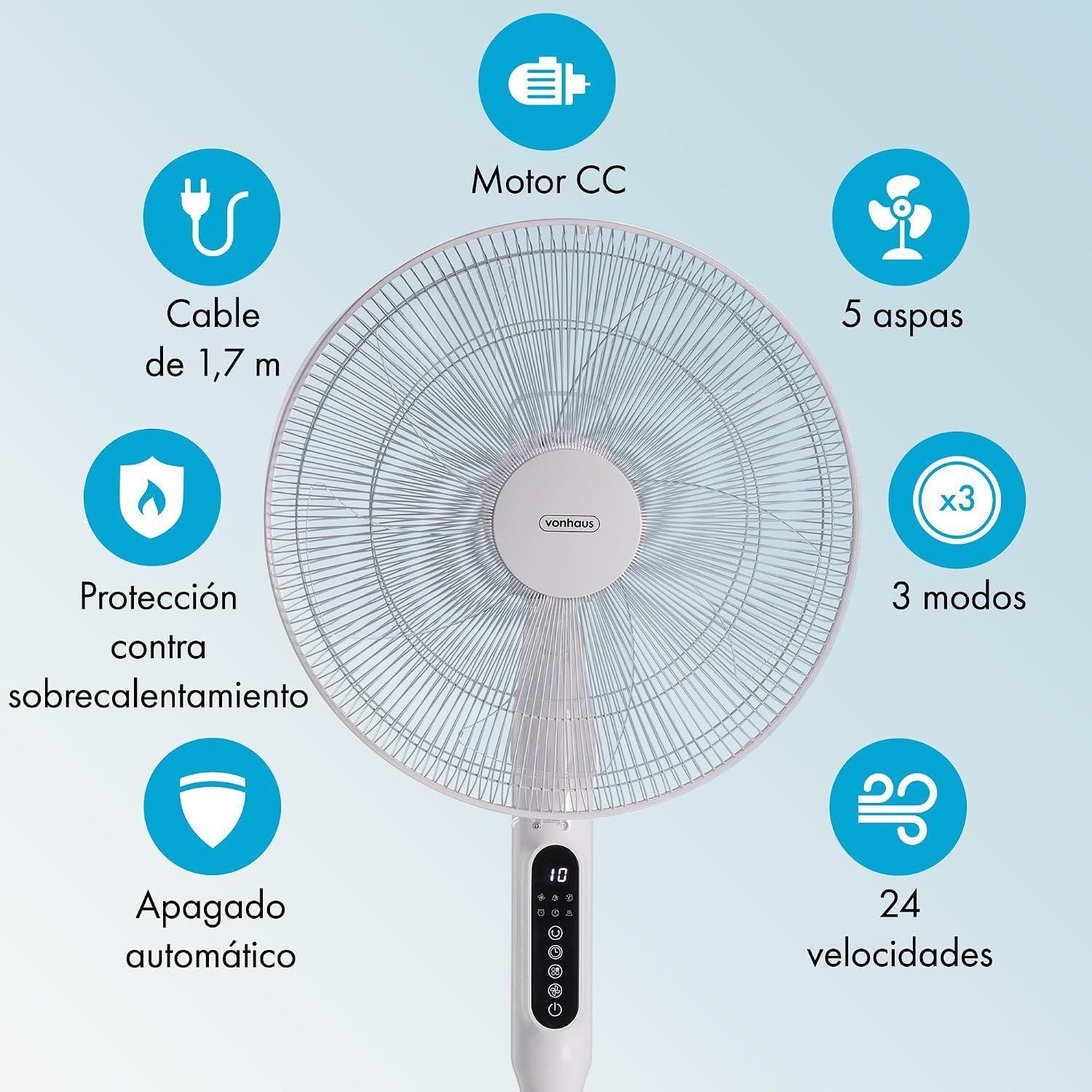
Image: This graphic summarizes the fan's main features, including a DC motor, 5 blades, 3 operating modes, 24 speeds, 1.7m cable, overheat protection, and automatic shut-off.
8. Udhamini na Msaada
All VonHaus products come with a minimum dhamana ya mwaka 2. This warranty covers manufacturing defects and ensures that we are available to assist you if any issues arise with your product.
For technical support, troubleshooting assistance, or warranty claims, please contact VonHaus customer service through the retailer where you purchased the product or visit the official VonHaus webtovuti kwa maelezo ya mawasiliano.
Tafadhali hifadhi uthibitisho wako wa ununuzi kwa madhumuni ya udhamini.