
1. Utangulizi
Thank you for choosing the TD Systems 24-inch Smart TV. This television combines a compact design with advanced smart features, powered by Google TV and Android 11. It offers a high-definition viewing experience, integrated digital tuners, and a wide range of connectivity options to enhance your entertainment.
This manual provides essential information for setting up, operating, and maintaining your new television. Please read it thoroughly before use to ensure proper functionality and safety.
2. Taarifa za Usalama
Always observe the following safety precautions to prevent electric shock, fire, or damage to the device:
- Usiweke TV kwenye mvua au unyevu.
- Usizuie fursa za uingizaji hewa.
- Hakikisha kamba ya umeme haijabanwa au kutembezwa.
- Tenganisha plagi ya umeme wakati wa dhoruba za umeme au inapotumika kwa muda mrefu.
- Rejelea huduma zote kwa wahudumu waliohitimu.
- Weka betri mbali na watoto.
3. Yaliyomo kwenye Kifurushi
Thibitisha kuwa vipengee vyote vipo kwenye kisanduku:
- TD Systems 24-inch Smart TV
- Udhibiti wa Kijijini
- Betri 2 x AAA (kwa udhibiti wa mbali)
- 2 x Legs (Left, Right)
- Mwongozo wa Mtumiaji (hati hii)

Image: The TD Systems 24-inch Smart TV, showcasing its sleek design and included stand.
4. Kuweka
4.1 Kuunganisha Stendi
- Weka skrini ya TV kwa uangalifu kwenye sehemu laini na tambarare ili kuzuia mikwaruzo.
- Identify the left and right legs.
- Align each leg with the corresponding screw holes on the bottom of the TV.
- Secure each leg using the provided screws. Do not overtighten.
4.2 Nguvu ya Kuunganisha
Plug the power cord into the TV's power input, then into a wall outlet. Ensure the power outlet is easily accessible.
4.3 Umeme wa Awali Umewashwa
Press the power button on the TV or the remote control. Follow the on-screen instructions to complete the initial setup, including language selection, network connection, and channel scanning.

Image: The 24-inch TD Systems Smart TV seamlessly integrated into a modern kitchen environment, demonstrating its compact size and versatile placement options.

Image: Detailed dimensions of the TD Systems 24-inch Smart TV, including width, height, and depth, useful for planning placement.
5. Maagizo ya Uendeshaji
5.1 Udhibiti wa mbaliview
Kidhibiti cha mbali kilichojumuishwa hukuruhusu kupitia vipengele vya TV. Ingiza betri 2 za AAA kwenye kidhibiti cha mbali, kuhakikisha polarity sahihi.

Image: The remote control for the TD Systems Smart TV, highlighting the dedicated buttons for popular streaming services and the voice assistant.
5.2 Kazi za Msingi
- Nguvu: Bonyeza kwa Nguvu kitufe cha kuwasha au kuzima TV.
- Kiasi: Tumia Kiasi +/- vifungo vya kurekebisha kiwango cha sauti.
- Kituo: Tumia Kituo +/- vifungo vya kubadilisha vituo.
- Ingizo: Bonyeza kwa Ingizo button to select different input sources (HDMI, AV, etc.).
- Urambazaji: Tumia mwelekeo Mshale vifungo na OK kitufe cha kusogeza menyu.
6. Muunganisho
Your TD Systems Smart TV offers a variety of ports for connecting external devices:
- HDMI (x2): Kwa ajili ya kuunganisha vifaa vya ubora wa juu kama vile vichezaji vya Blu-ray, vifaa vya michezo, au visanduku vya kuweka juu.
- USB: Kwa kuunganisha vifaa vya hifadhi ya USB ili kucheza midia files.
- AV Composite Input: For connecting older devices using RCA cables.
- Pato la Kipokea sauti: Kwa kuunganisha vichwa vya sauti au spika za nje.
- Toleo la Sauti ya Dijiti ya Macho: Kwa ajili ya kuunganisha kwenye upau wa sauti au mfumo wa ukumbi wa michezo wa nyumbani kwa ajili ya sauti ya ubora wa juu.
- Lango la CI+: For inserting a Conditional Access Module (CAM) to access encrypted channels.
- Ethaneti (RJ45): Kwa muunganisho wa mtandao wa waya.
- Wi-Fi: Kwa muunganisho wa intaneti usiotumia waya.
- Bluetooth: For connecting wireless accessories like headphones or speakers.

Image: A visual representation of the various input and output ports available on the TD Systems Smart TV, including HDMI, USB, DVB-T2/C/S2, AV, Optical, and Headphone Jack.
7. Vipengele vya Smart TV
Your TD Systems Smart TV runs on Android 11 with Google TV, providing a personalized and intuitive user experience.
7.1 Google TV Interface
Google TV organizes your favorite content from various streaming services into one central hub. It offers personalized recommendations based on your viewmazoea.

Image: The vibrant Google TV interface displayed on the TD Systems Smart TV, showing various streaming app icons and content recommendations.
7.2 Maombi Yanayotumika
Access a wide range of popular streaming applications directly from your TV, including:
- YouTube
- Netflix
- Disney+
- HBO Max
- Video Mkuu
You can download thousands of additional applications from the Google Play Store.

Image: The Google TV ecosystem on the TD Systems Smart TV, illustrating access to over 5000 apps via Google Play, including popular streaming services.
7.3 Udhibiti wa Sauti kwa kutumia Mratibu wa Google
Use your voice to control the TV, search for content, get answers, and manage smart home devices. Simply press the Google Assistant button on your remote and speak your command.

Image: The TD Systems remote control with a microphone icon and sound waves, demonstrating the voice control capability powered by Google Assistant.
7.4 Chromecast Imejengewa ndani
Easily cast movies, shows, photos, and more from your phone, tablet, or laptop directly to your TV screen using the built-in Chromecast feature.
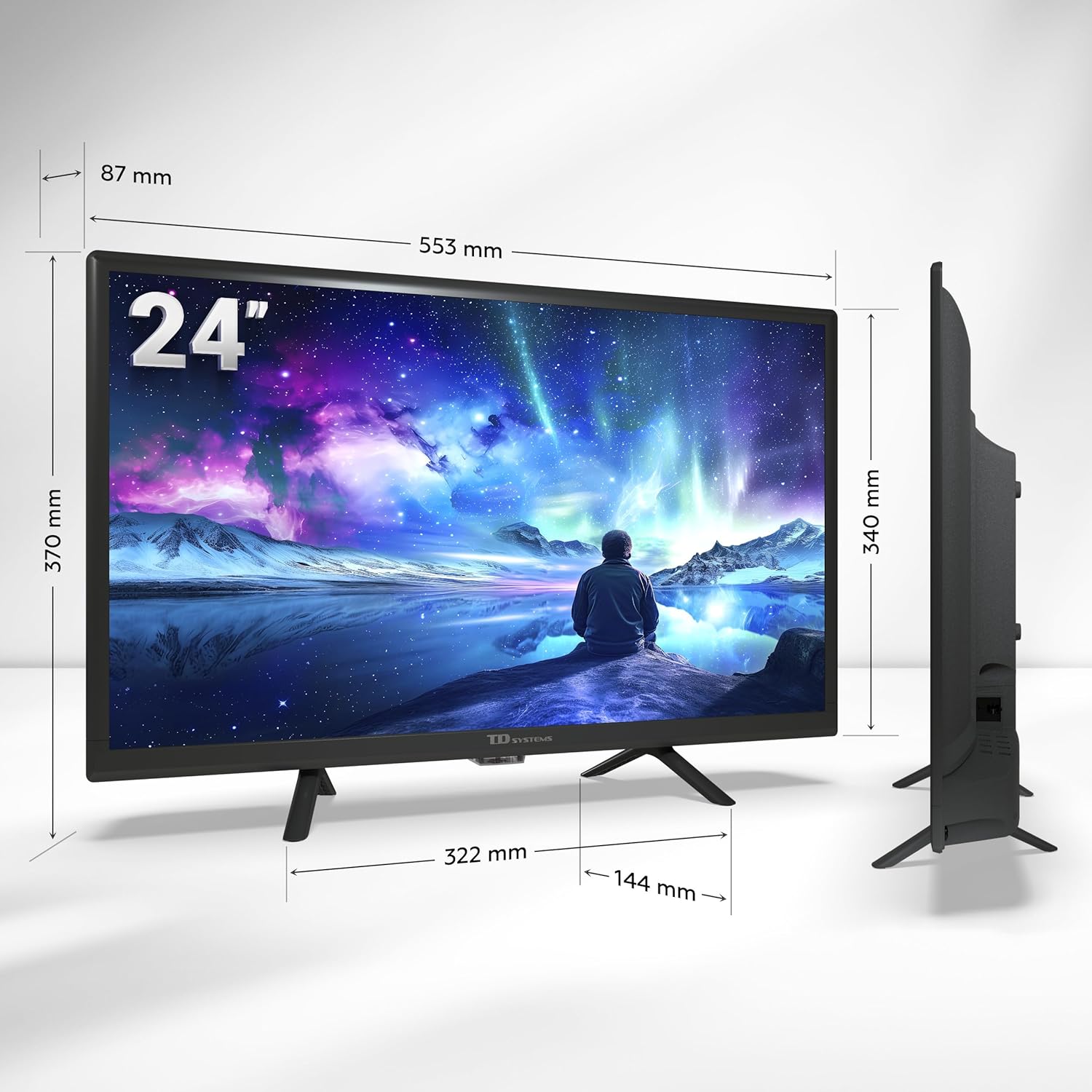
Image: A smartphone displaying content being wirelessly cast to the TD Systems Smart TV, illustrating the Chromecast built-in functionality.
8. Matengenezo
Proper care ensures the longevity of your TV:
- Kusafisha skrini: Futa skrini kwa upole kwa kitambaa laini kisicho na pamba. Kwa alama za ukaidi, tumia suluhisho la kusafisha skrini mahususi lililowekwa kwenye kitambaa, sio moja kwa moja kwenye skrini.
- Kusafisha baraza la mawaziri: Futa baraza la mawaziri la TV na kitambaa laini na kavu. Usitumie visafishaji vya abrasive au vimumunyisho.
- Uingizaji hewa: Hakikisha fursa za uingizaji hewa nyuma ya TV hazijazuiwa ili kuzuia joto kupita kiasi.
- Kamba ya Nguvu: Angalia mara kwa mara kamba ya nguvu kwa uharibifu wowote.
9. Utatuzi wa shida
Ukikumbana na matatizo na TV yako, rejelea matatizo na masuluhisho yafuatayo:
| Tatizo | Sababu inayowezekana | Suluhisho |
|---|---|---|
| Hakuna Nguvu | Kamba ya nguvu imekatika; hakuna nguvu kutoka kwa duka. | Angalia uunganisho wa kamba ya nguvu; jaribu kwa kifaa kingine. |
| Hakuna Picha, lakini Sauti Ipo | Chanzo kisicho sahihi cha ingizo kimechaguliwa; suala la kifaa cha nje. | Bonyeza kwa Ingizo button to select the correct source; check external device connection. |
| Hakuna Sauti, lakini Picha Ipo | Sauti imezimwa au chini sana; suala la mfumo wa sauti wa nje. | Unmute volume or increase level; check connections to external audio devices. |
| Haiwezi Kuunganishwa kwa Wi-Fi | Nenosiri lisilo sahihi; suala la router; TV iko mbali sana na kipanga njia. | Re-enter password; restart router; move TV closer to router or use Ethernet. |
| Udhibiti wa Mbali Haifanyi kazi | Betri zimeisha au kuingizwa vibaya; kizuizi. | Replace batteries; ensure correct polarity; remove obstructions between remote and TV. |
Tatizo likiendelea baada ya kujaribu suluhu hizi, tafadhali wasiliana na usaidizi kwa wateja.
10. Vipimo
| Kipengele | Maelezo |
|---|---|
| Chapa | Mifumo ya TD |
| Nambari ya Mfano | PRIME24C19GLE |
| Ukubwa wa skrini | Inchi 24 (sentimita 60) |
| Teknolojia ya Kuonyesha | LED |
| Azimio | pikseli 1366 x 768 (HD) |
| Kiwango cha Kuonyesha upya | 60 Hz |
| Mfumo wa Uendeshaji | Android TV (Android 11) with Google TV |
| Sauti | Dolby Digital Plus |
| Vichungi | DVB-T2/C/S2 (Digital Terrestrial, Cable, Satellite) |
| Muunganisho | 2x HDMI, 1x USB, AV Composite, Headphone Out, Optical Digital Audio Out, CI+, Ethernet (RJ45), Wi-Fi, Bluetooth |
| Vipengele Maalum | Google Assistant (Voice Control), Chromecast Built-in, Access to Google Play Store |
| Power Consumption (Energy Efficiency) | Darasa E |
| Vipengee vilivyojumuishwa | TV, Remote Control, 2x AAA Batteries, 2x Legs |
11. Udhamini na Msaada
11.1 Udhamini wa Mtengenezaji
This TD Systems Smart TV comes with a Udhamini wa mtengenezaji wa miezi 24 kuanzia tarehe ya ununuzi. Udhamini huu unashughulikia kasoro katika nyenzo na utengenezaji chini ya matumizi ya kawaida. Tafadhali hifadhi uthibitisho wako wa ununuzi kwa madai ya udhamini.
11.2 Usaidizi kwa Wateja
TD Systems is committed to providing high-quality products and exceptional customer service. If you have any questions, require technical assistance, or need to report an issue, please contact our support team. Your satisfaction is our priority.
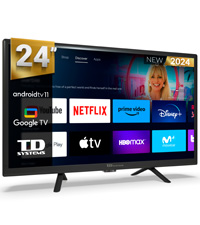
Image: A customer service representative, symbolizing the dedicated support available for TD Systems products.