
1. Utangulizi
The OSD Audio DAC-X200 is a powerful 2-channel Class D stereo amplifier designed to deliver high-fidelity audio. It features a built-in Hi-Res 24bit/192khz DAC, offering superior digital audio conversion. With versatile input options including USB, Optical, and RCA, and A/B speaker switching, this amplifier is suitable for various home audio setups, from driving bookshelf speakers to powering floorstanding units.
2. Maagizo ya Usalama
- Chanzo cha Nguvu: Unganisha kitengo kwa ujazo maalum wa usambazaji wa umemetage.
- Uingizaji hewa: Hakikisha uingizaji hewa wa kutosha. Usizuie fursa za uingizaji hewa.
- Maji na Unyevu: Usiweke kifaa kwenye mvua, unyevu, au unyevu kupita kiasi.
- Vyanzo vya joto: Weka kifaa mbali na vyanzo vya joto kama vile radiator, rejista za joto, majiko, au vifaa vingine vya kutoa joto.
- Kusafisha: Safisha tu kwa kitambaa kavu.
- Kuhudumia: Usijaribu kuhudumia bidhaa hii mwenyewe. Rejelea huduma zote kwa wafanyikazi waliohitimu wa huduma.
- Uwekaji: Place the unit on a stable, flat surface. Avoid placing heavy objects on top of the ampmaisha zaidi.
3. Yaliyomo kwenye Kifurushi
Thibitisha kuwa vipengee vyote vipo kwenye kifurushi:
- OSD Audio DAC-X200 Ampmaisha zaidi
- Mwongozo wa Kuanza Haraka
- Cable ya Nguvu
- Udhibiti wa Mbali (ikiwa umejumuishwa na mfano wako)
4. Bidhaa Imeishaview
4.1 Jopo la mbele
The front panel provides access to essential controls for daily operation.

Kielelezo cha 4.1: Mbele view of the DAC-X200 amplifier, showing the power button, speaker selectors, balance, and volume controls.

Kielelezo cha 4.2: Detail of the front panel, highlighting the Power button and Speaker A/B selection buttons.

Kielelezo cha 4.3: Detail of the front panel, showing the Balance and Volume control knobs.
4.2 Paneli ya Nyuma
The rear panel houses all input and output connections for audio sources and speakers.
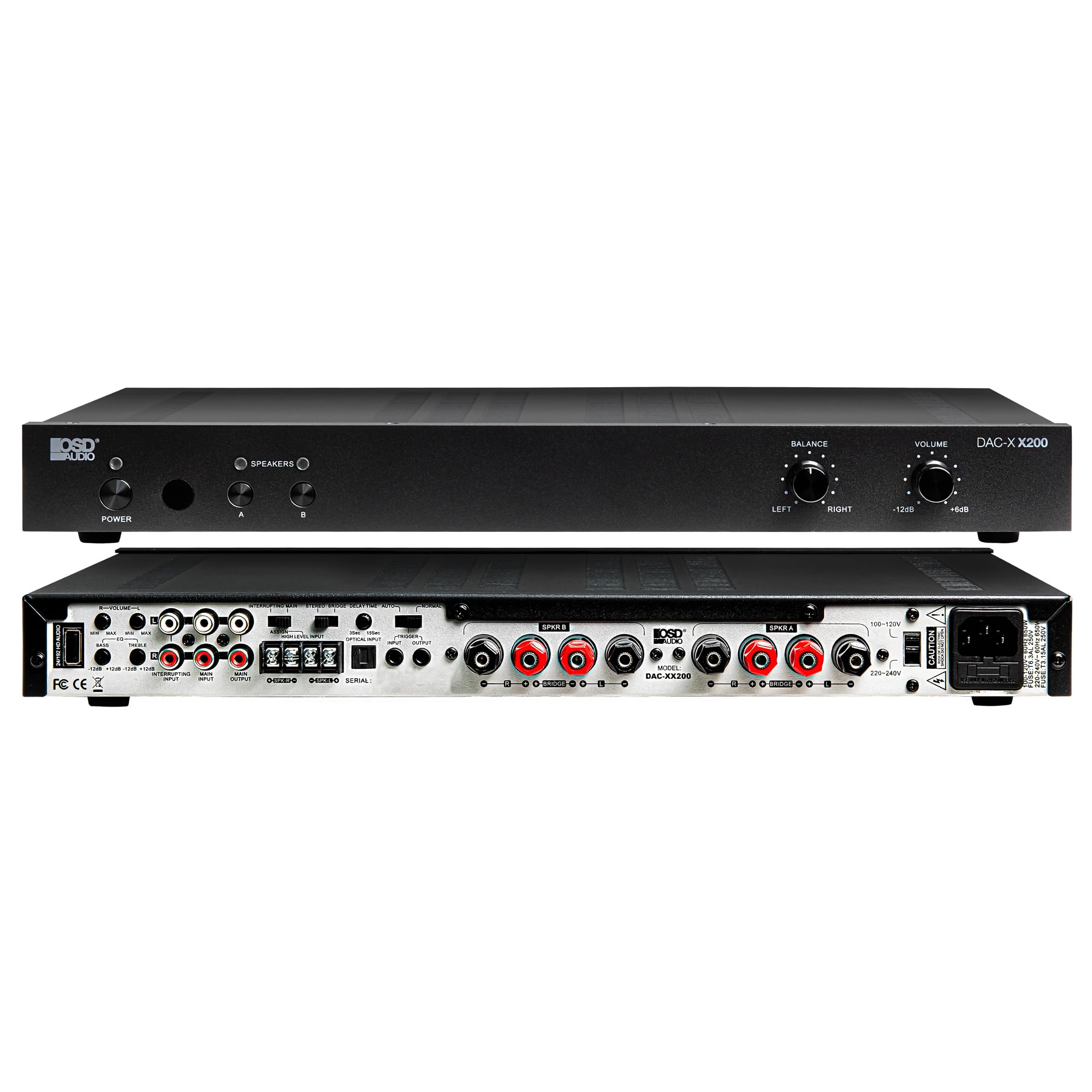
Kielelezo cha 4.4: Nyuma view of the DAC-X200 amplifier, displaying various audio inputs (USB, Optical, RCA), speaker outputs, and power input.

Kielelezo cha 4.5: Detail of the rear panel inputs, including USB, Optical, and RCA connections.

Kielelezo cha 4.6: Detail of the rear panel speaker output terminals for Speaker A and Speaker B.
5. Kuweka
5.1 Uwekaji
Place the DAC-X200 on a flat, stable surface with adequate space around it for ventilation. Avoid enclosed cabinets or areas with poor airflow to prevent overheating.
5.2 Kuunganisha Spika
- Hakikisha amplifier imezimwa na kuchomoka.
- Unganisha vipaza sauti vyako kwenye SPEAKER A na/au SPEAKER B terminals on the rear panel. Observe correct polarity (+ to + and - to -).
- For optimal performance, use high-quality speaker wire.
5.3 Kuunganisha Vyanzo vya Sauti
The DAC-X200 supports multiple input types:
- Uingizaji wa USB: Connect a computer or other USB audio source using a Type A to Type A USB 2.0 cable.
- Mbinu ya Kuingiza Data: Connect digital audio sources like TVs or CD players using an optical cable.
- Ingizo za RCA: Connect analog audio sources such as music streamers, turntables (with a pre-amp), or other devices using RCA cables.
Uunganisho wa Nguvu 5.4
After all audio and speaker connections are made, connect the supplied power cable to the ampmlango wa umeme wa lifier na kisha kwenye soketi ya umeme inayofaa.
6. Maagizo ya Uendeshaji
6.1 Washa/Zima
Bonyeza kwa NGUVU kitufe kwenye paneli ya mbele ili kugeuza ampKifaa cha kupokanzwa kikiwashwa au kuzima. Taa ya kiashiria cha nguvu itawaka wakati kifaa kimewashwa.
6.2 Uteuzi wa Ingizo
The DAC-X200 features smart source switching, automatically detecting and switching to an active input. If multiple inputs are active, you may need to manually select the desired input using the remote control (if applicable) or by cycling through inputs.
6.3 Udhibiti wa Kiasi
Adjust the overall output volume using the JUZUU knob on the front panel. Rotate clockwise to increase volume and counter-clockwise to decrease it.
6.4 Vidhibiti vya Toni
Tumia MIZANI knob to adjust the left/right channel balance. The DAC-X200 also includes bass and treble adjustment knobs (located on the rear panel or accessible via remote, depending on model variation) to fine-tune the sound to your preference or room acoustics.
6.5 A/B Speaker Switching
Bonyeza kwa A or B buttons on the front panel to select which set of speakers (Speaker A, Speaker B, or both) are active. This allows for multi-room audio configurations.
7. Matengenezo
- Kusafisha: Tumia kitambaa laini na kavu kusafisha sehemu ya nje ampUsitumie visafishaji vya kioevu au erosoli.
- Uingizaji hewa: Hakikisha mara kwa mara kwamba nafasi za uingizaji hewa hazina vumbi na uchafu.
- Hifadhi: Ikiwa kifaa kitahifadhi kwa muda mrefu, kichomoe kutoka kwa bomba la umeme na uihifadhi mahali pa baridi na kavu.
8. Utatuzi wa shida
| Tatizo | Sababu inayowezekana | Suluhisho |
|---|---|---|
| Hakuna nguvu | Kebo ya umeme haijaunganishwa; Soketi ya umeme haitumiki; Amplifier mbali. | Check power cable connection; Test power outlet; Press the Power button. |
| Hakuna sauti | Incorrect input selected; Speaker cables loose; Volume too low; Speakers A/B not selected. | Select correct input; Check speaker connections; Increase volume; Ensure Speaker A or B is active. |
| Sauti iliyopotoka | Input signal too high; Speaker impedance mismatch; Faulty cable. | Reduce source volume; Verify speaker impedance (8̣ or 4̣); Replace audio cables. |
| Input not switching automatically | Multiple active sources; Specific source not detected. | Manually select input; Ensure only one source is playing if auto-switching is desired. |
9. Vipimo
- Mfano: DAC-X200
- Nguvu ya Pato: 100W RMS per channel at 8̣; 225W RMS per channel at 4̣; 450W bridged mono
- Idadi ya Vituo: 2
- DAC: Hi-Res 24bit/192khz, DSD formats supported
- Ingizo: USB, Optical, RCA
- Speaker Zones: A/B Switching
- Vipimo (L x W x H): Inchi 16.7 x 10 x 2
- Aina ya Nyenzo: Plastiki
- UPC: 810074881173
10. Taarifa za Udhamini
OSD Audio products are designed for reliability and performance. This product is covered by a limited warranty against defects in materials and workmanship. Please refer to the official OSD Audio website or your purchase documentation for specific warranty terms and conditions, including duration and coverage details. Keep your proof of purchase for warranty claims.
11. Msaada
For technical assistance, troubleshooting not covered in this manual, or service inquiries, please contact OSD Audio customer support. You can find contact information, FAQs, and additional resources on the official OSD Audio webtovuti.
Webtovuti: www.osdaudio.com