
WORKPRO 1
WORKPRO Cordless Rotary Tool Kit
Mwongozo wa Mtumiaji
Mfano: 1
Utangulizi
Thank you for choosing the WORKPRO Cordless Rotary Tool Kit. This manual provides essential information for the safe and effective operation, maintenance, and troubleshooting of your new rotary tool. Please read this manual thoroughly before first use and keep it for future reference.
Yaliyomo kwenye Kifurushi
Upon opening the package, please verify that all items listed below are present and in good condition. If any items are missing or damaged, contact customer support.

Image: The WORKPRO Cordless Rotary Tool, its carrying case, Type-C charging cables, and a wide array of 117 accessories including various grinding, polishing, cutting, sanding, carving, and drilling bits.
- WORKPRO Cordless Rotary Tool (Pink)
- 117 Accessories (various grinding, carving, polishing, milling, cutting, sanding, collet, and drilling attachments)
- Aina ya C ya Kuchaji
- Tool Bag/Carrying Case
- Mwongozo wa Mtumiaji (hati hii)

Image: A visual guide detailing the 117 accessories, categorized by function such as grinding/sharpening, carving, polishing, milling, cutting, sanding, collet, and drilling, showing quantities for each type.
Sanidi
Charging the Rotary Tool
The WORKPRO Cordless Rotary Tool is equipped with a Type-C charging port and built-in rechargeable batteries. Before first use, fully charge the tool.
- Unganisha kebo ya kuchaji ya Aina ya C iliyotolewa kwenye mlango wa kuchaji wa kifaa.
- Unganisha mwisho mwingine wa kebo kwa adapta ya umeme inayolingana ya USB (haijajumuishwa).
- Charging typically takes 1.5 to 2 hours. The five indicator lights will turn white when fully charged.
- A full charge provides up to 200 minutes of continuous operation.
- Muhimu: For safety, do not operate the tool while it is charging.
Inasakinisha Vifaa
The tool features an automatic shaft locking design for easy and secure accessory replacement.

Image: A visual comparison highlighting the WORKPRO tool's automatic shaft locking design, which eliminates the need to press a button during accessory changes, contrasting it with other tools that require a button press.

Image: A detailed three-step guide demonstrating how to install accessories: 1. Unscrew the collet nut. 2. Choose the suitable collet and insert the accessory. 3. Tighten the collet nut. It also shows specific instructions for fitting sanding bands and cutting discs/sanding paper.
- Unscrew the collet nut at the tip of the rotary tool.
- Select the appropriate collet size for your desired accessory (two collet sizes are included: 0.235mm and 0.32mm).
- Ingiza shank ya nyongeza kwenye kola.
- Tighten the collet nut securely to hold the accessory in place.
- To replace accessories, simply unscrew the collet nut. The automatic locking mechanism will engage, allowing for easy removal and insertion.

Picha: Karibu view of the two different collet sizes (0.235mm and 0.32mm) provided with the WORKPRO rotary tool, along with various compatible accessory shanks.
Maagizo ya Uendeshaji
Chombo Kimekwishaview
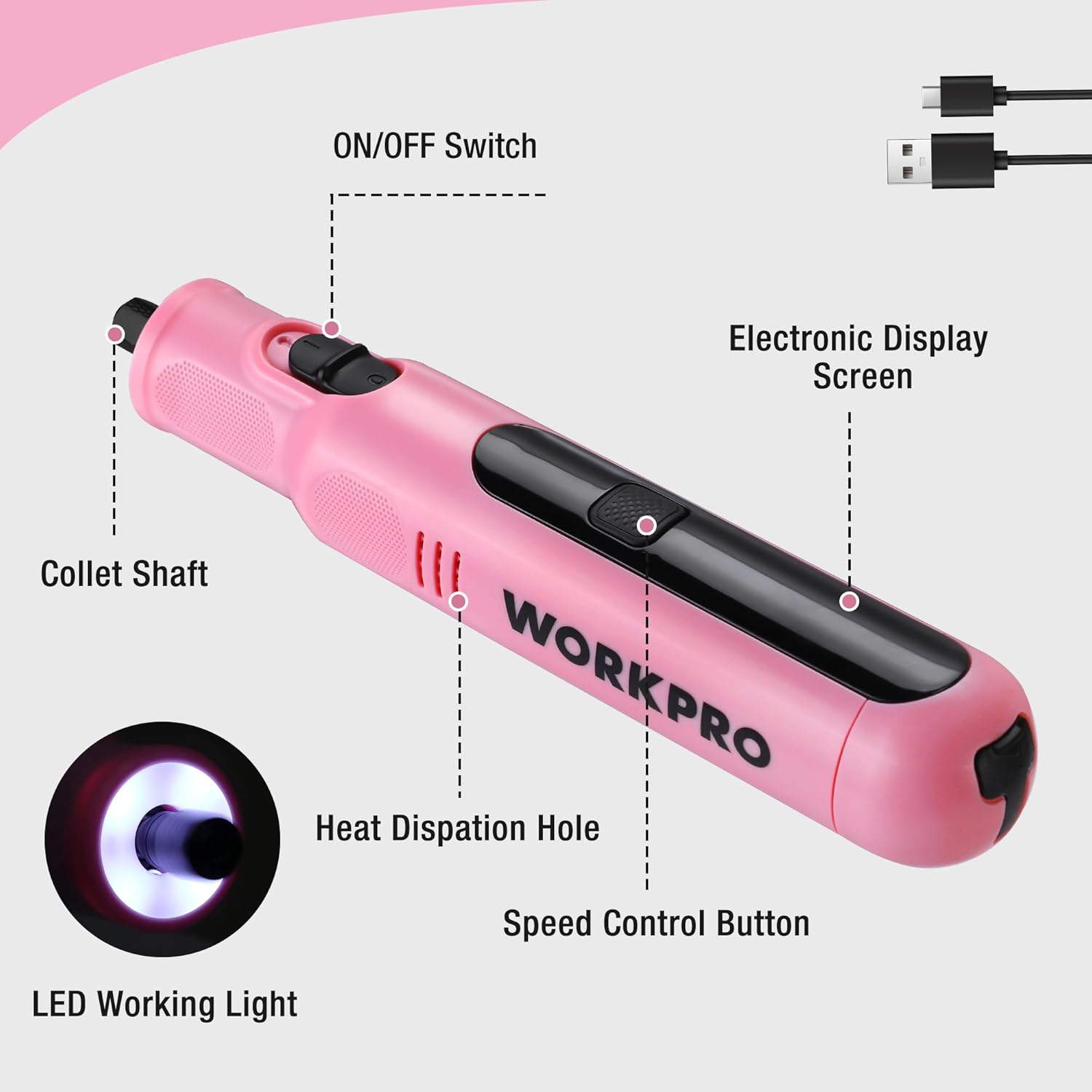
Image: An annotated diagram of the WORKPRO rotary tool, pointing out key features such as the ON/OFF switch, electronic display screen, collet shaft, heat dissipation hole, speed control button, and LED working light.
- Washa / ZIMA Zima: Located on the side, controls power to the tool.
- Electronic Display Screen: Shows current speed setting.
- Kitufe cha Kudhibiti Kasi: Adjusts the rotational speed.
- Mwanga wa kufanya kazi wa LED: Provides illumination for precise work.
- Collet Shaft: Where accessories are inserted and secured.
- Shimo la Kuondoa joto: Helps maintain optimal operating temperature.
Kuwasha/Kuzima na Marekebisho ya Kasi
The tool features 6 variable speed settings for diverse applications.
- To turn on the tool, slide the ON/OFF switch to the "ON" position. The LED work light will illuminate.
- Press the Speed Control Button to cycle through the 6 available speed settings: 5000 RPM, 10000 RPM, 15000 RPM, 20000 RPM, 25000 RPM, and 30000 RPM. The electronic display will show the current speed.
- Select the appropriate speed for your task. Lower speeds are suitable for delicate work, while higher speeds are for more robust applications.
- To turn off the tool, slide the ON/OFF switch to the "OFF" position.
- Kumbuka: When turned off, the product automatically locks the shaft, which may cause a slight clicking sound. This is normal and indicates the safety locking mechanism is engaged.

Picha: Njia ya kukatwa view of the WORKPRO rotary tool highlighting its powerful motor and variable speed capabilities, indicating a maximum speed of 30000 RPM.

Image: A close-up of the rotary tool's electronic display, clearly showing the selectable speed settings: 5000RPM, 10000RPM, 15000RPM, 20000RPM, 25000RPM, and 30000RPM.
Maombi
The WORKPRO Cordless Rotary Tool is versatile and suitable for a wide range of home projects and crafts, including but not limited to:
- Kusaga/Kunoa: For shaping and sharpening various materials.
- Kuchonga: Creating intricate designs on surfaces like wood, metal, or plastic.
- Kukata: Precision cutting of light materials.
- Kuchimba: Creating small holes.
- Kupanda: Smoothing rough surfaces.
- Kusafisha: Bringing a shine to finished pieces.

Image: A collage demonstrating the versatility of the 8V Cordless Rotary Tool, showing it in use for cutting, carving, polishing, sanding, and drilling various materials.

Image: A person using the WORKPRO rotary tool with a carving bit to engrave a design onto a clear acrylic sheet, demonstrating its precision for detailed work.
Matengenezo
Kusafisha
Kusafisha mara kwa mara huhakikisha utendaji bora na huongeza muda wa matumizi ya kifaa chako.
- Always disconnect the tool from any power source before cleaning.
- Use a soft, dry cloth to wipe down the tool's exterior.
- Remove any dust or debris from the heat dissipation holes using a soft brush or compressed air.
- Clean accessories after each use to prevent buildup that could affect performance.
Utunzaji wa Betri na Uhifadhi
Proper battery care is crucial for maintaining battery health and longevity.
- It is recommended to charge the battery periodically, even if the tool is not used for a long time, to protect the battery's lifespan.
- Store the rotary tool and its accessories in the provided tool bag in a cool, dry place, away from direct sunlight and extreme temperatures.

Image: A hand placing the compact WORKPRO rotary tool carrying case onto a shelf, demonstrating its portability and ease of storage.
Kutatua matatizo
| Tatizo | Sababu inayowezekana | Suluhisho |
|---|---|---|
| Zana haiwashi. | Betri imeisha. | Charge the tool fully using the Type-C cable. |
| Tool makes a clicking sound when turned off. | Normal operation of the automatic shaft locking mechanism. | No action required; this is a normal function for safety. |
| Kifaa hicho ni legevu au kinayumbayumba. | Collet nut not tightened sufficiently or incorrect collet size. | Ensure the collet nut is securely tightened. Verify that the correct collet size is used for the accessory shank. |
| Utendaji au kasi iliyopungua. | Betri ya chini au mpangilio usio sahihi wa kasi. | Recharge the battery. Adjust the speed setting to a higher RPM if needed for the task. |
Vipimo
| Kipengele | Maelezo |
|---|---|
| Chapa | WORKPRO |
| Nambari ya Mfano | 1 |
| Rangi | Pink |
| Mtindo | Penseli |
| Chanzo cha Nguvu | Inaendeshwa na Betri |
| Voltage | 8 Volts |
| Aina ya Betri | Lithium Ion (1 pamoja) |
| Muda wa Kuchaji | Approx. 1.5 - 2 hours (Type-C) |
| Muda wa Uendeshaji | Hadi dakika 200 |
| Mipangilio ya Kasi Inayobadilika | 6 (5000/10000/15000/20000/25000/30000 RPM) |
| Kasi ya Juu ya Mzunguko | 30000 RPM |
| Uzito | Gramu 227 (pauni 0.5) |
| Vipimo | 19 x 3.61 x 3.61 cm (7.48 inches length) |
| Vipengele Maalum | Lightweight, Cordless, Rechargeable, LED Work Light, Auto-Locking Protection |
| Vipengee vilivyojumuishwa | Rotary Tool, 117 Accessories, Type-C Cable, Tool Bag |
| Nchi ya Asili | China |

Image: A visual representation of the WORKPRO rotary tool's compact size (7.48 inches in length) and lightweight design (0.5 lbs), shown resting in a hand.
Taarifa ya Udhamini
This WORKPRO Cordless Rotary Tool comes with a dhamana ya mwaka 2 kuanzia tarehe ya ununuzi, ikifunika kasoro za utengenezaji. Zaidi ya hayo, Sera ya kurejesha ya siku 30 is available for refunds or replacements through the retailer.
Tafadhali hifadhi uthibitisho wako wa ununuzi kwa madai yoyote ya udhamini.
Usaidizi wa Wateja
For any questions, concerns, or technical assistance regarding your WORKPRO Cordless Rotary Tool, please contact the manufacturer or your point of purchase. Refer to the product packaging or the retailer's webtovuti kwa maelezo maalum ya mawasiliano.
You can also visit the official WORKPRO store on Amazon for more product information and support resources: Duka la WORKPRO
Ask a question about this manual
Ask about setup, troubleshooting, compatibility, parts, safety, or missing instructions. Manuals+ will review the question and use this page’s manual context to help answer it.