
SPI 31-040-9
SPI 31-040-9 Digital Protractor PRO3600 User Manual
Model: 31-040-9 | Brand: SPI
1. Utangulizi
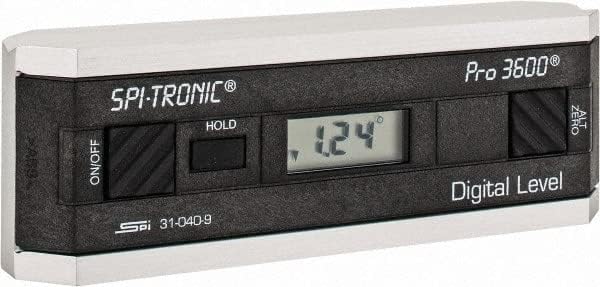
The SPI 31-040-9 Digital Protractor PRO3600 is a revolutionary tool designed to provide immediate digital indications of level, plumb, and angles. It features a light, rigid, and ultra-precise platform, utilizing a state-of-the-art sensor and microprocessor circuit for accurate readings. This instrument is built for durability, precision, and reliability, making it an essential tool for various metalworking and laboratory applications.
Sifa Muhimu:
- Floating zero provides zero selection anywhere within its 360° range.
- PRO 3600 features SPC output and excellent accuracy.
- Instant LCD Display with resolution of 0.1° up to +/-10°.
- Deviation from the true plane is measurable through full 360° (4x90°).
- Supplied in a protective plastic case.
- Top plate has a V-groove for accurate registration on curved or cylindrical surfaces.

2. Bidhaa Imeishaview
Familiarize yourself with the main components and controls of your SPI PRO3600 Digital Protractor.


3. Kuweka
3.1 Ufungaji wa Betri
The SPI PRO3600 is battery powered. To install or replace batteries:
- Locate the battery compartment cover, typically on the underside or side of the unit.
- Open the cover using a small screwdriver or coin if necessary.
- Insert the required batteries (refer to the battery type indicated inside the compartment, usually AAA or button cell) ensuring correct polarity (+/-).
- Funga kifuniko cha sehemu ya betri kwa usalama.
3.2 Umeme wa Awali Umewashwa
Baada ya kusakinisha betri, bonyeza kitufe cha WASHA/ZIMWA button to power on the device. The LCD display should illuminate and show a reading.
4. Maagizo ya Uendeshaji
4.1 Washa/Zima
- Ili kugeuza kitengo ON, bonyeza WASHA/ZIMWA kitufe.
- Ili kugeuza kitengo IMEZIMWA, bonyeza WASHA/ZIMWA kifungo tena.
- The unit will automatically shut off after 6 minutes of non-use to conserve battery life.
4.2 Zeroing (ALT ZERO)
The floating zero feature allows you to set a reference point anywhere within the 360° range.
- Place the unit on your chosen reference surface.
- Wait approximately 5 seconds for the reading to stabilize.
- Bonyeza kwa ALT ZERO button. The display will reset to 0.0°, establishing this as your new reference.
- To return to the original absolute reference (factory zero), press the ALT ZERO kifungo tena.
4.3 Holding a Reading
Ili kugandisha usomaji wa sasa kwenye onyesho:
- Bonyeza kwa SHIKA button. The displayed reading will be frozen.
- To unfreeze the display and resume live readings, press the SHIKA kifungo tena.
4.4 SPC Output
The PRO3600 features an SPC (Statistical Process Control) output port. This allows for data transfer to external devices for analysis. Refer to the manual for your specific SPC data collection system for connection and usage instructions.
4.5 Measuring Angles
Place the base of the protractor firmly on the surface you wish to measure. The digital display will show the angle relative to the last set zero point. For absolute measurements, ensure the unit is zeroed on a true horizontal surface.
4.6 Using the V-Groove
The top plate of the protractor features a V-groove. This design allows for accurate registration and measurement on curved or cylindrical surfaces, such as pipes or shafts. Simply align the V-groove with the cylindrical object to obtain a stable and accurate reading.
5. Matengenezo
5.1 Kusafisha
- Futa kifaa kwa kitambaa laini na kikavu.
- Kwa uchafu mkaidi, d kidogoamp kitambaa chenye sabuni laini kinaweza kutumika, ikifuatiwa na kukauka mara moja.
- Usitumie visafishaji vya kukwaruza, viyeyusho, au kuzamisha kifaa hicho ndani ya maji.
5.2 Hifadhi
- Store the protractor in its supplied plastic case when not in use to protect it from dust, dirt, and physical damage.
- Store in a dry environment, away from extreme temperatures and direct sunlight.
- Ikiwa itahifadhiwa kwa muda mrefu, ondoa betri ili kuzuia uvujaji.
6. Utatuzi wa shida
- Kitengo hakiwashi: Angalia usakinishaji wa betri na uhakikishe kuwa betri hazijaisha. Badilisha ikiwa ni lazima.
- Usomaji usio sahihi: Ensure the measurement surface is clean and stable. Perform an ALT ZERO calibration on a known true reference surface.
- Unit shuts off unexpectedly: The unit has an automatic shut-off feature after 6 minutes of non-use. This is normal operation. If it shuts off during active use, check battery levels.
- Onyesho ni hafifu au kumeta: Huenda betri zikawa chache. Zibadilishe.
7. Vipimo
| Sifa | Thamani |
|---|---|
| Mtengenezaji | MSC Industrial |
| Nambari ya Sehemu | 03883782 |
| Uzito wa Kipengee | Pauni 6.5 |
| Vipimo vya Bidhaa | Inchi 6 x 1.2 x 2.3 |
| Nambari ya Mfano wa Kipengee | 31-040-9 |
| Ukubwa | Ukubwa Mmoja |
| Rangi | Nyeusi |
| Nyenzo | Mchanganyiko |
| Chanzo cha Nguvu | Inaendeshwa na Betri |
| Kiasi cha Kifurushi cha Bidhaa | 1 |
| Vipengee vilivyojumuishwa | Fitted Case |
8. Udhamini na Msaada
8.1 Taarifa ya Udhamini
SPI measuring instruments are backed by an industry-leading 2-Year warranty, ensuring their durability, precision, and reliability. Please retain your proof of purchase for warranty claims.
8.2 Usaidizi kwa Wateja
For technical assistance, warranty service, or inquiries regarding your SPI PRO3600 Digital Protractor, please contact SPI customer support through their official webtovuti au muuzaji ambaye ulinunua bidhaa kutoka kwake.
Ask a question about this manual
Ask about setup, troubleshooting, compatibility, parts, safety, or missing instructions. Manuals+ will review the question and use this page’s manual context to help answer it.