
1. Utangulizi
This manual provides essential information for the setup, operation, maintenance, and troubleshooting of your DELTACO GAMING WM87 Gaming Mouse. Please read these instructions carefully to ensure proper use and to maximize your gaming experience.
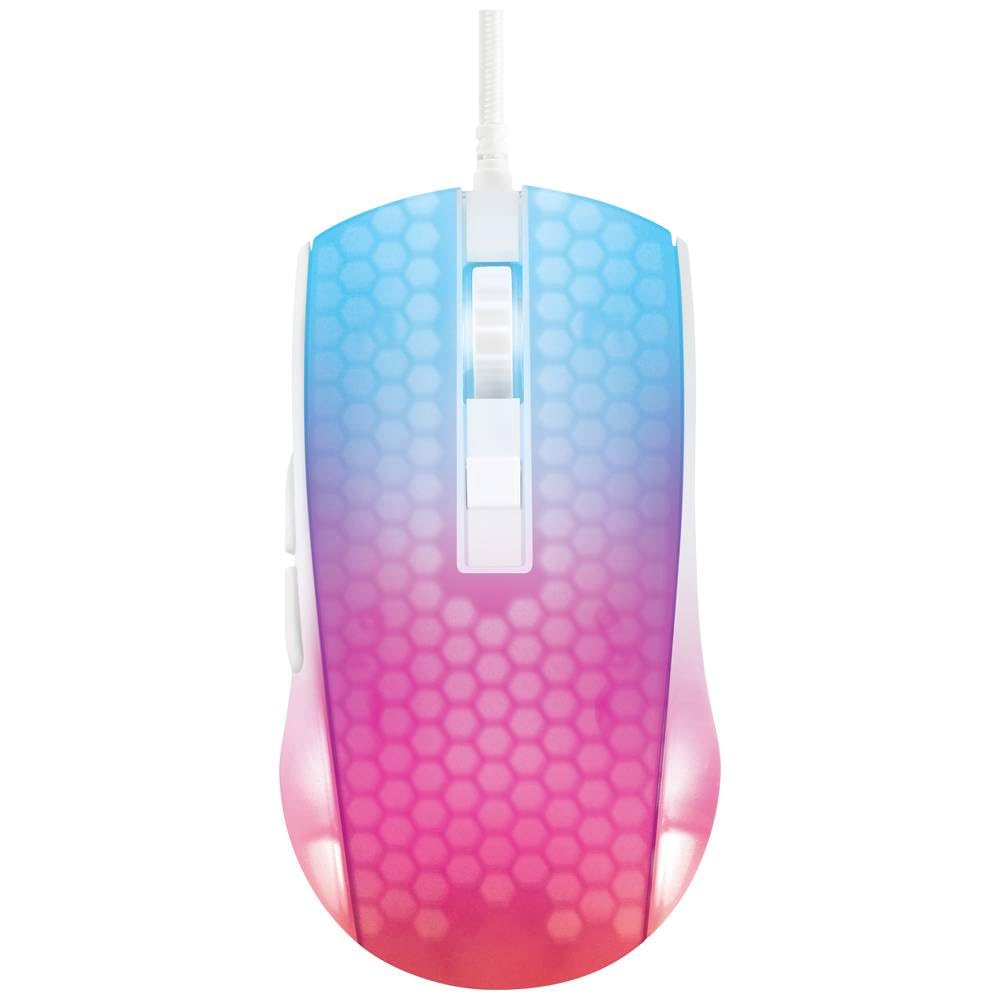
Rudia view of the DELTACO GAMING WM87 Gaming Mouse. The mouse features a translucent white body with an illuminated honeycomb pattern that transitions from blue at the front to pink and red at the rear. It has a scroll wheel and two main buttons, along with two side buttons visible on the left.
2. Bidhaa Imeishaview
The DELTACO GAMING WM87 is a high-performance gaming mouse designed for precision and comfort. It features a transparent design with integrated illumination, a high-accuracy optical sensor, and six programmable buttons.
Sifa Muhimu:
- Muunganisho: USB Wired
- Kihisi: Optical, up to 6200 DPI
- Vifungo: 6 (Left, Right, Scroll Click, DPI Cycle, Forward, Back)
- Muundo: Transparent shell with illuminated honeycomb pattern
- Utangamano: Personal Computer, Laptop
3. Maagizo ya Kuweka
- Fungua Panya: Carefully remove the DELTACO GAMING WM87 mouse from its packaging.
- Unganisha kwa Kompyuta: Locate an available USB port on your personal computer or laptop. Insert the USB connector of the mouse firmly into the USB port.
- Ufungaji wa Dereva: The mouse is plug-and-play. Your operating system should automatically detect and install the necessary drivers. No additional software installation is typically required for basic functionality.
- Thibitisha Utendaji: Once connected, move the mouse and click the buttons to ensure it is working correctly. The integrated illumination should light up.
4. Maagizo ya Uendeshaji
Kazi za Msingi:
- Bofya Kushoto: Kitendo cha msingi, uteuzi.
- Bonyeza kulia: Menyu ya muktadha, kitendo cha pili.
- Gurudumu la Kutembeza: Scroll up/down pages. Pressing the scroll wheel typically acts as a middle click.
- Vitufe vya Kusonga Mbele/Nyuma: Located on the left side of the mouse, these buttons are commonly used for navigation in web vivinjari au file wachunguzi.
Marekebisho ya DPI:
The DELTACO GAMING WM87 mouse features adjustable DPI (Dots Per Inch) settings, allowing you to change the cursor sensitivity on the fly. A dedicated DPI button (often located behind the scroll wheel) cycles through preset DPI levels up to 6200 DPI. Press this button to adjust the sensitivity to your preference.
Mwangaza:
The mouse features integrated illumination. The lighting pattern and colors are typically pre-programmed and may change based on DPI settings or automatically cycle through colors. Refer to any potential software for advanced customization, if available.
5. Matengenezo
- Kusafisha: Use a soft, dry, lint-free cloth to clean the exterior of the mouse. For stubborn dirt, slightly dampfunika kitambaa na maji. Epuka kutumia kemikali kali, miyeyusho, au vifaa vya kukwaruza.
- Kusafisha Sensorer: Wakati mwingine, vumbi au uchafu unaweza kujikusanya kuzunguka kitambuzi cha macho upande wa chini wa panya. Tumia swabu ya pamba au hewa iliyoshinikizwa kusafisha eneo la kitambuzi kwa upole.
- Hifadhi: Wakati haitumiki, hifadhi panya katika mazingira safi, kavu mbali na joto kali na jua moja kwa moja.
- Huduma ya Cable: Epuka kupinda au kupotosha kebo ya USB kupita kiasi ili kuzuia uharibifu.
6. Utatuzi wa shida
- Panya haijibu:
- Hakikisha kebo ya USB imechomekwa vizuri kwenye mlango wa USB unaofanya kazi.
- Jaribu kuunganisha kipanya kwenye mlango tofauti wa USB kwenye kompyuta yako.
- Anzisha tena kompyuta yako.
- Mwendo wa Mshale Mpotovu:
- Safisha kihisi cha macho kwenye sehemu ya chini ya panya.
- Hakikisha unatumia kipanya kwenye sehemu inayofaa (km pedi ya kipanya). Epuka sehemu zinazoakisi sana au zenye uwazi.
- Mwangaza Haufanyi Kazi:
- Angalia muunganisho wa USB.
- If the mouse has a dedicated lighting control button or software, ensure it is enabled.
7. Vipimo
| Kipengele | Maelezo |
|---|---|
| Chapa | MICHEZO YA DELTACO |
| Nambari ya Mfano | GAM-144-W (WM87) |
| Teknolojia ya Uunganisho | USB |
| Teknolojia ya kugundua harakati | Macho |
| Idadi ya Vifungo | 6 |
| DPI | Hadi 6200 |
| Mwelekeo wa Mikono | Sawa |
| Matumizi ya Bidhaa Iliyopendekezwa | Michezo ya kubahatisha |
| Vifaa Sambamba | Laptop, Kompyuta ya kibinafsi |
| Vipimo vya Bidhaa | 180 x 0.07 x 0.12 cm (Note: These dimensions appear to be for the cable or packaging, not the mouse itself. Please refer to product packaging for accurate mouse dimensions.) |
| Uzito | Approximately 65 Grams (Lithium battery weight, likely referring to overall mouse weight if no battery is present) |
| Tarehe ya Kwanza Inapatikana | Septemba 16, 2023 |
8. Udhamini na Msaada
For warranty information, technical support, or service inquiries regarding your DELTACO GAMING WM87 Gaming Mouse, please refer to the warranty card included with your product or visit the official DELTACO GAMING webtovuti. Weka uthibitisho wako wa ununuzi kwa madai ya udhamini.