
Infinity NX 10
Mwongozo wa Mtumiaji wa Infinity Smartwatch
Model: NX 10
Utangulizi
Welcome to the user manual for your Infinity Smartwatch, Model NX 10. This device is designed to enhance your daily life with advanced fitness tracking, communication features, and smart notifications. Featuring a vibrant 1.43" AMOLED screen and robust IP68 water resistance, your smartwatch is built for both everyday use and active lifestyles. Please read this manual carefully to ensure proper operation and maintenance of your device.

Figure 1: Infinity Smartwatch NX 10. This image shows the smartwatch from an angled perspective, highlighting its round AMOLED display, black silicone strap, and two side buttons.
Sanidi
1. Unboxing na Malipo ya Awali
Upon unboxing, ensure all components are present: the Infinity Smartwatch NX 10 and the charging cable.
- Unganisha kebo ya kuchaji yenye sumaku kwenye sehemu za kuchaji nyuma ya saa janja.
- Chomeka ncha ya USB ya kebo kwenye adapta ya kawaida ya nishati ya USB (haijajumuishwa) au mlango wa USB wa kompyuta.
- The watch display will show a charging indicator. Fully charge the device before first use, which typically takes approximately 2 hours.

Figure 2: Smartwatch charging. The image illustrates the smartwatch being charged magnetically, with a green lightning bolt icon on the screen indicating charging status and a "400mAh Battery Capacity" label.
2. Ufungaji na Kuoanisha Programu
To unlock the full potential of your Infinity Smartwatch, download and install the companion application, Fit Cloud Pro, on your smartphone.
- Scan the QR code provided in the quick start guide (if available) or search for "Fit Cloud Pro" in your smartphone's app store (Google Play Store for Android, Apple App Store for iOS).
- Sakinisha programu.
- Open the Fit Cloud Pro app and follow the on-screen instructions to create an account or log in.
- Hakikisha kuwa Bluetooth imewashwa kwenye simu yako mahiri.
- In the app, navigate to the device pairing section and search for your smartwatch (e.g., "NX 10" or similar Bluetooth name).
- Select your smartwatch from the list to initiate pairing. Confirm the pairing request on both your phone and the smartwatch if prompted.
- Once paired, the app will synchronize data with your smartwatch, and you can customize settings.
Maagizo ya Uendeshaji
1. Urambazaji wa Msingi
- Skrini ya kugusa: Swipe left/right to navigate between main screens (e.g., activity, heart rate, weather). Swipe up/down to access quick settings or notifications. Tap to select an option.
- Vifungo vya upande: The top button typically acts as a power button (long press) or a back/home button (short press). The bottom button may be customizable or provide quick access to sports modes.

Figure 3: 1.43" AMOLED Screen. This image highlights the vibrant display of the smartwatch, showing a detailed watch face with various data points like time, date, steps, and heart rate.
2. Kupiga na Kujibu Simu
Your Infinity Smartwatch supports Bluetooth calling, allowing you to make and receive calls directly from your wrist when connected to your smartphone.
- Ili kupiga simu: Access the dialer or contacts list on your smartwatch. You can dial a number directly or select a contact to call.
- Kujibu Simu: When a call comes in, the smartwatch will display the caller ID. Tap the green answer icon to accept the call or the red icon to decline.

Figure 4: Stay Connected On The Go. This image shows a user interacting with the smartwatch to make a call, illustrating the microphone, dialing, call records, and contacts features.
3. Fitness and Health Tracking
The smartwatch is equipped with multiple sensors to monitor your health and fitness activities.
- Pedometer: Automatically tracks your steps, distance, and calories burned throughout the day.
- Ufuatiliaji wa Kiwango cha Moyo: Provides real-time heart rate data. Access this feature from the main menu or set up continuous monitoring in the app.
- Ufuatiliaji wa Shinikizo la Damu: Offers blood pressure readings. For accurate results, ensure the watch is worn correctly and remain still during measurement. Kumbuka: Kipengele hiki ni cha marejeleo pekee na hakipaswi kutumika kwa utambuzi wa kimatibabu.
- Ufuatiliaji wa Usingizi: Hufuatilia mifumo yako ya usingizi, ikiwa ni pamoja na usingizi mzito, usingizi mwepesi, na nyakati za kuamka. View detailed analysis in the Fit Cloud Pro app.
- Mbinu za Michezo: Supports over 100 sports modes, including running, cycling, swimming, and more. Select your desired activity to track specific metrics.

Figure 5: Track Every Move. This image displays the smartwatch tracking a swimming activity, with additional visuals of rock climbing and cycling, indicating its multi-sport tracking capabilities.

Figure 6: More than 110 sports modes. This image shows a variety of colorful icons representing different sports activities supported by the smartwatch, overlaid on a background of a person cycling.
4. Kubinafsisha
Personalize your smartwatch experience through the Fit Cloud Pro app.
- Nyuso za Kuangalia: Choose from a wide range of pre-installed watch faces or download new ones via the app. You can also create custom watch faces using your own photos.
- Arifa: Configure which app notifications you wish to receive on your smartwatch (e.g., calls, SMS, social media alerts).
- Kengele na Vikumbusho: Set alarms, sedentary reminders, and hydration reminders through the app.
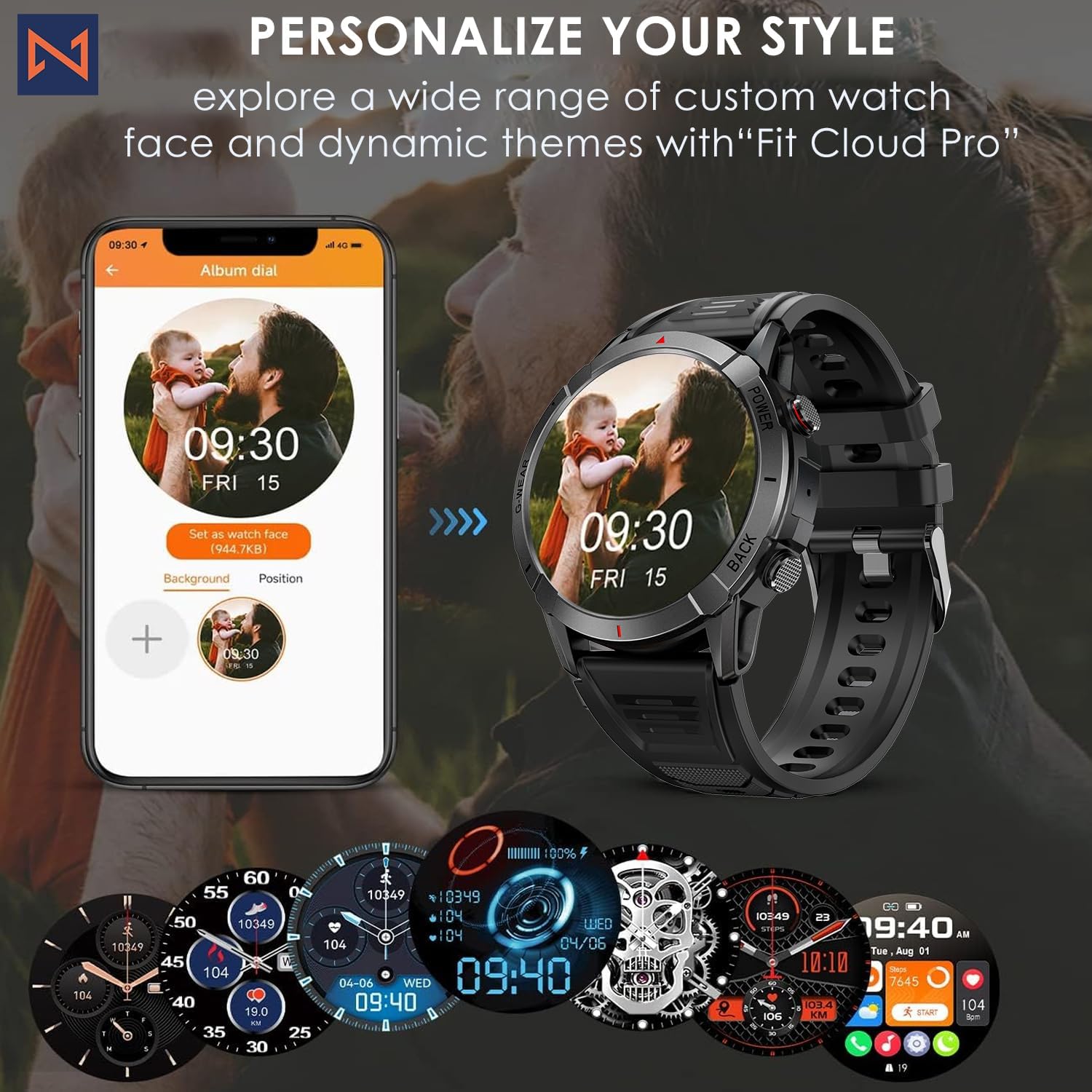
Figure 7: Personalize Your Style. This image demonstrates how to customize watch faces using the "Fit Cloud Pro" app, showing various digital and analog watch face options.
Matengenezo
1. Kusafisha Smartwatch Yako
Regular cleaning helps maintain the appearance and functionality of your device.
- Futa skrini na mwili kwa kitambaa laini kisicho na pamba.
- Kwa uchafu mkaidi, dampsw kitambaa kidogo na maji. Epuka kutumia kemikali kali au vifaa vya abrasive.
- Safisha anwani za kuchaji mara kwa mara ili kuhakikisha muunganisho sahihi.
2. Ustahimilivu wa Maji (IP68)
Your Infinity Smartwatch is rated IP68, meaning it is resistant to dust and can withstand immersion in water up to 1.5 meters for up to 30 minutes.
- Inafaa kwa matumizi ya kila siku, kunawa mikono, na mvua kidogo.
- Avoid prolonged immersion, hot water, steam, or high-pressure water jets (e.g., showering, sauna, diving).
- If the watch gets wet, dry it thoroughly before charging or operating buttons.

Figure 8: Engineered for Adventure. This image highlights the smartwatch's durability features, including waterproof, dustproof, anti-magnetic, and shockproof capabilities, with corresponding icons.
3. Utunzaji wa Betri
- Ili kuongeza muda wa matumizi ya betri, epuka halijoto kali.
- Chaji saa mara kwa mara; epuka kuruhusu betri kuisha kabisa kwa muda mrefu.
- Tumia kebo iliyotolewa tu ya kuchaji.
Kutatua matatizo
| Tatizo | Suluhisho linalowezekana |
|---|---|
| Saa haiwashi | Hakikisha saa imechajiwa kikamilifu. Unganisha kwenye chaja na usubiri dakika chache kabla ya kujaribu kuwasha. |
| Haiwezi kuoanishwa na simu mahiri |
|
| Data ya afya isiyo sahihi |
|
| Arifa hazijapokelewa |
|
| Maisha mafupi ya betri |
|
Vipimo
| Kipengele | Maelezo |
|---|---|
| Nambari ya Mfano | NX 10 |
| Onyesho | Skrini ya AMOLED ya inchi 1.43 |
| Azimio la Onyesho | HD 466x466 |
| Uwezo wa Betri | 400 mAh Lithium Polymer |
| Upinzani wa Maji | IP68 |
| Muunganisho | Bluetooth |
| Mfumo wa Uendeshaji | Android (inaoana na iOS) |
| Nyenzo ya Kamba | 22mm Silicon Belt |
| Nyenzo ya Kuonyesha | Aloi ya Zinki |
| Uzito wa Kipengee | 1.76 wakia |
| Uwezo wa Kuhifadhi Kumbukumbu | 128 MB |
Udhamini na Msaada
For warranty information and technical support, please refer to the documentation included with your purchase or visit the official Infinity webtovuti.
Manufacturer: Infiniity
For further assistance, you may contact Infiniity customer service through the contact information provided on their official website or within the Fit Cloud Pro application.
Ask a question about this manual
Ask about setup, troubleshooting, compatibility, parts, safety, or missing instructions. Manuals+ will review the question and use this page’s manual context to help answer it.