
Bumpboxx Remixx
Bumpboxx Remixx Retro Bluetooth Boombox
Mwongozo wa Mtumiaji
Model: Remixx | Brand: Bumpboxx
Utangulizi
Thank you for choosing the Bumpboxx Remixx Retro Bluetooth Boombox. This portable cassette-style speaker combines vintage aesthetics with modern audio technology, offering high-fidelity sound, wireless connectivity, and a range of features for an enhanced listening experience. This manual provides essential information for setting up, operating, maintaining, and troubleshooting your device.
Yaliyomo kwenye Kifurushi
Tafadhali hakikisha vitu vyote vipo kwenye kifurushi chako:
- Bumpboxx Remixx Bluetooth Boombox
- Maikrofoni isiyo na waya
- Carrying Shoulder Strap
- Adapta ya Nguvu (ya kuchaji)
- Cable ya Aux 3.5mm
- Udhibiti wa Kijijini
Bidhaa Imeishaview
Familiarize yourself with the main components and controls of your Bumpboxx Remixx.
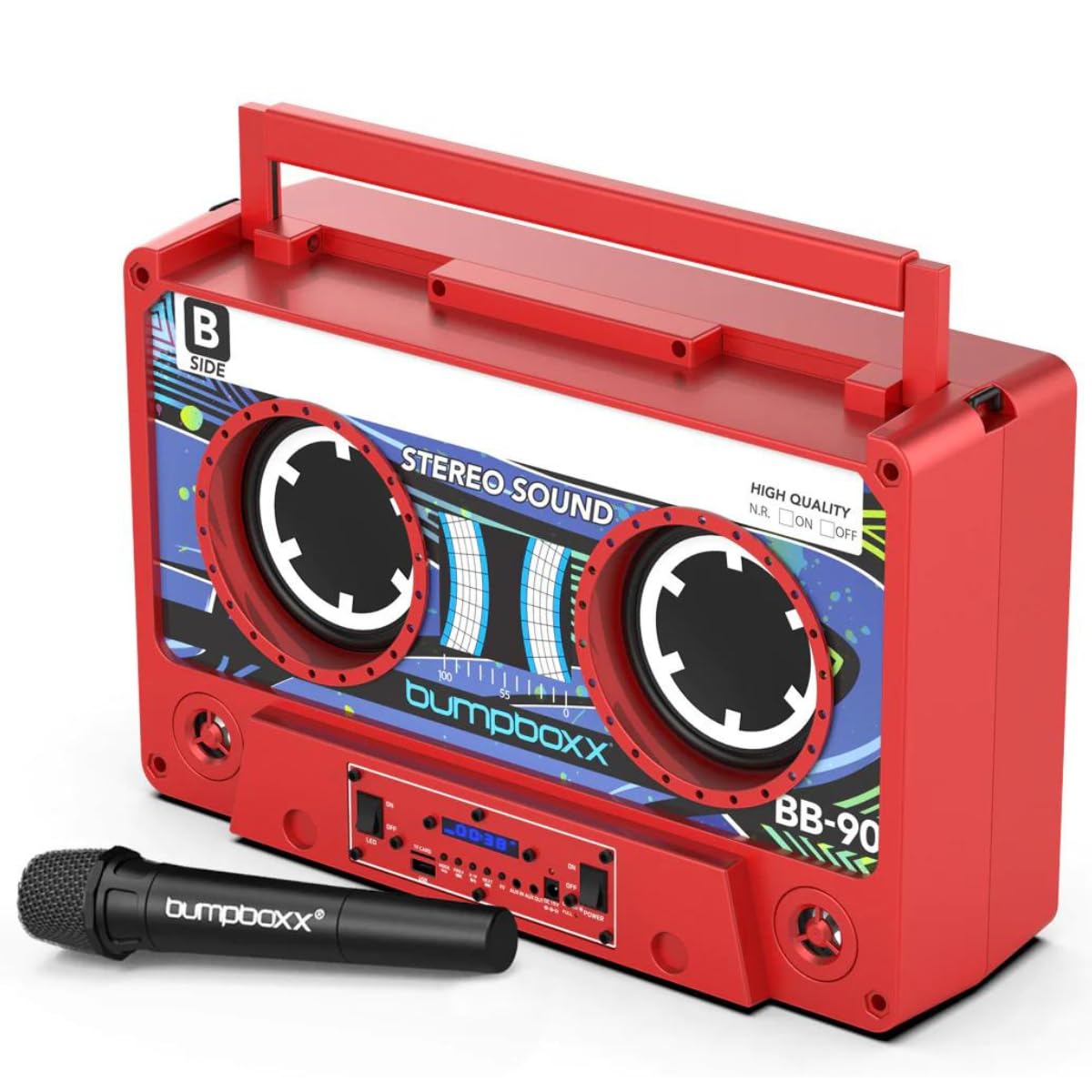
Kielelezo 1: Mbele view of the Bumpboxx Remixx Boombox.

Figure 2: Side control panel with various ports and switches.
Vidhibiti na Bandari:
- Kitovu cha Sauti: Hurekebisha kiwango cha jumla cha kutoa sauti.
- Bass Knob: Adjusts the low-frequency sound levels.
- Treble Knob: Adjusts the high-frequency sound levels.
- Kubadilisha Nguvu: Huwasha/Kuzima kifaa.
- Kubadilisha LED: Huwasha/Kuzima taa za LED.
- Mlango wa USB: Kwa kucheza MP3 files from a USB drive or charging external devices.
- Yanayopangwa Kadi ya TF: Kwa kucheza MP3 files from a TF (MicroSD) card.
- Kitufe cha Hali: Switches between input modes (Bluetooth, USB, TF Card, Aux In).
- Vifungo Vilivyotangulia/Vinavyofuata: Navigates tracks during playback.
- Kitufe cha Cheza/Sitisha: Udhibiti uchezaji wa media.
- Kitufe cha EQ: Cycles through 5 preset equalizer settings.
- Aux In (3.5mm): Unganisha vifaa vya sauti vya nje.
- Aux Out (3.5mm): Unganisha na mifumo mingine ya sauti.
- Ingizo la DC 15V: Power adapter connection for charging.
- Charge/Full LED Indicators: Inaonyesha hali ya kuchaji betri.
Sanidi
1. Kuchaji Betri:
- Connect the provided power adapter to the DC 15V input port on the side of the boombox.
- Chomeka adapta kwenye duka la kawaida la ukuta.
- The 'Charge' indicator LED will illuminate during charging. Once fully charged, the 'Full' indicator LED will light up.
- Malipo kamili hutoa takriban saa 12 za muda wa kucheza.
2. Kuwasha/Kuzima:
- To power on the boombox, slide the Nguvu badilisha hadi nafasi ya 'ON'.
- Ili kuzima, telezesha Nguvu badilisha hadi nafasi ya 'ZIMA'.
Maagizo ya Uendeshaji
1. Kuoanisha Bluetooth:
- Power on the Bumpboxx Remixx. The device will automatically enter Bluetooth pairing mode, indicated by a flashing Bluetooth icon on the display.
- Kwenye kifaa chako cha mkononi (simu mahiri, kompyuta kibao, n.k.), washa Bluetooth na utafute vifaa vinavyopatikana.
- Select "Bumpboxx Remixx" from the list of devices.
- Once connected, the Bluetooth icon will stop flashing, and a confirmation tone may sound.
- You can now play audio from your device through the boombox.
2. Auxiliary Input (AUX In):
- Connect one end of the 3.5mm Aux cable to the Aux In port on the boombox.
- Unganisha ncha nyingine kwenye jeki ya vipokea sauti vya masikioni au kifaa chako cha sauti cha nje.
- Bonyeza kwa Hali button on the boombox until "AUX" is displayed.
- Dhibiti uchezaji na sauti kutoka kwa kifaa chako cha nje.
3. Uchezaji wa Kadi ya USB/TF:
- Insert a USB drive into the USB port or a TF (MicroSD) card into the TF Card slot.
- The boombox will automatically switch to USB or TF Card mode and begin playing compatible MP3 files. Ikiwa sivyo, bonyeza kitufe Hali kitufe ili kuchagua ingizo sahihi.
- Tumia Iliyotangulia/Inayofuata na Cheza/Sitisha vifungo vya kudhibiti uchezaji.
4. Wireless Microphone Usage:
- Ensure the wireless microphone is powered on and within range of the boombox.
- The microphone will automatically connect to the boombox.
- Adjust the microphone volume using the dedicated control on the microphone or the boombox (if available).
5. Mipangilio ya EQ:
- Bonyeza kwa EQ button to cycle through the 5 preset equalizer settings (e.g., Pop, Rock, Jazz, Classic, Flat).
- Select the setting that best suits your audio preference.
6. Kuoanisha TWS (Tereo ya Kweli Isiyo na Waya):
The Bumpboxx Remixx supports TWS pairing, allowing two Remixx units to connect wirelessly for a stereo sound experience.
- Ensure both Bumpboxx Remixx units are powered on and in Bluetooth mode, but not connected to any other device.
- On one unit (this will be the primary unit), press and hold the Hali kitufe kwa sekunde chache hadi utakaposikia sauti ya kuoanisha.
- The two units will automatically connect to each other. A confirmation tone will sound once connected.
- Now, connect your mobile device to the primary Bumpboxx Remixx via Bluetooth as described in step 1.
- Audio will now play in stereo across both units.
Video 1: Demonstrating the Bumpboxx Remixx in action, showcasing muundo na sifa zake.
Video 2: A closer look at the Bumpboxx Remixx speaker, highlighting its audio capabilities.
Matengenezo
1. Kusafisha:
- Wipe the exterior of the boombox with a soft, dry cloth.
- Usitumie visafishaji vya abrasive, nta, au viyeyusho kwani vinaweza kuharibu umaliziaji.
- Weka milango bila vumbi na uchafu.
2. Hifadhi:
- Hifadhi boombox mahali pakavu na penye baridi mbali na jua moja kwa moja na halijoto kali.
- Iwapo itahifadhiwa kwa muda mrefu, hakikisha kuwa betri imechajiwa kiasi (karibu 50%) ili kuongeza muda wa maisha yake.
Kutatua matatizo
Hakuna Nguvu:
- Ensure the power adapter is securely connected to both the boombox and a working power outlet.
- Check if the battery is charged. If not, charge the device for several hours.
- Verify the Power switch is in the 'ON' position.
Hakuna Sauti:
- Increase the volume on both the boombox and your connected audio device.
- Ensure the correct input mode (Bluetooth, AUX, USB, TF Card) is selected.
- Ikiwa unatumia Bluetooth, hakikisha kuwa kifaa kimeoanishwa vizuri na kimeunganishwa.
- If using AUX, check the cable connection and ensure it is fully inserted.
Bluetooth Haiunganishi:
- Ensure the boombox is in Bluetooth pairing mode (flashing Bluetooth icon).
- Make sure your mobile device's Bluetooth is enabled and searching for devices.
- Move your mobile device closer to the boombox.
- Try forgetting the device from your mobile device's Bluetooth settings and re-pairing.
- Ensure no other devices are currently connected to the boombox.
Vipimo
- Jina la Mfano: Remixx
- Chapa: Bumpboxx
- Aina ya Spika: Imejengwa Ndani
- Teknolojia ya Uunganisho: Bluetooth
- Njia ya Pato la Sauti: Stereo
- Chanzo cha Nguvu: Inaendeshwa na Betri (betri 1 ya Ion ya Lithium imejumuishwa)
- Maisha ya Betri: Hadi saa 12 (inaweza kuchajiwa tena)
- Vipimo vya Bidhaa: Inchi 17.5 (Urefu) x Inchi 6.25 (Upana) x Inchi 11.5 (Urefu)
- Uzito wa Kipengee: Pauni 12.5
- Vipengele Maalum: Wireless Microphone, 5 EQ Settings, TWS Wireless Pairing, USB/TF MP3 Player, 3.5mm Line In/Line Out
- Rangi: Electric Red
- Nyenzo: Plastiki
- Mbinu ya Kudhibiti: Mguso, Kidhibiti cha Mbali
Udhamini na Msaada
The Bumpboxx Remixx Retro Bluetooth Boombox comes with a Udhamini wa mtengenezaji wa mwaka 1 kufunika kasoro katika nyenzo na utengenezaji.
For warranty claims, technical support, or any questions regarding your product, please contact Bumpboxx customer service through their official webtovuti au muuzaji ambapo bidhaa ilinunuliwa. Tafadhali hifadhi uthibitisho wako wa ununuzi kwa uthibitisho wa udhamini.