
1. Utangulizi
Thank you for choosing the WORKPRO 1500W Rotary Hammer Drill. This heavy-duty tool is designed for demanding tasks such as drilling in concrete, wood, and steel, as well as chiseling applications. This manual provides essential information for the safe and efficient operation, maintenance, and troubleshooting of your rotary hammer drill. Please read it thoroughly before first use and keep it for future reference.

Image 1.1: WORKPRO 1500W Rotary Hammer Drill and included accessories.
2. Maagizo ya Usalama wa Jumla
Daima zingatia tahadhari za kimsingi za usalama ili kupunguza hatari ya moto, mshtuko wa umeme na majeraha ya kibinafsi. Kukosa kufuata maagizo haya kunaweza kusababisha jeraha kubwa.
- Usalama wa Eneo la Kazi: Weka eneo la kazi safi na lenye mwanga. Maeneo yenye vitu vingi au giza hukaribisha ajali. Usitumie zana za nguvu katika angahewa zinazolipuka, kama vile maji yanayoweza kuwaka, gesi au vumbi.
- Usalama wa Umeme: Plugi za zana za nguvu lazima zilingane na plagi. Usiwahi kurekebisha plagi kwa njia yoyote. Epuka kugusana na uso wa udongo au chini. Usifichue zana za nguvu kwa mvua au hali ya mvua.
- Usalama wa Kibinafsi: Always wear eye protection. Use hearing protection when operating the tool for extended periods. Wear a dust mask if drilling in dusty conditions. Dress properly; avoid loose clothing or jewelry.
- Utunzaji na matumizi ya zana: Usilazimishe chombo cha nguvu. Tumia zana sahihi ya nishati kwa programu yako. Tenganisha plagi kutoka kwa chanzo cha nishati kabla ya kufanya marekebisho yoyote, kubadilisha vifuasi au kuhifadhi zana za nguvu.
- Matengenezo: Kudumisha zana za umeme. Angalia upotovu au kufungwa kwa sehemu zinazohamia, kuvunjika kwa sehemu, na hali nyingine yoyote ambayo inaweza kuathiri utendaji wa zana ya nguvu.
3. Vipengele vya Bidhaa na Bidhaa Zilizojumuishwa
Familiarize yourself with the parts of your WORKPRO Rotary Hammer Drill and the accessories provided.

Image 3.1: Key components of the rotary hammer drill, including SDS-PLUS Chuck, Four Functions Switch, Grease Pot, Shock Absorber, On/Off Switch, Cushioned Handle, Variable Speed Control, 360° Rotatable Handle, and Heat Outlet.
Vifaa vilivyojumuishwa:

Image 3.2: The complete set of accessories includes a carrying case, rotary hammer drill, SDS-plus point flat bit (250mm), SDS-plus point chisel bit (250mm), wrench, grease, SDS-plus drill bits (8mm, 10mm, 12mm), and a dust collector.
- 1 x Heavy-duty Rotary Hammer Drill
- 3 x SDS-plus Drill Bits (8 mm, 10 mm, 12 mm)
- 1 x Round Shank Chisel (Φ14 × 250 mm)
- 1 x Flat Chisel (Φ14 × 250 mm)
- 1 x Grease container
- 1 x Carbon Brush set
- 1 x Kifuniko cha vumbi
- 1 x Wrench
- 1 x Kesi ya kubeba
4. Kuweka na Kukusanya
4.1 Kuambatanisha Kishikio Kisaidizi
The 360° rotatable handle provides better control and comfort. Loosen the handle clamp, position the handle to your desired angle, and tighten the clamp salama.
4.2 Inserting and Removing SDS-plus Bits
The SDS-plus chuck allows for quick and secure bit changes.
- Inaingiza: Clean the bit shank. Pull back the chuck collar, insert the bit into the chuck until it clicks into place. Release the collar. Pull on the bit to ensure it is securely locked.
- Inaondoa: Pull back the chuck collar and pull the bit out.

Image 4.1: Illustration of the auto-lock SDS-plus chuck for secure bit clamping.
4.3 Attaching the Dust Collector
For cleaner operation and to protect the user, attach the dust collector to the front of the tool when drilling.

Image 4.2: The anti-dust cover protects users and the machine from dust and debris.
5. Maagizo ya Uendeshaji
The WORKPRO Rotary Hammer Drill features four operating modes and variable speed control for versatile applications.
5.1 Uteuzi wa Njia
Use the four-function switch located on the side of the tool to select the desired operating mode:
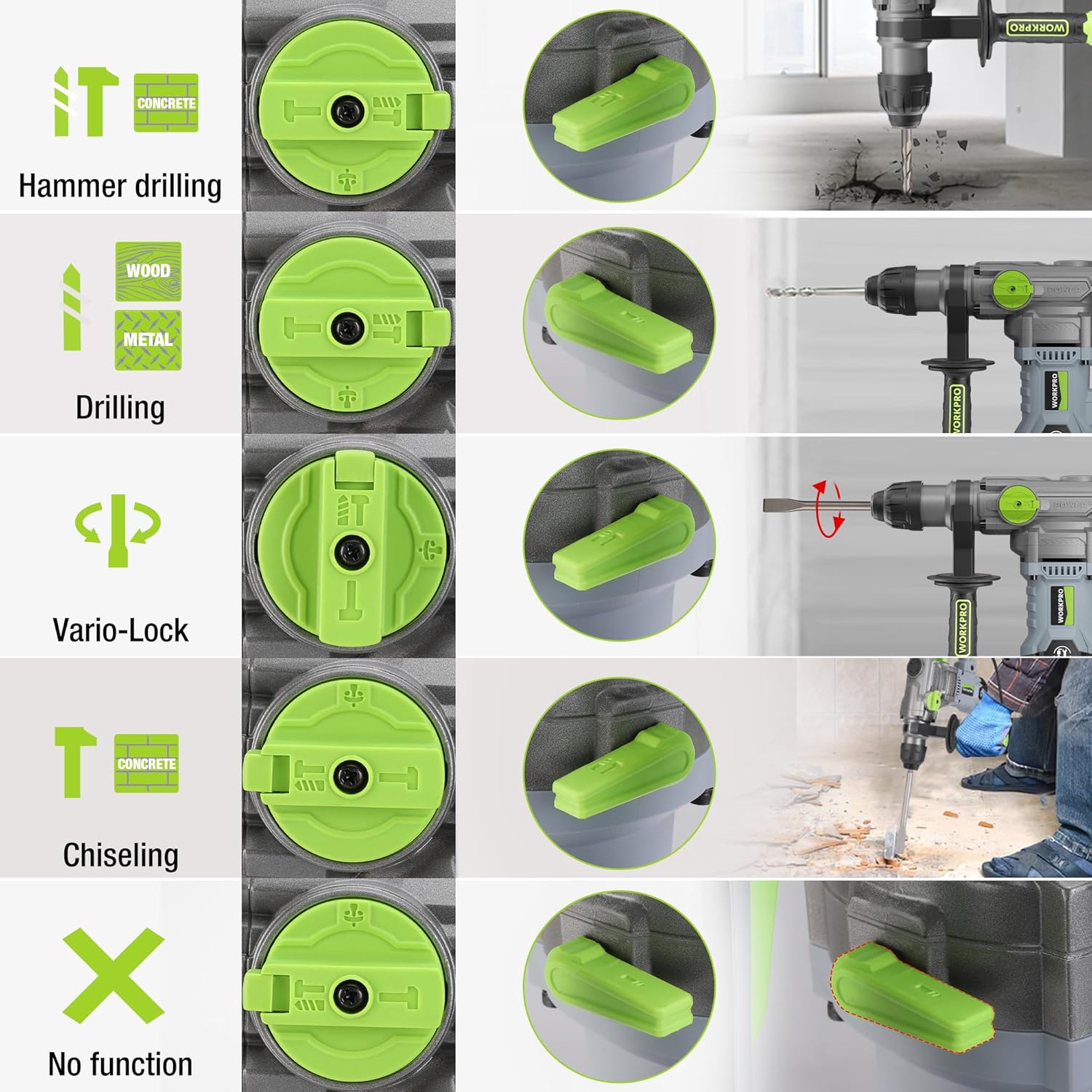
Image 5.1: The four-function switch allows selection between Hammer Drilling, Drilling, Vario-Lock (Chisel Adjust), and Chiseling modes.
- Uchimbaji Nyundo: For drilling in concrete and masonry with impact.
- Kuchimba: For drilling in wood, metal, and plastic without impact.
- Kukata Chiseli (Nyundo Pekee): For light chiseling work in concrete and masonry.
- Vario-Lock (Chisel Adjust): Allows you to rotate and lock the chisel in various positions to optimize the working angle.

Image 5.2: Visual representation of the hammer drilling, drilling, hammer, and chisel adjust modes.
5.2 Udhibiti wa Kasi Unaobadilika
The variable speed control allows you to adjust the rotation speed (0-930 RPM) and impact frequency (0-4300 BPM) to match the material and application.
- Rotate the speed adjustment dial to increase or decrease the speed.
- Start with a lower speed for precise drilling and increase as needed.
5.3 Drilling Capacities
The tool offers excellent drilling performance across various materials:
- Zege: Hadi 32 mm
- Mbao: Hadi 42 mm
- Chuma: Hadi 13 mm
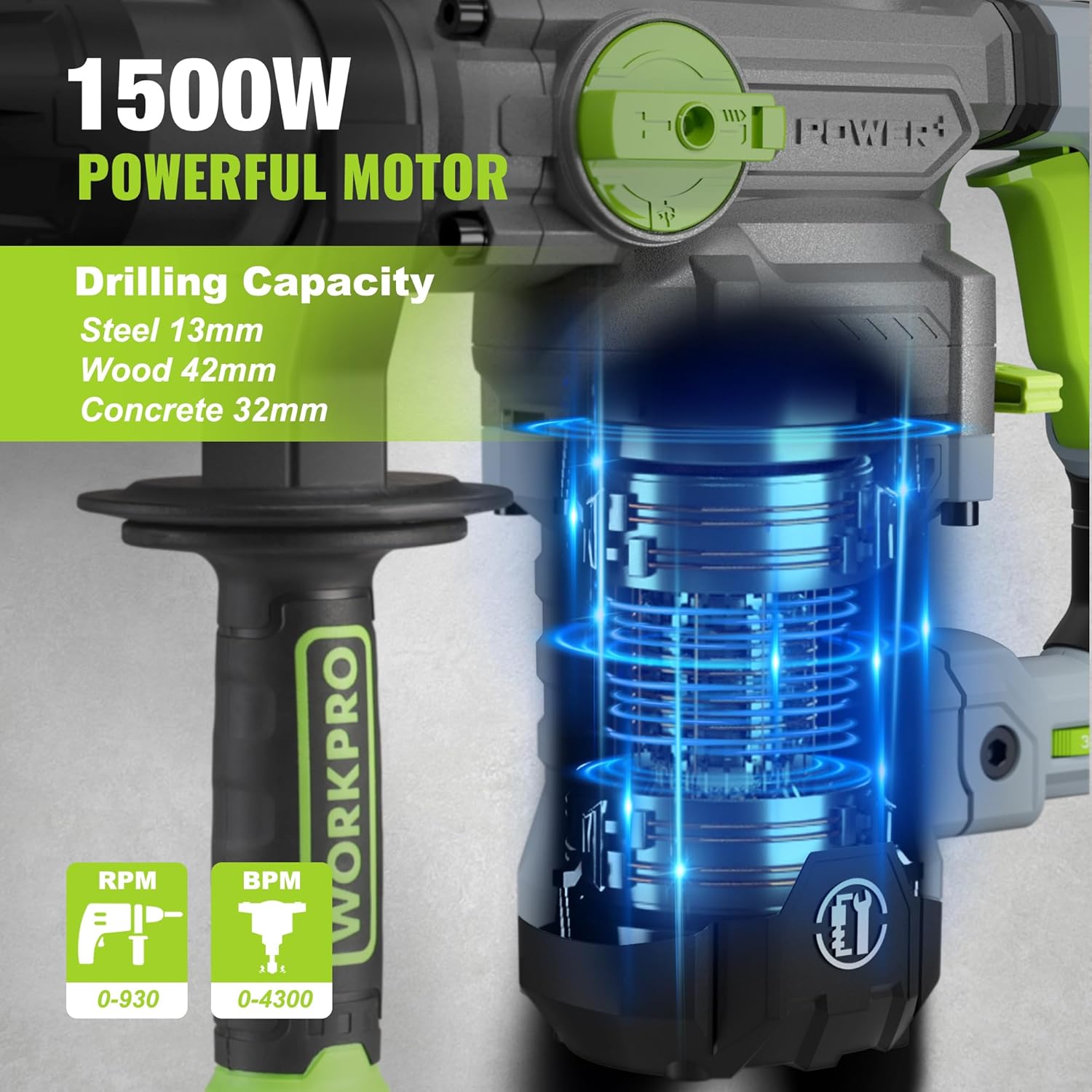
Image 5.3: The 1500W motor provides sufficient power for drilling in steel, wood, and concrete.
5.4 Maombi Kutampchini

Image 5.4: The tool is suitable for various tasks including chiseling concrete, removing tiles, concrete drilling, and floor breaking.
6. Matengenezo
Utunzaji wa kawaida huhakikisha maisha marefu na utendakazi bora wa zana yako.
6.1 Kusafisha
- Daima tenganisha kifaa kutoka kwa chanzo cha umeme kabla ya kusafisha.
- Safisha sehemu za uingizaji hewa mara kwa mara ili kuzuia joto kupita kiasi.
- Futa nyumba ya chombo na laini, damp kitambaa. Usitumie kemikali kali au visafishaji vya abrasive.
- The tool features a dust-proof design and anti-dust bottom structure to extend its service life.
6.2 Kujaza mafuta
To maintain optimal performance and durability, replenish the grease every 30-40 hours of cumulative use.
- Use the provided wrench to open the grease pot.
- Apply the advanced lubricant (grease) as instructed.
- Securely close the grease pot after replenishment.
Image 6.1: Instructions for grease replenishment using the provided spanner and grease.
6.3 Ubadilishaji wa Brashi ya Kaboni
Carbon brushes are wear parts and should be checked periodically. Replace them when they are worn down to their limit to ensure consistent motor performance.
7. Utatuzi wa shida
Sehemu hii inashughulikia masuala ya kawaida ambayo unaweza kukutana nayo. Kwa matatizo ambayo hayajaorodheshwa hapa, wasiliana na usaidizi kwa wateja.
| Tatizo | Sababu inayowezekana | Suluhisho |
|---|---|---|
| Chombo hakianza | Hakuna usambazaji wa nguvu; Kubadili kosa; Brashi za kaboni zilizovaliwa | Check power connection; Test switch; Replace carbon brushes |
| Utendaji mdogo wa kuchimba visima | Dull drill bit; Incorrect mode selected; Insufficient grease | Replace or sharpen drill bit; Select correct mode; Replenish grease |
| Mtetemo / kelele nyingi | Loose components; Damaged bit; Internal issue | Check all connections; Replace bit; Contact service center |
| Kuzidisha joto | Nafasi za uingizaji hewa zilizozuiwa; Matumizi makubwa ya muda mrefu | Clean ventilation slots; Allow tool to cool down |
8. Maelezo ya kiufundi
| Kipengele | Vipimo |
|---|---|
| Nambari ya Mfano | W125244A |
| Uingizaji Voltage | 230-240 V |
| Mzunguko | 50 Hz |
| Imekadiriwa Nguvu ya Kuingiza | 1500 W |
| Kasi isiyo na mzigo | 0-930 rpm ±10% |
| Mzunguko wa Athari | 0-4300 bpm ±10% |
| Nguvu Moja ya Athari | 5.5 J |
| Uwezo wa Kuchimba (Zege) | 32 mm |
| Uwezo wa Kuchimba (Mbao) | 42 mm |
| Uwezo wa Kuchimba (Chuma) | 13 mm |
| Aina ya Chuck | SDS-plus |
| Vipimo vya Bidhaa (L x W x H) | 38.6 x 10.4 x 26.4 cm |
| Uzito | 8.34 kg |
| Chanzo cha Nguvu | Umeme wa Cord |
| Idadi ya Gia | 6 (Variable Speed) |
9. Udhamini na Taarifa ya Msaada
For warranty details, product support, or service inquiries, please refer to the warranty card included with your purchase or contact WORKPRO customer service directly. Keep your proof of purchase for any warranty claims.