
Bidhaa Imeishaview
This manual provides essential information for the installation and maintenance of your new 15.6" LED LCD Replacement Screen. This screen is designed for HP laptops, specifically compatible with models like HP HQ-TRE 71025 and 15-AY082NA, featuring a HD 1366x768 glossy display with a 30-pin connector.
Our screens are brand new, tested, and safely packaged to ensure they arrive in perfect condition. We dispatch compatible brand screens with the exact same resolution and specifications as advertised.

Kielelezo 1: Mbele view of the 15.6 inch LED LCD replacement screen, showing the display area and the bottom edge with the connector.

Kielelezo 2: Nyuma view of the replacement screen, featuring the EU-SOURCING logo.
Important Considerations Before Purchase/Installation
- Utangamano: Similar laptop models can use different types of screens and fittings. Always verify the specifications of the screen and match them with your old screen before purchasing. If you are unsure, please contact us for confirmation.
- Nambari ya Sehemu: If an exact screen part number is not available in stock, we will provide a 100% compatible part number.
- Sera ya Pixel: This screen adheres to ISO 13406-2 standards, which dictate an acceptable range of 2-5 dead pixels.
- Geographical Service Limitations: Please note that we do not offer service to the following locations: Balearic Islands (Mallorca, Menorca, Ibiza, Formentera), Canary Islands (Tenerife, Gran Canaria, Lanzarote, Fuerteventura, La Palma), Ceuta, Melilla, Santa Cruz (Tenerife), French Polynesia, New Caledonia, Reunion, Corsica, Martinique, Guadeloupe, Mayotte, and Saint Pierre and Miquelon. We recommend checking service availability in your region before making a purchase.
Kuweka na Kuweka
Installing a laptop screen requires careful handling and some technical knowledge. If you are not comfortable performing the installation yourself, it is highly recommended to seek professional assistance.
Tahadhari za Usalama:
- Always disconnect the laptop from power and remove the battery before starting any installation.
- Use anti-static precautions (e.g., an anti-static wrist strap) to prevent damage from electrostatic discharge.
- Handle the screen by its edges; avoid touching the display surface or the circuit board.
Hatua za Ufungaji (Mwongozo wa Jumla):
- Tayarisha Laptop: Power off the laptop, disconnect the AC adapter, and remove the battery.
- Ondoa Skurubu za Bezel: Carefully remove any rubber screw covers on the laptop bezel and unscrew the underlying screws.
- Ondoa Bezel: Gently pry off the plastic bezel surrounding the screen.
- Fungua Skrini ya Zamani: Unscrew the mounting brackets holding the old screen in place.
- Tenganisha Kebo: Lay the old screen face down on the keyboard. Carefully peel back the tape holding the video cable (30-pin connector) and disconnect it.
- Prepare New Screen: Before connecting the new screen, ensure to peel off the protective film from the display surface.
- Connect New Screen: Connect the 30-pin video connector to the new screen, ensuring it is firmly seated. Secure it with tape if necessary.
- Weka Skrini Mpya: Position the new screen and screw it into the mounting brackets.
- Unganisha tena Bezel: Snap the plastic bezel back into place and reinsert the screws.
- Mtihani: Reinsert the battery and connect the AC adapter. Power on the laptop to test the new screen.

Figure 3: Illustration of peeling off the protective film from the screen before installation.

Kielelezo 4: Karibu view of the 30-pin video connector located at the bottom right of the screen.
Maagizo ya Uendeshaji
Once installed, the replacement screen operates identically to the original screen. No special drivers or software are typically required beyond your laptop's existing display drivers.
- Marekebisho ya Mwangaza: Tumia vitufe vya utendakazi vya kompyuta yako ya mkononi (kwa mfano, Fn + F5/F6) ili kurekebisha mwangaza wa skrini.
- Mipangilio ya Azimio: Ensure your operating system is set to the native resolution of 1368x768 for optimal display quality. This can usually be adjusted in your display settings.
Matengenezo
Proper maintenance will extend the lifespan of your screen.
- Kusafisha: Tumia kitambaa laini, kisicho na ute kilichoundwa mahususi kwa ajili ya vifaa vya elektroniki. Kwa uchafu mkaidi, tumia kitambaa kidogoampen the cloth with distilled water or a screen-cleaning solution. Avoid harsh chemicals, abrasive materials, or spraying liquid directly onto the screen.
- Kushughulikia: Avoid applying pressure to the screen surface. When closing the laptop lid, ensure no objects are left on the keyboard that could press against the screen.
- Halijoto: Operate and store the laptop within recommended temperature ranges to prevent damage to the LCD panel.
Kutatua matatizo
Ukikumbana na matatizo baada ya usakinishaji, fikiria hatua zifuatazo za utatuzi wa matatizo:
| Tatizo | Sababu inayowezekana | Suluhisho |
|---|---|---|
| No display / Black screen | Loose video cable connection; Incorrect screen type; Faulty screen (rare) |
|
| Onyesho linalopeperuka | Loose video cable; Driver issue; Incompatible refresh rate |
|
| Incorrect colors / Distorted image | Loose video cable; Driver issue; Graphics card issue |
|
If these steps do not resolve the issue, please refer to the Warranty & Support section.
Vipimo
| Kipengele | Vipimo |
|---|---|
| Ukubwa wa skrini | inchi 15.6 |
| Azimio | 1366 x 768 PIXEL (WXGA) |
| Screen Finish | Inang'aa |
| Kiunganishi cha Data | 30 Pin (bottom right) |
| Paneli ya Kugusa | Haijajumuishwa |
| Aina | LED Razor Slim |
| Uwiano wa kipengele | 1.78:1 |
| Nambari ya Sehemu ya Mtengenezaji | N156BGE-EA483 |
Udhamini & Msaada
Your new screen comes with a dhamana ya miezi 6 kuanzia tarehe ya ununuzi.
All items are dispatched from Poland and are carefully packaged in a secured box with Airshock Protected Screen Package to prevent damage during transit.
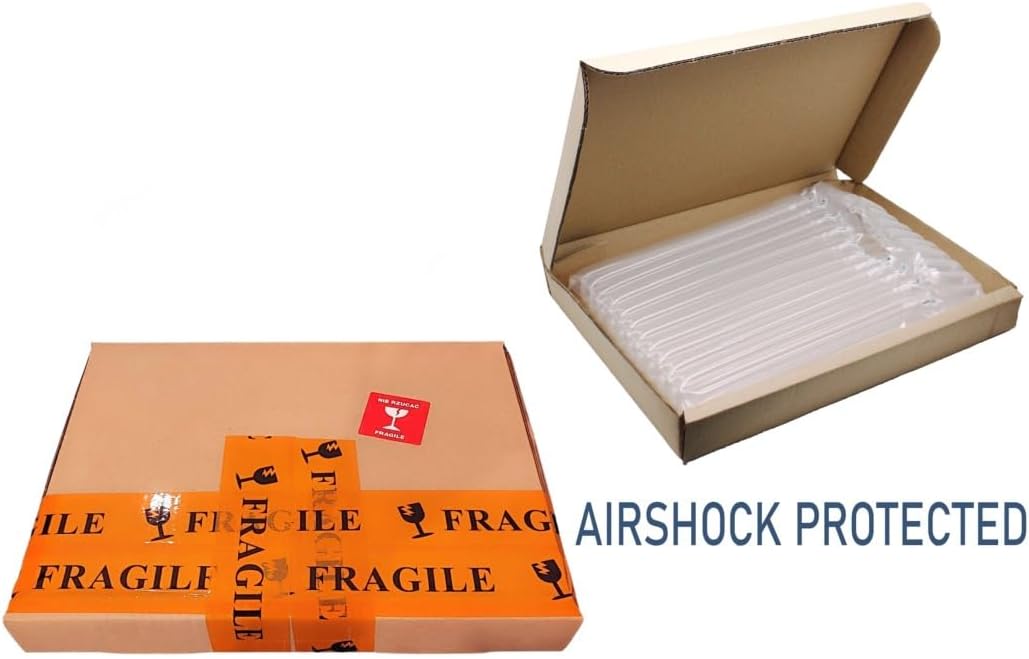
Kielelezo 5: Kutample of the secure packaging with airshock protection used for shipping the screen.
For any questions, concerns, or warranty claims, please contact EU-SOURCING customer support. When contacting support, please have your purchase details and the screen's model number (N156BGE-EA483) ready.
You can typically find contact information on your purchase receipt or the seller's page where you bought the product. We recommend sending an email for any doubts or inquiries.


