
SEAFRONT SEAFRONTqbks9m7dhv
SEAFRONT 1.1kW Variable Frequency Drive (VFD) User Manual
Model: SEAFRONTqbks9m7dhv
1. Utangulizi
This manual provides essential information for the safe and efficient operation of your SEAFRONT 1.1kW Variable Frequency Drive (VFD). Please read this manual thoroughly before installation, operation, or maintenance to ensure proper usage and prevent potential hazards. Keep this manual for future reference.
The SEAFRONT VFD is designed to control the speed of 3-phase motors, converting a single-phase input (176-264V) into a three-phase output (0-220V) with a frequency range of 0.1-400Hz. It features V/F control, vector control, and output torque control, along with an external LED digital display panel for easy monitoring and adjustment.

Kielelezo 1: Mbele view of the SEAFRONT 1.1kW VFD, showing the LED display, control buttons (PROG, RUN, STOP, OK, UP, DOWN), and a rotary knob for frequency adjustment.
2. Taarifa za Usalama
Daima zingatia tahadhari zifuatazo za usalama ili kuzuia majeraha ya kibinafsi au uharibifu wa kifaa:
- Installation and wiring must be performed by qualified personnel only.
- Hakikisha ugavi wa umeme umekatika kabla ya kutekeleza wiring au matengenezo yoyote.
- Do not touch the terminals while power is applied or shortly after power is removed, as residual voltage inaweza kuwepo.
- The VFD enclosure is made of flame-retardant PC material, providing good insulation. However, proper grounding is essential.
- Do not operate the VFD with damaged cables or if the enclosure is open.
- Protect the VFD from moisture, dust, direct sunlight, and corrosive gases.
3. Bidhaa Imeishaview na Vipengele
The SEAFRONT 1.1kW VFD is a compact and robust motor speed controller designed for various industrial applications. Key features include:
- Njia Nyingi za Kudhibiti: Supports V/F control, vector control, and output torque control for versatile motor management.
- Ujenzi wa kudumu: Features a flame-retardant PC enclosure for good insulation and environmental protection.
- High Performance Coils: Utilizes copper core coils for strong resistance, stable performance, and high load capacity.
- Masafa mapana ya Masafa: Operates within a frequency range of 0.1-400Hz.
- Onyesho la LED la Nje: Equipped with an external LED digital display panel for clear status indication and parameter adjustment.
- Muundo Kompakt: Small size with high torque output, suitable for various applications.
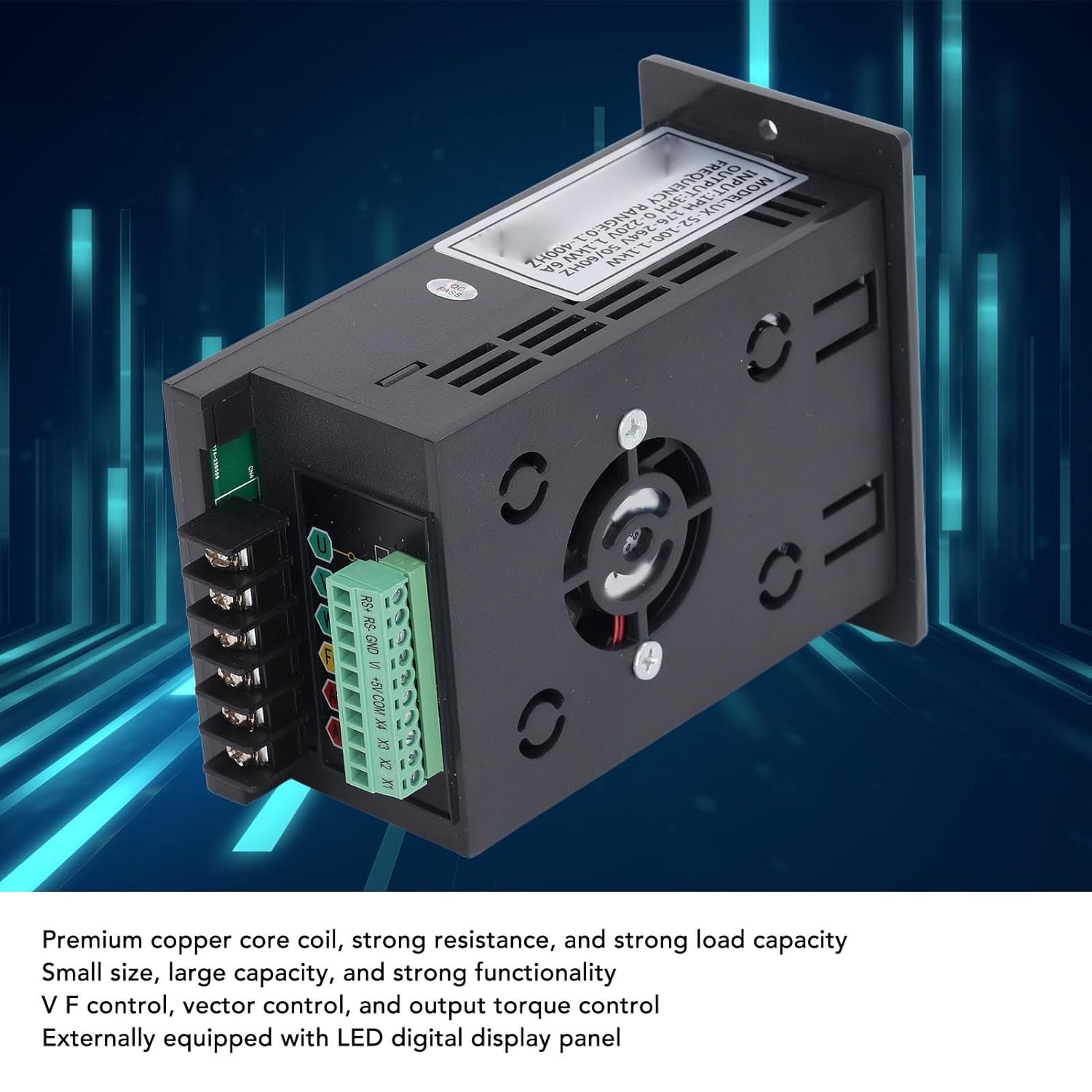
Figure 2: Internal components of the VFD, highlighting the premium copper core coils for stable performance and the integrated cooling fan.
4. Kuweka na Kuweka
4.1 Kufungua na Kukagua
Upon receiving the VFD, carefully unpack it and inspect for any signs of damage during transit. Verify that all components are present according to the packing list (if provided). If any damage or missing parts are found, contact your supplier immediately.
4.2 Kuweka
Mount the VFD in a vertical position on a flat, stable surface. Ensure adequate ventilation around the unit to prevent overheating. Maintain sufficient clearance from other equipment and walls for proper airflow. Avoid mounting in areas with excessive vibration, dust, or direct heat sources.
Wiring
All wiring must comply with local electrical codes and safety regulations. Ensure the main power supply is disconnected before proceeding with any wiring.
- Power Input (AC): Connect the single-phase 176-264V AC power supply to the "AC" terminals. Ensure correct polarity if applicable, though AC typically does not have strict polarity.
- Pato la Gari (U, V, W): Connect the three-phase motor leads to the "U", "V", and "W" output terminals.
- Ground (FG): Connect the frame ground (FG) terminal to a reliable earth ground. This is crucial for safety.
- Control Terminals (RS+, RS-, GND, V+, +5V, COM, X1, X2, X3, X4): These terminals are for external control signals, such as remote start/stop, speed reference (analog input V+), and digital inputs (X1-X4). Refer to the detailed wiring diagram for specific connections based on your application.

Figure 3: Wiring terminals on the VFD, including AC input, U/V/W motor output, FG ground, and control terminals.
5. Maagizo ya Uendeshaji
5.1 Kuongeza Nguvu kwa Awali
After completing all wiring and safety checks, apply power to the VFD. The LED display should illuminate, indicating the unit is powered on. The display will typically show the current frequency or a default parameter.
5.2 Operesheni ya Msingi
- Anza/Acha: Bonyeza kwa KIMBIA button to start the motor and the SIMAMA kifungo ili kuizuia.
- Marekebisho ya mara kwa mara: Use the rotary knob on the front panel to adjust the output frequency, which directly controls the motor speed. Turn clockwise to increase frequency, counter-clockwise to decrease.
- Urambazaji wa Vigezo: Tumia PROG button to enter the parameter setting mode. Use the UP na CHINI buttons to navigate through parameters. Press OK to select a parameter and confirm changes.
5.3 Advanced Control Settings
The VFD offers various programmable parameters for fine-tuning motor control. These include acceleration/deceleration times, maximum/minimum frequencies, V/F curve settings, and input/output terminal configurations. Refer to the detailed parameter list in the full technical manual for advanced programming.
ExampMaombi: The VFD is suitable for a wide range of equipment, including fans, water pumps, automated machine tools, and engraving machines.

Figure 4: Common application scenarios for the SEAFRONT VFD, demonstrating its versatility in industrial and automated settings.
6. Matengenezo
Regular maintenance helps ensure the longevity and reliable operation of your VFD. Always disconnect power before performing any maintenance.
- Kusafisha: Periodically clean the VFD's exterior and ventilation openings to prevent dust accumulation, which can hinder cooling. Use a soft, dry cloth. Do not use liquid cleaners.
- Ukaguzi wa Mashabiki: Check the cooling fan for proper operation and ensure it is free from obstructions. Replace the fan if it becomes noisy or stops working.
- Ugumu wa Kituo: Periodically check all terminal connections for tightness. Loose connections can cause overheating and intermittent operation.
- Ukaguzi wa Mazingira: Hakikisha mazingira ya uendeshaji yanabaki ndani ya viwango maalum vya joto na unyevunyevu.
7. Utatuzi wa shida
This section provides solutions to common issues. For problems not listed here or if issues persist, contact technical support.
| Tatizo | Sababu inayowezekana | Suluhisho |
|---|---|---|
| VFD haiwashi | No input power; incorrect wiring; blown fuse. | Check power supply; verify wiring connections; inspect fuses. |
| Motor haina kuanza | Incorrect control signal; motor wiring error; VFD in fault state. | Check RUN command; verify motor connections (U, V, W); check VFD display for error codes. |
| Kasi ya gari si thabiti | Improper V/F curve setting; motor load fluctuations; interference. | Adjust V/F parameters; ensure stable load; check for electromagnetic interference. |
| Overcurrent/Overload fault | Motor overloaded; acceleration time too short; short circuit in motor wiring. | Reduce motor load; increase acceleration time; check motor and wiring for shorts. |
8. Vipimo
| Kigezo | Thamani |
|---|---|
| Nambari ya Mfano | SEAFRONTqbks9m7dhv |
| Uingizaji Voltage | 1PH 176-264V |
| Pato Voltage | 3PH 0-220V |
| Nguvu Iliyokadiriwa | 1.1 kW |
| Iliyokadiriwa Sasa | 6A |
| Masafa ya Marudio | 0.1-400Hz |
| Njia za Kudhibiti | V/F control, Vector control, Output torque control |
| Nyenzo ya Uzio | Kompyuta inayozuia moto |
| Onyesho | External LED Digital Display Panel |

Figure 5: Dimensional drawing of the VFD, indicating measurements for installation planning.
9. Udhamini na Msaada
This product comes with a standard manufacturer's warranty. For specific warranty terms and conditions, please refer to the documentation provided with your purchase or contact your retailer. For technical support, troubleshooting assistance, or spare parts inquiries, please contact SEAFRONT customer service or your authorized distributor.
Kumbuka: Availability of spare parts information is currently unavailable. Please contact support for assistance.
Ask a question about this manual
Ask about setup, troubleshooting, compatibility, parts, safety, or missing instructions. Manuals+ will review the question and use this page’s manual context to help answer it.