
1. Utangulizi
Thank you for choosing BUGANI Open Ear Headphones, Model MH22109. These headphones are designed to provide a comfortable, open-ear listening experience with advanced Bluetooth 5.3 technology, immersive stereo sound, and clear call functionality. This manual will guide you through the setup, operation, and maintenance of your new headphones.
2. Taarifa za Usalama
- Do not expose the headphones or charging case to extreme temperatures, direct sunlight, or fire.
- Epuka kutumia vipokea sauti vya masikioni kwa sauti kubwa kupita kiasi kwa muda mrefu ili kuzuia uharibifu wa kusikia.
- Keep the device away from water and liquids, although it is IPX5 rated for sweat and light splashes, it is not designed for submersion.
- Usijaribu kutenganisha au kurekebisha kifaa. Hii itabatilisha dhamana.
- Tumia kebo iliyotolewa tu ya kuchaji au kebo ya Aina ya C iliyoidhinishwa ili kuchaji.
- Be aware of your surroundings when using open-ear headphones, especially in traffic or hazardous environments.
3. Yaliyomo kwenye Kifurushi
The BUGANI Open Ear Headphones package includes the following items:
- BUGANI Open Ear Headphones (Left and Right)
- Kesi ya Kuchaji
- USB Type-C Charging Cable (not explicitly listed but standard)
- Mwongozo wa Mtumiaji (hati hii)

Image: The BUGANI Open Ear Headphones and their transparent charging case.
4. Bidhaa Imeishaview
The BUGANI Open Ear Headphones feature a unique design that rests gently on your ears without entering the ear canal, providing comfort and situational awareness. The charging case protects the earbuds and provides extended battery life.

Image: A woman wearing the BUGANI Open Ear Headphones, illustrating the open-ear design and comfortable fit.

Image: A man relaxing and listening to music with the headphones, highlighting the immersive stereo sound.
5. Kuweka
5.1 Kuchaji Vipaza sauti na Kesi
Kabla ya matumizi ya kwanza, chaji kikamilifu vipokea sauti vya masikioni na kipochi cha kuchaji.
- Weka vifaa vya sauti vya masikioni kwenye kipochi cha kuchaji. Hakikisha wameketi kwa usahihi.
- Connect the Type-C charging cable to the charging port on the case and plug the other end into a USB power adapter (not included) or a computer's USB port.
- The LED indicator on the charging case will show the charging status. A full charge for the case typically takes 1-2 hours.
- The earbuds provide up to 6 hours of playtime on a single charge, and the charging case extends total playtime to approximately 30 hours.

Image: The charging case with earbuds, displaying the battery level, next to a smartphone playing music, illustrating the 30-hour playtime.
5.2 Kuoanisha Bluetooth
Vipokea sauti vya masikioni vina uunganishaji otomatiki wa hatua moja kwa urahisi.
- Fungua kesi ya malipo. Vifaa vya sauti vya masikioni vitawashwa kiotomatiki na kuingia katika hali ya kuoanisha.
- Kwenye kifaa chako (smartphone, kompyuta kibao, kompyuta), washa Bluetooth.
- Tafuta available Bluetooth devices and select "BUGANI OpenFit" from the list.
- Once connected, you will hear an audible confirmation, and the device will show "Connected".
- Vipokea sauti vya masikioni vitaunganishwa kiotomatiki kwenye kifaa kilichooanishwa mwisho vinapoondolewa kwenye kipochi, ikiwa Bluetooth imewashwa kwenye kifaa.

Image: A smartphone screen displaying the Bluetooth settings, with "BUGANI OpenFit" listed as a connected device, demonstrating the one-step auto-pairing process.
6. Maagizo ya Uendeshaji
6.1 Kuvaa Vipaza sauti
The open-ear design ensures a secure and comfortable fit without blocking your ear canal.
- Tambua vifaa vya masikioni vya Kushoto (L) na Kulia (R).
- Gently hook the earbud over your ear, ensuring the speaker portion is positioned near your ear canal without entering it.
- Rekebisha ili itoshee vizuri na vizuri.
6.2 Vidhibiti vya Kugusa Mahiri
The headphones feature touch-sensitive areas for controlling various functions:
| Kitendo | Vifaa vya masikioni | Kazi |
|---|---|---|
| Gonga x1 | R/L | Play/Pause Music, Answer Call |
| Gonga x2 | R | Volume Up |
| Gonga x2 | L | Sauti Chini |
| Gonga x3 | R | Wimbo Unaofuata |
| Gonga x3 | L | Wimbo Uliopita |
| Bonyeza na Ushikilie (sekunde 2) | R/L | Kata Simu, Kataa Simu |
| Bonyeza na Ushikilie (sekunde 2) | L | Washa Mratibu wa Sauti |
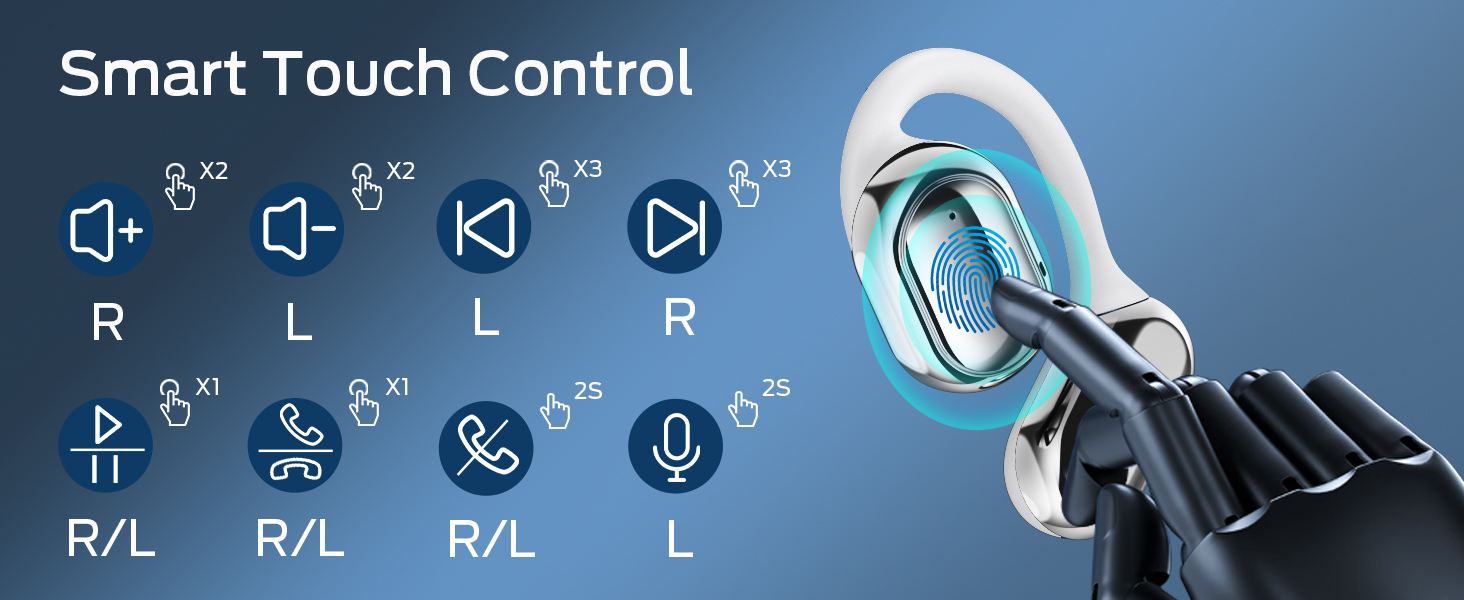
Image: A visual guide to the smart touch controls on the BUGANI Open Ear Headphones, detailing single, double, triple taps, and long presses for various functions.
6.3 Kupiga na Kupokea Simu
The built-in dual microphones with environmental noise reduction technology ensure clear calls.
- Jibu Simu: Gusa kifaa chochote cha masikioni mara moja.
- Maliza Simu: Bonyeza na ushikilie kifaa chochote cha masikioni kwa sekunde 2.
- Kataa Simu: Bonyeza na ushikilie kifaa chochote cha masikioni kwa sekunde 2.

Image: A man using the BUGANI Open Ear Headphones to make a phone call, emphasizing the clear call feature.
7. Matengenezo
7.1 Kusafisha
- Futa vifaa vya sauti vya masikioni na kisanduku cha kuchaji kwa kitambaa laini, kikavu, kisicho na utepe.
- Usitumie visafishaji abrasive, pombe, au vimumunyisho vya kemikali.
- Hakikisha migusano ya kuchaji ni safi na kavu.
7.2 Hifadhi
- Hifadhi vipokea sauti vya masikioni kwenye kisanduku chao cha kuchaji wakati havitumiki ili kuvilinda na kuviweka vikiwa vimechajiwa.
- Store in a cool, dry place, away from extreme temperatures.
7.3 Ustahimilivu wa Maji (IPX5)
The headphones are rated IPX5, meaning they are protected against low-pressure water jets from any direction. This makes them suitable for sports and running, protecting against sweat and light rain. They are not designed for swimming or submersion in water.
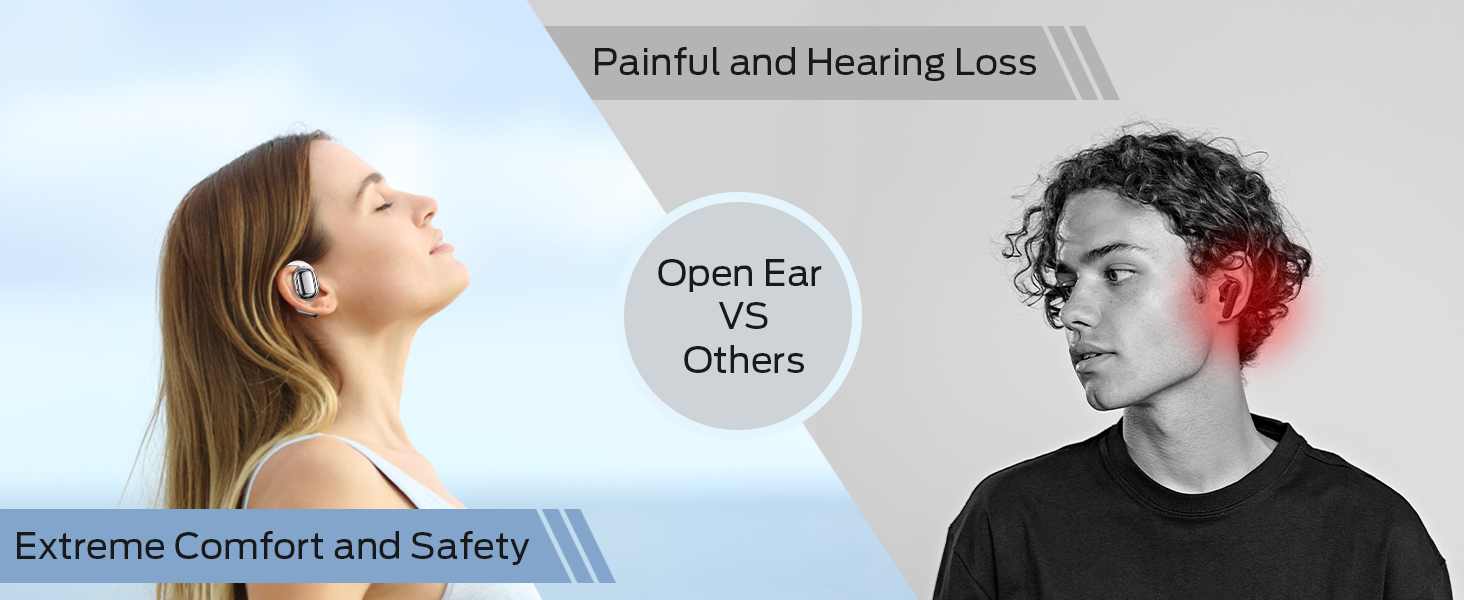
Image: A man running with water splashing on him, demonstrating the IPX5 waterproof feature of the headphones, suitable for active use.
8. Utatuzi wa shida
If you encounter issues with your BUGANI Open Ear Headphones, please refer to the following common solutions:
- Hakuna Sauti: Ensure the headphones are charged, paired correctly, and the volume on both the headphones and your device is turned up.
- Masuala ya Kuoanisha: Turn off Bluetooth on your device, then turn it back on. Place the earbuds back in the case, close it, then open it again to re-enter pairing mode. Try pairing again.
- Muunganisho wa Mara kwa mara: Ensure you are within the Bluetooth range (up to 10 meters) and there are no significant obstacles between the headphones and your device. Avoid strong electromagnetic interference.
- Vifaa vya masikioni havichaji: Check that the charging cable is securely connected and the charging contacts on the earbuds and case are clean. Ensure the charging case itself has power.
- Kifaa kimoja cha masikioni Haifanyi kazi: Try placing both earbuds back in the case, closing it, and then taking them out again to reset the connection. If the issue persists, try re-pairing.
9. Vipimo
| Kipengele | Vipimo |
|---|---|
| Jina la Mfano | BUGANI OpenFit |
| Nambari ya Mfano | MH22109 |
| Teknolojia ya Uunganisho | Isiyo na waya (Bluetooth) |
| Toleo la Bluetooth | 5.3 |
| Msururu wa Bluetooth | Mita 10 |
| Uwekaji wa Masikio | Fungua Sikio |
| Ukubwa wa Dereva | 16mm (Dual Large Driver) |
| Maisha ya Betri (Chaji Moja) | Hadi Saa 6 |
| Jumla ya Muda wa Kucheza (pamoja na Kipochi cha Kuchaji) | Hadi Saa 30 |
| Kuchaji Bandari | Aina-C |
| Ukadiriaji wa Upinzani wa Maji | IPX5 |
| Maikrofoni | Built-in Dual Microphones with Environmental Noise Reduction |
| Vifaa Sambamba | Bluetooth-enabled devices (smartphones, computers, TVs) |
| Nyenzo | Plastiki |
| Uzito wa Kipengee | 6.4 wakia |
10. Udhamini na Msaada
BUGANI products are designed for reliability and performance. For warranty information, please refer to the warranty card included with your purchase or visit the official BUGANI website. If you require technical support or have questions not covered in this manual, please contact BUGANI customer service through their official channels.
You can often find support contact information on the BUGANI brand store page: BUGANI Store on Amazon