
1. Utangulizi
Thank you for choosing the Aigo AC SE 360 Rainbow 360mm Water Cooler. This all-in-one liquid cooling solution is designed to provide efficient thermal management for your high-performance CPU, featuring a 360mm triple radiator and vibrant ARGB lighting. This manual provides essential information for proper installation, operation, and maintenance to ensure optimal performance and longevity of your product.

Image 1.1: Aigo AC SE 360 Rainbow 360mm Water Cooler assembled view.
2. Taarifa za Usalama
- Tenganisha nishati kutoka kwa kompyuta yako kila wakati kabla ya kusakinisha au kukarabati.
- Kushughulikia vipengele kwa uangalifu ili kuepuka uharibifu.
- Hakikisha kuweka msingi mzuri ili kuzuia hatari za umeme.
- Weka bidhaa mbali na unyevu na joto kali.
- Do not attempt to open the pump or radiator, as this may void the warranty and cause leaks.
- Weka mbali na watoto.
3. Yaliyomo kwenye Kifurushi
Thibitisha kuwa vipengele vyote vilivyoorodheshwa hapa chini vipo kwenye kifurushi chako:
- 1x Aigo AC SE 360 Water Cooler Unit (Radiator, Pump/CPU Block, Tubing)
- 3x 120mm ARGB Fans
- Mounting Hardware for Intel Sockets (LGA 115X, 1200, 1700, 2011, 2066)
- Mounting Hardware for AMD Sockets (AM2, AM3, AM4, AM5)
- Kuweka joto
- Fan Screws and Radiator Screws
- ARGB Controller (if included with your specific model)
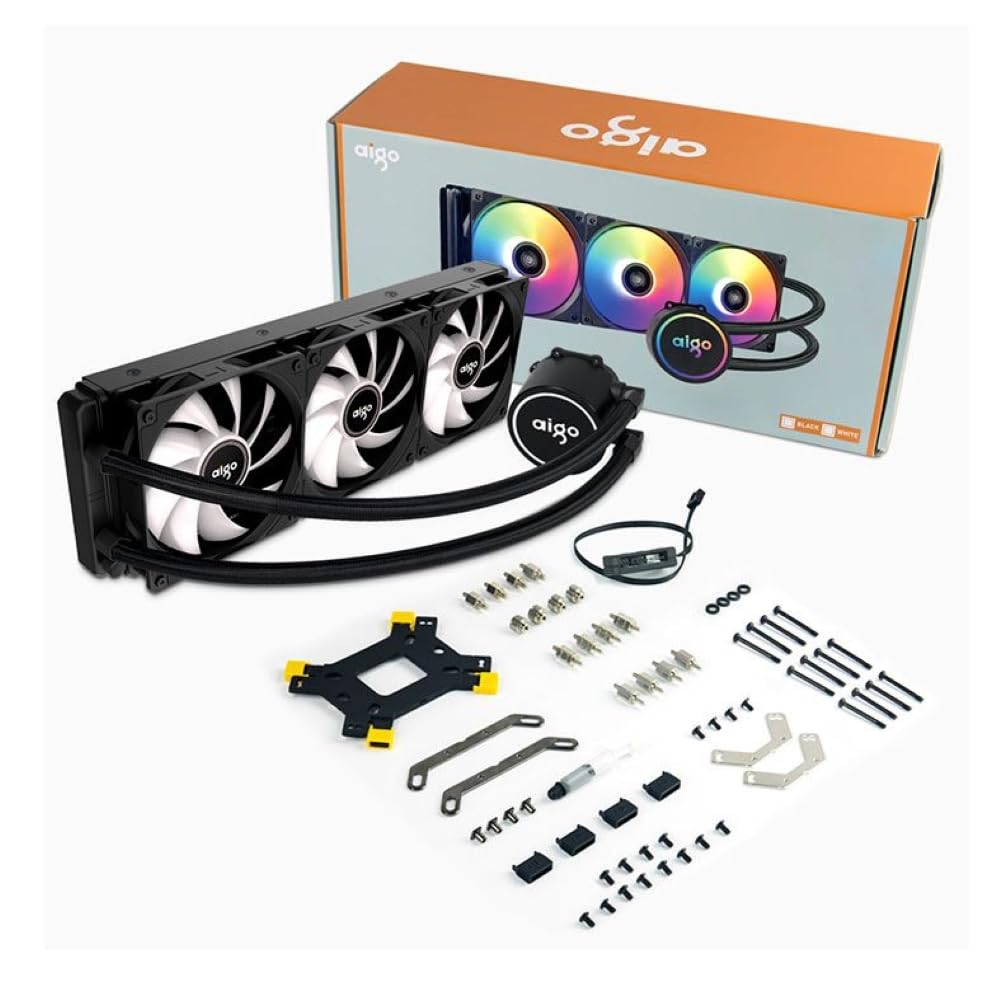
Image 3.1: All components included in the Aigo AC SE 360 package.
4. Kuweka na Kuweka
Follow these steps for proper installation of your Aigo AC SE 360 Water Cooler:
- Tayarisha ubao wa mama: Install the appropriate backplate and standoffs for your CPU socket (Intel: 115X, 1200, 1700, 2011, 2066; AMD: AM2, AM3, AM4, AM5). Refer to your motherboard manual for specific instructions.
- Weka Bandika la Joto: Clean the CPU surface. Apply a small amount of thermal paste to the center of the CPU IHS (Integrated Heat Spreader).
- Mount the CPU Block/Pump: Carefully place the CPU block onto the CPU, aligning it with the standoffs. Secure it with the provided screws, tightening them in a diagonal pattern until snug. The magnetic block design allows for easy rotation to align the logo or tubing as desired.
- Install Fans to Radiator: Attach the three 120mm ARGB fans to the radiator using the longer screws provided. Ensure the fan airflow direction is correct for your case configuration (typically blowing air through the radiator).
- Radiator ya Mlima: Install the radiator assembly into your PC case. The 360mm radiator is compatible with most ATX cases that support this size. Secure it with the appropriate screws.
- Connect Fans (Daisy Chain): The fans feature a daisy chain connection system. Connect the fans to each other in series, then connect the final fan's cable to the motherboard's fan header or an ARGB controller. This simplifies cable management by reducing the number of cables.
- Unganisha Mwangaza wa ARGB: Connect the ARGB cables from the fans and pump to a 3-pin, 5V ARGB header on your motherboard or a dedicated ARGB controller. Ensure the voltage is correct (5V) to prevent damage.
- Unganisha Nguvu ya Pampu: Connect the pump's 4-pin power connector to a dedicated AIO_PUMP or CPU_FAN header on your motherboard.
- Usimamizi wa Cable: Organize all cables neatly to ensure proper airflow and a clean build.
5. Maagizo ya Uendeshaji
Once installed, the Aigo AC SE 360 Water Cooler operates automatically to maintain optimal CPU temperatures. Here are key operational aspects:
- Automatic Cooling: The pump and fans will adjust their speed based on CPU temperature, ensuring efficient cooling. The pump operates at 12V with 3200 RPM, and fans operate between 800-1800 RPM.
- Udhibiti wa Mwangaza wa ARGB: The Rainbow ARGB lighting can be controlled via your motherboard's ARGB software (if connected to a compatible header) or through an included ARGB controller. This allows for various lighting effects and synchronization with other ARGB components.
- Kiwango cha Kelele: The cooler is designed for quiet operation, with a noise level of approximately 30 dB.
6. Matengenezo
Regular maintenance helps ensure the longevity and performance of your water cooler:
- Kusafisha vumbi: Periodically clean the radiator fins and fan blades to prevent dust buildup, which can impede airflow and cooling performance. Use compressed air or a soft brush.
- Kagua Mirija: Check the tubing for any signs of kinks, leaks, or damage.
- Fuatilia Halijoto: Use monitoring software to keep an eye on your CPU temperatures. Significant increases may indicate a need for further inspection or cleaning.
- Bandika la Joto: While not frequently required, reapplying thermal paste every few years can help maintain optimal thermal transfer.
7. Utatuzi wa shida
If you encounter issues with your Aigo AC SE 360 Water Cooler, refer to the following common problems and solutions:
| Tatizo | Sababu inayowezekana | Suluhisho |
|---|---|---|
| Joto la juu la CPU | Insufficient thermal paste, poor contact, dust buildup, pump failure, fan failure. | Reapply thermal paste, ensure CPU block is securely mounted, clean radiator and fans, check pump/fan connections. |
| Mashabiki Hawazunguki | Loose fan connection, incorrect fan header, faulty fan. | Check fan cables and connections, ensure connected to appropriate motherboard header, test fans individually if possible. |
| No ARGB Lighting | Loose ARGB connection, incorrect ARGB header (e.g., 12V instead of 5V), faulty ARGB component. | Verify ARGB cables are securely connected to a 3-pin, 5V ARGB header. Check motherboard manual for correct header. |
| Kelele Zisizo za Kawaida | Air bubbles in loop, fan rubbing, pump issue. | Gently tilt the PC case to help dislodge air bubbles. Check for obstructions around fans. If pump noise persists, contact support. |
8. Vipimo
| Kipengele | Maelezo |
|---|---|
| Mfano | AC SE 360 |
| Ukubwa wa Radiator | 360 mm (394 x 120 x 27 mm) |
| Ukubwa wa shabiki | 120 mm |
| Kasi ya shabiki | 800-1800 RPM |
| Mtiririko wa hewa | 64.05 CFM |
| Shinikizo tuli | 1.85 mmH₂O |
| Kiwango cha Kelele | 30 dB |
| Pampu Voltage | 12 Volts |
| Kasi ya Pampu | 3200 RPM |
| Matumizi ya Nguvu | 3.24 Watts |
| Aina ya Kuzaa | Kuzaa kauri |
| TDP Supported | 280 W |
| Soketi Sambamba | Intel (LGA 115X, 1200, 1700, 2011, 2066), AMD (AM2, AM3, AM4, AM5) |
| Kiunganishi cha Nguvu | 4-pini |
| Kiunganishi cha ARGB | 3-pini, 5V |
9. Udhamini na Msaada
The Aigo AC SE 360 Water Cooler comes with a dhamana ya miezi 12 kuanzia tarehe ya ununuzi. Udhamini huu unashughulikia kasoro za utengenezaji chini ya hali ya kawaida ya utumiaji.
For technical support, warranty claims, or any questions not covered in this manual, please contact your retailer or the Aigo customer support team. Please have your proof of purchase and product model number (ACSE360) ready when contacting support.

