
Radtel RT-890 Dual-Band Amateur Radio Walkie Talkie User Manual
Mfano: RT-890
1. Utangulizi
The Radtel RT-890 is a versatile dual-band amateur radio walkie talkie designed for reliable communication. It features a color LCD display, dual-band TX/RX capabilities, airband reception, FM radio, and VOX functionality. This manual provides essential information for the safe and efficient operation of your device.

Mbele view of the Radtel RT-890 walkie talkie, showcasing its color LCD display and keypad.
2. Yaliyomo kwenye Kifurushi
Tafadhali angalia yaliyomo kwenye kifurushi unapoondoa sanduku. Ikiwa bidhaa yoyote haipo au kuharibiwa, wasiliana na muuzaji wako.
- Radtel RT-890 Walkie Talkie Unit
- Antena
- 1 x Betri ya Lithium-Ioni
- Chaja ya Desktop
- Klipu ya Ukanda
- Mwongozo wa Mtumiaji
3. Kuweka
3.1. Ufungaji na Kuchaji Betri
- Pangilia betri na mirija iliyo nyuma ya redio.
- Telezesha betri juu hadi ibofye mahali pake.
- To charge, place the radio (with battery installed) into the desktop charger. Ensure the charging indicator light illuminates.
- Charge the battery fully before first use. A full charge typically takes several hours.
3.2. Kiambatisho cha Antena
- Telezesha antena kwa mwendo wa saa kwenye kiunganishi kilicho juu ya redio hadi isikate kidole. Usiimarishe zaidi.
4. Maagizo ya Uendeshaji
The Radtel RT-890 features dual band, dual display, and dual standby mode with a large, color LCD display for easy viewing of main functions.
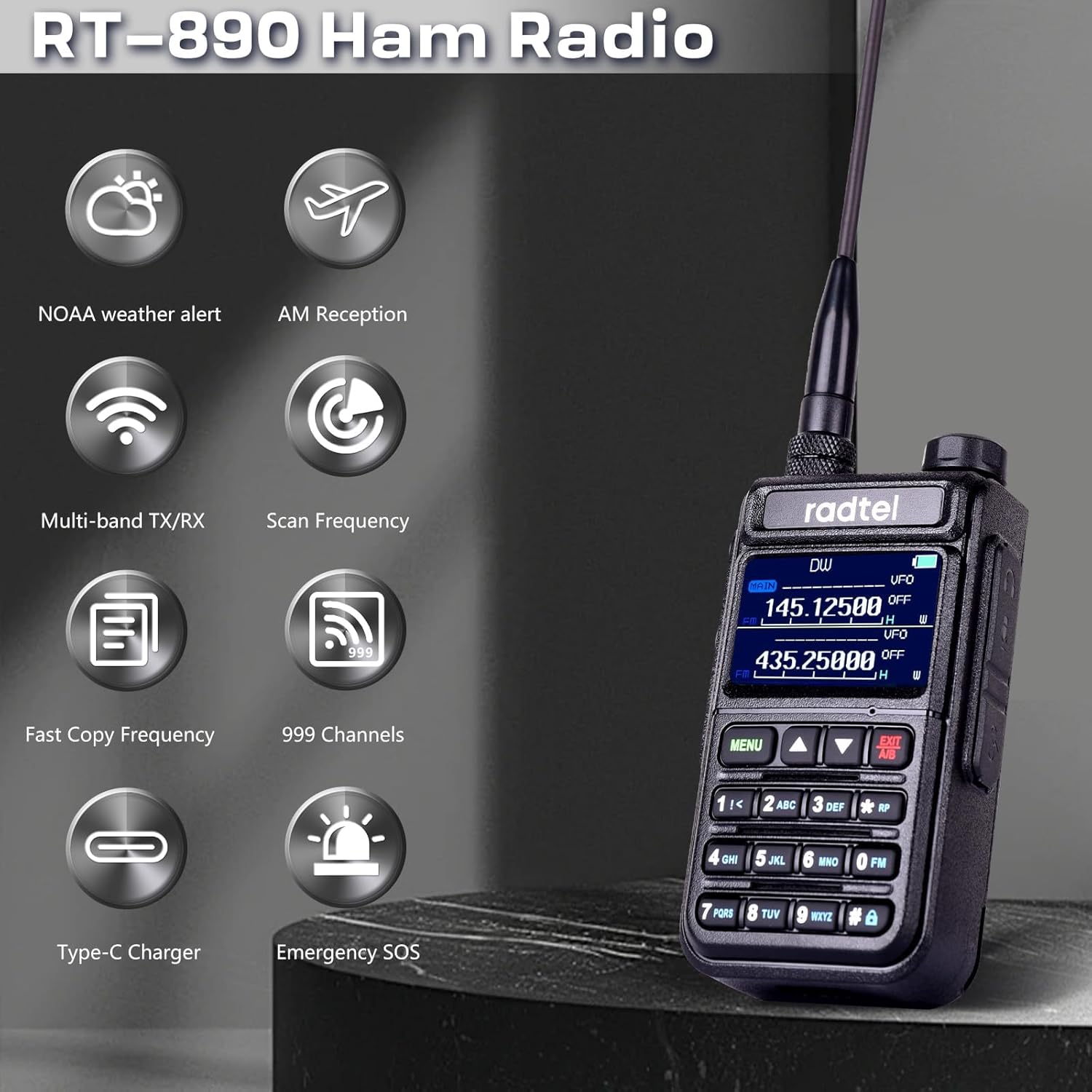
An illustration highlighting key features of the Radtel RT-890, such as NOAA weather alerts, AM reception, multi-band transmit/receive, frequency scanning, fast frequency copying, 999 channel capacity, Type-C charging, and emergency SOS.
4.1. Washa/Zima na Kiasi
- To power on, rotate the volume knob clockwise until you hear a click.
- Ili kuzima, zungusha kipigo cha sauti kinyume na saa hadi usikie mbofyo.
- Rekebisha sauti kwa kuzungusha kitufe kile kile.
4.2. Mara kwa mara na Uchaguzi wa Idhaa
- The radio supports 999 channels. Use the keypad to directly input frequencies or navigate through channels.
- The RT-890 operates on dual-band TX/RX amateur frequencies (144-146 MHz and 430-440 MHz).
- It also supports reception on Airband (108-136 MHz) and FM Radio (64-108 MHz).
4.3. Sifa Maalum
- Kazi ya VOX: Voice-operated transmission allows hands-free operation. Activate via the menu.
- Redio ya FM: Tembelea vituo vya utangazaji vya FM kwa burudani.
- Airband Reception: Monitor aircraft communications within the 108-136 MHz range.
- Kipimo cha Mzunguko: Utilize the built-in frequency measurement function for analysis.
- Masafa ya Nakala Isiyotumia Waya: Quickly seek and copy frequencies and CTCSS tones from other radios.
- Tahadhari za Hali ya Hewa za NOAA: Receive alerts for severe weather conditions.
- SOS ya dharura: Activate the SOS function in emergency situations.

The Radtel RT-890 walkie talkie shown in an outdoor setting, emphasizing its NOAA Weather Alert capability for monitoring severe weather conditions.

Two Radtel RT-890 radios in a car, illustrating the wireless copy frequency feature for quickly seeking and replicating frequencies and CTCSS tones.
5. Matengenezo
5.1. Utunzaji wa Betri
- To maximize battery life, avoid overcharging or completely draining the battery.
- Hifadhi betri mahali penye ubaridi, pakavu wakati haitumiki kwa muda mrefu.
- The typical battery life is 3 years under normal usage conditions.
5.2. Kusafisha
- Futa redio kwa laini, damp kitambaa. Usitumie kemikali kali au visafishaji vya abrasive.
- Hakikisha redio ni kavu kabla ya kutumia au kuchaji.
5.3. Waterproof Level
The Radtel RT-890 is designed to be waterproof. However, it is not intended for submersion. Avoid exposing the radio to extreme water pressure or prolonged immersion.
6. Utatuzi wa shida
If you encounter issues with your Radtel RT-890, please refer to the following common problems and solutions:
- Hakuna Nguvu:
- Ensure the battery is properly installed and fully charged.
- Check if the volume knob is turned on. - Hakuna Mawimbi/Mapokezi Maskini:
- Hakikisha antena imeunganishwa vizuri.
- Check if you are within range of other compatible devices or repeaters.
- Ensure the correct frequency or channel is selected.
- Environmental factors (buildings, terrain) can affect signal strength. - Hakuna Sauti:
- Adjust the volume level.
- Check if an external earpiece/microphone is connected and functioning correctly.
- Ensure the squelch level is not set too high.
Kwa matatizo yanayoendelea, tafadhali wasiliana na huduma kwa wateja.

A collage showing the Radtel RT-890 being used in diverse environments, including a factory warehouse, an outdoor field, and during a 'secret mission', highlighting its versatility.
7. Vipimo
| Kipengele | Vipimo |
|---|---|
| Chapa | Radtel |
| Nambari ya Mfano | RT-890 |
| Rangi | Nyeusi |
| Idadi ya Vituo | 999 |
| Masafa ya Marudio | 144 MHz - 430 MHz (TX/RX), 108-136 MHz (Airband RX), 64-108 MHz (FM Radio RX) |
| Kiwango cha Juu cha Mazungumzo | Kilomita 10 |
| Voltage | 7.4 Volts |
| Kiwango cha kuzuia maji | Kuzuia maji |
| Idadi ya Betri | Lithium-Ion 1 (imejumuishwa) |
| Vipengee vilivyojumuishwa | 1 x Betri ya Lithium-Ioni |
| Maisha ya Betri | Miaka 3 |
| Teknolojia ya Tuner | AM/FM |
| Vifaa Sambamba | Other Radtel two-way radios on the same frequency band, Airband or FM Radio devices |
| Mtengenezaji | Xiamen Radtel Electronics Co.,Ltd |
| UPC | 729162472882 |
| Nambari ya Sehemu | rt890 |
8. Udhamini na Msaada
8.1. Taarifa za Udhamini
Tafadhali rejelea afisa wa mtengenezaji website or contact customer support for detailed warranty information regarding your Radtel RT-890.
8.2. Msaada kwa Wateja
For technical assistance, troubleshooting, or any inquiries about your Radtel RT-890, please contact Xiamen Radtel Electronics Co.,Ltd customer support through their official channels.