
1. Utangulizi
Thank you for choosing the Cecotec Bolero Hexa AF316000 Multifunction Built-in Oven. This manual provides essential information for the safe and efficient operation, installation, and maintenance of your new appliance. Please read this manual thoroughly before using the oven and keep it for future reference.

Kielelezo 1.1: Mbele view of the Cecotec Bolero Hexa AF316000 oven.
2. Taarifa za Usalama
Daima fuata tahadhari zifuatazo za usalama ili kuzuia majeraha ya kibinafsi au uharibifu wa kifaa.
- Ensure the oven is properly installed by a qualified technician before use.
- Usiguse sehemu zenye joto. Daima tumia miwani ya oveni au vishikio vya sufuria.
- Weka watoto na wanyama kipenzi mbali na oveni wakati wa operesheni.
- Never use abrasive cleaners or sharp objects to clean the oven interior.
- Tenganisha usambazaji wa umeme kabla ya kufanya matengenezo yoyote au kusafisha.
- Usihifadhi vifaa vinavyoweza kuwaka ndani au karibu na tanuri.
3. Bidhaa za Bidhaa
The Cecotec Bolero Hexa AF316000 oven is designed with advanced features for versatile cooking.
3.1. Sifa Muhimu
- Uwezo Kubwa: 81 Liters with 5 shelf positions, offering up to 25% more interior space.
- 11 kazi za kupikia: Convection, Maxi Grill, Fast Cooking, Steam Assist Cooking, Steam EasyClean, Fan Grill, Multicooking, Airfry Master, Pizza Master, 3D Cooking, and Defrost.
- Daraja A la Ufanisi wa Nishati: Designed for reduced energy consumption.
- Udhibiti wa Kati: Intuitive electronic control for easy operation.
- X3 Display: Three-zone display for clear viewing and selection of temperature, time, and cooking mode.
- Miongozo ya Telescopic: For easy access and control of food during cooking.

Figure 3.1: Visual representation of the oven's spacious 81-liter capacity.

Figure 3.2: The oven's Energy Efficiency Class A rating.

Figure 3.3: Close-up of the intuitive control panel with various function icons.
4. Kuweka na Kuweka
Ufungaji sahihi ni muhimu kwa uendeshaji salama na ufanisi wa oveni yako. Inashauriwa kwamba usakinishaji ufanywe na mtaalamu aliyehitimu.
4.1. Dimensions and Clearance
Ensure adequate space and ventilation around the oven. Refer to the diagrams below for precise measurements.

Kielelezo 4.1: Upande view of the oven with overall dimensions (59.4 cm width, 59.5 cm height, 63.5 cm depth).

Figure 4.2: Diagram illustrating the required cutout dimensions for built-in installation.

Figure 4.3: Diagram illustrating the required cutout dimensions for installation in a tall cabinet.
4.2. Uunganisho wa Umeme
The oven requires a 230 Volts electrical supply with a power rating of 3400 Watts. Ensure the electrical circuit can support this load and is properly grounded. Consult a qualified electrician for connection.
4.3. Kusafisha Awali
Kabla ya matumizi ya kwanza, safisha sehemu ya ndani ya oveni na vifaa vyake kwa kutumia tangazo.amp cloth and mild detergent. Run the oven empty at a high temperature (e.g., 200°C) for about 30 minutes to burn off any manufacturing residues. Ensure the kitchen is well-ventilated during this process.
5. Maagizo ya Uendeshaji
This section details how to use the various functions of your Cecotec oven.
5.1. Operesheni ya Msingi
- Washa: Turn the central control knob or press the power button to activate the oven.
- Chagua Kazi: Use the function selection buttons or knob to choose your desired cooking mode (e.g., Convection, Grill).
- Weka Joto: Adjust the temperature using the dedicated control. The X3 display will show the selected temperature.
- Weka Muda: Use the timer controls to set the cooking duration.
- Anza Kupika: Bonyeza kitufe cha kuanza ili kuanza mchakato wa kupikia.

Figure 5.1: A hand interacting with the oven's control panel to select settings.
5.2. Kazi Maalum
- Airfryer Master: This function uses forced hot air convection for healthier frying with minimal oil. Place food in the included SS Airfry Basket for best results.
- Mwalimu wa Piza: Achieve authentic stone-baked pizzas. Use the included Pizza Stone XXL (35 cm diameter) for professional results.
- Kupikia kwa Msaada wa Mvuke: Add water to the designated area to create steam, ensuring dishes are crispy on the outside and juicy on the inside.
- Kupikia kwa 3D: Ensures homogeneous heat distribution throughout the oven cavity for perfect cooking results on multiple levels.

Kielelezo 5.2: Kutamples of dishes prepared using Airfryer, Pizza Master, and Steam Assist functions.

Figure 5.3: The Pizza Master function in action, utilizing the special pizza stone.

Figure 5.4: Illustrating the Steam Assist function, where water is added to generate steam for cooking.
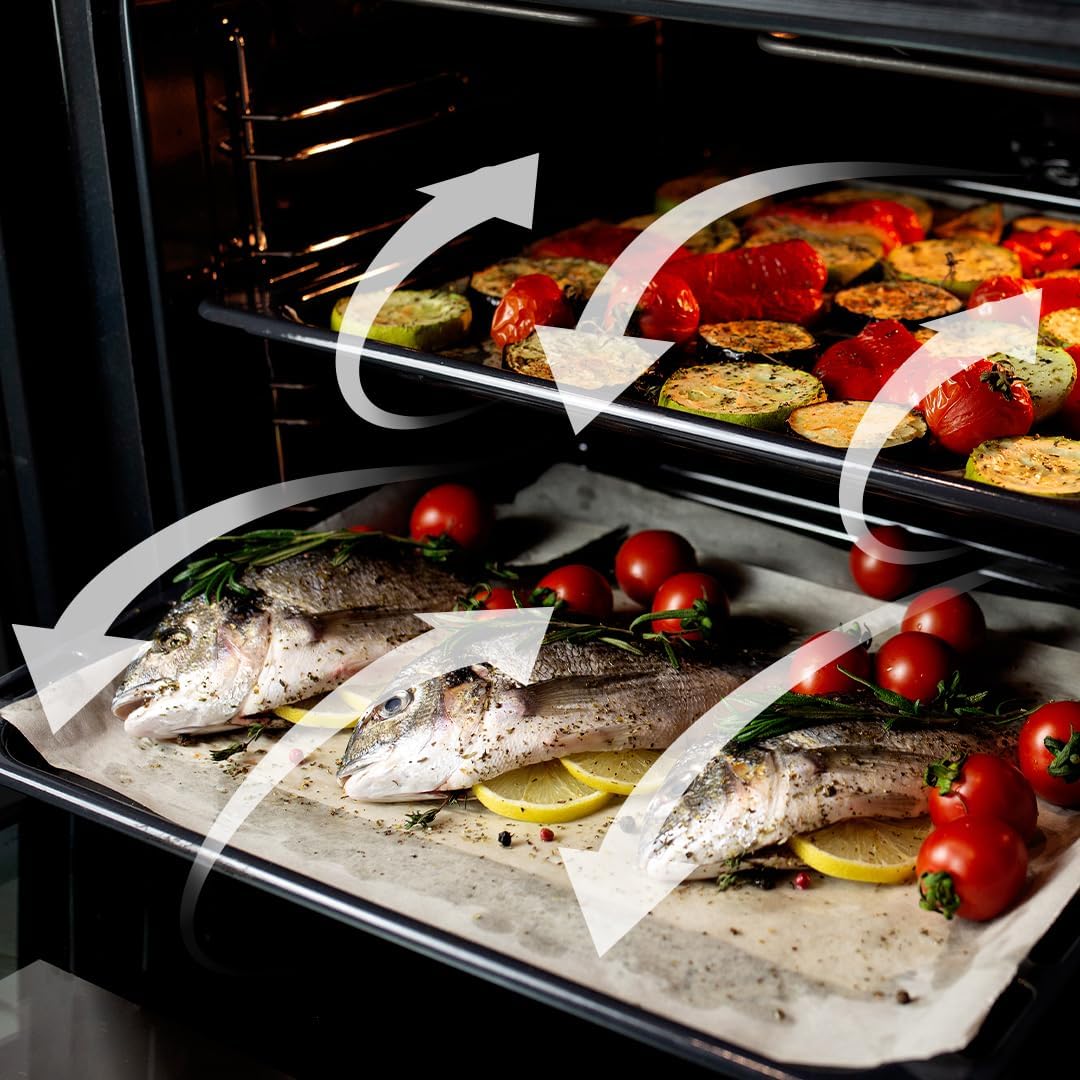
Figure 5.5: Visual representation of the 3D Cooking function's homogeneous airflow.
6. Kusafisha na Matengenezo
Kusafisha na kudumisha mara kwa mara kutaongeza muda wa matumizi ya oveni yako na kuhakikisha utendaji bora.
6.1. Steam EasyClean Function
This function uses steam to loosen dirt and food residues, making cleaning easier. Add water to the designated area and activate the Steam EasyClean function. After the cycle, wipe the interior with a soft cloth.

Figure 6.1: Comparison showing the effectiveness of the Steam EasyClean function.
6.2. Usafishaji wa Jumla
- Safisha sehemu ya nje na tangazoamp kitambaa na sabuni kali. Epuka cleaners abrasive.
- Remove and clean oven racks and accessories separately using warm soapy water.
- Hakikisha oveni iko baridi kabla ya kusafisha.
7. Utatuzi wa shida
If you encounter issues with your oven, refer to the table below for common problems and solutions.
| Tatizo | Sababu inayowezekana | Suluhisho |
|---|---|---|
| Tanuri haiwashi | Hakuna usambazaji wa umeme | Angalia waya wa umeme, kikatiza mzunguko, na sehemu ya ukuta. |
| Tanuri haina joto | Incorrect function/temperature setting | Verify selected function and temperature. |
| Kupika bila usawa | Improper rack position or overloaded oven | Use recommended rack positions; avoid overcrowding. Utilize 3D Cooking function. |
| Smoke/odor during first use | Utengenezaji wa mabaki yanayoungua | This is normal. Ensure good ventilation. It will dissipate after initial use. |
Ikiwa tatizo litaendelea baada ya kujaribu suluhisho hizi, tafadhali wasiliana na huduma kwa wateja ya Cecotec.
8. Vipimo
Detailed technical specifications for the Cecotec Bolero Hexa AF316000 oven.
| Vipimo | Thamani |
|---|---|
| Chapa | Cecotec |
| Nambari ya Mfano | AF316000 (02814) |
| Uwezo | 81 lita |
| Vipimo (L x W x H) | 59.4 x 63.5 x 59.5 cm |
| Uzito | Kilo 32.3 |
| Nguvu | 3400 Watts |
| Voltage | 230 Volts |
| Ufanisi wa Nishati | Darasa A |
| Aina ya Ufungaji | Mlima wa Ukuta (Umejengwa ndani) |
| Njia za kupikia | 11 Functions (Convection, Maxi Grill, Fast Cooking, Steam Assist, Steam EasyClean, Fan Grill, Multicooking, Airfry Master, Pizza Master, 3D Cooking, Defrost) |
| Vipengee vilivyojumuishwa | 1 Integrated Air Fryer Oven, 1 Airfryer Basket, 1 User Manual, 1 Pizza Stone XXL |
| Upatikanaji wa Vipuri | Miaka 10 |
9. Udhamini na Msaada
Cecotec products are manufactured to high-quality standards. This product comes with a standard manufacturer's warranty. For specific warranty terms and conditions, please refer to the warranty card included with your product or visit the official Cecotec webtovuti.
For technical support, spare parts, or service inquiries, please contact Cecotec customer service through their official channels. When contacting support, please have your model number (AF316000 or 02814) and purchase date available.
You can find more information and support at the official Cecotec webtovuti: www.cecotec.com