
1. Utangulizi
Asante kwa ununuziasing the COSTWAY Mobile 3-in-1 Air Cooler, Humidifier, and Fan. This appliance is designed to provide a comfortable environment by offering cooling, humidification, and air circulation functions. It features a 10-liter water tank, three operating modes, three fan speeds, a 15-hour timer, and a remote control for convenient operation. Please read this manual thoroughly before use to ensure proper operation, maintenance, and safety.

Picha 1.1: Mbele view of the COSTWAY Mobile 3-in-1 Air Cooler.
2. Maagizo ya Usalama
Ili kupunguza hatari ya moto, mshtuko wa umeme, au majeraha, kila wakati fuata tahadhari hizi za kimsingi za usalama:
- Soma maagizo yote kabla ya kutumia kifaa.
- Hakikisha ugavi wa umeme ujazotage inalingana na lebo ya ukadiriaji kwenye kifaa.
- Usitumbukize kifaa, uzi wa umeme au kuchomeka kwenye maji au vimiminiko vingine.
- Unplug the appliance from the power outlet when not in use, before cleaning, or before moving.
- Weka kifaa mbali na watoto na kipenzi.
- Usitumie kifaa hicho kwa kutumia waya au plagi iliyoharibika, au ikiwa kimeharibika au kimeharibika kwa njia yoyote.
- Weka kifaa kwenye uso thabiti, usawa.
- Do not block air inlets or outlets. Maintain at least 20 cm clearance from walls and other objects.
- Do not use the appliance in bathrooms or other humid environments where it could come into contact with water.
- Only use clean tap water in the water tank. Do not add any chemicals or additives other than recommended ice packs.
- Usijaribu kutengeneza au kurekebisha kifaa mwenyewe. Wasiliana na wafanyakazi wa huduma waliohitimu.
3. Bidhaa Imeishaview
3.1 Vipengele
The air cooler consists of the main unit, a water tank, a removable air filter, a honeycomb cooling pad, and a remote control. Two ice packs are also included for enhanced cooling.
3.2 Paneli ya Kudhibiti na Onyesho
The LED control panel on top of the unit allows you to manage all functions. It includes buttons for Power, Speed, Mode, Timer, Oscillation, and Cooling. The display shows current settings.

Picha 3.1: Kina view of the LED control panel and remote control.
4. Kuweka
4.1 Kufungua na Kuweka
- Ondoa kwa uangalifu kifaa kutoka kwa kifurushi chake.
- Place the air cooler on a firm, level surface. Ensure there is at least 20 cm of space around the unit for proper airflow.
- The unit is equipped with 360° swivel wheels and integrated handles for easy movement.

Image 4.1: The air cooler features wheels and handles for easy portability.
4.2 Kujaza Tangi la Maji
- Toa tanki la maji kutoka sehemu ya chini ya nyuma ya kifaa.
- Jaza tanki kwa maji safi ya bomba hadi kiashiria cha kiwango cha 'MAX'. Usijaze kupita kiasi.
- For enhanced cooling, place the included ice packs in a freezer for a few hours until frozen.
- Mara tu baada ya kugandishwa, weka vifurushi vya barafu kwenye tanki la maji.
- Telezesha tanki la maji ndani ya kifaa hadi litakapobofya mahali pake.
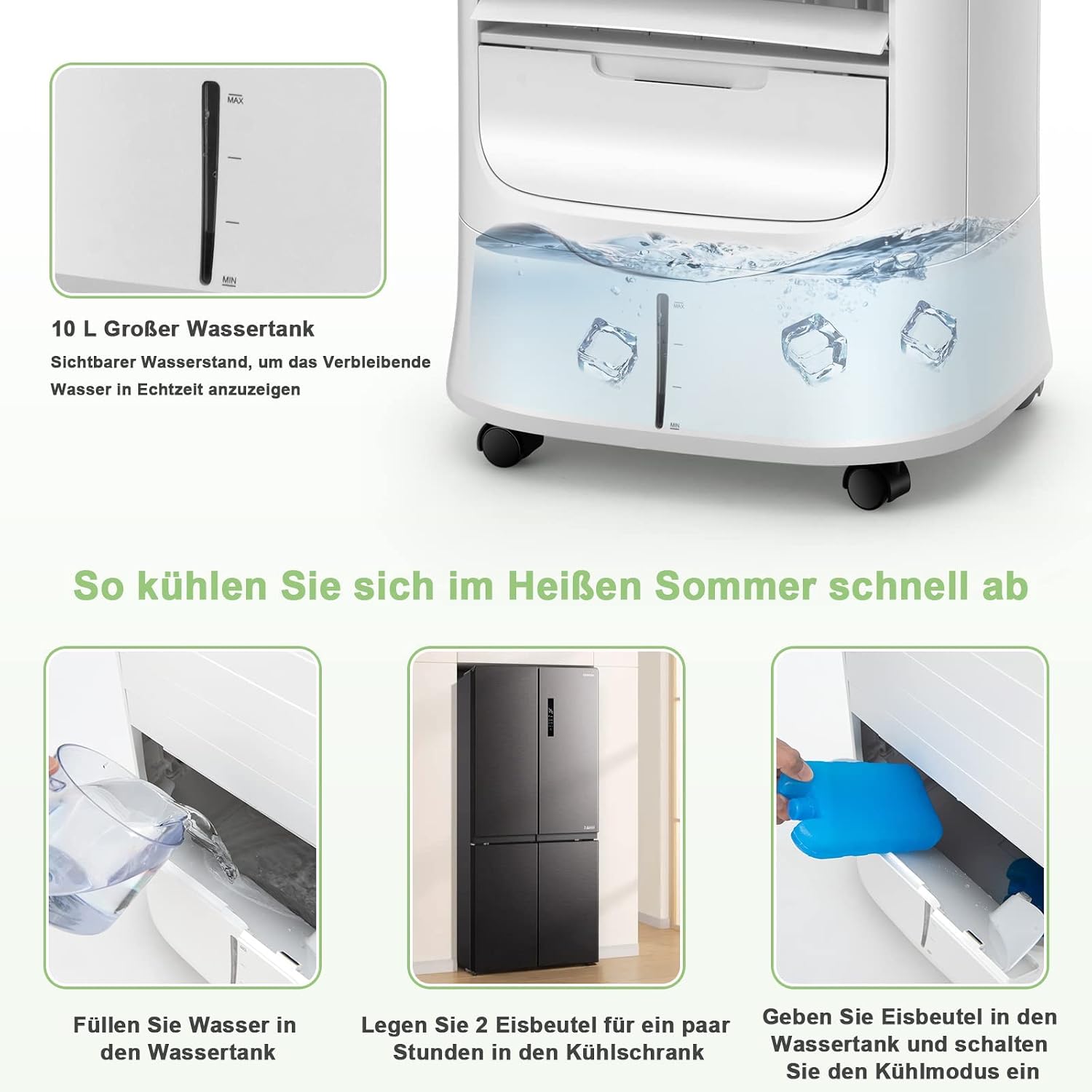
Image 4.2: Steps for filling the water tank and adding ice packs.
5. Maagizo ya Uendeshaji
5.1 Washa/Zima
- Chomeka kebo ya umeme kwenye sehemu inayofaa ya umeme.
- Bonyeza kwa Nguvu kitufe kwenye paneli ya kudhibiti au kidhibiti cha mbali ili kuwasha au kuzima kifaa.
5.2 Marekebisho ya Kasi ya Mashabiki
- Bonyeza kwa Kasi button repeatedly to cycle through the three fan speeds: Low, Medium, and High.
5.3 Uteuzi wa Njia
Bonyeza kwa Hali kitufe cha kuchagua mojawapo ya njia zifuatazo za uendeshaji:
- Hali ya Kawaida: Hutoa mtiririko wa hewa unaoendelea kwa kasi iliyochaguliwa.
- Hali ya Asili: Huiga upepo wa asili kwa kubadilisha kasi ya feni.
- Njia ya Kulala: Hufanya kazi kwa kasi ya chini na tulivu, polepole hupunguaasing fan speed for undisturbed sleep.

Image 5.1: The air cooler offers Normal, Natural, and Sleep modes with adjustable fan speeds.
5.4 Kazi ya Oscillation
- Bonyeza kwa Kufutwa button to activate the automatic horizontal swing of the external louvers (120° up and down).
- The internal louvers can be manually adjusted 63° left and right to direct airflow.

Image 5.2: The air cooler features wide-angle oscillation for even air distribution.
5.5 Mpangilio wa Kipima saa
- Bonyeza kwa Kipima muda button repeatedly to set the desired operating time (from 1 to 15 hours). The unit will automatically turn off after the set time.
5.6 Cooling/Humidification Function
- Ensure the water tank is filled and ice packs are inserted (if desired).
- Bonyeza kwa Baridi button to activate the cooling and humidification function. The unit will draw water from the tank to cool and humidify the air.
6. Matengenezo
Matengenezo ya mara kwa mara huhakikisha utendaji bora na huongeza muda wa matumizi ya kipozeo chako.
6.1 Cleaning the Air Filter and Honeycomb Cooling Pad
- Chomoa kifaa kabla ya kusafisha.
- Remove the rear filter screen and the honeycomb cooling pad.
- Clean the air filter and cooling pad with a soft brush and mild detergent, then rinse thoroughly with clean water.
- Allow them to air dry completely before reinserting them into the unit.

Image 6.1: The air cooler's filtration system, including the removable dust filter and honeycomb cooling pad.
6.2 Kusafisha Tangi la Maji
- Chomoa kifaa.
- Pull out the water tank and empty any remaining water.
- Safisha tangi kwa kitambaa laini na sabuni laini. Suuza vizuri ili kuondoa mabaki yoyote.
- For thorough cleaning, the drain plug at the bottom of the unit can be used to empty the tank.
- Allow the tank to dry completely before reinserting.
6.3 Hifadhi
If the appliance will not be used for an extended period, empty and clean the water tank and filter. Store the unit in a cool, dry place, preferably in its original packaging.
7. Utatuzi wa shida
| Tatizo | Sababu inayowezekana | Suluhisho |
|---|---|---|
| Hakuna nguvu | Power cord not plugged in; no power at outlet; unit turned off. | Check power cord connection; check circuit breaker; press Power button. |
| Mtiririko dhaifu wa hewa | Air filter or cooling pad clogged; fan speed too low. | Clean air filter and cooling pad; increase fan speed. |
| Hakuna athari ya baridi | Water tank empty; cooling function not activated; ice packs not used. | Fill water tank; press Cool button; add frozen ice packs. |
| Uvujaji wa maji | Water tank overfilled; tank not properly seated; drain plug loose. | Do not overfill; ensure tank is correctly inserted; check drain plug. |
| Kelele isiyo ya kawaida | Unit not on a level surface; foreign object in fan. | Place on a level surface; unplug and check for obstructions. |
Tatizo likiendelea baada ya kujaribu suluhu hizi, tafadhali wasiliana na usaidizi kwa wateja.
8. Vipimo
| Kipengele | Vipimo |
|---|---|
| Chapa | NJIA |
| Jina la Mfano | ES10122DE-WH-GM |
| Kazi | Air Cooler, Humidifier, Fan |
| Nyenzo | ABS Terpolymer |
| Rangi | Nyeupe |
| Aina ya Kuweka | Kujitegemea |
| Aina ya Kudhibiti | Remote Control, LED Panel |
| Uwezo wa Tangi la Maji | 10 lita |
| Uzito wa Bidhaa | Kilo 7.7 |
| Vipimo vya Bidhaa (L x W x H) | 39 x 33 x 74 cm |
| Wattage | 78 W |
| Voltage | 220-240 V, 50/60 Hz |
| Kiwango cha Kelele | Less than 58 Decibels |
| Idadi ya Kasi | 3 |
| Kipima muda | Saa 0-15 |
| Kasi ya Hewa | 1.8-5 m/s |
| Vipengee vilivyojumuishwa | Pakiti 2 za Barafu |

Image 8.1: Dimensions and technical specifications of the air cooler.
9. Udhamini na Msaada
This product comes with a standard manufacturer's warranty. For detailed warranty information, please refer to the warranty card included with your purchase or contact COSTWAY customer service. If you encounter any issues or have questions regarding the operation or maintenance of your air cooler, please reach out to our support team for assistance.
Contact information for support can typically be found on the product packaging, the official COSTWAY webtovuti, au risiti yako ya ununuzi.


