
Utangulizi
Thank you for choosing the Glorious Gaming Model O Wireless Mouse. This manual provides essential information for setting up, operating, maintaining, and troubleshooting your new gaming mouse. Designed for competitive gaming, the Model O Wireless combines a superlight honeycomb design with lag-free 2.4GHz wireless technology and customizable RGB lighting to enhance your gaming experience.
Vipengele vya Bidhaa
- Superlight Design: Weighing only 69 grams, the honeycomb shell reduces weight while maintaining structural integrity and improving airflow.
- Lag-Free 2.4GHz Wireless: Experience ultra-low wireless latency for responsive and crisp clicks, ensuring no unexpected double-clicking.
- Muda wa Kudumu wa Betri: Up to 71 hours of playtime with RGB lighting off, allowing for prolonged gaming sessions without frequent recharging.
- Njia za Waya na Waya: Includes a flexible USB-C Ascended charging cable for continuous performance even while charging.
- Ambidextrous Shape: Ergonomically designed for comfortable use by both left and right-handed users.
- Mwangaza wa RGB unaoweza kubinafsishwa: Personalize your mouse with various lighting effects and colors via the Glorious CORE software.
- Kihisi cha Macho cha Usahihi wa Juu: Equipped with a Glorious BAMF sensor, offering up to 19,000 DPI and 400 IPS tracking speed for pinpoint accuracy.
- Swichi Zinazodumu: Features switches rated for 80 million clicks, ensuring long-lasting performance.
- G-Skates Premium PTFE Mouse Feet: Provides smooth gliding across any surface with minimal friction.

Picha: Juu-chini view of the Glorious Model O Wireless Gaming Mouse, showcasing its honeycomb shell and vibrant RGB lighting.
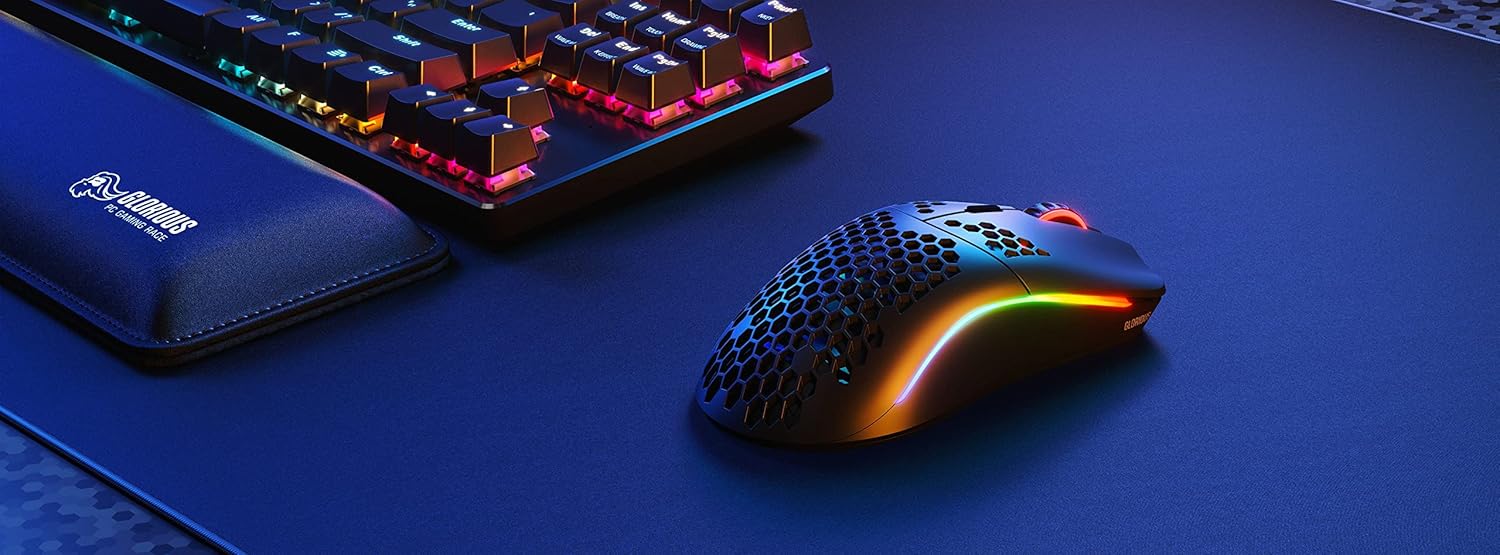
Image: Technical diagram illustrating the dimensions and key specifications of the Glorious Model O Wireless Gaming Mouse.
Sanidi
- Unboxing: Carefully remove the mouse, USB-C Ascended charging cable, and wireless dongle from the packaging.
- Unganisha Dongle Isiyotumia Waya: Plug the 2.4GHz wireless USB dongle into an available USB port on your computer.
- Kuwasha Kipanya: Locate the power switch on the underside of the mouse and slide it to the 'ON' position. The mouse should automatically connect to the dongle.
- Malipo ya Awali (Si lazima): For optimal performance, it is recommended to fully charge the mouse before first use. Connect the USB-C Ascended cable to the front of the mouse and the other end to a USB port on your computer or a USB charger.
- Install Glorious CORE Software: Download and install the Glorious CORE software from the official Glorious webtovuti (www.gloriousgaming.com/pages/glorious-core) to customize settings, RGB lighting, and button assignments.
Video: A seller demonstrates the unboxing and initial setup of the Glorious Model O Wireless mouse, highlighting its lightweight design and flexible cable.
Maagizo ya Uendeshaji
The Glorious Model O Wireless mouse features 6 programmable buttons for versatile control during gaming and general use.
- Bonyeza Kushoto (Kitufe cha 1): Kitufe cha msingi cha kitendo.
- Bonyeza kulia (Kitufe cha 2): Kitufe cha pili cha kitendo.
- Scroll Wheel Click (Button 3): Often used for middle-click functions or opening new tabs.
- DPI Button (Button 4): Cycles through preset DPI settings. Default settings can be customized via Glorious CORE.
- Side Buttons (Buttons 5 & 6): Typically used for forward/backward navigation in browsers or assigned to in-game actions. These are fully programmable.
For advanced customization of button functions, macros, and DPI levels, refer to the Glorious CORE software.
Kubinafsisha
The Glorious Model O Wireless offers extensive customization options through the Glorious CORE software:
- Mwangaza wa RGB: Choose from various effects (e.g., Seamless Breathing, Glorious Mode, Single Color) and adjust brightness and speed. You can set different lighting for wired and wireless modes.
- Mipangilio ya DPI: Create and save multiple DPI profiles, allowing you to switch sensitivity on the fly using the dedicated DPI button.
- Kazi ya Kitufe: Remap any of the 6 buttons to perform mouse functions, keyboard commands, custom macros, or multimedia controls.
- Kiwango cha Kura: Rekebisha kiwango cha upigaji kura (hadi 1000 Hz) kwa mwitikio bora.
- Umbali wa Kuinua (LOD): Rekebisha umbali ambao kitambuzi huacha kufuatilia kipanya kinapoinuliwa.

Image: Screenshot of the Glorious CORE software, displaying options for customizing RGB lighting effects and colors for the mouse.
Matengenezo
- Kusafisha: Use a soft, dry cloth to wipe down the mouse. For the honeycomb shell, a can of compressed air can help remove dust and debris. Avoid using harsh chemicals or abrasive materials.
- Huduma ya Cable: Handle the Ascended cable gently to prevent fraying or damage. Avoid sharp bends or excessive pulling.
- Hifadhi: Wakati haitumiki, hifadhi panya katika mazingira safi na makavu mbali na halijoto kali.
Kutatua matatizo
| Suala | Suluhisho linalowezekana |
|---|---|
| Kipanya hakijibu (Isiyotumia Waya) | Ensure the mouse is powered on and the wireless dongle is securely plugged into a USB port. Try a different USB port. Re-pair the mouse if necessary (refer to Glorious CORE software for pairing instructions). |
| Kipanya hakijibu (Imeunganishwa kwa waya) | Hakikisha kebo ya USB-C imeunganishwa vizuri kwenye kipanya na kompyuta. Jaribu mlango tofauti wa USB. |
| Lag or stuttering | Ensure the mouse is fully charged. Reduce wireless interference by moving the dongle closer to the mouse or away from other wireless devices. Update mouse firmware via Glorious CORE. |
| Taa ya RGB haifanyi kazi | Check RGB settings in Glorious CORE. Ensure brightness is not set to 0. Update mouse firmware. |
| Vifungo havifanyi kazi ipasavyo | Verify button assignments in Glorious CORE. Reset to default settings if needed. Update mouse firmware. |
Vipimo
| Kipengele | Maelezo |
|---|---|
| Chapa | MAHALI |
| Mfano | Mfano O Wireless |
| Rangi | Matte Nyeusi |
| Muunganisho | Waya isiyotumia waya ya 2.4GHz, USB-C |
| Kihisi | Glorious BAMF Optical Sensor |
| DPI | Hadi 19,000 |
| Kasi ya Kufuatilia (IPS) | 400 |
| Kiwango cha Kura | 1000 Hz (Dual Wired/Wireless) |
| Click Latency | 2.08ms (Internal Testing) |
| Uzito | 69 grams (+/- 1.5g) |
| Maisha ya Betri | Up to 71 Hours (RGB off) |
| Vifungo | 6 (Inayoweza Kupangwa) |
| Mwelekeo wa Mikono | Ambidextrous |
| Miguu ya Panya | G-Skates Premium PTFE |
| Vifaa Sambamba | Windows, Mac, Linux |
Udhamini na Msaada
The Glorious Gaming Model O Wireless Mouse comes with a Udhamini mdogo wa siku 90. For warranty claims or technical support, please visit the official Glorious Gaming webtovuti au wasiliana na huduma kwa wateja wao. Weka uthibitisho wako wa ununuzi kwa uthibitisho wa udhamini.
Video: A seller provides a quick overview of the Glorious Model O Wireless mouse, highlighting its features and suitability for gaming.