
1. Utangulizi
The eppfun AK3040R is a versatile Bluetooth 5.3 audio receiver designed to upgrade your existing wired audio systems, such as home speakers or car stereos, with wireless Bluetooth capabilities. It allows you to stream music from your smartphone or other Bluetooth-enabled devices. Featuring NFC for quick pairing, multiple audio output options (3.5mm AUX, RCA), and a TF card slot for direct music playback, the AK3040R offers a convenient and enhanced audio experience.
2. Bidhaa za Bidhaa
- Teknolojia ya Bluetooth 5.3: Incorporates the latest low-energy Bluetooth Ver 5.3 chip, providing a longer transmission distance and faster speed compared to Bluetooth 4.0, while maintaining compatibility with older versions.
- Kazi ya NFC: Supports one-touch pairing with NFC-enabled mobile phones for quick and convenient connection.
- Matokeo ya Sauti Nyingi: Equipped with 3.5mm AUX and RCA ports for broad compatibility with various audio systems.
- Yanayopangwa Kadi ya TF: Allows direct playback of music files from a TF (MicroSD) card.
- Ubunifu wa Compact na Lightweight: Portable and easy to integrate into any audio setup.
3. Yaliyomo kwenye Kifurushi
Tafadhali angalia kifurushi kwa vitu vifuatavyo:
- eppfun AK3040R Bluetooth 5.3 Audio Receiver
- Kebo ya Kuchaji ya USB (Aina-C)
- Kebo ya Sauti ya 3.5mm
- Kebo ya Sauti ya RCA
- Mwongozo wa Mtumiaji
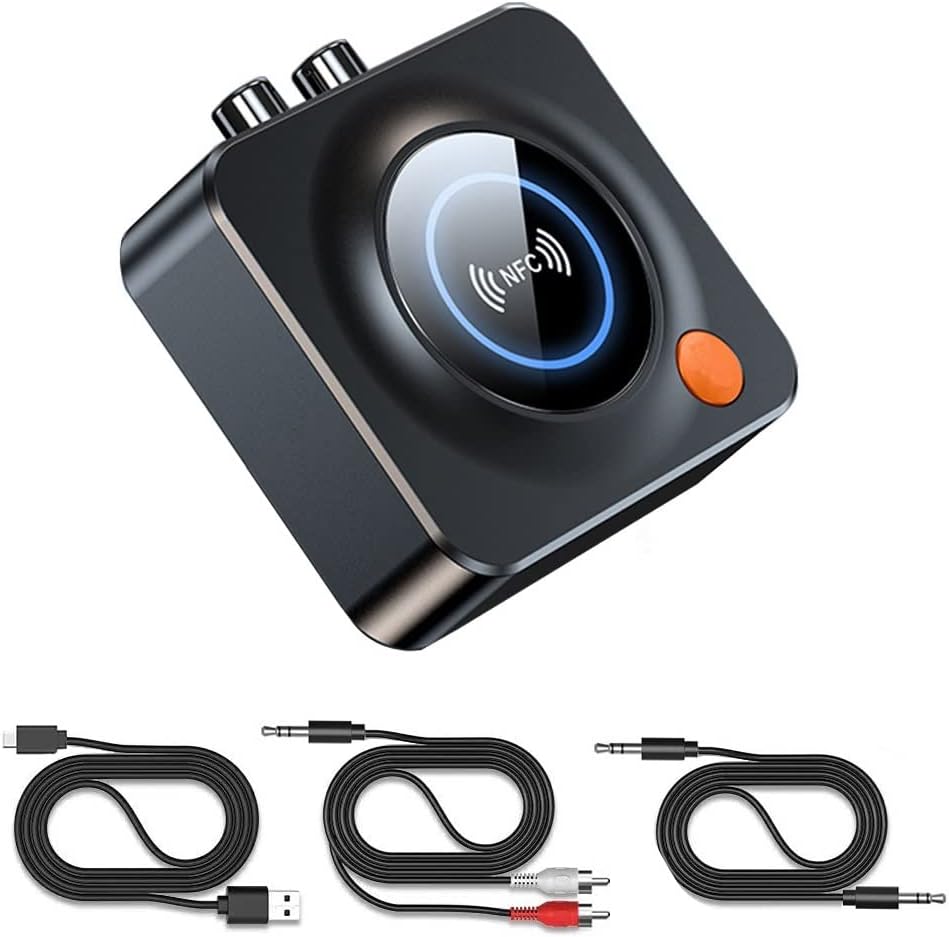
Image: The eppfun AK3040R Bluetooth receiver shown with its included USB charging cable, 3.5mm audio cable, and RCA audio cable.
4. Mpangilio wa Kifaa

Picha: Juu-chini view of the eppfun AK3040R Bluetooth receiver. The top surface features a circular NFC sensing area with an NFC logo and a blue LED ring. An orange power button is visible on the side. The rear panel shows RCA (red and white) audio output ports, a 3.5mm AUX output, and a USB-C power input. A TF card slot is on the right side.
Familiarize yourself with the device's ports and controls:
- Eneo la Kuhisi NFC: For quick pairing with NFC-enabled devices.
- Kitufe cha Nguvu: To turn the device on/off and initiate pairing.
- Pato la AUX la 3.5mm: Connects to speakers or headphones via a 3.5mm audio cable.
- Pato la RCA: Connects to home stereo systems or amplifiers via RCA cables.
- Yanayopangwa Kadi ya TF: Ingiza kadi ya TF (MicroSD) kwa ajili ya uchezaji wa muziki wa ndani.
- Uingizaji wa Nguvu wa USB-C: Kwa kuunganisha cable ya nguvu.
5. Kuweka
Follow these steps to set up your eppfun AK3040R Bluetooth receiver:
- Unganisha Nguvu: Plug the USB charging cable into the USB-C power input on the AK3040R and connect the other end to a USB power adapter (not included) or a powered USB port. The device will automatically power on and enter pairing mode.
- Unganisha kwenye Mfumo wa Sauti:
- For speakers or headphones with a 3.5mm input, use the provided 3.5mm audio cable to connect the AK3040R's 3.5mm AUX output to your audio device's input.
- For home stereo systems or amplifiers with RCA inputs, use the provided RCA audio cable to connect the AK3040R's RCA outputs to your audio system's RCA inputs.

Image: A diagram illustrating the connection process. It shows a USB-C cable and RCA/3.5mm audio cables being plugged into the receiver's ports. A smartphone is shown pairing with the device, and the receiver is connected to a home theater system.
6. Maagizo ya Uendeshaji
6.1. Kuoanisha Bluetooth
The AK3040R will automatically enter pairing mode when powered on. The LED indicator will flash, indicating it's ready to pair.
- Standard Bluetooth Pairing:
- Enable Bluetooth on your smartphone or other audio source device.
- Tafuta available Bluetooth devices and select "AK3040R" from the list.
- Once connected, the LED indicator on the receiver will turn solid blue.
- Kuoanisha NFC kwa Kugusa Moja:
- Hakikisha NFC imewashwa kwenye simu yako ya mkononi.
- Gently tap your NFC-enabled phone on the NFC sensing area of the AK3040R.
- Confirm the pairing request on your phone. The devices will connect automatically.
6.2. Kucheza Muziki
Once successfully paired, you can start playing music:
- From a Bluetooth Device: Play music on your paired smartphone or tablet. The audio will be streamed wirelessly to the AK3040R and output through your connected speakers.
- From TF Card: Insert a TF (MicroSD) card containing music files into the TF card slot. The receiver will automatically detect and begin playing music from the card.

Image: A visual representation of a smartphone streaming music wirelessly via Bluetooth to the eppfun AK3040R receiver, which is then connected to a pair of wired speakers, enhancing the audio experience.
7. Matengenezo
To ensure the longevity and optimal performance of your AK3040R:
- Weka kifaa kikavu na mbali na unyevu.
- Safisha kifaa kwa kitambaa laini na kavu. Usitumie kemikali kali au visafishaji vya abrasive.
- Epuka halijoto kali.
- Usijaribu kutenganisha au kutengeneza kifaa mwenyewe. Hii itabatilisha udhamini.
8. Utatuzi wa shida
| Tatizo | Sababu inayowezekana | Suluhisho |
|---|---|---|
| Kifaa hakiwashi. | Hakuna usambazaji wa umeme au kebo yenye hitilafu. | Ensure the USB-C cable is securely connected to a working power source. Try a different cable or power adapter. |
| Haiwezi kuoanisha na kifaa cha Bluetooth. | Bluetooth is off on your device; AK3040R is not in pairing mode; too many devices connected. | Ensure Bluetooth is enabled on your phone/tablet. Confirm the AK3040R LED is flashing (pairing mode). Disconnect other Bluetooth devices from your phone. Restart both devices. |
| Hakuna sauti baada ya kuunganisha. | Incorrect audio cable connection; volume too low; wrong input selected on audio system. | Check that audio cables are firmly connected to the correct input/output ports. Increase volume on both the AK3040R and your audio system. Select the correct input source on your amplifier/ wasemaji. |
| Kuoanisha NFC kunashindwa. | NFC is off on your phone; phone not placed correctly. | Ensure NFC is enabled on your phone. Place your phone directly over the NFC sensing area on the AK3040R. |
| TF card music not playing. | Kadi ya TF haijaingizwa ipasavyo; haitumiki file format; card corrupted. | Ensure the TF card is fully inserted. Check if music files are in a supported format (e.g., MP3). Try a different TF card. |
9. Vipimo
| Kipengele | Maelezo |
|---|---|
| Mfano | AK3040R |
| Toleo la Bluetooth | 5.3 |
| Njia za Pato la Sauti | Stereo |
| Teknolojia ya Uunganisho | Bluetooth, 3.5mm AUX, RCA |
| Vipengele Maalum | NFC, Hands-free calling, Low latency |
| Vifaa Sambamba | Android Smartphones, iPhones, iPads, Laptops, Wired Speakers |
| Umbali wa Mapokezi | Up to 10m (indoors) |
| Uingizaji Voltage | 4.8V ~ 5.25V |
| Vipimo vya Bidhaa | Sentimita 6.9 x 6.9 x 2.4 (inchi 2.7 x 2.7 x 0.94) |
| Uzito wa Kipengee | Gramu 45 (wakia 1.59) |
| Nyenzo | ABS, Metal |
10. Udhamini na Msaada
eppfun provides a dhamana ya miezi 12 for this product. We are committed to ensuring a positive customer experience.
If you encounter any issues or have questions regarding your eppfun AK3040R Bluetooth 5.3 Audio Receiver, please do not hesitate to contact our customer support. You can typically reach us through your purchase platform via your order history (e.g., on Amazon: [Order History] - [Contact Seller]). We aim to resolve your concerns as quickly as possible.