
1. Utangulizi
Welcome to the user manual for your new Avtex W195TS Smart TV. This television is specifically designed for mobile living, offering versatile power options (12V, 24V, and 240V) and a range of smart features, including Wi-Fi, Bluetooth, and an integrated Freesat satellite decoder. This manual provides essential information for setting up, operating, maintaining, and troubleshooting your device to ensure optimal performance and enjoyment.
2. Taarifa za Usalama
Tafadhali soma maagizo yote ya usalama kwa makini kabla ya kutumia televisheni. Weka mwongozo huu kwa marejeleo ya baadaye.
- Ugavi wa Nguvu: Hakikisha ujazo sahihitage is used (12V, 24V DC or 240V AC). Do not overload power outlets.
- Uingizaji hewa: Usizuie fursa za uingizaji hewa. Ruhusu nafasi ya kutosha kuzunguka TV kwa mtiririko mzuri wa hewa.
- Maji na Unyevu: Usiweke TV kwenye mvua au unyevu. Usiweke vitu vilivyojaa vimiminika kwenye TV.
- Kusafisha: Chomoa TV kabla ya kusafisha. Tumia kitambaa laini na kavu. Usitumie visafishaji vya kioevu au visafishaji vya erosoli.
- Uwekaji: Place the TV on a stable, flat surface or mount securely to a wall/bracket. Avoid direct sunlight or heat sources.
- Kuhudumia: Usijaribu kuhudumia bidhaa hii mwenyewe. Rejelea huduma zote kwa wafanyikazi waliohitimu wa huduma.
3. Yaliyomo kwenye Kifurushi
Before setup, please check that all items are present in the box:
- Avtex W195TS Smart TV
- Kidhibiti cha Mbali na Betri
- 12V/24V DC Power Cable
- Adapta ya Umeme ya AC ya 240V
- Kibanda cha Meza (ikiwa kinatumika)
- Mwongozo wa Mtumiaji (hati hii)
4. Bidhaa Imeishaview
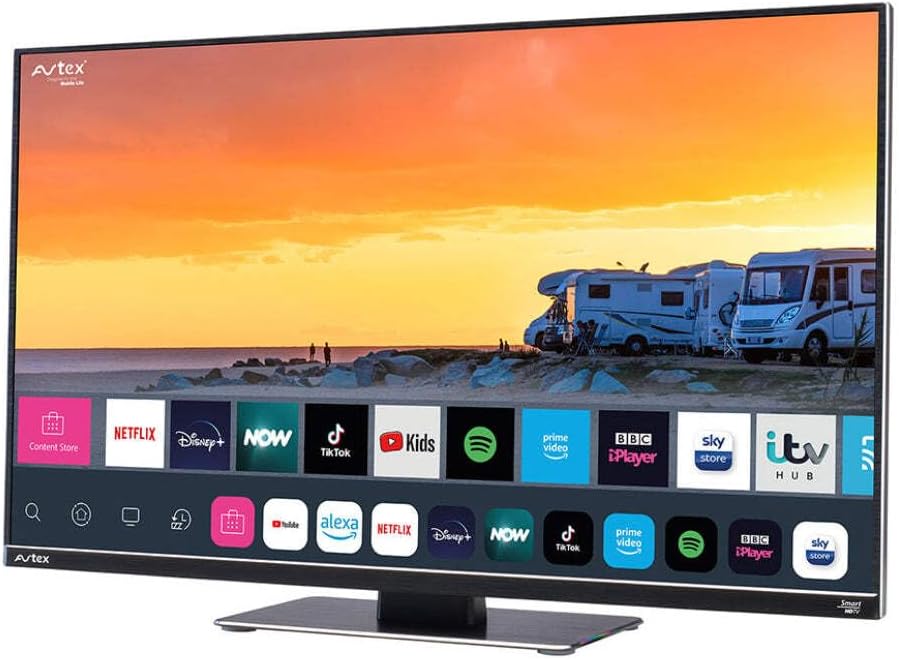
Figure 4.1: Avtex W195TS Smart TV Front View
This image shows the Avtex W195TS Smart TV from a slight angle, highlighting its slim design and the vibrant display. The screen shows a user interface with icons for popular streaming services like Netflix, Disney+, Now, TikTok, Kids, Spotify, Prime Video, BBC iPlayer, Sky Store, and ITV Hub. The background on the screen depicts a scenic view of motorhomes parked near a beach at sunset. The Avtex logo is visible on the top left and bottom left of the TV frame.
4.1. Milango na Miunganisho
- Bandari za HDMI: For connecting external devices like Blu-ray players, game consoles, or set-top boxes.
- Bandari za USB (2): For media playback from USB drives or connecting USB accessories.
- Ingizo la Antena: For connecting a terrestrial TV antenna.
- Ingizo la Setilaiti: For connecting a satellite dish for Freesat or other satellite services.
- Uingizaji wa Nguvu wa DC: For 12V/24V DC power connection.
- Uingizaji wa Nguvu ya AC: For 240V AC power connection via adapter.
- Bandari ya Ethernet: Kwa uunganisho wa mtandao wa waya.
- Pato la Sauti: Kwa ajili ya kuunganisha mifumo ya sauti ya nje au vipokea sauti vya masikioni.
5. Kuweka
5.1. Installing the Stand (Optional)
- Weka kwa uangalifu TV uso chini kwenye sehemu laini na safi ili kuzuia uharibifu wa skrini.
- Pangilia stendi na mashimo ya kupachika chini ya TV.
- Salama kusimama kwa kutumia screws zinazotolewa.
5.2. Uunganisho wa Nguvu
The Avtex W195TS supports multiple power inputs:
- 12V/24V DC: Connect the supplied 12V/24V DC power cable to the DC input on the TV and to your vehicle's 12V or 24V power outlet.
- AC 240V: Connect the supplied 240V AC power adapter to the AC input on the TV, then plug the adapter into a standard 240V AC wall socket.
Kumbuka: Do not connect both DC and AC power simultaneously.
5.3. Antenna/Satellite Connection
- Terrestrial TV: Connect your aerial cable to the 'ANTENNA IN' port.
- Satellite TV (Freesat): Connect your satellite dish cable to the 'SATELLITE IN' port.
5.4. Umeme wa Awali na Usanidi wa Mara ya Kwanza
- Connect the TV to power and press the power button on the remote control or TV.
- The First-Time Setup Wizard will appear. Follow the on-screen prompts to select your language, country, and time zone.
- Perform an automatic channel scan for both terrestrial and satellite channels.
- Connect to your Wi-Fi network by selecting your network name and entering the password.
6. Kufanya kazi
6.1. Kazi za Udhibiti wa Kijijini
Jifahamishe na vitufe vya udhibiti wa mbali kwa usogezaji kwa urahisi na udhibiti wa vipengele vya TV yako.
- Kitufe cha Nguvu: Huwasha/kuzima TV.
- Kitufe cha Chanzo: Selects input sources (HDMI, USB, TV, Satellite).
- Kiasi +/-: Hurekebisha kiwango cha sauti.
- Kituo +/-: Inabadilisha vituo vya TV.
- Vifungo vya Kusogeza (Juu/Chini/Kushoto/Kulia/Sawa): Kwa urambazaji wa menyu na uteuzi.
- Smart Hub/Home Button: Inafikia kiolesura cha Smart TV.
- Vifungo vya Programu: Dedicated buttons for popular streaming apps (if available).
6.2. Vipengele vya Smart TV
Your Avtex W195TS is equipped with smart TV capabilities:
- Duka la Programu: Download and install various applications for streaming, news, and entertainment.
- Huduma za Utiririshaji: Access pre-installed or downloaded apps like Netflix, Disney+, Prime Video, BBC iPlayer, etc. (subscription may be required).
- Web Kivinjari: Vinjari mtandao moja kwa moja kwenye TV yako.
- Kuakisi skrini: Connect your smartphone or tablet to display content on the TV screen (compatibility may vary).
6.3. Muunganisho wa Bluetooth
Pair Bluetooth devices such as headphones or external speakers for enhanced audio experience.
- Nenda kwenye menyu ya mipangilio ya TV.
- Chagua 'Bluetooth' au 'Vifaa Vilivyounganishwa'.
- Enable Bluetooth and put your device into pairing mode.
- Chagua kifaa chako kutoka kwenye orodha ili kuoanisha.
6.4. Uchezaji wa Vyombo vya Habari kupitia USB
Insert a USB drive into one of the USB ports to view picha, cheza video, au sikiliza muziki.
- The TV will usually prompt you to open the media player.
- Nenda kupitia yako filekwa kutumia kidhibiti cha mbali.
7. Matengenezo
7.1. Kusafisha TV
- Skrini: Futa skrini kwa upole kwa kitambaa laini kisicho na pamba. Kwa alama za ukaidi, kidogo dampPaka kitambaa maji au suluhisho maalum la kusafisha kwa kutumia skrini (usinyunyizie moja kwa moja kwenye skrini).
- Casing: Tumia kitambaa laini na kikavu kuifuta TV casing. Epuka visafishaji abrasive au vimumunyisho.
7.2. Sasisho za Programu
Periodically check for software updates to ensure your TV has the latest features and bug fixes. Updates can usually be found in the TV's settings menu under 'System' or 'Software Update'.
8. Utatuzi wa shida
If you encounter issues with your Avtex W195TS, refer to the following common problems and solutions:
| Tatizo | Sababu inayowezekana | Suluhisho |
|---|---|---|
| Hakuna Nguvu | Power cable not connected; no power from outlet. | Check power cable connection; test outlet with another device; ensure correct voltage (12V / 24V / 240V). |
| Hakuna Picha, lakini Sauti Ipo | Chanzo kisicho sahihi cha ingizo kimechaguliwa; cable mbovu. | Press the 'Source' button on the remote to select the correct input; check HDMI/antenna cables. |
| Hakuna Sauti, lakini Picha Ipo | Sauti imezimwa au chini sana; suala la mfumo wa sauti wa nje. | Unmute volume or increase level; check connections to external audio devices. |
| Haiwezi Kuunganishwa kwa Wi-Fi | Nenosiri lisilo sahihi; suala la router; TV iko mbali sana na kipanga njia. | Re-enter Wi-Fi password; restart router; move TV closer to router or use an extender. |
| Udhibiti wa Mbali Haifanyi kazi | Betri zilizokufa; kizuizi; suala la kuoanisha. | Replace batteries; remove obstructions; re-pair remote if it's a Bluetooth remote. |
9. Vipimo
| Kipengele | Vipimo |
|---|---|
| Chapa | Avtex |
| Nambari ya Mfano | AVTEX W195TS |
| Ukubwa wa skrini | Inchi 19.5 |
| Azimio | 1080p (HD Kamili) |
| Uwiano wa kipengele | 16:9 |
| Teknolojia ya Uunganisho | Bluetooth, HDMI, Wi-Fi |
| Jumla ya Bandari za USB | 2 |
| Voltage | Volti 12, Volti 24, Volti 240 |
| Uzito wa Kipengee | Kilo 2.5 |
| Mwaka wa Mfano | 2018 |
10. Udhamini na Msaada
Your Avtex W195TS Smart TV comes with a manufacturer's warranty. Please refer to the warranty card included in your product packaging for specific terms and conditions, including warranty period and coverage details. Keep your proof of purchase for warranty claims.
For technical support, troubleshooting assistance beyond this manual, or warranty inquiries, please contact Avtex customer service through their official website or the contact information provided with your product. When contacting support, please have your model number (AVTEX W195TS) and serial number ready.