
1. Utangulizi
This manual provides essential information for the safe and efficient use of your OPPO F21 Pro (5G) smartphone. Please read this manual thoroughly before using your device to ensure optimal performance and longevity.
The OPPO F21 Pro (5G) is a high-performance smartphone featuring a 2.2 GHz Octa-core processor, 8GB of RAM, and 128GB of internal storage, expandable via microSDXC. It operates on Android 12 and is powered by a non-removable 4500 mAh Li-Po battery. Key features include a 6.43-inch AMOLED display, a 64 MP AI Triple Camera system, and 5G connectivity.
2. Usanidi wa Kifaa
2.1 Yaliyomo kwenye Kifurushi
- OPPO F21 Pro (5G) Smartphone
- Kebo ya USB
- Mwongozo wa Kuanza Haraka (unaweza kutofautiana kulingana na eneo)
- Taarifa za Usalama (zinaweza kutofautiana kulingana na eneo)
2.2 Kuingiza SIM kadi na kadi ya MicroSD
Your OPPO F21 Pro (5G) supports Dual-SIM functionality and a microSDXC card for expanded storage. The device uses Nano-SIM cards.
- Tafuta trei ya SIM kadi kwenye kando ya simu yako.
- Ingiza zana ya ejector ya SIM (ikiwa imetolewa) kwenye shimo dogo karibu na trei na sukuma kwa upole hadi trei itoke.
- Weka kadi yako ya Nano-SIM na/au kadi ya microSDXC kwenye nafasi zilizowekwa kwenye trei. Hakikisha viunga vya dhahabu vinatazama chini.
- Sukuma trei kwa uangalifu ndani ya simu hadi itakapokuwa imechanganyika na upande.
Dokezo Muhimu la Utangamano wa Mtandao kwa Wanunuzi wa Marekani:
This smartphone is not compatible with CDMA networks, including VERIZON, SPRINT, and US CELLULAR. Please verify 3G or 4G/LTE compatibility with your network provider before purchase.
2.3 Kuwasha / Kuzima
- Kuwasha: Bonyeza na ushikilie kitufe cha Kuwasha/Kuzima (kilichopo upande wa kulia) hadi nembo ya OPPO ionekane.
- Kuzima: Bonyeza na ushikilie kitufe cha Kuwasha/Kuzima, kisha uchague 'Zima' kutoka kwa chaguo kwenye skrini.
- Ili Kuanzisha Upya: Bonyeza na ushikilie kitufe cha Kuwasha/Kuzima, kisha uchague 'Anzisha upya' kutoka kwa chaguo.
2.4 Usanidi wa Awali
Upon first power-on, follow the on-screen instructions to complete the initial setup process. This includes selecting your language, connecting to Wi-Fi, setting up your Google account, and configuring security features like Face Recognition.
3. Kuendesha Kifaa Chako
3.1 Urambazaji Msingi
Your OPPO F21 Pro (5G) runs on Android 12, offering an intuitive user interface. Use gestures or navigation buttons (configurable in settings) to move between apps, return to the home screen, and access recent applications.
Vipengele 3.2 vya Kuonyesha

The front of the OPPO F21 Pro (5G) features a vibrant AMOLED display with a punch-hole cutout for the front camera.

Maelezo ya kina view of the punch-hole front camera, integrated seamlessly into the display.
The device features a 6.43-inch AMOLED display with a resolution of 1080 x 2400 pixels, protected by Schott Xensation glass. This display provides vivid colors and deep blacks for an enhanced viewuzoefu.
3.3 Matumizi ya Kamera
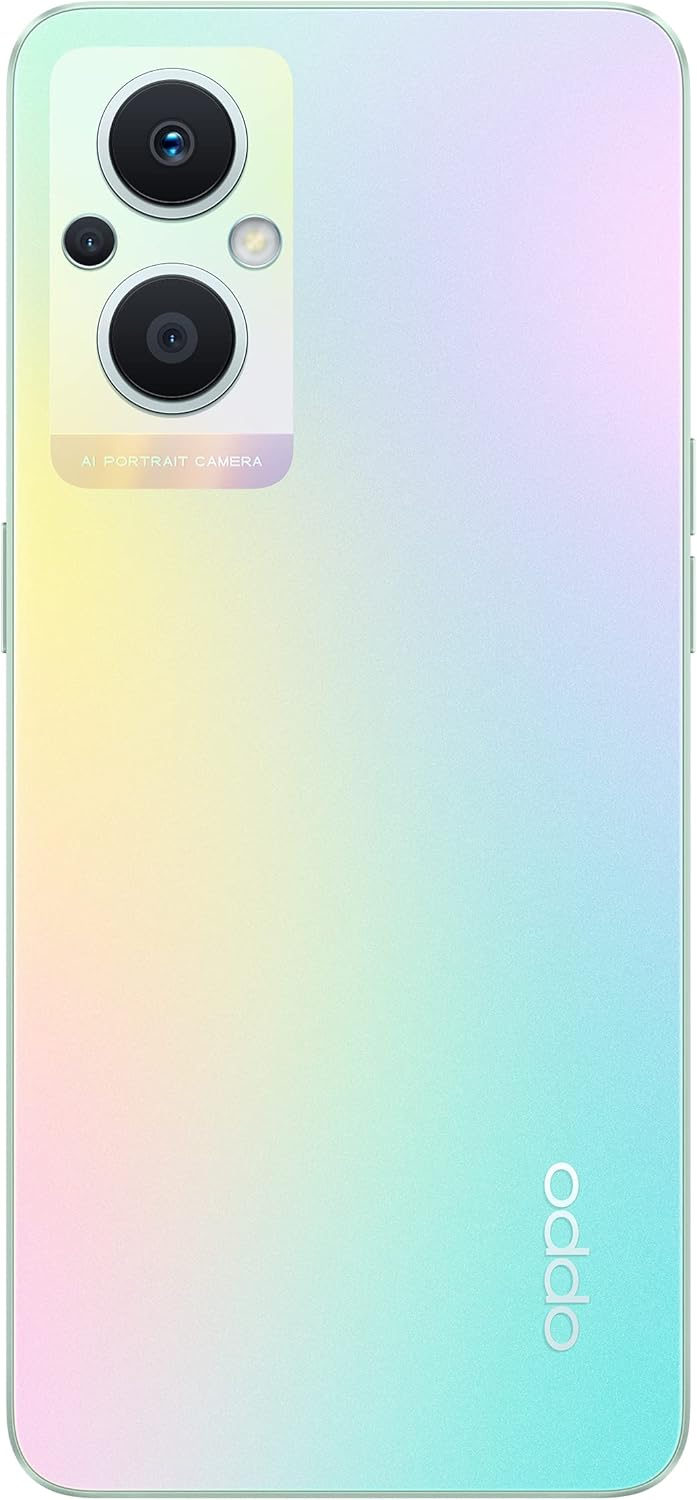
The back of the OPPO F21 Pro (5G) showcases its triple camera system and sleek design.

Maelezo ya kina view of the AI Portrait Camera module on the rear, highlighting the lenses and flash.
The OPPO F21 Pro (5G) is equipped with a versatile camera system:
- Kamera ya Nyuma: 64 MP (wide, f/1.7, PDAF), 2 MP (macro, f/2.4), 2 MP (depth, f/2.4).
- Kamera ya mbele: 16 MP (wide, f/2.4).
Access the Camera app from your home screen or app drawer. Select various shooting modes such as Photo, Video, Portrait, Macro, and more. Tap the screen to focus and press the shutter button to capture images or start/stop video recording.
3.4 Muunganisho
- Mtandao wa 5G: Supports N1/ N8/ N28/ N41/ N77/ N78 SA/NSA bands.
- Wi-Fi: Unganisha kwenye mitandao isiyotumia waya kwa ufikiaji wa mtandao.
- Bluetooth: Oanisha na vifaa visivyotumia waya kama vile vipokea sauti vya masikioni na spika.
- USB Type-C: Kwa malipo na uhamisho wa data.
3.5 Vipengele vya Usalama
The device includes Face Recognition for convenient and secure unlocking. You can set this up in the Security settings menu.
4. Matengenezo
4.1 Utunzaji wa Betri
Your OPPO F21 Pro (5G) is equipped with a 4500 mAh Lithium-Polymer battery. To maximize battery life:
- Epuka halijoto kali.
- Tumia chaja asili na kebo ya USB iliyotolewa.
- Epuka kutoa betri kikamilifu mara kwa mara.
- Optimize battery settings in the device's settings menu.
4.2 Kusafisha Kifaa Chako
The device is rated as Water Resistant. To clean your phone:
- Zima kifaa kabla ya kusafisha.
- Tumia kitambaa laini kisicho na pamba.
- Epuka kutumia kemikali kali, visafishaji vya abrasive, au hewa iliyobanwa.
- Usiingize kifaa ndani ya maji.
4.3 Usasisho wa Programu
Regularly check for and install software updates to ensure your device has the latest features, security patches, and performance improvements. You can check for updates in the device's Settings menu under 'About phone' or 'Software update'.
5. Utatuzi wa shida
If you encounter issues with your OPPO F21 Pro (5G), try the following basic troubleshooting steps:
- Kifaa Kimeshindwa Kujibu: Bonyeza na ushikilie Kitufe cha Kuwasha/kuzima kwa takriban sekunde 10-15 ili kulazimisha kuwasha upya.
- Masuala ya Mtandao: Ensure your SIM card is correctly inserted. Check your network settings and ensure mobile data or Wi-Fi is enabled. Restart your device.
- Kushindwa kwa Programu: Funga na ufungue tena programu. Futa akiba na data ya programu katika Mipangilio > Programu. Tatizo likiendelea, sanidua na usakinishe upya programu.
- Betri inaisha haraka: Review battery usage in Settings to identify power-hungry apps. Reduce screen brightness, disable unnecessary features (GPS, Bluetooth, Wi-Fi) when not in use.
- Hifadhi Imejaa: Futa isiyo ya lazima files, photos, and videos. Move media to a microSD card if installed. Clear app caches.
For more complex issues, refer to the official OPPO support webtovuti au wasiliana na huduma kwa wateja.
6. Vipimo

Juuview of the OPPO F21 Pro (5G) showcasing its main features including the 64MP AI Triple Camera, AMOLED screen, and Qualcomm Snapdragon 5G SoC.

The OPPO F21 Pro (5G) in Rainbow Spectrum, displaying both its front and rear aesthetics.
| Kipengele | Vipimo |
|---|---|
| Chapa | OPPO |
| Jina la Mfano | OPPO F21 Pro (5G) |
| Mfumo wa Uendeshaji | Android 12.0 |
| Kichakataji | Qualcomm SM6375 Snapdragon 695 5G (nm 6), Octa-core (2x2.2 GHz Kryo 660 Gold & 6x1.7 GHz Kryo 660 Silver) |
| RAM | GB 8 |
| Hifadhi ya Ndani | GB 128 |
| Hifadhi inayoweza kupanuliwa | microSDXC |
| Ukubwa wa skrini | Inchi 6.43 (Sentimita 16.33) |
| Aina ya Kuonyesha | AMOLED |
| Azimio | pikseli 1080 x 2400 |
| Kamera ya Nyuma | MP 64 (upana), MP 2 (jumla), MP 2 (kina) |
| Kamera ya mbele | MP 16 (upana) |
| Uwezo wa Betri | 4500 mAh (Lithium-Polymer, non-removable) |
| Teknolojia ya Simu | 5G (SIM mbili) |
| Teknolojia ya Wireless | Wi-Fi, Bluetooth |
| Aina ya kiunganishi | USB Aina C |
| Usalama wa Biometriska | Utambuzi wa Uso |
| Kiwango cha Upinzani wa Maji | Sugu ya Maji |
| Vipimo | Inchi 6.3 x 2.87 x 0.31 |
| Uzito wa Kipengee | Gramu 173 |
7. Taarifa za Udhamini
Your OPPO F21 Pro (5G) smartphone comes with a Udhamini wa mtengenezaji wa mwaka 1. Udhamini huu unashughulikia kasoro katika nyenzo na utengenezaji chini ya matumizi ya kawaida. Tafadhali hifadhi uthibitisho wako wa ununuzi kwa madai ya udhamini.
The warranty does not cover damage caused by misuse, accidents, unauthorized modifications, or normal wear and tear. For full terms and conditions, please refer to the warranty card included in your product packaging or visit the official OPPO webtovuti.
8. Msaada
For further assistance, technical support, or to find service centers, please visit the official OPPO support webtovuti:
You may also find helpful FAQs and community forums on the support webtovuti.