
PALOVUE iSound
PALOVUE Wireless Earbuds User Manual
Model: iSound
Your guide to setting up, operating, and maintaining your PALOVUE iSound Wireless Earbuds.
1. Utangulizi
The PALOVUE iSound Wireless Earbuds are designed to provide a superior audio experience with advanced features for daily use. Equipped with Qualcomm CSR and Bluetooth 5.0 technology, these earbuds offer a stable and crystal-clear connection, supporting aptX HD sound quality. The CVC 8.0 Noise Cancelling technology with 4 built-in microphones ensures clear calls by effectively reducing ambient noise. Their ergonomic design and multiple ear-tip sizes provide a comfortable and secure fit for extended wear.
The iSound earbuds feature convenient one-step reconnection and intuitive one-touch operation. With up to 24 hours of playtime using the compact charging case, they are ideal for on-the-go listening. Further customization and control are available through the PALOVUE iSound APP.

Image: PALOVUE iSound Wireless Earbuds resting in their open charging case, showcasing muundo wao mweusi mweusi.
2. Ni nini kwenye Sanduku
Upon opening your PALOVUE iSound package, you will find the following components:
- Kipochi cha Kuchaji Bila Waya
- PALOVUE iSound Earbuds (Left and Right)
- Ear Tips (multiple sizes for a customizable fit)
- Kebo ya Kuchaji (USB-C)
- Lanyard
- Sanduku la Kufunga
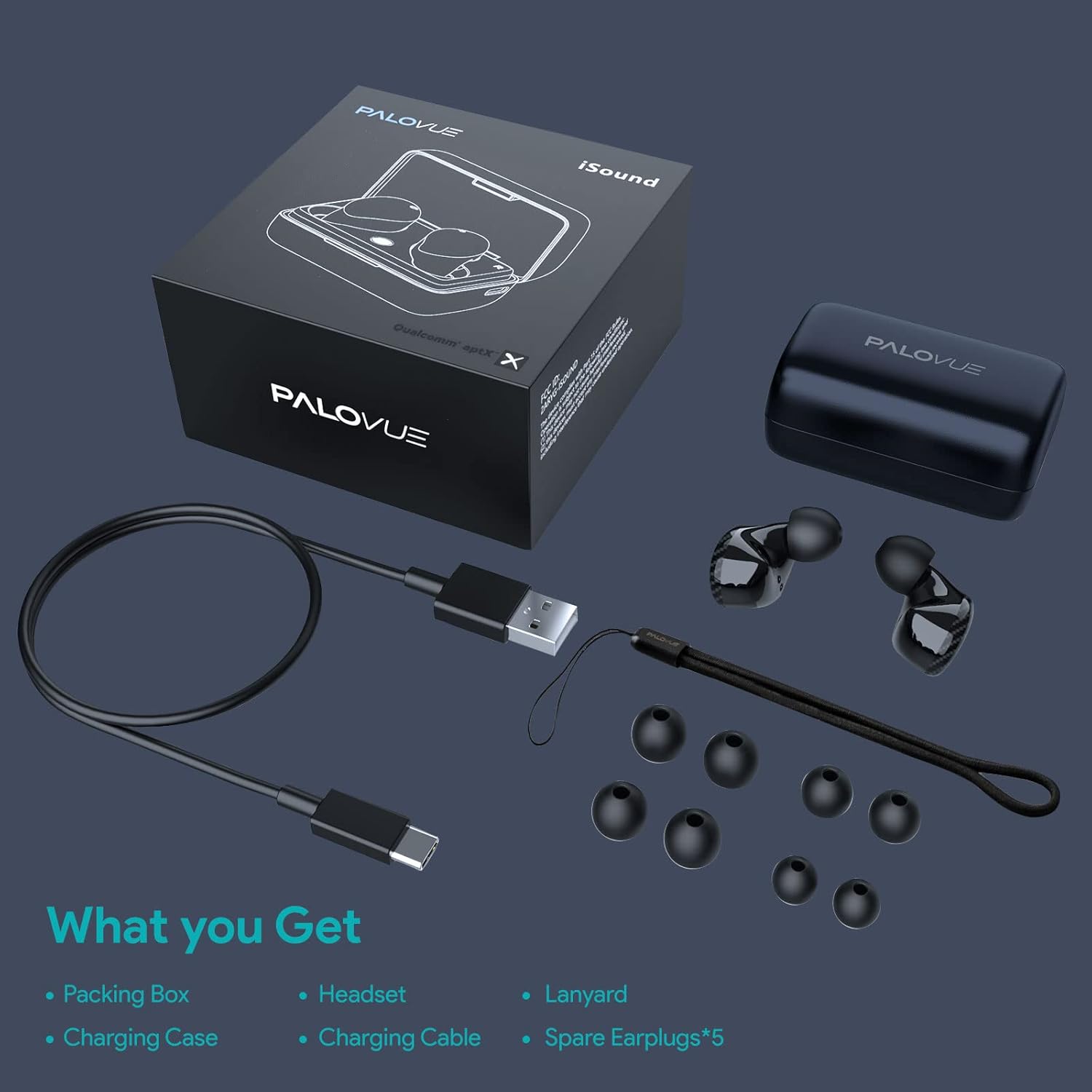
Image: A flat lay showing all items included in the PALOVUE iSound package: the packing box, charging case, earbuds, charging cable, lanyard, and five pairs of spare ear tips.
3. Mwongozo wa Kuweka
3.1 Kuchaji Awali
Before first use, ensure both the earbuds and the charging case are fully charged. Place the earbuds into the charging case. Connect the provided USB-C cable to the charging case and a power source. The indicator lights on the case will show charging status. A full charge typically takes approximately 2 hours for the case.
3.2 Kuoanisha na Kifaa Chako
The PALOVUE iSound earbuds feature one-step reconnection for convenience.
- Fungua kesi ya malipo. Vifaa vya sauti vya masikioni vitawashwa kiotomatiki na kuingia katika hali ya kuoanisha.
- Kwenye simu yako mahiri au kifaa kilichowezeshwa na Bluetooth, nenda kwenye mipangilio ya Bluetooth.
- Tafuta "PALOVUE iSound" in the list of available devices and select it to connect.
- Baada ya kuunganishwa, utasikia uthibitisho unaosikika, na vifaa vya sauti vya masikioni vitakuwa tayari kutumika.
- Kwa matumizi yanayofuata, fungua tu kisanduku cha kuchaji, na vifaa vya masikioni vitaunganishwa kiotomatiki kwenye kifaa cha mwisho kilichooanishwa.
Video: A detailed guide demonstrating the connection and operation of the PALOVUE iSound earbuds, including initial pairing steps and touch control functions.
4. Kuendesha vifaa vyako vya masikioni
4.1 Vidhibiti vya Kugusa
The PALOVUE iSound earbuds feature intuitive touch controls on each earbud. The specific functions can be customized via the PALOVUE iSound APP.
| Kitendo | Vifaa vya masikioni vya Kushoto | Earbud ya kulia |
|---|---|---|
| Gonga Moja | Sauti Chini | Volume Up |
| Gonga Mara Mbili | Cheza/Sitisha Muziki, Jibu/Katisha Simu | Cheza/Sitisha Muziki, Jibu/Katisha Simu |
| Bonyeza kwa Muda Mrefu | Previous Song, Reject Call | Next Song, Reject Call |
Video: A short demonstration of the touch controls for the PALOVUE iSound earbuds, showing how to adjust volume, skip tracks, and manage calls.
4.2 Using the PALOVUE iSound APP
Enhance your experience by downloading the PALOVUE iSound APP. The app allows you to:
- Customize touch control functions (e.g., volume, track control, call management).
- Adjust equalizer (EQ) settings for personalized sound profiles (Male Vocals, Electronic, Jazz, Rock, Classical, Female Vocals, Original, Customize).
- Check battery levels of each earbud.
- Access device information and firmware updates.

Image: A woman wearing PALOVUE iSound earbuds, illustrating their comfortable fit and suitability for daily use.

Picha: Ililipuka view diagram of the PALOVUE iSound earbud, detailing its internal structure and emphasizing Qualcomm AptX and Deep Bass sound capabilities.
5. Matengenezo
To ensure the longevity and optimal performance of your PALOVUE iSound Wireless Earbuds, follow these maintenance guidelines:
- Kusafisha: Safisha vifaa vya masikioni na kisanduku cha kuchaji mara kwa mara kwa kitambaa laini, kikavu, kisicho na rangi. Usitumie visafishaji au viyeyusho vyenye kukwaruza. Ondoa nta au uchafu wowote wa sikio kwa upole kutoka kwenye ncha za sikio na matundu ya spika kwa kutumia brashi ndogo, laini au swabu ya pamba.
- Hifadhi: Wakati hazitumiki, weka vifaa vya sauti vya masikioni kwenye kisanduku chao cha kuchaji ili kuvilinda kutokana na vumbi, uchafu, na uharibifu wa kimwili.
- Utunzaji wa Betri: Avoid fully depleting the battery frequently. For long-term storage, charge the earbuds and case to about 50% to preserve battery health.
- Upinzani wa Maji: The earbuds are rated IPX4 for water resistance, meaning they are protected against splashing water from any direction. They are designed for sports and can withstand sweat and light rain, but they are not suitable for swimming or submersion in water. Ensure the earbuds are dry before placing them back in the charging case.
Video: A short promotional video highlighting the compact size and powerful features of the iSound True Wireless Earbuds, including their IPX4 water resistance.
6. Utatuzi wa shida
If you encounter issues with your PALOVUE iSound Wireless Earbuds, try the following solutions:
6.1 Masuala ya Kuoanisha
- Vifaa vya sauti vya masikioni haviunganishi: Ensure Bluetooth is enabled on your device. Place earbuds back in the case, close it, wait a few seconds, then open it again to re-initiate pairing mode.
- Kifaa kimoja tu cha sauti cha masikioni kinachofanya kazi: Try placing both earbuds back in the charging case, closing the lid, and then reopening it. Ensure both earbuds have sufficient charge.
- Vifaa vya masikioni havionekani kwenye orodha ya Bluetooth: Turn off Bluetooth on your device, then turn it back on. Restart your device if necessary.
6.2 Masuala ya Ubora wa Sauti
- Sauti ya chini: Increase the volume on both your earbuds (via touch control) and your connected device.
- Sauti iliyopotoshwa: Ensure the earbuds are within Bluetooth range of your device. Check for obstructions between the earbuds and your device.
- Ubora duni wa simu: Ensure the microphones are not obstructed. CVC 8.0 Noise Cancelling technology helps, but extreme noise environments can still affect clarity.
6.3 Battery and Charging Issues
- Vifaa vya masikioni havichaji: Ensure the charging contacts on the earbuds and inside the case are clean and dry. Try a different charging cable or power adapter.
- Kesi haichaji: Hakikisha kebo ya kuchaji na chanzo cha umeme vinafanya kazi vizuri.
6.4 How to Reset Your Earbuds
If you experience persistent issues, a factory reset may resolve them:
- Weka vipuli vyote vya masikio kwenye kesi ya kuchaji.
- Press and hold the reset button on the charging case (usually located inside or near the charging port) until the indicator lights on the earbuds flash red and green alternately.
- Release the button and wait until only the green light flashes, indicating the reset is complete.
- Ondoa vifaa vya masikioni kutoka kwenye kipochi na ujaribu kuviunganisha tena na kifaa chako.
Refer to the "PALOVUE iSound Connection operation guide" video in the Setup section for a visual demonstration of the reset process.
7. Vipimo
| Kipengele | Maelezo |
|---|---|
| Chapa | PALOVUE |
| Jina la Mfano | iSound |
| Teknolojia ya Uunganisho | Isiyo na waya (Bluetooth 5.0) |
| Teknolojia ya Mawasiliano ya Wireless | Bluetooth |
| Chipset | Qualcomm CSR QCC3020 |
| Udhibiti wa Kelele | CVC 8.0 Noise Cancellation (for calls) |
| Maikrofoni | 4 Mics |
| Aina ya Kudhibiti | Udhibiti wa Kugusa |
| Uwekaji wa Masikio | Katika Masikio |
| Kipengele cha Fomu | Katika Masikio |
| Maisha ya Betri (Earbuds) | Hadi saa 6 (takriban.) |
| Jumla ya Muda wa Kucheza (pamoja na kesi) | Hadi Saa 24 |
| Muda wa Kuchaji (Kesi) | Saa 2 |
| Msururu wa Bluetooth | Hadi Mita 10 (futi 32.8) |
| Kiwango cha Upinzani wa Maji | IPX4 (Splashproof) |
| Nyenzo | Silicone (Ear Tips) |
| Uzito wa Kipengee | 1.76 wakia |
| Vifaa Sambamba | Smartphones, Tablets, Laptops, Desktops, Smart TVs, Car Audio Systems |
8. Udhamini na Msaada
PALOVUE products typically come with a manufacturer's warranty. Please refer to the warranty card included in your product packaging for specific terms and conditions, including warranty period and coverage details. For technical support, troubleshooting assistance, or warranty claims, please contact PALOVUE customer service through their official webtovuti au maelezo ya mawasiliano yaliyotolewa katika nyaraka za bidhaa yako.
You can also visit the official PALOVUE store on Amazon for more information and support: PALOVUE Amazon Store.