
Fnatic BOLT
Fnatic BOLT Wireless Gaming Mouse User Manual
Utangulizi
This manual provides detailed instructions for the setup, operation, maintenance, and troubleshooting of your Fnatic BOLT Wireless Gaming Mouse. Please read this manual thoroughly before using the product to ensure optimal performance and longevity.
Bidhaa Imeishaview
The Fnatic BOLT is a lightweight wireless gaming mouse designed for high performance. It features a durable construction and versatile connectivity options.
Vipengele
- Left and Right Click Buttons
- Gurudumu la Kutembeza
- DPI Cycle Button (typically located on the bottom or top)
- Vifungo vya upande (mbele/nyuma)
- Mlango wa Kuchaji wa USB-C
- Wireless Receiver (dongle)

Kielelezo 1: Juu view of the Fnatic BOLT Wireless Gaming Mouse, showing the main click buttons and scroll wheel.

Kielelezo 2: Pembe view of the Fnatic BOLT Wireless Gaming Mouse, highlighting the two programmable side buttons.

Kielelezo 3: Mbele view of the Fnatic BOLT Wireless Gaming Mouse, displaying the USB-C charging port.
Sanidi
1. Uchaji wa Awali
Before first use, it is recommended to fully charge the Fnatic BOLT mouse.
- Connect the provided USB-C cable to the charging port on the front of the mouse.
- Connect the other end of the USB-C cable to a powered USB port on your computer or a USB wall adapter.
- The mouse's indicator light will show charging status (refer to product documentation for specific light patterns). A full charge typically takes a few hours.
2. Kuunganisha kwenye Kompyuta yako
The Fnatic BOLT supports two wireless connection modes: 2.4 GHz wireless (via USB dongle) and Bluetooth.
2.1. Muunganisho wa Waya wa 2.4 GHz
- Locate the USB wireless receiver (dongle) that came with your mouse.
- Chomeka kipokeaji cha USB kwenye mlango wa USB unaopatikana kwenye kompyuta yako.
- Washa kipanya kwa kutumia swichi ya kuwasha iliyo chini ya kipanya.
- The mouse should automatically connect to the receiver. The indicator light will confirm a successful connection.
2.2. Uunganisho wa Bluetooth
- Hakikisha kuwa Bluetooth ya kompyuta yako imewashwa.
- Turn on the mouse and switch it to Bluetooth mode (refer to the mouse's bottom switch or button for mode selection).
- Kwenye kompyuta yako, nenda kwa mipangilio ya Bluetooth na utafute vifaa vipya.
- Select "Fnatic BOLT" from the list of available devices to pair.
- The mouse's indicator light will confirm successful pairing.
Maagizo ya Uendeshaji
Marekebisho ya DPI
The Fnatic BOLT mouse allows you to adjust its Dots Per Inch (DPI) sensitivity. This mouse features 4 preset DPI levels.
- Locate the DPI cycle button, typically on the bottom of the mouse.
- Press the DPI button to cycle through the available sensitivity settings.
- An indicator light (often on the scroll wheel or top of the mouse) may change color or flash to indicate the current DPI level.
Kazi za Kitufe
- Bofya Kushoto: Kitendo cha msingi, uteuzi.
- Bonyeza kulia: Menyu ya muktadha, kitendo cha pili.
- Mbofyo wa Gurudumu la Kusogeza: Middle click, often used for opening links in new tabs or specific in-game functions.
- Sogeza Juu/Chini: Navigating documents or web kurasa.
- Vifungo vya upande: Default to Forward/Back in web browsers. These can often be customized via software (if available).
Usimamizi wa Nguvu
- To conserve battery life, turn off the mouse using the power switch when not in use for extended periods.
- The mouse may enter a sleep mode after a period of inactivity. Move the mouse or click a button to wake it up.
- Monitor the battery indicator (if available) to know when to recharge.
Matengenezo
Kusafisha
- Safisha uso wa panya mara kwa mara kwa kitambaa laini, kikavu, kisicho na rangi.
- Kwa uchafu mkaidi, kidogo dampjw.org sw kitambaa chenye maji au myeyusho mdogo wa kusafisha. Epuka kemikali kali.
- Clean the optical sensor on the bottom of the mouse with a cotton swab to ensure accurate tracking.
- Usiruhusu vimiminika kuingia kwenye vipengele vya ndani vya panya.
Utunzaji wa Betri
- Epuka kutoa betri kikamilifu mara kwa mara.
- Hifadhi panya mahali pakavu na penye baridi wakati haitumiki kwa muda mrefu.
- Usimweke panya kwenye halijoto kali.
Kutatua matatizo
Panya Haitikii
- Angalia Betri: Ensure the mouse is charged. Connect it to the USB-C cable and allow it to charge for a period.
- Kubadilisha Nguvu: Verify the mouse's power switch is in the "ON" position.
- Wireless Connection (2.4 GHz):
- Hakikisha kipokezi cha USB kimechomekwa kwa usalama kwenye mlango wa USB unaofanya kazi. Jaribu mlango tofauti wa USB.
- Ensure the mouse is within range of the receiver.
- Epuka vyanzo vya kuingiliwa (kwa mfano, vifaa vingine visivyo na waya, vitu vikubwa vya chuma).
- Uunganisho wa Bluetooth:
- Hakikisha kuwa Bluetooth ya kompyuta yako imewashwa.
- Check if the mouse is in Bluetooth pairing mode or already paired. Re-pair if necessary.
- Remove and re-add the device in your computer's Bluetooth settings.
- Anzisha upya: Anzisha tena kompyuta yako.
Ufuatiliaji Usio Sahihi
- Sensorer Safi: Safisha kihisi cha macho kilicho chini ya panya.
- Uso: Ensure you are using the mouse on a suitable surface. Highly reflective or uneven surfaces can affect tracking. A mouse pad is recommended.
- Kuweka DPI: Adjust the DPI setting to a level that suits your preference and task.
Maisha Mafupi ya Betri
- Inachaji: Hakikisha panya imechajiwa kikamilifu.
- Zima umeme: Remember to turn off the mouse when not in use.
- Matumizi: High-intensity usage or certain settings might consume more power.
Vipimo
| Kipengele | Maelezo |
|---|---|
| Chapa | Fnatic |
| Jina la Mfano | FnaticGear BOLT |
| Nambari ya Mfano wa Kipengee | BOLT |
| Rangi | nyeupe |
| Teknolojia ya Uunganisho | Bluetooth, Wi-Fi (2.4 GHz Wireless) |
| Teknolojia ya kugundua harakati | Macho |
| Idadi ya Vifungo | 6 |
| Mwelekeo wa Mikono | Sawa |
| Vipengele Maalum | Nyepesi |
| Aina ya Chanzo cha Nguvu | Wireless (Rechargeable Battery) |
| Betri Imejumuishwa | Ndiyo (betri 1 ya Lithiamu Metal) |
| Yaliyomo ya Nishati ya Betri ya Lithiamu | Milioni 470amp Saa (mAh) |
| Vipimo vya Bidhaa | 12.5 x 6.5 x 0.1cm; 69g |
| Vifaa Sambamba | Laptop, Kompyuta ya kibinafsi |
| Mifumo ya Uendeshaji | Linux, Windows 7, Windows XP (and newer) |
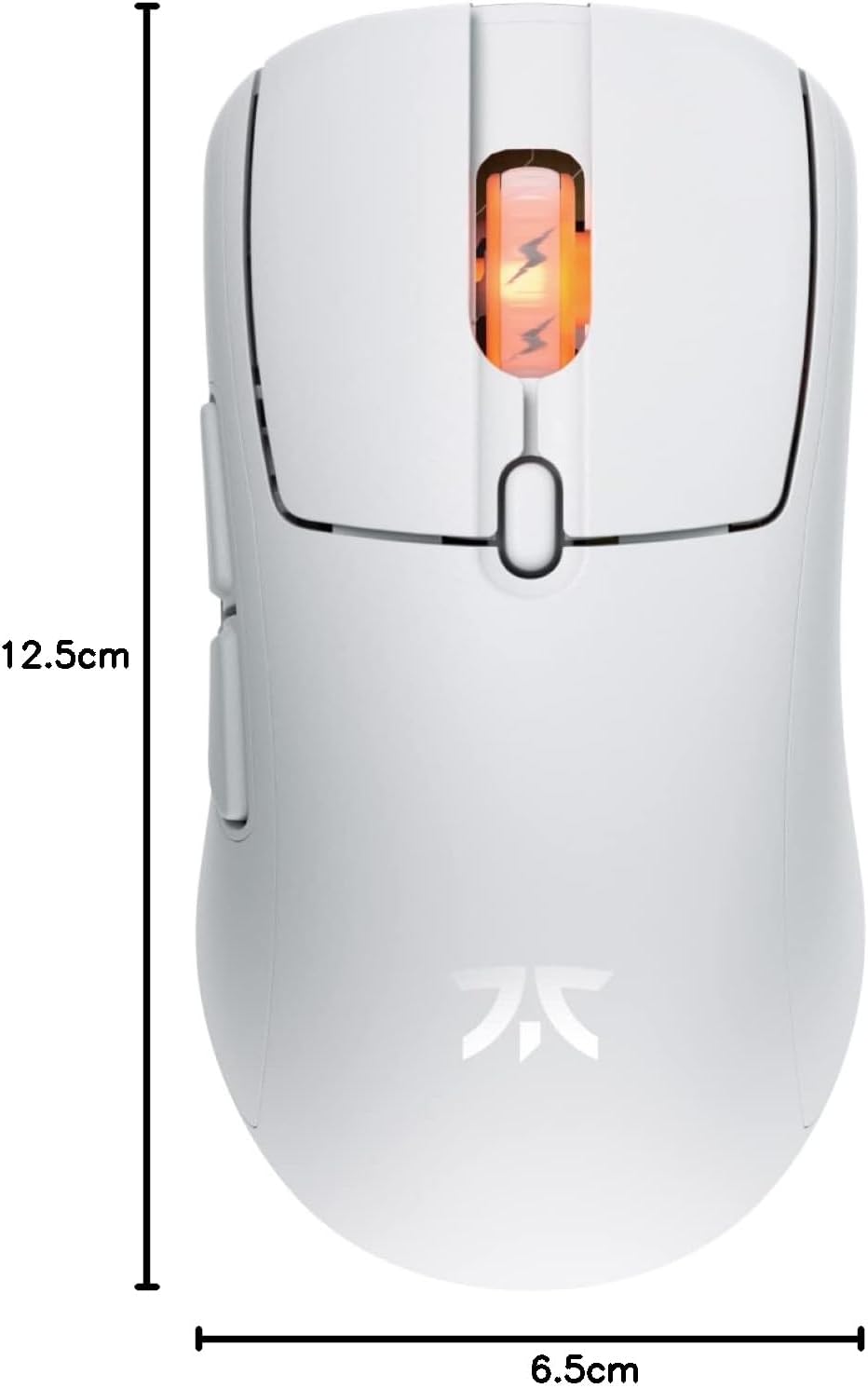
Figure 4: Diagram showing the dimensions of the Fnatic BOLT Wireless Gaming Mouse.
Udhamini na Msaada
For information regarding warranty coverage and technical support, please refer to the official Fnatic webtovuti au kadi ya udhamini iliyojumuishwa na bidhaa yako.
You can typically find support resources, FAQs, and contact information on the manufacturer's official support pages.
Ask a question about this manual
Ask about setup, troubleshooting, compatibility, parts, safety, or missing instructions. Manuals+ will review the question and use this page’s manual context to help answer it.