
Utangulizi
This manual provides detailed instructions for the setup, operation, and maintenance of your Acogedor Bluetooth 5.0 Receiver Wireless Audio Adapter. Please read this manual thoroughly before using the product to ensure proper function and to prevent damage.

Image: The Acogedor Bluetooth 5.0 Receiver, highlighting its NFC capability.
Taarifa za Usalama
- Usifunue kifaa kwa maji au unyevu.
- Epuka halijoto kali.
- Do not disassemble the device. This will void the warranty.
- Use only the provided or recommended power adapter (DC 5V).
- Weka mbali na watoto.
Yaliyomo kwenye Kifurushi
Thibitisha kuwa vipengee vyote vipo kwenye kifurushi:
- Acogedor Bluetooth 5.0 Receiver
- Kebo ya Sauti ya 3.5mm
- Kebo ya Sauti ya RCA
- Cable ya Nguvu ya USB
- Mwongozo wa Mtumiaji (hati hii)
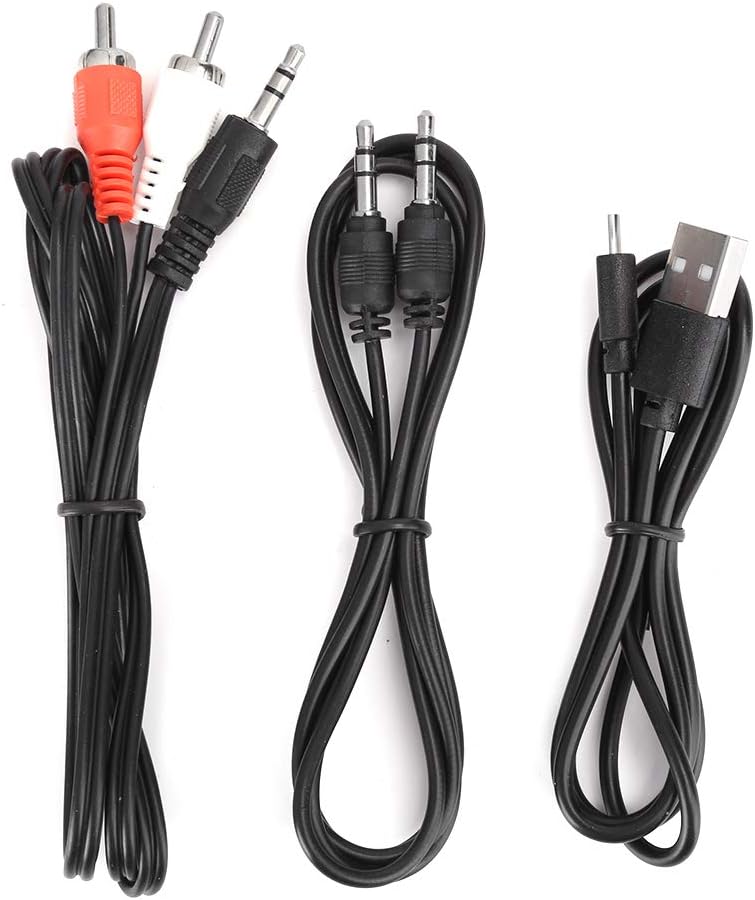
Image: The various audio and power cables included with the receiver.
Bidhaa Imeishaview
Familiarize yourself with the ports and controls of the Acogedor Bluetooth 5.0 Receiver.

Image: Rear panel with power input, USB port, RCA audio output, and 3.5mm AUX output.

Image: Top panel with playback control buttons (Previous, Play/Pause, Next).
- Ingizo la DC 5V: Power connection port (Micro USB).
- Mlango wa USB: Kwa ajili ya uchezaji wa diski ya U.
- Sauti Nje (RCA): Red and white RCA jacks for audio output to amplifiers au wasemaji.
- AUX nje: 3.5mm jack for audio output to speakers or headphones.
- Vifungo vya Kudhibiti: Wimbo uliopita, Cheza/Sitisha, Wimbo unaofuata.
- Eneo la NFC: For near-field pairing with compatible devices.
Sanidi
1. Uunganisho wa Nguvu
- Connect the provided USB power cable to the Uingizaji wa DC 5V bandari kwenye mpokeaji.
- Plug the other end of the USB cable into a 5V USB power adapter (not included) or a USB port on your audio equipment.
- The indicator light on the receiver will illuminate, indicating it is powered on.
2. Muunganisho wa Sauti Inayotoka
Choose one of the following methods to connect the receiver to your audio system:
- Kutumia Kebo za RCA: Connect one end of the RCA audio cable to the Sauti Iliyotolewa (RCA) ports (red to red, white to white) on the receiver. Connect the other end to the corresponding RCA input ports on your amplifier au wasemaji amilifu.
- Using 3.5mm AUX Cable: Unganisha ncha moja ya kebo ya sauti ya 3.5mm kwenye AUX nje port on the receiver. Connect the other end to the 3.5mm AUX input port on your speaker, headphones, or ampmaisha zaidi.

Image: The receiver connected to an external speaker and a smartphone, demonstrating a typical setup.
3. Kuoanisha Bluetooth
The receiver will automatically enter pairing mode when powered on. The indicator light will flash.
- NFC Pairing (Recommended for NFC-enabled devices):
- Ensure NFC is enabled on your smartphone or other NFC-enabled device.
- Tap your NFC-enabled device gently against the Eneo la NFC on the top of the receiver.
- Confirm the pairing request on your device. The receiver will connect automatically.

Image: A smartphone being used to initiate NFC pairing with the receiver.
- Uoanishaji wa Bluetooth Mwongozo:
- Kwenye simu yako mahiri au kifaa kilichowezeshwa na Bluetooth, nenda kwenye mipangilio ya Bluetooth.
- Tafuta available devices. The receiver will appear as "Acogedor Bluetooth Receiver" or similar.
- Select the receiver from the list to connect.
- Once connected, the indicator light will become solid blue.
Maagizo ya Uendeshaji
Uchezaji wa Sauti ya Bluetooth
- Ensure the receiver is powered on and successfully paired with your device.
- Start playing audio on your paired device. The sound will be transmitted wirelessly to the receiver and output through your connected speakers.
- Tumia Vifungo vya Kudhibiti on the receiver or your paired device to manage playback:
- Cheza/Sitisha: Bonyeza kitufe cha katikati.
- Wimbo Ufuatao: Bonyeza kitufe cha kulia.
- Wimbo Uliopita: Bonyeza kitufe cha kushoto.
Uchezaji wa Disk
The receiver supports playing audio files moja kwa moja kutoka kwa kiendeshi cha USB flash.
- Ingiza kiendeshi cha USB flash kilicho na sauti files kwenye Bandari ya USB kwenye mpokeaji.
- The receiver will automatically detect the U disk and begin playing audio.
- Tumia Vifungo vya Kudhibiti to navigate tracks.

Image: The receiver demonstrating connections for both Bluetooth audio from a smartphone and direct playback from a USB flash drive.
Matengenezo
- Safisha kifaa kwa kitambaa laini na kavu. Usitumie cleaners kioevu au erosoli.
- Weka bandari bila vumbi na uchafu.
- Store the receiver in a cool, dry place when not in use.
Kutatua matatizo
| Tatizo | Sababu inayowezekana | Suluhisho |
|---|---|---|
| No power indicator light. | Power cable not connected or faulty power source. | Ensure the USB power cable is securely connected to both the receiver and a working 5V power source. Try a different USB port or adapter. |
| Haiwezi kuoanisha kupitia Bluetooth. | Receiver not in pairing mode; Bluetooth disabled on source device; too many paired devices. | Ensure the receiver is powered on and the indicator light is flashing (pairing mode). Enable Bluetooth on your source device. Forget previous pairings on your device and try again. Move closer to the receiver. |
| Hakuna pato la sauti. | Incorrect audio cable connection; volume too low; wrong input selected on amplifier/msemaji. | Verify audio cables are correctly connected to the Sauti Nje ports on the receiver and the correct input on your speaker/amplifier. Increase volume on both the source device and the connected audio system. Ensure the correct input source is selected on your amplifier/msemaji. |
| U Disk playback not working. | U disk not inserted correctly; unsupported file format; U disk corrupted. | Ensure the U disk is fully inserted into the Bandari ya USB. Check if audio files are in a supported format (e.g., MP3). Try a different U disk. |
Vipimo
| Kipengele | Maelezo |
|---|---|
| Mfano | Acogedordebyv7h1rw1035 |
| Toleo la Bluetooth | 5.0 |
| Teknolojia ya Uunganisho | Auxiliary, Bluetooth, NFC, RCA, USB |
| Njia ya Pato la Sauti | Stereo |
| Aina ya kiunganishi | Jack 3.5mm, RCA, USB |
| Vifaa Sambamba | Smartphone, Speaker, Ampmaisha zaidi |
| Ingizo la Nguvu | DC 5V (kupitia Micro USB) |
| Vipimo vya Bidhaa | Inchi 6.3 x 5.12 x 1.57 |
| Uzito wa Kipengee | Wakia 5.3 (Kilo 0.15) |
| Rangi zisizo na waya | Up to 15 meters / 49.2 feet (barrier-free) |

Image: Key features of the receiver including Bluetooth reception, signal transmission range, USB playback, and decoding chip.
Udhamini na Msaada
Acogedor products are designed for reliability and performance. For any questions, technical support, or warranty claims, please contact Acogedor customer service through the retailer where the product was purchased.
Tafadhali hifadhi uthibitisho wako wa ununuzi kwa madhumuni ya udhamini.