
Pipishell PILFK1
Mwongozo wa Maelekezo ya Kuweka Ukutani kwa Televisheni ya Pipishell Kamili ya Mwendo
Model: PILFK1 | Brand: Pipishell
Utangulizi
Thank you for choosing the Pipishell Full Motion TV Wall Mount. This manual provides detailed instructions for safe installation, operation, and maintenance of your TV mount. Designed for most 37-75 inch TVs weighing up to 132lbs, this mount offers full motion adjustment for optimal viewing.
Taarifa Muhimu za Usalama
Please read all instructions carefully before installation. Failure to do so may result in personal injury or property damage. Keep this manual for future reference.
- Uwezo wa Uzito: Usizidi uzani wa juu wa uwezo wa lbs 132 (kilo 60).
- Upatanifu wa Ukubwa wa TV: Suitable for TVs between 37 and 75 inches.
- Utangamano wa VESA: Compatible with VESA mounting patterns from 200x100mm to 600x400mm. Verify your TV's VESA pattern before installation.
- Aina ya Ukuta: This mount is designed for installation on 12" or 16" wood studs, solid concrete, or brick walls. USIsakinishe kwenye drywall pekee.
- Ensure all screws are tightened securely but do not overtighten.
- Daima tumia kifaa cha kutafuta vijiti ili kupata vijiti vya mbao kwa usahihi.
Ni nini kwenye Sanduku
Kifurushi kinajumuisha vipengele vifuatavyo:
- Kiunganishi cha Kupachika TV Ukutani
- Kuweka Kigezo
- Mwongozo wa Maagizo
- Standard Mounting Hardware (various TV bolts, lag screws, washers, spacers, wall anchors)
- Kiwango Kidogo
- Vifungo vya Cable
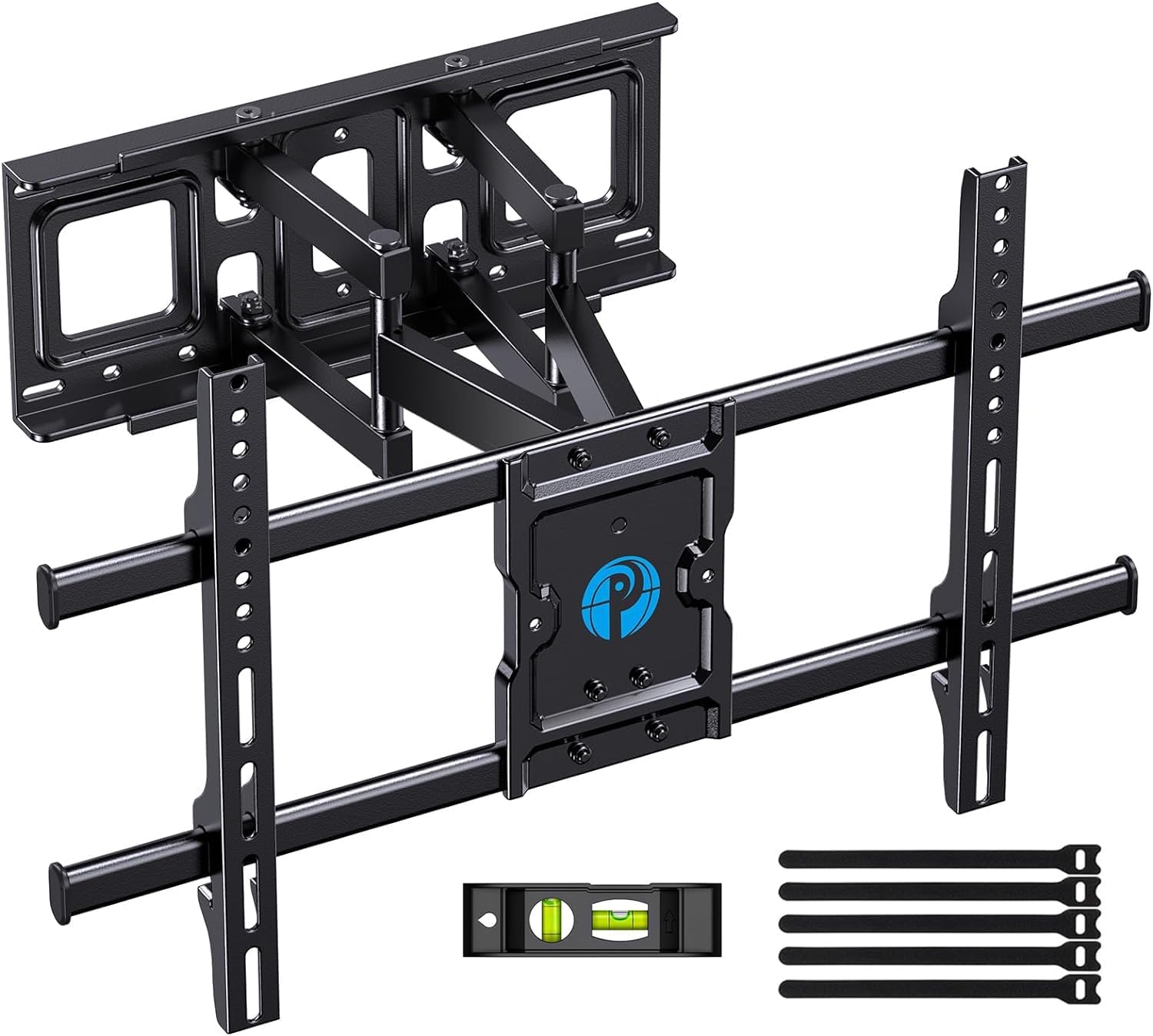
Image: All components included in the Pipishell TV Wall Mount package.
Vipimo
| Vipimo | Thamani |
|---|---|
| Vipimo vya Bidhaa | Inchi 23.62 x 0.79 x 15.75 |
| Uzito wa Kipengee | Pauni 10.56 |
| Upeo Saizi Inayolingana | Inchi 75 |
| Saizi Ya Chini Inayooana | Inchi 37 |
| Kiwango cha Juu cha Uwezo wa Kupakia | Pauni 132 (kilo 60) |
| Utangamano wa VESA | 200x100mm hadi 600x400mm |
| Aina ya Mwendo | Kuzunguka, Kuinamisha, Kupanua |
| Nyenzo | Aloi ya chuma |
| Rangi | Nyeusi |
| Nambari ya Mfano | PILFK1 |
Kuweka na Kuweka
The installation process is designed to be straightforward. Always ensure you have the necessary tools and verify your wall construction before drilling.
1. Verify TV Compatibility
Before starting, ensure your TV's size, weight, and VESA pattern are compatible with the mount. The mount supports VESA patterns from 200x100mm to 600x400mm.

Image: How to measure your TV's VESA pattern.
2. Choose Wall Type and Location
Identify your wall type (wood studs, concrete, or brick). Use a stud finder for wood studs. The mount fits 12" and 16" wood studs. Do not install into drywall alone.

Image: Compatible wall types for installation.
3. Attach TV Brackets to TV
Select the appropriate TV bolts and spacers from the provided hardware kit based on your TV's specifications. Secure the vertical brackets to the back of your TV.

Image: TV mount attached to a TV, highlighting its 132 lbs max load capacity.
4. Secure Wall Plate to Wall
Use the provided drilling template to mark the pilot holes on your wall. Drill the holes and secure the wall plate using the appropriate lag screws and wall anchors for your wall type. Use the included level to ensure the mount is perfectly horizontal.

Image: Using the drilling template to mark the right location on the wall.
5. Hang TV on Wall Plate
Carefully lift the TV with the attached brackets and hook them onto the wall plate. Ensure the TV is securely seated on the mount. Tighten any safety screws to prevent accidental dislodgement.
Uendeshaji na Marekebisho
The Pipishell Full Motion TV Wall Mount offers versatile adjustments to achieve your ideal viewpembe.
- Marekebisho ya Tilt: Tilt your TV +5°/-15° to reduce glare and optimize viewkutoka urefu tofauti.
- Marekebisho ya Swivel: Swivel the TV +/-45° (maximum swivel angle depends on TV size) to direct the screen towards your seating area.
- Kiendelezi/Kufuta: Extend the TV up to 14.84 inches from the wall for flexible viewing or collapse it to 3 inches to save space.
- Marekebisho ya Kiwango: Fine-tune the TV's level by +/-3° after installation for a perfectly straight display.

Image: Demonstrating the mount's extension (up to 14.84 inches) and tilt range (+5°/-15°).

Image: The mount allows for a +/-45° swivel for optimum viewing from anywhere in the room.
Matengenezo
To ensure the longevity and safe operation of your TV mount, follow these maintenance tips:
- Ukaguzi wa Mara kwa Mara: Mara kwa mara angalia skrubu na miunganisho yote ili kuhakikisha kuwa zinasalia kuwa ngumu na salama.
- Kusafisha: Wipe the mount with a soft, dry cloth to remove dust. Avoid using abrasive cleaners or solvents.
- Upakaji mafuta: Ikiwa mikono inayounganisha inakuwa ngumu, paka kiasi kidogo cha mafuta ya silikoni kwenye viungo vinavyosogea.
Kutatua matatizo
If you encounter any issues with your Pipishell TV Wall Mount, try the following solutions:
- TV Sio Kiwango: Use the level adjustment feature (+/-3°) to correct the TV's horizontal alignment.
- Mlima unahisi kulegea: Re-check all lag screws and TV bolts to ensure they are securely tightened into the wall studs/anchors and the TV.
- Ugumu wa Kurekebisha: Ensure no cables are snagged or obstructing movement. Apply lubricant to joints if stiffness persists.
- TV Ports Blocked: If the mount blocks TV ports, use the provided spacers or adjust the TV's position on the vertical brackets if possible.
Udhamini na Msaada
Pipishell guarantees the quality of this TV mount to be free of defects in materials and workmanship. For any questions, assistance, or warranty claims, please contact our US-based product support team.
Unaweza pia kumrejelea afisa Mwongozo wa Mtumiaji (PDF) kwa maelezo ya ziada.