
Utangulizi
Asante kwa ununuziasing the Amgico Digital Alarm Clock. This manual provides detailed instructions for setting up, operating, and maintaining your new clock. Please read this manual thoroughly before use to ensure proper function and longevity of the product.
Yaliyomo kwenye Kifurushi
- Saa 1 ya Ukutani ya Amgico Digital
- Kamba ya Nguvu ya DC ya 1 x 5V
- Adapta ya Nguvu ya 1 x 5V 1A
- 1 x Kidhibiti cha Mbali kisicho na waya
- 2 x CR2032 Batteries (for remote control and backup)
- Mwongozo 1 wa Bidhaa (hati hii)
- Mounting Hardware (2 x sturdy stands, hanging holes, screws with anchors, stick-on hooks)

Image: Contents of the Amgico Digital Alarm Clock package.
Sanidi
Uunganisho wa Nguvu
The Amgico Digital Alarm Clock is powered by an external power supply. Connect the provided 5V DC power cord to the clock and plug the 5V 1A power adapter into a standard wall outlet. The clock will power on automatically.
Kumbuka: This clock is not battery-powered for primary operation. The included CR2032 batteries are for backup purposes only, retaining settings during a power outage but not powering the display.
Hifadhi Nakala ya Ufungaji Betri
To ensure settings are retained during a power interruption, install the CR2032 backup battery into the designated slot on the back of the clock. Ensure correct polarity.
Chaguzi za uwekaji
The clock can be placed on a desk or mounted on a wall.
- Uwekaji wa Dawati: Attach the two sturdy stands to the bottom of the clock for stable tabletop use.
- Uwekaji Ukuta: Use the hanging holes on the back of the clock with the provided screws and anchors, or the stick-on hooks, to securely mount the clock on a wall. Ensure the power cord can reach an outlet.
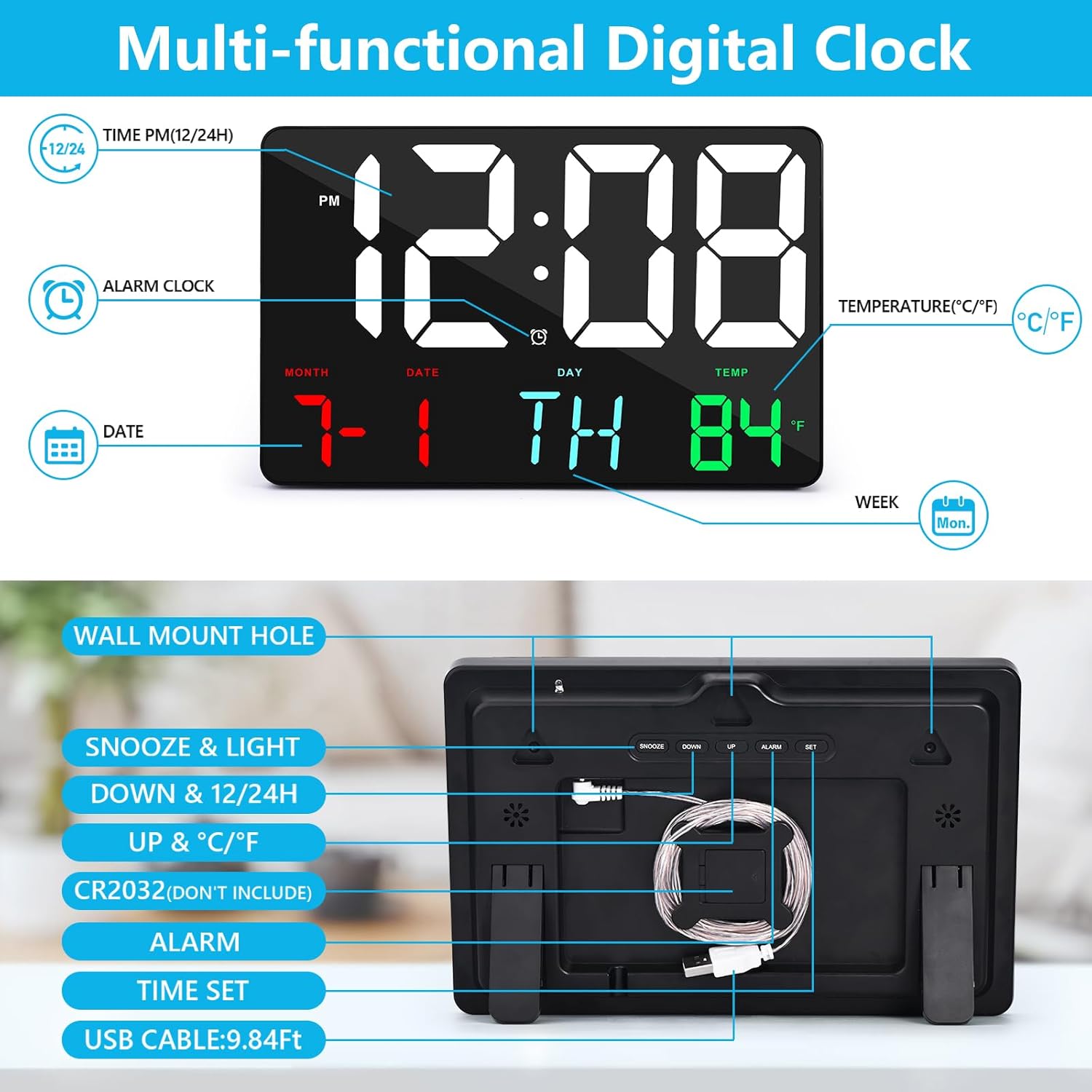
Picha: Nyuma view of the clock indicating power input, battery slot, and control buttons.

Picha: Examples of wall-mounted and table-mounted clock setups.
Maagizo ya Uendeshaji
The clock can be operated using the buttons on the back or the included wireless remote control.
Udhibiti wa Kijijiniview
The remote control allows for convenient adjustment of all clock functions from up to 30 feet away.

Image: Demonstrating the use of the remote control for the clock.
Kuweka Saa na Tarehe
- Press the "SET" button on the remote or the "TIME SET" button on the back of the clock to enter time setting mode.
- Use the "UP" and "DOWN" buttons on the remote or clock to adjust the hour.
- Press "SET" again to move to minute adjustment, then use "UP" and "DOWN" to set minutes.
- Continue pressing "SET" to cycle through year, month, and day settings, adjusting each with "UP" and "DOWN".
- Press "SET" one last time to save settings and exit.
Hali ya Saa 12/24
To switch between 12-hour and 24-hour time formats, press the "12/24H" button on the remote or the "DOWN & 12/24H" button on the back of the clock.

Image: Visual representation of 12-hour and 24-hour time display modes.
Kuweka Kengele
- Press the "ALARM" button on the remote or the "ALARM" button on the back of the clock to enter alarm setting mode.
- Use the "UP" and "DOWN" buttons to adjust the alarm hour.
- Press "ALARM" again to move to minute adjustment, then use "UP" and "DOWN" to set minutes.
- Press "ALARM" one last time to save and activate the alarm. An alarm icon will appear on the display.
Ahirisha Kitendaji
When the alarm sounds, press the "SNOOZE" button on the remote or the "SNOOZE & LIGHT" button on the back of the clock to activate snooze. The alarm will temporarily stop and sound again after a set interval (typically 5-9 minutes).
Brightness Adjustment (Dimmer)
The clock features 4 levels of brightness. Press the "LIGHT" button on the remote or the "SNOOZE & LIGHT" button on the back of the clock repeatedly to cycle through the brightness levels (L4, L3, L2, L1) and turn off the display.

Image: Illustration of the 4-level dimmer function.
Onyesho la Joto
The clock displays indoor temperature. To switch between Fahrenheit (°F) and Celsius (°C), press the "°C/°F" button on the remote or the "UP & °C/°F" button on the back of the clock.

Image: Visual comparison of Celsius and Fahrenheit temperature displays.
Matengenezo
- Kusafisha: Wipe the clock surface with a soft, dry cloth. Do not use abrasive cleaners or solvents.
- Nguvu: Always use the provided power adapter. Disconnect power before cleaning or if the clock will not be used for an extended period.
- Mazingira: Avoid placing the clock in direct sunlight, near heat sources, or in areas with high humidity.
Kutatua matatizo
| Tatizo | Sababu inayowezekana | Suluhisho |
|---|---|---|
| Onyesho la saa limezimwa. | No power, power adapter disconnected, or display is set to off (L1). | Ensure power adapter is securely connected to the clock and wall outlet. Press the "LIGHT" button on the remote or clock to adjust brightness. |
| Udhibiti wa mbali haufanyi kazi. | Remote batteries are dead or incorrectly installed. Obstruction between remote and clock. | Replace CR2032 batteries in the remote, ensuring correct polarity. Remove any obstructions. Ensure remote is pointed directly at the clock. |
| Kengele haisikiki. | Kengele haijawekwa au sauti haijapungua sana. | Verify alarm is set and activated (alarm icon visible). Ensure clock is powered. |
| Time/Date incorrect after power outage. | Backup battery (CR2032) is dead or not installed. | Install or replace the CR2032 backup battery. Reset time and date manually. |
| Usomaji wa halijoto unaonekana kuwa si sahihi. | Clock placed near a heat source or in direct sunlight. | Relocate the clock to an area with stable ambient temperature, away from direct heat or cold sources. |
Vipimo
| Kipengele | Maelezo |
|---|---|
| Nambari ya Mfano | GH0717 |
| Aina ya Kuonyesha | Digital LED |
| Ukubwa wa Kuonyesha | Inchi 11.5 (diagonal) |
| Vipimo vya Bidhaa | 9.8"W x 6.3"H |
| Chanzo cha Nguvu | Umeme Uliounganishwa kwa Waya (adapta ya 5V 1A) |
| Betri chelezo | 1 x CR2032 (not for primary power) |
| Viwango vya Mwangaza | 4 levels + Off |
| Vitengo vya joto | Fahrenheit (°F) / Selsiasi (°C) |
| Umbizo la Wakati | 12-saa / 24-saa |
| Safu ya Udhibiti wa Mbali | Hadi futi 30 |
| Chaguzi za Kuweka | Desk (with stands), Wall (hanging holes, screws/anchors, stick-on hooks) |
| Nyenzo | Polycarbonate (PC) |

Image: Detailed dimensions of the Amgico Digital Alarm Clock.
Udhamini na Msaada
The Amgico Digital Alarm Clock comes with a 12-month warranty from the date of purchase. This warranty covers manufacturing defects and issues arising from normal use.
For any questions, concerns, or technical support regarding your product, please contact Amgico customer service. Our support team is available 24/7 to assist you.
Tafadhali rejelea maelezo ya mawasiliano yaliyotolewa kwenye kifungashio cha bidhaa au Amgico rasmi webtovuti kwa maelezo ya usaidizi yaliyosasishwa.

Image: Amgico product packaging highlighting the 1-year warranty.