
CDIYTOOL 4yhujuyj
CDIYTOOL 100A MPPT Solar Charge Controller User Manual
Model: 4yhujuyj
Utangulizi
This manual provides essential information for the safe and efficient operation of your CDIYTOOL 100A MPPT Solar Charge Controller. This controller is designed for 36V, 48V, and 60V battery systems and features an LCD display, multiple load control modes, and dual USB outputs. Please read this manual thoroughly before installation and use.
The controller automatically adapts to 36V/48V/60V systems and is not suitable for 12V/24V systems. It utilizes innovative MPPT technology for high tracking efficiency, detecting the maximum charging current.
Maagizo ya Usalama
Always adhere to the following safety guidelines to prevent injury and damage to the controller or other components.
- Hakikisha kuwa betri ina ujazo wa kutoshatage for the controller to recognize the correct battery type upon first use.
- Connect the battery to the controller first, then connect the solar panels. Reversing this order can damage the controller.
- Kiwango cha juu cha kuingiza voltage is 50V. Ensure your solar panel configuration does not exceed this limit. For example, a 19V photovoltaic panel matches a 12V battery, and a 38V photovoltaic panel matches a 24V battery. When a 38V panel is connected, the maximum voltage may reach 42V.
- The controller is suitable for various battery types (including open, lead-acid, gel, and lithium batteries). Refer to the controller's settings for specific battery types.
- The controller provides protection against overvoltage, short circuit, overload, overcharge, and over-discharge.
- Usijaribu kutenganisha au kutengeneza kidhibiti mwenyewe. Wasiliana na wafanyakazi waliohitimu kwa ajili ya huduma.

Image: Excerpt from the user manual detailing safety instructions and a connection diagram.
Vipengele vya Bidhaa
- Multi-function LCD Display: Provides real-time display of charging current, discharge current, and power generation.
- Teknolojia ya MPPT: Innovative Maximum Power Point Tracking with high efficiency (up to 99%) for optimal solar energy harvesting.
- Ulinzi wa Kuaminika: Inajumuisha overvolvetage, short circuit, overload, overcharge, and over-discharge protection.
- Automatic Focusing MPPT Tracking: Ensures high charging efficiency and bidirectional focusing tracking.
- Fidia ya Halijoto: Hurekebisha kiotomatiki ujazo wa kuchajitage based on ambient temperature changes.
- Matokeo ya USB mbili: Provides 5V/2A output for charging mobile devices.

Picha: Mbele view of the CDIYTOOL 100A MPPT Solar Charge Controller, highlighting the LCD display and dual USB ports.
Kuweka na Kuweka
Fuata hatua hizi kwa usakinishaji sahihi wa kidhibiti cha chaji cha jua:
- Tayarisha Wiring: Ensure all wires are correctly sized for the expected current and are properly insulated.
- Unganisha Betri: Connect the battery to the charge controller first. Ensure correct polarity (+ to + and - to -). The controller requires sufficient battery voltage to recognize the system type.
- Unganisha Paneli ya Jua: Connect the solar panel(s) to the charge controller. Ensure correct polarity. Do not exceed the maximum input voltage ya 50V.
- Unganisha Mzigo (Si lazima): Connect your DC load to the load terminals of the controller. The controller can manage load output based on settings.
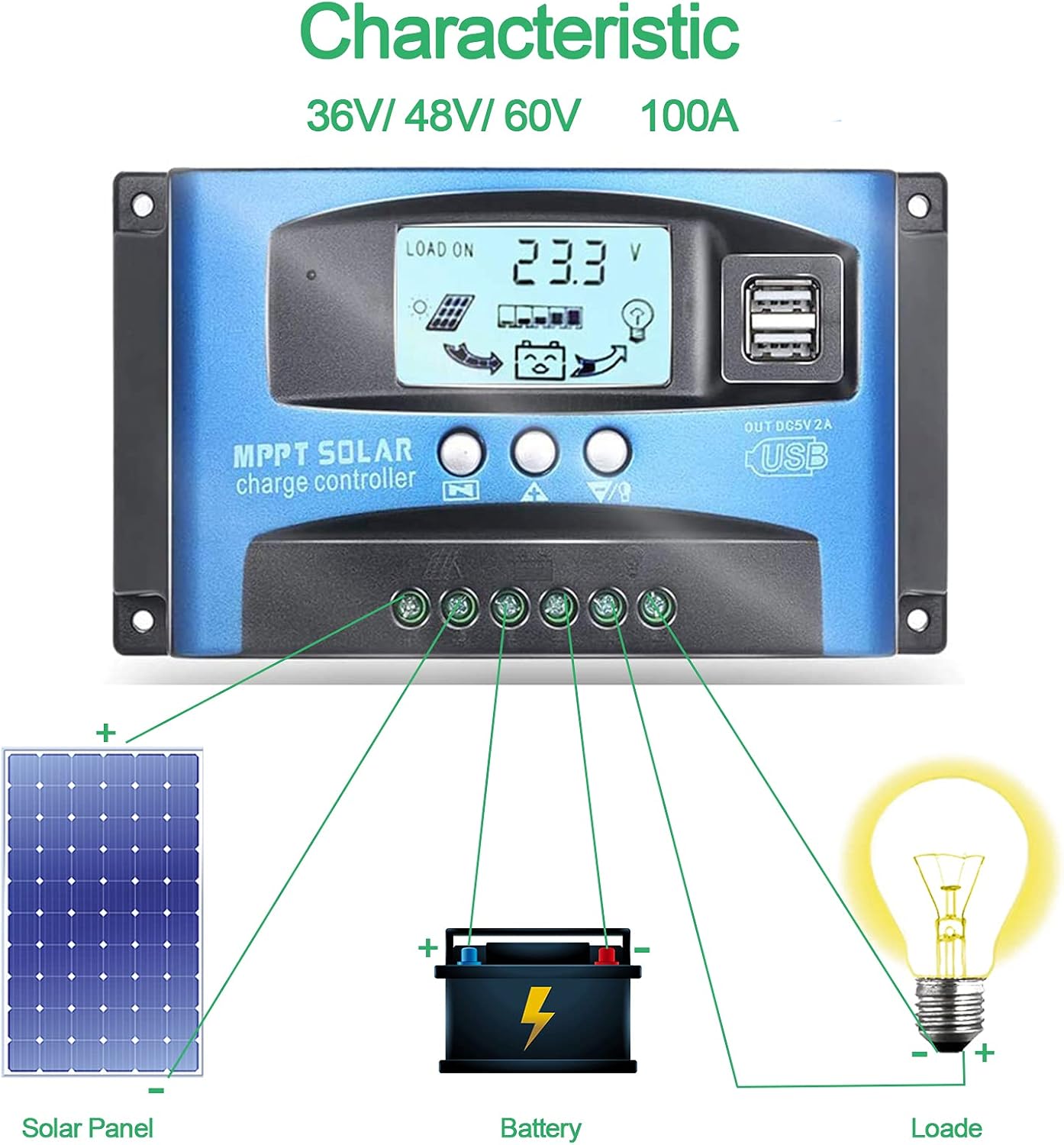
Image: Connection diagram illustrating how to connect solar panels, battery, and load to the charge controller.

Picha: Kina view of the controller with labels for its components, including buttons, LCD, USB ports, and connection points.
Maagizo ya Uendeshaji
The controller features an LCD display and three buttons for operation: Menu, Page Up, and Page Down/Manual.
Onyesho la LCD
The LCD displays various parameters including battery voltage, charging current, discharge current, and system status. The icons on the display indicate solar panel activity, battery charge level, and load status.
Kazi za Kitufe
- Kitufe cha Menyu: Press to enter the menu interface and cycle through different settings. Long press to modify parameters.
- Kitufe cha Kuongeza Ukurasa: Used to increase values or navigate upwards in menus.
- Page Down/Manual Button: Used to decrease values or navigate downwards in menus. Also functions as a manual load control switch (on/off) when on the main interface.
Kuchaji USB
The controller is equipped with dual USB ports providing 5V/2A output for charging compatible devices such as mobile phones and tablets.

Image: Demonstration of the controller's dual USB ports being used to charge a mobile phone.
Matengenezo
Matengenezo ya mara kwa mara huhakikisha uimara na utendaji bora wa kidhibiti chako cha chaji cha jua.
- Kagua Viunganisho: Mara kwa mara angalia miunganisho yote ya nyaya ili kuona kama inabana na kutu. Miunganisho iliyolegea inaweza kusababisha upotevu wa umeme au joto kupita kiasi.
- Kidhibiti Safi: Weka kidhibiti kikiwa safi na bila vumbi na uchafu. Tumia kitambaa kikavu kufuta uso. Usitumie visafishaji vya kioevu.
- Fuatilia Utendaji: Regularly check the LCD display for normal operation and expected voltagusomaji wa kielektroniki/wa sasa.
- Afya ya Betri: Ensure your battery is well-maintained and within its recommended operating parameters.
Kutatua matatizo
Sehemu hii hutoa suluhisho kwa masuala ya kawaida ambayo unaweza kukutana nayo.
| Hali | Sababu inayowezekana | Suluhisho |
|---|---|---|
| Hakuna onyesho kwenye skrini | Betri haijaunganishwa au sauti ya chinitage | Connect battery, check battery voltage |
| No charge when sunny | Solar panel reversed or open circuit | Reconnect solar panel, check wiring |
| Mzigo haufanyi kazi | Load short circuit, overload, or over-discharge protection | Check load wiring, reduce load, or charge battery |
| Kidhibiti hakichaji | Paneli ya jua voltage too low or battery full | Ensure sufficient solar input, check battery status |
The controller includes built-in protections for reverse polarity, overvoltage, short circuit, overload, overcharge, and over-discharge. If an issue persists after troubleshooting, contact customer support.
Vipimo
| Kigezo | Thamani |
|---|---|
| Mfano | 4yhujuyj |
| Chapa | CDIYTOOL |
| Iliyokadiriwa Sasa | 100A |
| Mfumo Voltage | 36V/48V/60V Auto Adapt (Not for 12V/24V) |
| Kiwango cha Juu cha Uingizaji wa Jua Voltage | 50V |
| Pato la USB | Dual 5V/2A |
| Aina ya Kuonyesha | LCD |
| Uzito wa Kipengee | 14.4 wakia |
| Vipimo vya Kifurushi | Inchi 6.81 x 3.98 x 2.01 |

Image: Diagram showing the physical dimensions of the solar charge controller.
Rasilimali za Ziada na Msaada
For further assistance or to access the mobile application for monitoring, please refer to the following:
Programu ya Simu ya Mkononi
The BL-912V APP can be installed on your Android phone to monitor and control the solar charge controller. Scan the QR code below or visit the provided link to download and install the application.
Kiungo cha Kupakua: http://fir.sdhzwl.cn/5w4b
The mobile phone app allows for remote monitoring of charging and discharging data, daily power generation, and other functions.
Image: Section of the user manual detailing the BL-912V APP installation process, including a QR code.
Udhamini na Huduma kwa Wateja
For warranty information or technical support, please contact CDIYTOOL customer service through the platform where you purchased the product. Keep your purchase receipt for warranty claims.
Maombi ya Kawaida
The CDIYTOOL MPPT Solar Charge Controller is suitable for a variety of off-grid solar power applications, including:
- Residential solar power systems
- RV and marine solar setups
- Solar street lighting
- Remote monitoring stations
- Agricultural irrigation systems

Picha: Examples of typical applications for the solar charge controller in various settings.