
Utangulizi
Thank you for choosing the Cecotec BigDry 9000 Professional Dehumidifier. This manual provides essential information for the safe and efficient operation, maintenance, and troubleshooting of your new appliance. Please read this manual thoroughly before use and keep it for future reference.
This dehumidifier is designed to significantly reduce humidity levels in your environment, contributing to improved comfort and preventing issues caused by excessive moisture, such as mold growth or damage to furniture. With its advanced features, including Wi-Fi control and a large capacity tank, it offers a convenient and effective solution for humidity management.
Maagizo ya Usalama
Fuata tahadhari za kimsingi za usalama kila wakati unapotumia vifaa vya umeme ili kupunguza hatari ya moto, mshtuko wa umeme na majeraha.
- Hakikisha kifaa kimewekwa kwenye uso thabiti, usawa.
- Do not operate the dehumidifier near water or in excessively wet environments.
- Weka kifaa mbali na vyanzo vya joto na jua moja kwa moja.
- Usizuie njia za kuingilia au kutoa hewa. Hakikisha kuna nafasi ya kutosha kuzunguka kitengo kwa ajili ya mtiririko mzuri wa hewa.
- Unplug the dehumidifier from the power outlet before cleaning, maintenance, or when not in use.
- Do not use if the power cord or plug is damaged. Contact qualified service personnel for repair.
- Kifaa hiki ni cha matumizi ya ndani tu.
- Do not allow children to play with the dehumidifier.
- Muhimu: Baada ya kusafirisha, acha kifaa kisimame wima kwa angalau saa 24 kabla ya kukiunganisha. Hii inaruhusu kifaa cha kupoeza kutulia.
Bidhaa Imeishaview
Vipengele
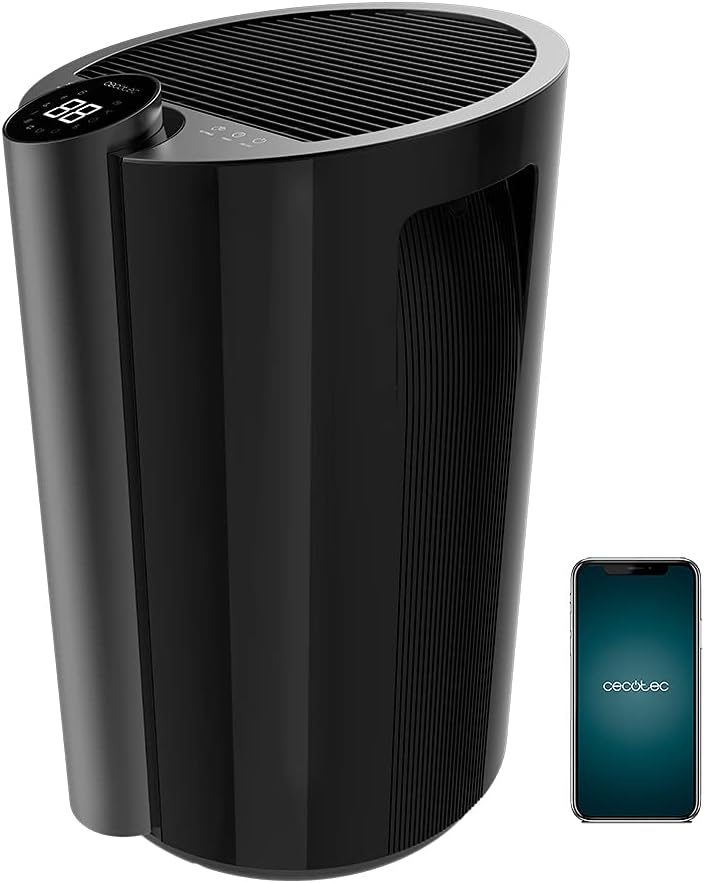
- Jopo la Kudhibiti lenye Onyesho la LED
- Grille ya uingizaji hewa
- Grille ya Outlet ya Hewa
- Water Tank (4.5 Liters)
- Magurudumu ya kubebeka
- Ushughulikiaji Jumuishi
- Kamba ya Nguvu
- Kichujio cha Hewa
Sifa Muhimu
- Uwezo wa Juu wa Kuondoa Unyevu: Up to 20 liters per day.
- Tangi kubwa la maji: 4.5-liter removable tank minimizes emptying frequency.
- Udhibiti wa Wi-Fi: Manage settings remotely via your smartphone.
- Chanjo pana: Effective for areas up to 90 m² (250 m³/h).
- Full Tank Warning: Prevents overflows and conserves energy.
- Unyevu Unaoweza Kurekebishwa: Set desired ambient humidity between 40% and 80%.
- Onyesho la LED: Shows current ambient humidity, temperature, and selected settings.
- Vidhibiti vya Kugusa: Kiolesura chenye angavu na rahisi kutumia.
- Kipima Muda Kinachoweza Kupangwa: Up to 12 hours with automatic shut-off.
- Kasi Mbili: Low and High dehumidification speeds.
- Operesheni ya utulivu: Imeundwa kwa usumbufu mdogo wa kelele.
- Kichujio cha Hewa: Improves air quality by preventing large particle entry.
- Uwezo wa kubebeka: Imewekwa magurudumu na mpini kwa ajili ya urahisi wa kusogea.
Sanidi
- Kufungua: Ondoa kwa uangalifu kiondoa unyevu kutoka kwa kifurushi chake. Hifadhi vifaa vya ufungaji kwa uhifadhi au usafirishaji wa siku zijazo.
- Uwekaji: Place the dehumidifier on a firm, level surface in the desired room. Ensure there is at least 20 cm (8 inches) of space around all sides of the unit for proper air circulation. Avoid placing it against walls or furniture that could obstruct airflow.
- Initial Standby: After transport, it is crucial to let the dehumidifier stand upright for a minimum of 24 hours before plugging it into a power outlet. This allows the refrigerant fluid to stabilize, preventing potential damage to the compressor.
- Muunganisho wa Nishati: Chomeka kebo ya umeme kwenye sehemu ya umeme iliyowekwa chini. Hakikisha ujazotage inalingana na vipimo vya kitengo.
- Ufungaji wa tanki la maji: Ensure the water tank is correctly inserted into its compartment. The unit will not operate if the tank is not properly seated or is full.
- Usanidi wa Wi-Fi (Hiari):
- Download the official Cecotec app on your smartphone.
- Unda akaunti au ingia.
- Follow the in-app instructions to add your BigDry 9000 dehumidifier. This typically involves pressing the Wi-Fi button on the unit for 5 seconds to enter pairing mode. Note that the device requires a 2.4 GHz Wi-Fi network.

Maagizo ya Uendeshaji
Jopo la Kudhibiti Juuview

- Kitufe cha KUWASHA/KUZIMA: Bonyeza ili kuwasha au kuzima kitengo.
- Kitufe cha MODE: Cycle through different operating modes (e.g., continuous dehumidification, auto mode).
- Kitufe cha KASI YA SHABIKI: Adjust fan speed between Low and High.
- SETTINGS Button: Used to set the desired humidity level. Press repeatedly to cycle through humidity percentages (40% - 80%).
- Kitufe cha TIMER: Set the automatic shut-off timer (up to 12 hours).
- Onyesho la LED: Shows current ambient humidity, temperature, and selected settings.
Operesheni ya Msingi
- Washa: Press the ON/OFF button to start the dehumidifier. The LED display will show the current ambient humidity.
- Weka Unyevu Unaohitajika: Press the SETTINGS button to select your target humidity level. The unit will operate until the desired humidity is reached, then cycle on and off to maintain it.
- Rekebisha Kasi ya Mashabiki: Press the FAN SPEED button to switch between low and high fan speeds. Lower speed provides quieter operation, while higher speed offers faster dehumidification.
- Weka Kipima muda: Press the TIMER button to set the desired operating duration (e.g., 1 hour, 2 hours, up to 12 hours). The unit will automatically turn off after the set time.
- Udhibiti wa Wi-Fi: If connected to Wi-Fi, use the Cecotec app on your smartphone to control all functions remotely.
Matengenezo
Matengenezo ya mara kwa mara huhakikisha utendaji bora na huongeza muda wa matumizi wa kifaa chako cha kuondoa unyevunyevu.
Kumwaga Tangi la Maji

- When the water tank is full, the unit will automatically stop operating and an indicator light (or message on the LED display) will alert you.
- Toa tanki la maji kwa uangalifu kutoka mbele ya kifaa.
- Mimina maji yaliyokusanywa.
- Slide the empty tank back into its position until it clicks securely. The unit will resume operation.
Kusafisha Kichujio cha Hewa
- Inashauriwa kusafisha kichujio cha hewa kila baada ya wiki mbili au zaidi kulingana na matumizi na ubora wa hewa.
- Zima kiondoa unyevu na uchomoe kutoka kwa mkondo wa umeme.
- Locate and remove the air filter (refer to your specific model's diagram for exact location, usually at the back or side).
- Clean the filter using a vacuum cleaner to remove dust and debris. For heavier dirt, wash it gently with lukewarm water and a mild detergent.
- Ruhusu kichujio kikauke kabisa kabla ya kukiingiza tena kwenye kitengo. Usitumie dryer au joto moja kwa moja.
- Reinsert the dry filter and plug the unit back in.
Usafishaji wa Jumla
- Futa sehemu ya nje ya kiondoa unyevu kwa laini, damp kitambaa. Usitumie visafishaji vya abrasive au vimumunyisho.
- Hakikisha hakuna maji yanayoingia kwenye vipengele vya umeme.
Kutatua matatizo
Kabla ya kuwasiliana na huduma kwa wateja, tafadhali rejelea mwongozo ufuatao wa utatuzi wa matatizo kwa matatizo ya kawaida.
| Tatizo | Sababu inayowezekana | Suluhisho |
|---|---|---|
| Dehumidifier haiwashi. | No power; Water tank full or incorrectly inserted. | Check power connection; Empty and reinsert water tank correctly. |
| Hakuna maji yaliyokusanywa au kiwango kidogo cha unyevunyevu. | Ambient humidity too low; Air filter clogged; Room temperature too low; Unit size too small for room. | Increase target humidity setting; Clean air filter; Ensure room temperature is above 5°C (41°F); Consider a larger unit for the space. |
| Kitengo kina kelele. | Kitengo kisicho kwenye uso wa usawa; Kichujio cha hewa kimefungwa; Uzuiaji katika shabiki. | Weka kwenye uso wa ngazi; Kichujio cha hewa safi; Angalia na uondoe vikwazo vyovyote. |
| Matatizo ya muunganisho wa Wi-Fi. | Incorrect Wi-Fi password; Router too far; Only supports 2.4 GHz network. | Verify password; Move unit closer to router; Ensure your Wi-Fi is 2.4 GHz. |
Vipimo
| Kipengele | Vipimo |
|---|---|
| Chapa | Cecotec |
| Nambari ya Mfano | 05655 |
| Rangi | Black - Bigdry 9000 Professional Black Connected |
| Uwezo wa kudorora | Lita 20/siku |
| Uwezo wa Tangi la Maji | 4.5 lita |
| Nguvu | 320 Watts |
| Eneo la Chanjo | Up to 90 m² (250 m³/h) |
| Kipima muda | Up to 12 hours (automatic shut-off) |
| Idadi ya Kasi | 2 (Chini, Juu) |
| Vipimo (L x W x H) | 38.1 x 60.5 x 38.3 cm |
| Uzito wa Kipengee | Kilo 14 |
| Vipengele Maalum | Wi-Fi Control, Timer, High Dehumidification Capacity |
Udhamini na Msaada
Cecotec products are manufactured to the highest quality standards. For warranty information and customer support, please refer to the official Cecotec webtovuti au wasiliana na huduma kwa wateja wao moja kwa moja.
- Upatikanaji wa Vipuri: Miaka 10 (kulingana na vipimo vya bidhaa).
- For technical assistance, troubleshooting beyond this manual, or warranty claims, please visit www.cecotec.com au wasiliana na muuzaji aliyeidhinishwa wa eneo lako.