
Infinity KAPPA693C
Mwongozo wa Mtumiaji wa Mfumo wa Spika ya Vipengele vya Infinity KAPPA693C
Model: KAPPA693C (INFSPKKA693CAM)
Utangulizi
The Infinity Kappa Series component speaker system is engineered to deliver exceptional car audio performance. Featuring Plus One fiberglass woofers for powerful bass and high-resolution edge-driven textile dome tweeters for clear highs, this system provides a superior listening experience in virtually any vehicle. This manual provides essential information for installation, operation, and maintenance of your KAPPA693C speaker system.
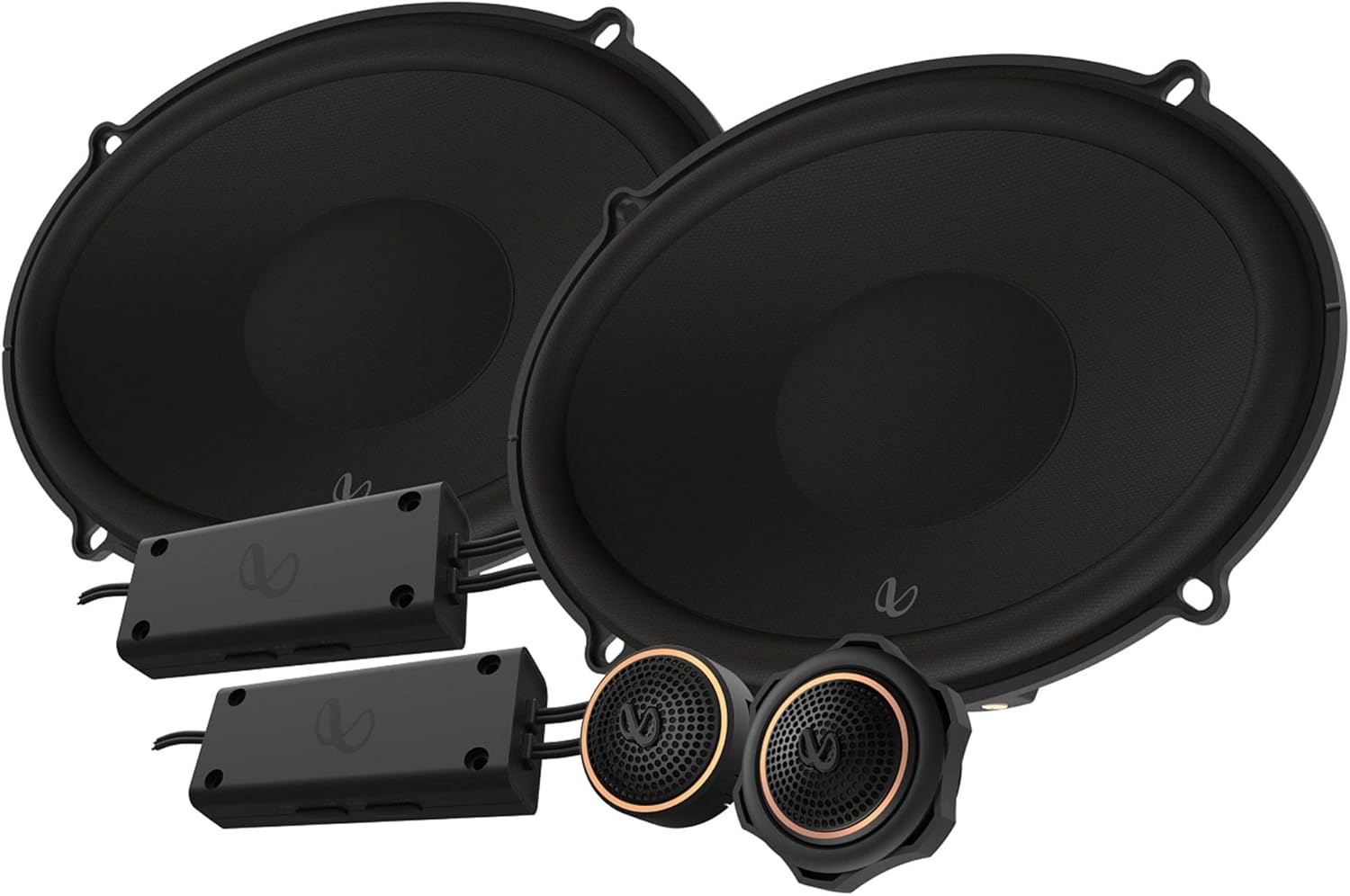
Figure 1: Infinity KAPPA693C Component Speaker System components.
Ni nini kwenye Sanduku
Thibitisha kuwa vipengele vyote vilivyoorodheshwa hapa chini vipo kwenye kifurushi chako:
- Spika 2x (Woofers)
- Spacers 2x
- 2x gaskets povu
- 2x Crossovers
- Watangazaji wa 2x
- 2x Threaded flush-mlima adapta
- 2x Karanga za kufunga za plastiki
- Vikombe 2-mlima wa uso
- Milima ya 2x Starfish tweeter
- 22x screws
- Sehemu za kasi za 16x
- 1x Allen kichwa kidogo (2.5mm)
- Beji za nembo ya 2x Infinity
- Stika 2x za chapa
- Mwongozo wa mmiliki 1x (hati hii)
Vipimo
| Kipengele | Maelezo |
|---|---|
| Aina ya Spika | 6" x 9" (168mm x 240mm) Two-way Component System |
| Ushughulikiaji wa Nguvu | 145W RMS, 435W Peak |
| Unyeti (@ 2.83V) | 94dB |
| Majibu ya Mara kwa mara | 35Hz - 40kHz |
| Impedans | 3.0 ohm |
| Kipenyo cha Woofer | sentimita 15.24 (inchi 6) |
| Kipenyo cha Tweeter | sentimita 1.91 (inchi 0.75) |
| Uzito wa Jumla | Kilo 5.06 (pauni 10.93) |
| Nambari ya Mfano | INFSPKKA693CAM |
| UPC | 050667376987 |
Sifa Muhimu
- Plus One Fiberglass Woofers: Lighter and stiffer cones provide increased low-frequency output and higher efficiency for robust bass.
- Waandishi wa Tweet wa Kuba la Hariri Linaloendeshwa na Ukingo: Equipped with oversized voice coils for smooth highs and impressive thermal power handling up to 40kHz.
- Matokeo ya Tweeter Yanayoweza Kurekebishwa: A push-button on the angled tweeter allows for 0dB or -3dB output level control to optimize system linearity based on installation.
- Mistari Midogo ya Kuvuka: Designed for easy integration, with 2-way and 3-way selections to accommodate optional midrange upgrades.


Kielelezo 2: Kina views of the woofer, tweeters, and crossovers.
Kuweka na Kuweka
Professional installation is recommended for optimal performance and to prevent damage to your vehicle's electrical system. Always disconnect the vehicle's battery before beginning any electrical work.
1. Kupanga Ufungaji
- Uteuzi wa Mahali: Choose suitable locations for the woofers, tweeters, and crossovers within your vehicle. Ensure adequate clearance and proper acoustic placement.
- Mchoro wa Wiring: Refer to the detailed wiring diagram provided in the physical owner's manual for correct connections between your head unit, amplifier (if used), crossovers, woofers, and tweeters.
- Zana Zinazohitajika: Gather necessary tools including screwdrivers, wire strippers, crimpers, drill, and appropriate safety gear.
2. Kuweka Woofers
- Carefully remove existing speakers or prepare the mounting location.
- Use the provided spacers and foam gaskets as needed to ensure a secure and sealed fit.
- Secure the woofers using the supplied screws and speed clips.

Kielelezo 3: Upande view of the woofer, illustrating mounting depth considerations.
3. Kuweka Tweeters
- Choose between flush-mount, surface-mount, or starfish tweeter mounts based on your vehicle's interior and desired sound dispersion.
- Install the tweeters securely using the appropriate adapters and nuts.
- Adjust the tweeter output level (0dB or -3dB) using the push-button on the tweeter to match your listening preference and vehicle acoustics.
4. Installing Crossovers
- Mount the compact crossovers in a dry, accessible location, away from excessive heat or moisture.
- Connect the input from your amplifier/head unit to the crossover, and then connect the woofer and tweeter outputs from the crossover to their respective speakers.
- Hakikisha miunganisho yote ni salama na imewekewa maboksi ipasavyo ili kuzuia nyaya fupi.
Maagizo ya Uendeshaji
Once installed, operate your Infinity KAPPA693C system as follows:
- Uwezeshaji wa Awali: Baada ya usakinishaji, unganisha tena betri ya gari. Washa mfumo wako wa sauti wa gari kwa sauti ya chini.
- Marekebisho ya Sauti: Gradually increase the volume to a comfortable listening level. Avoid excessively high volumes that can cause distortion or damage to the speakers.
- Mipangilio ya Sauti: Adjust your head unit's equalizer and sound settings to optimize the audio output for your vehicle's acoustics and personal preference. Experiment with bass, treble, and balance controls.
- Tweeter Level: If you notice the highs are too bright or too subtle, re-adjust the tweeter output level on the tweeters (0dB or -3dB) as needed.
Matengenezo
To ensure the longevity and optimal performance of your Infinity KAPPA693C speakers, follow these maintenance guidelines:
- Kusafisha: Use a soft, dry cloth to gently wipe down the speaker grilles and surrounds. Avoid using harsh chemicals or abrasive cleaners.
- Ulinzi wa Mazingira: While designed for automotive use, avoid exposing the speakers to extreme moisture or direct sunlight for prolonged periods, which can degrade materials over time.
- Ukaguzi wa Mara kwa Mara: Mara kwa mara angalia miunganisho ya spika ili kuona kuna kubana na uhakikishe kuwa hakuna waya zilizokatika au kufichuliwa.
- Epuka Kuzidi Nguvu: Do not continuously play audio at distortion levels, as this can cause permanent damage to the speaker components.
Kutatua matatizo
If you experience issues with your speaker system, consult the following common troubleshooting steps:
| Tatizo | Sababu inayowezekana | Suluhisho |
|---|---|---|
| Hakuna Sauti kutoka kwa Spika | Viunganisho vya waya vilivyolegea au visivyo sahihi. AmpKifaa cha lifier/kifaa cha kichwa hakijawashwa au hakina hitilafu. Speaker wires shorted. | Check all wiring connections at the head unit, amplifier, crossovers, and speakers. Ensure proper polarity. Verify power to your audio system components. Kagua waya za spika kwa uharibifu au kaptura. |
| Sauti Iliyopotoka | Kiasi ni cha juu sana. Ampongezeko la lifier limewekwa juu sana. Mipangilio isiyo sahihi ya crossover. Spika iliyoharibika. | Punguza kiasi. Rekebisha ampmipangilio ya faida ya lifier. Verify crossover connections and settings. Kagua spika kwa uharibifu wa kimwili. |
| Spika Moja Haifanyi Kazi | Loose connection to that specific speaker or crossover. Damaged speaker or crossover. | Check connections for the affected speaker. Swap the speaker with a known working one to isolate the issue. |
| Ukosefu wa Besi | Incorrect woofer wiring polarity. Haitoshi ampnguvu ya lifier. Poor speaker seal in mounting location. | Verify woofer wiring polarity. Hakikisha ampLififier hutoa nguvu ya kutosha. Check for air leaks around the speaker mounting. |
If the problem persists after trying these steps, contact Infinity customer support or a qualified car audio technician.
Udhamini na Msaada
Maelezo ya Udhamini: This product comes with a Limited Warranty provided by Infinity. Please refer to the physical owner's manual included in your package for specific terms, conditions, and duration of the warranty. Retain your proof of purchase for warranty claims.
Usaidizi kwa Wateja: For technical assistance, installation questions, or warranty service, please visit the official Infinity website or contact their customer support line. Contact information can typically be found in your physical manual or on the manufacturer's webtovuti.
Unaweza pia kutembelea Infinity Store kwenye Amazon kwa maelezo zaidi ya bidhaa na nyenzo za usaidizi.
Ask a question about this manual
Ask about setup, troubleshooting, compatibility, parts, safety, or missing instructions. Manuals+ will review the question and use this page’s manual context to help answer it.