
1. Utangulizi
Asante kwa ununuziasing the ONIKUMA K1 RGB Gaming Headset. This manual provides detailed instructions for setup, operation, maintenance, and troubleshooting to ensure optimal performance and longevity of your headset. Please read this manual carefully before use and retain it for future reference.
2. Bidhaa Imeishaview
The ONIKUMA K1 is a wired gaming headset designed for multi-platform compatibility, featuring vibrant RGB lighting, 7.1 surround sound, and a noise-cancelling microphone. It is built for comfort during extended gaming sessions.
Sifa Muhimu:
- 7.1 Sauti inayozunguka: Provides immersive audio for an enhanced gaming experience.
- Maikrofoni ya Kughairi Kelele: Huhakikisha mawasiliano wazi kwa kupunguza kelele za chinichini.
- Mwangaza wa RGB: Dynamic lighting effects for an aesthetic appeal.
- Utangamano wa Majukwaa mengi: Works with PC, PlayStation (PS3, PS4), Mobile devices, and Xbox (Xbox One requires an adapter, not included).
- Muundo wa Kustarehesha: Features soft protein earpads, an adjustable headband, and cozy head cushions.
- Vidhibiti vya ndani: Easy access to volume adjustment and microphone mute.
Vipengele:
The headset includes the main unit with integrated microphone and a wired connection featuring a 3.5mm audio jack and a USB connector for RGB lighting.

Figure 1: Headset with in-line volume and microphone mute control, USB connector for RGB lighting, and 3.5mm audio jack.

Figure 2: Flexible microphone with 160-degree adjustment and 360-degree voice pick-up for clear communication.

Figure 3: Soft protein earpads, adjustable headband, and cozy head cushions designed for supreme comfort.
3. Maagizo ya Kuweka
Follow these steps to connect your ONIKUMA K1 headset to your device.
Utangamano wa Majukwaa mengi:
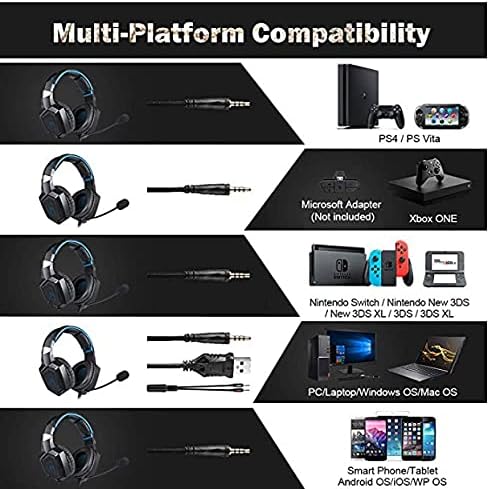
Mchoro 4: Utangamano juu yaview for PC, PlayStation, Xbox, Nintendo Switch, and mobile devices.
- For PC/Laptop (Windows OS/Mac OS):
Connect the 3.5mm audio jack to your computer's audio output/input port. Connect the USB cable to a USB port for RGB lighting. Ensure your sound settings are configured to use the headset. - For PlayStation (PS4/PS Vita/PS3):
Connect the 3.5mm audio jack to the controller or console's audio port. For PS4, go to Settings > Devices > Audio Devices > Output to Headphones > All Audio. Connect the USB for RGB lighting if a USB port is available. - For Xbox ONE:
An additional Microsoft Adapter (not included) is required for older Xbox One controllers. Connect the 3.5mm audio jack to the adapter, then connect the adapter to your controller. Newer Xbox One controllers have a built-in 3.5mm jack. Connect the USB for RGB lighting if a USB port is available on the console. - For Nintendo Switch/New 3DS XL/3DS/3DS XL:
Connect the 3.5mm audio jack directly to the console's audio port. - For Smart Phone/Tablet (Android OS/iOS/WP OS):
Connect the 3.5mm audio jack directly to your mobile device's headphone jack.
4. Maagizo ya Uendeshaji
Once connected, you can begin using your headset. Here are the basic operating functions:
- Udhibiti wa Sauti: Use the in-line volume roller to adjust the audio output level. Roll up to increase volume, roll down to decrease.
- Zima maikrofoni: Use the in-line switch to mute or unmute the microphone. Slide the switch to the 'OFF' position to mute and 'ON' to unmute.
- Marekebisho ya Maikrofoni: The microphone is flexible. Adjust its position closer to your mouth for optimal voice pickup or away when not in use.
- Mwangaza wa RGB: The RGB lighting is powered via the USB connection. Once the USB is plugged in, the lighting will activate automatically. There are no user-adjustable controls for the RGB lighting patterns on the headset itself.
- Kifaa cha Vifaa vya Sauti: Adjust the headband to ensure a comfortable and secure fit over your ears. The earpads should fully cover your ears for optimal sound isolation and comfort.
5. Matengenezo
Utunzaji sahihi utaongeza muda wa matumizi ya vifaa vyako vya masikioni.
- Kusafisha: Tumia kitambaa laini na kikavu kusafisha vifaa vya masikioni. Usitumie visafishaji vya kioevu au vifaa vya kukwaruza.
- Hifadhi: Hifadhi vifaa vya sauti mahali pa baridi, pakavu mbali na jua moja kwa moja na joto kali.
- Huduma ya Cable: Avoid sharp bends or excessive pulling on the cables to prevent damage. The cable is designed to be tangle-free.
- Epuka unyevu: The headset is not water-resistant. Keep it away from liquids.
6. Utatuzi wa shida
Ukikumbana na matatizo na vifaa vyako vya sauti, tafadhali rejelea suluhu zifuatazo za kawaida:
| Tatizo | Suluhisho linalowezekana |
|---|---|
| Hakuna sauti au sauti ya chini |
|
| Maikrofoni haifanyi kazi |
|
| Taa ya RGB haifanyi kazi |
|
| Sound quality issues (e.g., no 7.1 surround sound) |
|
7. Vipimo
| Kipengele | Maelezo |
|---|---|
| Jina la Mfano | K1-B-Black RGB |
| Teknolojia ya Uunganisho | Wired |
| Jack ya kipaza sauti | 3.5 mm Jack |
| Unyeti | 104 dB |
| Majibu ya Mara kwa mara | Not specified (Original data: 3045 Unknown Rate) |
| Udhibiti wa Kelele | Kughairi Kelele Inayotumika |
| Kipengele cha Fomu ya Headphone | Zaidi ya Sikio |
| Uwekaji wa Masikio | Zaidi ya Sikio |
| Rangi | Nyeusi |
| Jina la Biashara | ONIKUMA |
| Vipimo vya Bidhaa | 22.5 x 19.5 x 10.5 cm |
| Uzito wa Kipengee | gramu 394 |
| Kipengele cha Cable | Tangle-bure |
| Aina ya Kudhibiti | Udhibiti wa Kiasi |
| Vifaa Sambamba | Majukwaa mengi |
| Matumizi Yanayopendekezwa | Gaming, Making Calls |
| Matumizi Mahususi ya Bidhaa | Vifaa vya Sauti vya Michezo ya Kubahatisha |
| Nyenzo | Plastic, Polycarbonate Leather (PC) |
| Maelezo ya Masafa ya Umri | Mtu mzima |
| Kiwango cha Upinzani wa Maji | Sio sugu ya maji |
8. Udhamini na Msaada
For warranty information or technical support, please refer to the documentation included with your purchase or contact the seller directly. Keep your proof of purchase for any warranty claims.