
Teslong TD450D85L1 Articulating Borescope User Manual
Model: TD450D85L1
1. Utangulizi
The Teslong TD450D85L1 Articulating Borescope is a professional inspection tool designed for visual examination of hard-to-reach areas. It features a two-way 180-degree articulating probe, an integrated 4.5-inch IPS LCD monitor, and high-definition imaging capabilities. This manual provides essential information for the safe and effective use of your borescope.
2. Taarifa za Usalama
- Non-Waterproof Probe: The inspection probe of this borescope is SIYO MAJI. Do not submerge the probe or any part of the device in water or other liquids. Doing so will cause damage and void the warranty.
- Avoid using the device in environments with extreme temperatures or high humidity.
- Weka kifaa mbali na sehemu zenye nguvu za sumaku.
- Usijaribu kutenganisha au kurekebisha kifaa. Matengenezo yanapaswa kufanywa tu na wafanyikazi walioidhinishwa.
- Ensure the device is fully charged before use to prevent unexpected power loss during inspections.

3. Yaliyomo kwenye Kifurushi
Thibitisha kuwa bidhaa zote zilizoorodheshwa hapa chini zimejumuishwa kwenye kifurushi chako:
- TD450D85L1 Articulating Borescope Unit (with integrated 4.5-inch IPS monitor)
- Kebo ya kuchaji ya Type-C ya USB
- Kadi ya MicroSD ya 8GB (iliyosanikishwa mapema)
- Kesi ya kubeba
- Mwongozo wa Mtumiaji

4. Bidhaa Imeishaview na Vipengele
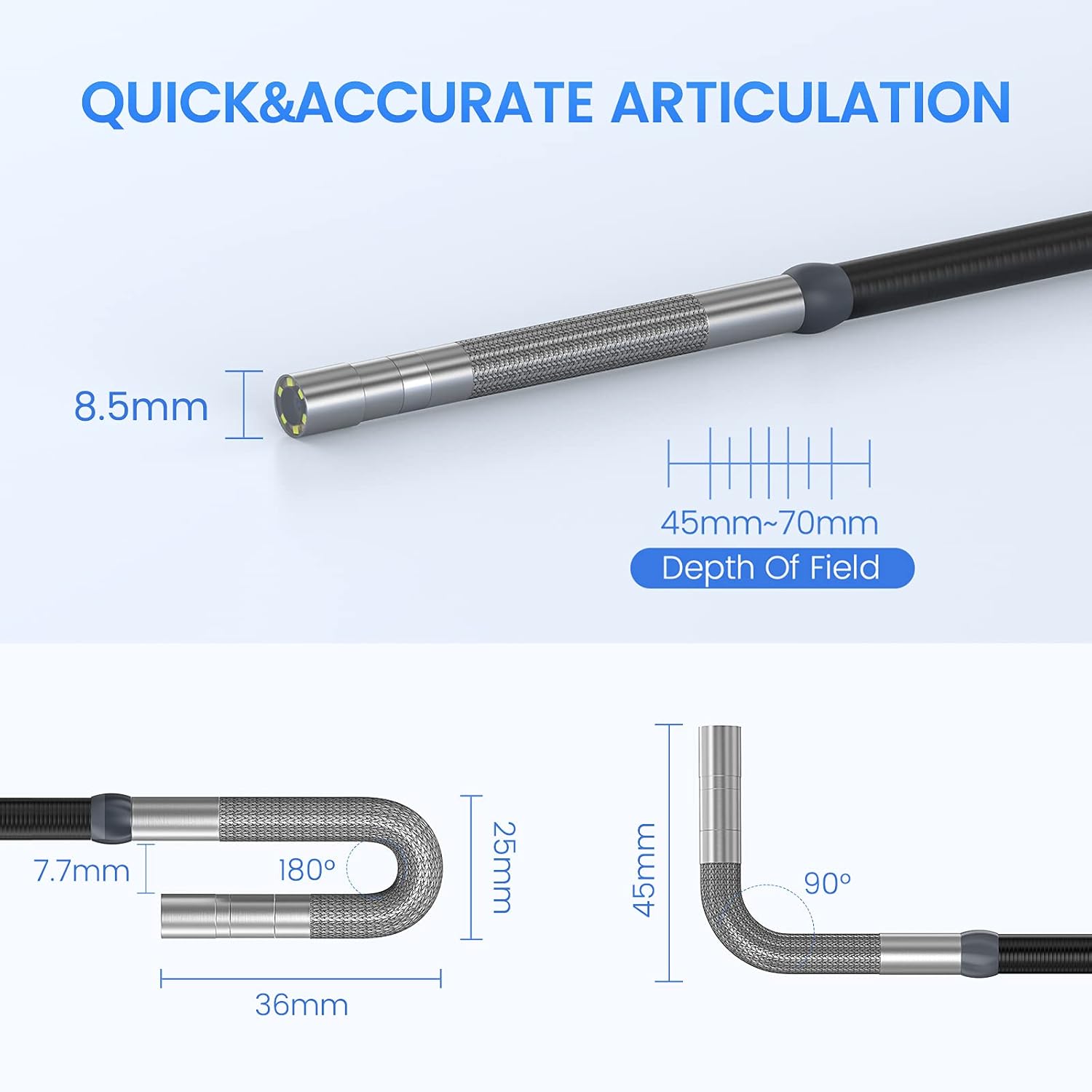
The Teslong TD450D85L1 is an advanced inspection camera designed for detailed visual inspections. It features a flexible gooseneck probe with an 8.5mm diameter and a 2.0MP CMOS sensor, providing 1080P HD image and video capture. The integrated 4.5-inch IPS LCD monitor offers a clear view without the need for external devices or Wi-Fi connections.
Sifa Muhimu:
- Two-Way 180° Articulation: Allows precise control of the probe tip for navigating complex spaces and maintaining optimal viewpembe za pembe.
- Integrated 4.5-inch IPS LCD Monitor: Provides a clear, real-time display of the inspection area. No smartphone, Wi-Fi, or app required.
- Upigaji picha wa Ubora wa Juu: 1080P HD resolution with a 2.0MP CMOS sensor for capturing detailed images and videos.
- Mwangaza wa LED Unaoweza Kurekebishwa: Built-in highlighting LEDs ensure clear visibility in dark conditions.
- Photo and Video Recording: Supports JPG image and AVI video recording directly to the included 8GB MicroSD card. Includes a microphone and speaker for audio recording.
- Maisha marefu ya Betri: Equipped with a built-in 5000mAh rechargeable battery for extended operation.


5. Kuweka
5.1 Kuchaji Awali
- Connect the USB Type-C charging cable to the borescope's charging port.
- Chomeka ncha nyingine ya kebo ya USB kwenye adapta ya kawaida ya umeme ya USB (haijajumuishwa) au mlango wa USB wa kompyuta.
- Allow the device to charge fully before first use. The charging indicator light will change when charging is complete.
5.2 Usakinishaji wa Kadi ya MicroSD
The 8GB MicroSD card is typically pre-installed. If it needs to be inserted or replaced:
- Locate the MicroSD card slot on the side of the monitor unit.
- Ingiza kadi ya MicroSD kwa upole huku miguso ya dhahabu ikiangalia chini hadi itakapobofya mahali pake.
- Ili kuiondoa, sukuma kadi ndani kidogo hadi itoke.

6. Maagizo ya Uendeshaji
6.1 Kuwasha / Kuzima
- Ili kuwasha, bonyeza na ushikilie kitufe cha Kuwasha hadi skrini iangaze.
- To power off, press and hold the Power button until the screen shuts down.
6.2 Controlling Articulation
The borescope probe features two-way 180-degree articulation. Use the control knob on the handle to adjust the direction of the probe tip:
- Rotate the knob clockwise or counter-clockwise to bend the probe tip left or right.
- The articulation can be locked in position for stable viewing.

6.3 Kurekebisha Mwangaza wa LED
The probe tip is equipped with adjustable LED lights to illuminate the inspection area. Use the dedicated button on the monitor unit to cycle through different brightness levels or turn the lights off.
6.4 Taking Photos and Recording Videos
- Ili kupiga picha: Ukiwa hai view, press the Photo button (usually indicated by a camera icon) to capture a still image.
- Ili kurekodi video: Press the Video button (usually indicated by a video camera icon) to start recording. Press it again to stop recording. The device will record audio through its built-in microphone.
- All captured media is saved to the installed MicroSD card.
6.5 Reviewing Media
Access the playback mode from the main menu to view captured photos and videos. Use the navigation buttons to browse through your media files.
7. Matengenezo
- Kusafisha: Gently wipe the monitor screen and the probe with a soft, dry cloth. For stubborn dirt on the probe, use a slightly damp cloth and ensure it is completely dry before storage. Do not use abrasive cleaners or solvents.
- Hifadhi: Store the borescope in its carrying case in a cool, dry place, away from direct sunlight and extreme temperatures.
- Utunzaji wa Betri: For optimal battery life, charge the device regularly and avoid fully discharging it for extended periods. If storing for a long time, charge it to about 50% every few months.
- Masasisho ya Programu: Angalia mtengenezaji webtovuti mara kwa mara kwa masasisho yoyote ya programu dhibiti yanayopatikana.
8. Utatuzi wa shida
| Tatizo | Sababu inayowezekana | Suluhisho |
|---|---|---|
| Kifaa hakiwashi. | Betri ya chini. | Chaji kifaa kikamilifu. |
| Hakuna picha kwenye skrini. | Probe cable not securely connected. | Ensure the probe cable is firmly connected to the monitor unit. |
| Image is blurry or dark. | Insufficient lighting; dirty camera lens; incorrect focus. | Adjust LED brightness. Clean the camera lens. Ensure the object is within the 45-70mm depth of field. |
| Haiwezi kurekodi picha/video. | MicroSD card full or not inserted correctly; card error. | Check MicroSD card insertion. Delete unnecessary files or replace the card. Format the card if necessary (this will erase all data). |
| Articulation is stiff or unresponsive. | Mechanical obstruction; debris in articulation mechanism. | Carefully inspect the probe tip for any obstructions. Do not force articulation. Contact customer support if the issue persists. |
9. Vipimo
| Kipengele | Vipimo |
|---|---|
| Jina la Mfano | Articulating Endoscope Inspection Camera (TD450D85L1) |
| Ukubwa wa skrini | LCD ya IPS ya inchi 4.5 |
| Ufanisi Bado Azimio | 2 Mbunge |
| Azimio la Kukamata Video | 1080p |
| Kipenyo cha Probe | 8.5 mm |
| Matamshi | Two-Way 180 Degrees |
| Macro Focus Range (Depth of Field) | 45-70mm |
| Pembe Halisi ya View | 60 Digrii |
| Aina ya Sensor | CMOS |
| Aina ya Vyombo vya Habari | Micro SD Card (8GB included) |
| File Umbizo | JPG (images), AVI (videos) |
| Kurekodi Sauti | Yes (with internal microphone) |
| Teknolojia ya Uunganisho | USB |
| Uwezo wa Betri | 5000mAh (inaweza kuchajiwa tena) |
| Kiwango cha Upinzani wa Maji | Not Waterproof (probe) |
10. Udhamini na Msaada
Your Teslong TD450D85L1 Articulating Borescope comes with a dhamana ya miezi 12 from the date of purchase. This warranty covers manufacturing defects and ensures reliable performance under normal use.
For technical assistance, troubleshooting, or warranty claims, please contact Teslong customer service. Refer to the contact information provided on the official Teslong website or in your product packaging for the most up-to-date support channels.
Please have your model number (TD450D85L1) and purchase details ready when contacting support.