
Utangulizi
This manual provides essential instructions for the proper use and maintenance of your Vikefon Type C Charging and Data Cable. This 1-meter cable is designed for efficient charging and high-speed data transfer between your Type C enabled devices and compatible power sources or computers.

Image: The Vikefon Type C Charging and Data Cable, featuring a standard USB-A connector on one end and a reversible USB-C connector on the other.
Vipengele vya Bidhaa
- USB Connector Quality: Ensures reliable charging and high-speed data transmission.
- Pato la Nguvu: Supports up to 5V, 3 Amp kwa malipo ya haraka.
- Utangamano wa Universal: Fully compatible with all Type C mobile devices for fast charging and syncing.
- Reversible USB Type-C Connector: Allows for quick and easy connections in any orientation.
- Muundo wa Kudumu: Features intricate nylon braiding for enhanced durability and longevity, outlasting standard cables.
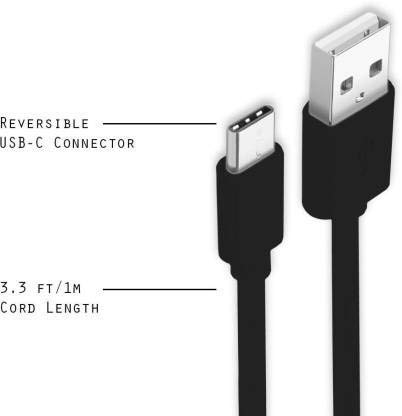
Image: A diagram illustrating the reversible nature of the USB-C connector and the cable's 1-meter (3.3 ft) cord length.
Sanidi
- Tambua Viunganishi: The cable has a standard USB-A connector on one end and a smaller, oval-shaped USB Type-C connector on the other.
- Unganisha kwenye Chanzo cha Nguvu/Kompyuta: Insert the USB-A end of the cable into a compatible USB port on a wall adapter, power bank, car charger, or computer.
- Unganisha kwenye Kifaa: Insert the USB Type-C end into the charging/data port of your smartphone, tablet, or other Type C enabled device. The USB Type-C connector is reversible, so it can be inserted in either orientation.
- Thibitisha Muunganisho: Ensure both ends are securely connected. Your device should indicate that it is charging or connected for data transfer.
Maagizo ya Uendeshaji
Inachaji Kifaa Chako
- Connect the USB-A end of the cable to a compatible USB power adapter (e.g., wall charger, car charger, power bank).
- Connect the USB Type-C end to your device's charging port.
- Ensure the power adapter is plugged into a live power outlet. Your device should begin charging.
Inahamisha Data
- Unganisha mwisho wa kebo ya USB-A kwenye mlango wa USB kwenye kompyuta yako.
- Connect the USB Type-C end to your device.
- On your device, you may receive a prompt asking to allow data access or to select a USB connection mode (e.g., "File Transfer," "MTP"). Select the appropriate option to enable data transfer.
- Your device should appear as a removable drive or media device on your computer, allowing you to transfer files.
Matengenezo
- Ushughulikiaji Sahihi: Always grasp the connector head when plugging or unplugging the cable. Avoid pulling directly on the cable itself to prevent damage to the internal wires.
- Epuka Kukunja: Do not excessively bend or crimp the cable, especially near the connectors, as this can cause internal wire breakage.
- Hifadhi: Store the cable in a clean, dry place away from extreme temperatures and direct sunlight. Avoid tangling the cable.
- Kusafisha: If necessary, gently wipe the cable and connectors with a dry, soft cloth. Do not use liquids or abrasive cleaners.

Picha: Karibu view highlighting the durable metal heads of the Vikefon Type C cable connectors, designed for anti-oxidation and corrosion resistance.
Kutatua matatizo
- Kifaa Hakichaji:
- Hakikisha ncha zote mbili za kebo zimeunganishwa kwa usalama.
- Verify that the power adapter is functioning correctly and plugged into a live outlet.
- Jaribu kutumia adapta tofauti ya umeme au mlango wa USB.
- Check your device's charging port for any debris or damage.
- Inachaji polepole:
- Ensure you are using a power adapter that supports fast charging (e.g., 3A output).
- Close any unnecessary background applications on your device.
- Hakuna Uhamisho wa Data:
- Confirm the cable is properly connected to both your device and computer.
- On your device, check the notification panel for USB options and select "File Transfer" or "MTP."
- Jaribu kuunganisha kwenye mlango tofauti wa USB kwenye kompyuta yako.
- Anzisha upya kifaa chako na kompyuta.
Vipimo
| Kipengele | Maelezo |
|---|---|
| Chapa | Vikefon |
| Jina la Mfano | Aina C |
| Nambari ya Mfano | Aina C 0129 |
| Aina ya kiunganishi | USB Aina ya C (Mwanaume kwa Mwanaume) |
| Aina ya Cable | USB |
| Vifaa Sambamba | Laptop, PC, Smartphone (e.g., Xiaomi Redmi 8A, Poco M2, Poco M2 Pro, Samsung, Motorola, Lenovo, Lava, Sony, HTC, LG, Karbonn, Maxx) |
| Vipengele Maalum | Charging Wire, Durable, High Data Transfer Rate, High Quality, Long Length |
| Kiwango cha Uhamisho wa Data | Up to 0.48 Gigabits Per Second (480 Mbps) |
| Teknolojia ya Uunganisho | USB |
| Uainishaji Met | ISO |
| Rangi | Nyeusi |
| Umbo la Kipengee | Mzunguko |
| Outer Material Type | Rubber (with Nylon Braiding) |
| Urefu wa Cable | Mita 1 |
Udhamini na Msaada
Specific warranty details for the Vikefon Type C Charging and Data Cable are not provided in this manual. For information regarding warranty coverage, returns, or technical support, please refer to the product packaging or contact the manufacturer directly through their official channels.