
Utangulizi
This manual provides essential instructions for the safe and efficient operation, maintenance, and troubleshooting of your Brother LB7000 Computerized Embroidery and Sewing Machine. Please read this manual thoroughly before using the machine to ensure proper function and to prevent damage.
The Brother LB7000 is a versatile machine designed for both sewing and embroidery tasks, offering a range of features to enhance your creative projects.

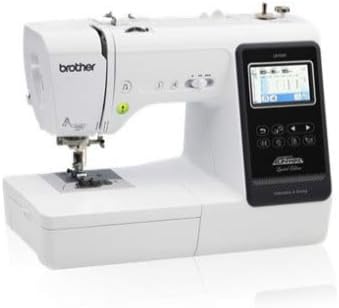
Image: The Brother LB7000 Computerized Embroidery and Sewing Machine in its standard configuration.
1. Kuweka
1.1 Kufungua na Kuweka
- Ondoa kwa uangalifu mashine kutoka kwa kifurushi chake. Hifadhi vifaa vyote vya ufungaji kwa usafiri au uhifadhi wa siku zijazo.
- Place the machine on a stable, level surface. Ensure adequate space around the machine for comfortable operation and ventilation.
- Unganisha waya wa umeme kwenye mashine kisha kwenye soketi inayofaa ya umeme.
1.2 Attaching the Embroidery Unit
For embroidery functions, the embroidery unit must be attached.
- Hakikisha mashine imezimwa.
- Slide the embroidery unit onto the machine's free arm until it clicks securely into place.
- Turn on the machine. The display will show embroidery mode options.

Image: The Brother LB7000 machine with the embroidery unit and hoop attached, ready for embroidery.
1.3 Kunyoosha Mashine
Proper threading is crucial for optimal sewing and embroidery performance.
- Weka kipande cha uzi kwenye pini ya kipande cha uzi.
- Follow the numbered threading path indicated on the machine, guiding the thread through all tension discs and guides.
- Tumia kifaa cha kuzungushia sindano kiotomatiki kwa urahisi, au zungushia sindano kwa mikono kutoka mbele hadi nyuma.
1.4 Kupeperusha Bobbin
- Weka bobini tupu kwenye shimoni la kuzungushia bobini.
- Ongoza uzi kutoka kwa spool kupitia diski ya mvutano ya vilima vya bobbin.
- Wrap the thread around the bobbin a few times, then push the bobbin winder shaft to the right.
- Press the Start/Stop button to begin winding. The machine will stop automatically when the bobbin is full.
2. Maagizo ya Uendeshaji
2.1 Shughuli za Msingi za Kushona
- Kuchagua Mishono: Use the touch screen display to navigate and select desired utility or decorative stitches.
- Kurekebisha Mipangilio: Modify stitch length and width using the dedicated buttons or touch screen controls.
- Kuanza kushona: Place fabric under the presser foot, lower the presser foot, and press the Start/Stop button or use the foot controller.
- Kushona kwa Nyuma: Press and hold the reverse stitch button to sew in reverse for securing seams.
Picha: Karibu view of the Brother LB7000's control panel and LCD screen, showing sewing stitch selection.
2.2 Operesheni za Ushonaji
- Kitambaa cha Hooping: Securely place your fabric and stabilizer within the embroidery hoop. Ensure the fabric is taut and wrinkle-free.
- Selecting Designs: Choose from built-in embroidery designs or load designs via USB (if applicable).
- Nafasi: Use the touch screen to adjust the design's position, rotation, and size within the hoop area.
- Starting Embroidery: Attach the hooped fabric to the embroidery unit. Confirm thread color and press the Start/Stop button. The machine will prompt for thread changes as needed.
3. Matengenezo
3.1 Kusafisha Mashine
- Kusafisha mara kwa mara: After each use, or every few hours of operation, remove the needle plate and bobbin case. Use the provided brush to remove lint and dust from the feed dogs and bobbin area.
- Usafishaji wa nje: Futa sehemu ya nje ya mashine kwa kitambaa laini na kikavu. Usitumie kemikali kali au visafishaji vya kukwaruza.
3.2 Ubadilishaji wa Sindano
Replace the needle regularly (approximately every 8-10 hours of sewing) or if it becomes bent, dull, or damaged.
- Zima mashine.
- Fungua sindano clamp screw.
- Remove the old needle and insert a new needle with the flat side facing the back of the machine, pushing it up as far as it will go.
- Kaza sindano clamp screw salama.
3.3 Kupaka mafuta
The Brother LB7000 is designed to be largely maintenance-free regarding oiling. Do not oil any part of the machine unless specifically instructed by Brother service personnel or an authorized service center. Improper oiling can damage the machine.
4. Utatuzi wa shida
| Tatizo | Sababu inayowezekana | Suluhisho |
|---|---|---|
| Mashine haiwashi. | Kamba ya umeme haijaunganishwa vizuri. | Check power cord connection to machine and outlet. Ensure outlet is functional. |
| Upper thread breaks. | Incorrect threading, needle bent/dull, tension too high, poor quality thread. | Re-thread the machine correctly. Replace needle. Adjust upper thread tension. Use good quality thread. |
| Mishono iliyoruka. | Incorrect needle type/size, bent needle, improper threading. | Use appropriate needle for fabric. Replace needle. Re-thread machine. |
| Jam za kitambaa. | Incorrect presser foot, feed dogs not engaged, fabric too thick/thin. | Use correct presser foot. Ensure feed dogs are up. Use appropriate needle and stabilizer for fabric. |
| Poor embroidery quality. | Improper hooping, wrong stabilizer, incorrect tension, dull needle. | Re-hoop fabric tautly. Use correct stabilizer for fabric and design. Adjust tension. Replace needle. |
5. Vipimo
| Kipengele | Maelezo |
|---|---|
| Chapa | Ndugu |
| Nambari ya Mfano | LB7000 |
| Chanzo cha Nguvu | Umeme wa Cord |
| Ni Umeme | Ndiyo |
| UPC | 012502649830 |
| GTIN | 012502649830 |
6. Udhamini na Msaada
For detailed warranty information, please refer to the warranty card included with your product or visit the official Brother webtovuti. Weka uthibitisho wako wa ununuzi kwa madai ya udhamini.
If you encounter issues not covered in this troubleshooting section or require technical assistance, please contact Brother Customer Support. You can find contact information on the official Brother webtovuti au kupitia Brother Store on Amazon.