
Utangulizi
This WAVLINK USB-C Triple Display Docking Station (Model WL-UMD04) provides comprehensive connectivity and display expansion for compatible laptops. Featuring HDMI, DisplayPort, and VGA outputs for triple display setups, 100W Power Delivery, Gigabit Ethernet, multiple USB 3.0/2.0 ports, and SD/Micro SD card readers, it enhances productivity for various computing environments.
Special Remark: This docking station is only compatible with PCs or laptops equipped with a full-featured USB-C port. A full-featured Type-C port supports USB-C power delivery, VESA video output mode, and data transfer.
Mwongozo wa Kuweka
- Unboxing na Ukaguzi wa vipengele:
Carefully remove the docking station and all accessories from the packaging. Ensure the main unit, quick start guide, and any included documentation are present.

Image: The WAVLINK WL-UMD04 USB-C Triple Display Docking Station, quick start guide, and other accessories neatly packaged.
- Ufungaji wa Dereva (ikiwa ni lazima):
If your computer does not automatically recognize the Ethernet port or other functions, you may need to download the driver. Refer to the quick start guide or scan the QR code provided for the official WAVLINK website to download drivers based on the RTL8153 main control chip.

Image: The docking station alongside its quick start guide and a mini-CD for driver installation (or download link).
- Connecting to your Laptop:
Connect the integrated USB-C cable from the docking station to a full-featured USB-C port on your laptop.

Picha: Sehemu ya juu view of the WAVLINK WL-UMD04 docking station, highlighting its various ports and the integrated USB-C connection cable.
- Muunganisho wa Nishati (Si lazima lakini Inapendekezwa):
For optimal performance and laptop charging, connect your laptop's USB-C power adapter to the "USB-C Power In" port on the docking station. This port supports up to 100W PD3.0, providing up to 85W to your laptop and 15W to other peripherals.

Image: The docking station connected to a laptop via USB-C and to a power adapter for pass-through charging.
Maagizo ya Uendeshaji
Onyesha Muunganisho
The docking station supports triple display output via HDMI, DisplayPort, and VGA ports. You can configure your displays in mirror or extend mode.
- Onyesho Moja: HDMI or DisplayPort can support up to 4K@30Hz (under DP1.2 source).
- Onyesho Mbili: Resolution will be 2K@60Hz when two monitors are used simultaneously.
- Onyesho Mara tatu: Resolution will be 1600x900@60Hz when HDMI, DisplayPort, and VGA are used together.
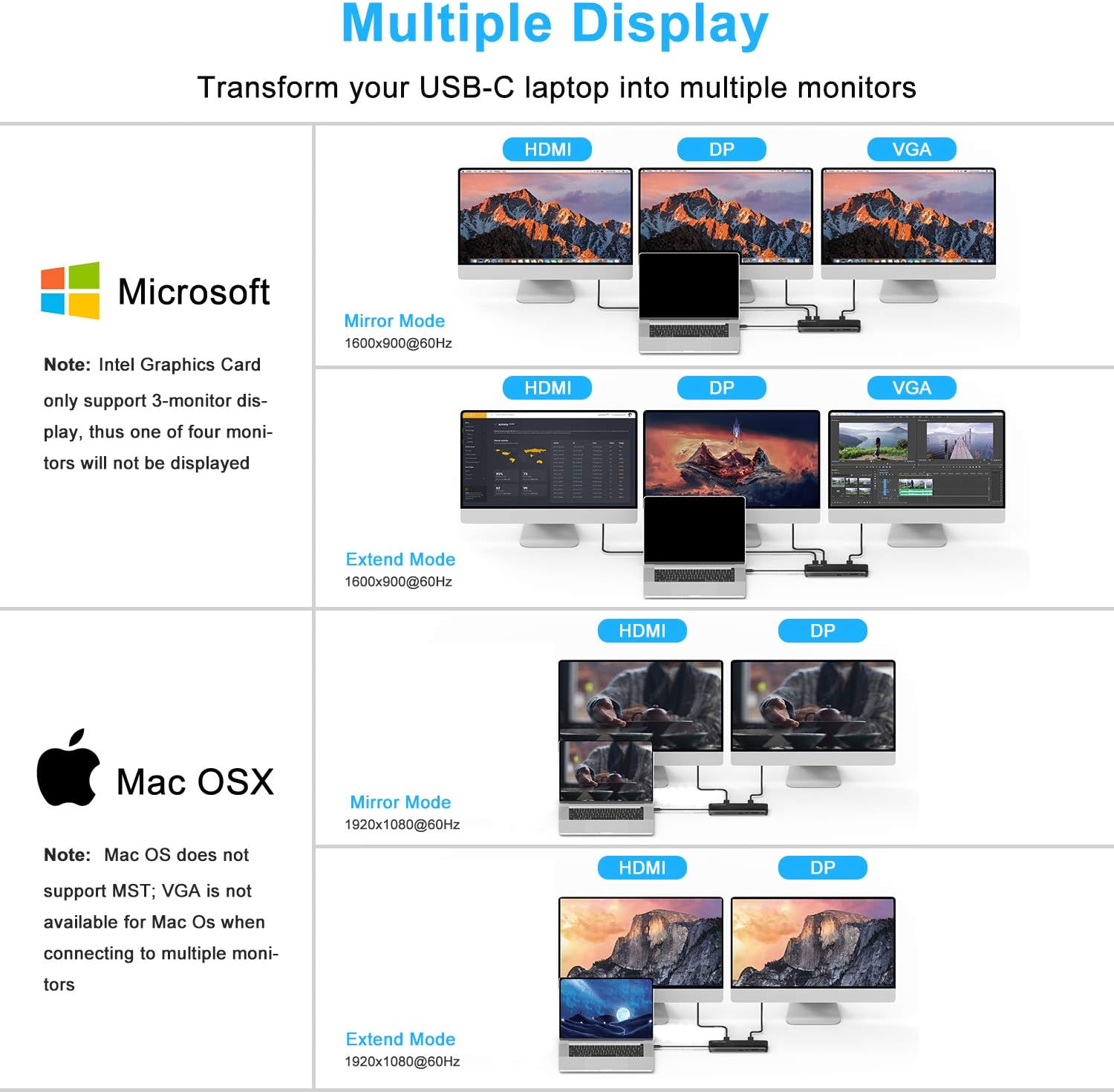
Image: A visual guide illustrating mirror and extend display modes for both Microsoft Windows and Mac OS, showing connections to HDMI, DisplayPort, and VGA.
Note for Apple M1 Chip users: There may be no sound output from the DisplayPort interface. Subsequent OS updates may resolve this issue.

Image: A laptop connected to a large 4K monitor through the WAVLINK docking station, demonstrating high-resolution video output.
Data Transfer and Network
- Bandari za USB 3.0: Two USB 3.0 ports provide data transfer speeds up to 5Gbps.
- Bandari za USB 2.0: Two USB 2.0 ports are suitable for connecting wireless mice, keyboards, and other peripherals.
- Visomaji vya Kadi ya SD/Micro SD: Built-in slots support SD and Micro SD memory cards up to 2TB, with simultaneous reading capability.
- Ethernet ya Gigabit: The 1000Mbps Ethernet port ensures a stable and fast wired network connection.

Image: The docking station connected to a laptop, with various USB-A devices such as a mouse, keyboard, and external storage, demonstrating its versatile connectivity.
Matengenezo
- Weka kituo cha kupakia mizigo kikiwa safi kwa kukifuta kwa kitambaa laini na kikavu.
- Epuka kuhatarisha kifaa kwenye joto kali, unyevunyevu au jua moja kwa moja.
- Hakikisha uingizaji hewa sahihi karibu na kifaa ili kuzuia overheating.
- Disconnect all cables when not in use for extended periods.
Kutatua matatizo
- No Network Connection via Ethernet:
If your computer is connected to the Ethernet port on the dock but there is no network, you may need to download the driver based on the RTL8153 main control chip. Visit the official WAVLINK website for more details and driver downloads.
- Display Issues (Apple M1 Chip):
When using on an Apple computer with an M1 chip, there might be no sound output from the DisplayPort interface. This is a known issue that may be resolved with subsequent OS updates from Apple.
- Power Delivery Not Working:
Ensure your laptop's USB-C port is full-featured and supports Power Delivery. Use a compatible USB-C power adapter connected to the dock's "Power In" port.
- General Connectivity Problems:
Ensure all cables are securely connected. Try restarting your laptop and reconnecting the docking station. Verify that your laptop's USB-C port supports data transfer and video output.
Vipimo
| Kipengele | Maelezo |
|---|---|
| Chapa | WAVLINK |
| Nambari ya Mfano | WL-UMD04 |
| Kiunzi cha vifaa | DisplayPort, Ethernet, HDMI, USB 2.0, USB 3.0, VGA |
| Jumla ya Bandari za USB | 4 (2x USB 3.0, 2x USB 2.0) |
| Jumla ya Bandari za HDMI | 1 |
| DisplayPort | 1 |
| Bandari ya VGA | 1 |
| Bandari ya Ethernet | 10/100/1000Mbps Gigabit Ethaneti |
| Msomaji wa Kadi | SD and Micro SD (supports up to 2TB, simultaneous reading) |
| Jack ya sauti | Sauti ya 3.5mm |
| Utoaji wa Nguvu | Up to 100W (85W to laptop, 15W to peripherals) |
| Uzito wa Kipengee | Gramu 325 |
| Vifaa Sambamba | Dell XPS 9380/ XPS 13 9365/ XPS 15 2018/ XPS 13 9300/ New XPS 15 with i7 dedicated video card 64GB of ram and 2TB SSD; Latitute 7280/ Latitude 5310 2-in-1; Precision 7730/ Precision 7750; Laptop 5590, HP Spectre Laptop 13-af001TU/ Spectre x360 13t/ Spectre folio (13t-ak000cto)/ Spectre 360 laptop/ Specter x369; Elitebook 840 G5 series/ Elitebook X2/ Elitebook x360 1030 G3/ Elitebook 745 G6/ Elitebook 830 G6/ 2018 HP Elite 800 G4; Envy Geforce mx250/ Envy x360 Laptop (15z-ds100); Z book 15u G3/ Zbook 17 G4, Lenovo Yoga 720-13IKB/ Yoga 730/ Yoga 900-13ISK/ Yoga 910/ Yoga 920/ Yoga 930/ Yoga 940-14IIL; 3rd generation Thinkpad Yoga; Yoga15 Thinkpad Ultrabook Pro; Thinkpad E590/ Thinkpad P72/ Thinkpad T470/ Thinkpad X1 Carbon (2019 model); Flex 14 IML (81XG)/ Flex 5; Legion Y530; Lenovo C930/ T480s/ X390/ 81N8, Microsoft Surface Book 2/ Surface Go/ Surface Laptop 3; Surface Pro 7, Huawei Macbook Mate10/ Mate10 pro/ Mate20/ Mate20 pro / Mate30/ Mate30Pro; Google Slate (2019); Chromebook C340-15; SanDisk Cruise Glide; Razer Blade 2017 (gtx 1060); Pixel book go 2019/2020 |
Udhamini na Msaada
Kwa taarifa za udhamini, usaidizi wa kiufundi, na usaidizi zaidi, tafadhali tembelea WAVLINK rasmi webtovuti au wasiliana na huduma kwa wateja wao.
Official WAVLINK Store: WAVLINK Amazon Store
Anwani: Contact@wavlink.com
Simu: +1 8889730883 (UTC -5) Jumatatu - Ijumaa 9AM - 6PM