
1. Bidhaa Imeishaview
The MTM Walkie Talkies XF-638 are designed for reliable two-way communication, featuring 22 channels, hands-free VOX operation, and a clear LCD display. These radios are suitable for various outdoor activities, family events, and general communication needs.

Image: MTM Walkie Talkies XF-638 4-pack in orange color, ready for use.
Utambulisho wa Sehemu
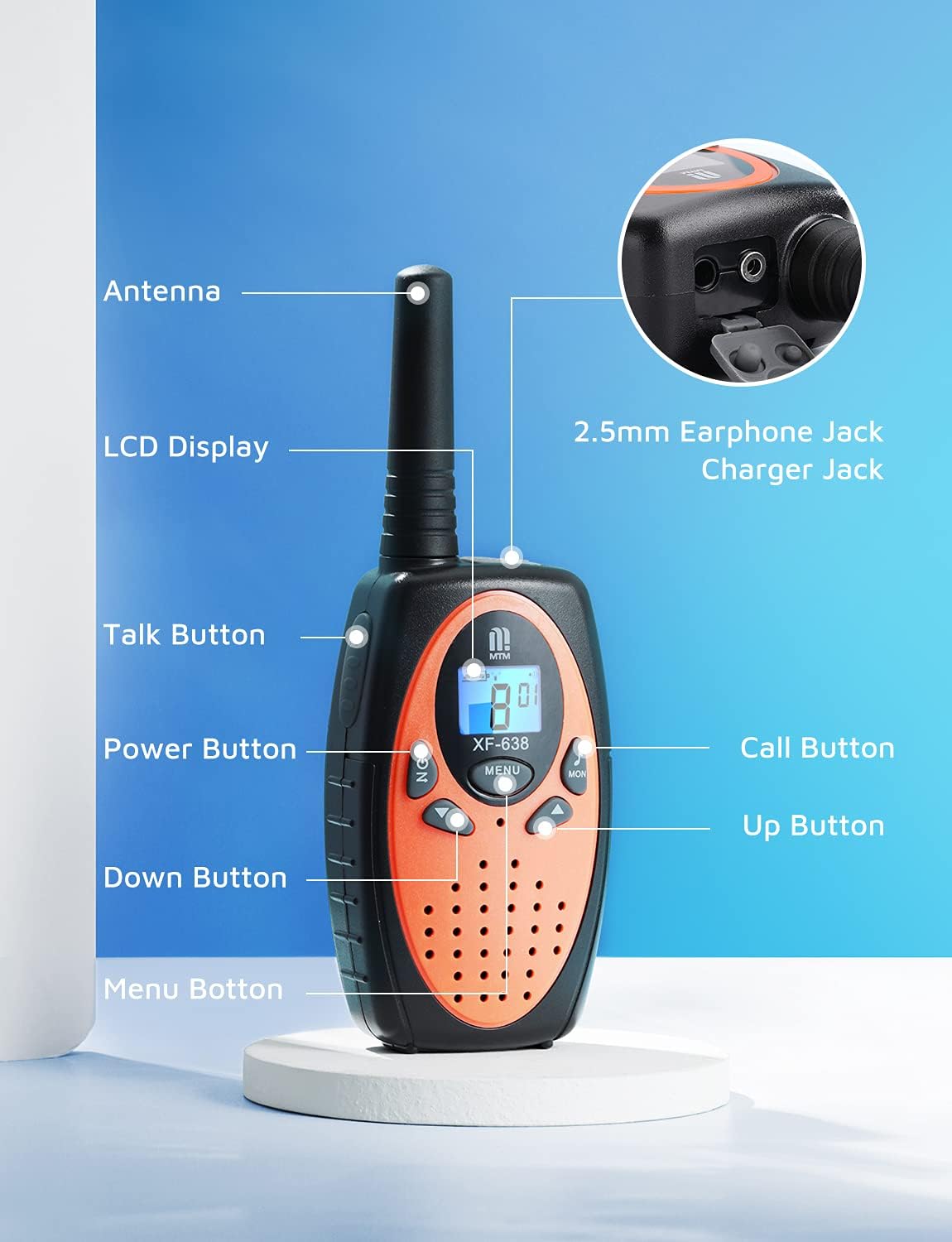
Image: Diagram illustrating the various parts and buttons of the MTM Walkie Talkie XF-638.
- Antena: Kwa kusambaza na kupokea ishara.
- Onyesho la LCD: Shows channel, volume, battery status, and other indicators.
- Kitufe cha Kuzungumza (PTT): Bonyeza na ushikilie ili kusambaza sauti yako.
- Kitufe cha Kuwasha/Kuzima (Washa/Zima): Long press to turn the unit on or off.
- Vifungo vya Juu / Chini: Adjust volume, change channels, and navigate menu options.
- Kitufe cha Menyu: Access and confirm settings.
- Kitufe cha Simu: Hutuma sauti ya simu kwa redio zingine kwenye chaneli hiyo hiyo.
- Kitufe cha MON: Activates the monitor function to listen for weak signals.
- 2.5mm Earphone Jack/Charger Jack: For connecting an external earphone/microphone or charging (if using rechargeable batteries, not included).
2. Kuweka
Ufungaji wa Betri
Each MTM Walkie Talkie requires 3 AAA batteries (not included). Ensure correct polarity when inserting batteries.
- Tafuta kifuniko cha sehemu ya betri nyuma ya kifaa cha kuongea cha walkie.
- Telezesha kwa upole au uondoe kifuniko ili kufungua chumba.
- Insert 3 AAA batteries, matching the positive (+) and negative (-) terminals as indicated inside the compartment.
- Badilisha kifuniko cha sehemu ya betri, ukihakikisha kuwa inabofya mahali pake kwa usalama.

Picha: Nyuma view of the walkie talkie with the battery compartment open, showing where to insert 3 AAA batteries.
Belt Clip Attachment
Attach the included belt clip for convenient carrying.
- Pangilia klipu ya mkanda na nafasi zilizoainishwa nyuma ya kizunguzungu.
- Telezesha klipu chini hadi ijifunge vizuri mahali pake.

Image: A hiker wearing an MTM Walkie Talkie XF-638 attached to their backpack strap with a belt clip.
3. Operesheni ya Msingi
Washa/Zima
- Kuwasha: Bonyeza na ushikilie WASHA/ZIMWA kifungo hadi skrini ya LCD iangaze.
- Kuzima: Bonyeza na ushikilie WASHA/ZIMWA mpaka skrini ya LCD igeuke.
Uteuzi wa Kituo
The MTM Walkie Talkies feature 22 channels. All radios must be on the same channel to communicate.
- Bonyeza kwa MENU button once. The channel number on the LCD will flash.
- Tumia UP or CHINI vitufe vya kuchagua chaneli unayotaka (1-22).
- Bonyeza kwa MENU kitufe tena ili kuthibitisha chaguo lako.

Image: Close-up of the walkie talkie's LCD screen showing the current channel and battery level.
Marekebisho ya Kiasi
Adjust the listening volume to a comfortable level.
- Bonyeza kwa UP kitufe ili kuongeza sauti.
- Bonyeza kwa CHINI kitufe ili kupunguza sauti.

Image: Close-up of the walkie talkie's speaker area, indicating adjustable volume levels.
Kusambaza na Kupokea
- Kutuma: Bonyeza na ushikilie Talk (PTT) button. Speak clearly into the microphone.
- To receive: Release the Talk (PTT) kitufe.
Piga Toni
- To send a call tone: Briefly press the Piga simu button. This alerts other users on the same channel.
Kufuatilia Kazi
- Ili kuamilisha: Bonyeza MON button. This allows you to listen for weak signals on the current channel.
- To deactivate: Press the MON kifungo tena.
4. Vipengele vya Juu
VOX (Ubadilishanaji wa Sauti)
VOX allows for hands-free communication. When activated, the radio automatically transmits when you speak and stops when you are silent.
- Bonyeza kwa MENU button multiple times until the VOX icon appears on the LCD.
- Tumia UP or CHINI buttons to select a VOX sensitivity level (e.g., 1-3, with 3 being most sensitive) or turn VOX off.
- Bonyeza kwa MENU kitufe cha kuthibitisha.

Image: A mother and child communicating using walkie talkies, demonstrating long-range and potentially hands-free use.
Kitufe cha Keypad
The keypad lock prevents accidental changes to your settings.
- Kufunga: Bonyeza na ushikilie MENU button until a key icon appears on the LCD.
- Ili kufungua: Bonyeza na ushikilie MENU button again until the key icon disappears.
Kazi Nyingine
- Auto Squelch System: Automatically mutes weak signals or background noise for clearer communication.
- Kazi ya Kumbukumbu ya Kiotomatiki: Remembers your last used channel and settings.
- Auto Scan Function: Scans all channels for active transmissions.
- Kuokoa Nishati Kiotomatiki: Extends battery life by entering a low-power mode during periods of inactivity.
- Tahadhari ya Chaji ya Betri: An icon on the LCD display indicates when batteries are low and need replacement.
- Headset Option: Compatible with headsets via the 2.5mm earphone jack for private listening and hands-free talking.

Picha: Juu view of the walkie talkie showing the 2.5mm earphone jack and charger port.
5. Range and Usage
The MTM Walkie Talkies XF-638 offer a communication range of up to 3 miles in open fields. The actual range can vary significantly based on terrain, weather conditions, and obstructions.

Image: Graphic illustrating the long-range capability of the MTM Walkie Talkies.
Factors Affecting Range:
- Mandhari: Open areas provide maximum range. Hills, dense foliage, and urban environments with buildings can significantly reduce range.
- Vizuizi: Metal structures, vehicles, and large buildings can block or weaken signals.
- Hali ya hewa: Heavy rain or fog can interfere with signal transmission.
Recommended Usage Scenarios:
- Outdoor adventures like campkupanda, kupanda na uvuvi.
- Family events and activities where staying connected is important.
- Emergency preparedness.

Children playing outdoors with walkie talkies.

Adults using walkie talkies while kayaking.

Restaurant staff using walkie talkies for coordination.
6. Matengenezo
- Kusafisha: Futa redio kwa laini, damp kitambaa. Usitumie kemikali kali au visafishaji vya abrasive.
- Utunzaji wa Betri: Ondoa betri ikiwa redio haitatumika kwa muda mrefu ili kuzuia uvujaji.
- Hifadhi: Hifadhi kifaa cha kuongea cha walkie mahali pakavu na penye baridi mbali na jua moja kwa moja na halijoto kali.
7. Utatuzi wa shida
| Tatizo | Sababu inayowezekana | Suluhisho |
|---|---|---|
| Hakuna nguvu | Betri zimekufa au kusakinishwa vibaya. | Badilisha betri au uhakikishe polarity sahihi. |
| Poor reception/short range | Obstructions (buildings, hills), low battery, incorrect channel/privacy code. | Move to an open area, replace batteries, verify channel and privacy code settings. |
| Haiwezi kusambaza | Keypad locked, low battery, not on the same channel. | Unlock keypad, replace batteries, ensure both radios are on the same channel. |
| Kuingilia kati | Other radios on the same channel or nearby electronic devices. | Change to a different channel or use privacy codes. Move away from interfering devices. |
8. Vipimo
| Kipengele | Maelezo |
|---|---|
| Chapa | MTM |
| Nambari ya Mfano | XF-638 |
| Idadi ya Vituo | 22 |
| Masafa ya Marudio | 462 hadi 467 MHz |
| Upeo wa Masafa ya Kuzungumza | Up to 3 miles (in open fields) |
| Vipengele Maalum | Keypad Lock, Long Range, VOX, Auto Squelch, LCD Display |
| Chanzo cha Nguvu | Betri 3 x AAA (hazijajumuishwa) |
| Kiwango cha Upinzani wa Maji | Waterproof (as per specifications, but general care is advised) |
| Kitambulisho cha FCC | 2AN6WXF-638 |
9. Udhamini na Msaada
MTM provides comprehensive support for your walkie talkies.
- Udhamini: Enjoy a 1-year quality warranty from the date of purchase.
- Usaidizi wa Kiufundi: Lifetime email support is available for any questions or issues you may encounter.
- Anwani: If you are not satisfied with your MTM product or require assistance, please contact us. We aim to respond to customer inquiries within 24 hours.
For support, please refer to your order details to find contact information or visit the official MTM store page.