
1. Maagizo Muhimu ya Usalama
Please read all instructions carefully before using the Taurus Rapidissimo Clean Pro steam cleaner. Failure to follow these instructions may result in electric shock, fire, or serious injury.
- Daima hakikisha kuwa kifaa kimechomoka kutoka kwa chanzo cha umeme kabla ya kujaza maji, kusafisha au kufanya matengenezo.
- Usitumbukize kifaa, uzi wa umeme au kuchomeka kwenye maji au vimiminiko vingine.
- Weka kisafishaji cha mvuke mbali na watoto na kipenzi.
- Exercise extreme caution when using steam. Steam is hot and can cause burns. Keep hands, face, and other body parts away from the steam nozzle.
- Do not open the water tank cap while the appliance is pressurized or hot. Allow it to cool down completely before refilling.
- Use only tap water. Do not add cleaning solutions, perfumes, or other chemicals to the water tank, as this can damage the appliance and void the warranty.
- Do not direct steam at electrical appliances, power outlets, or other electrical components.
- Ikiwa kamba ya umeme imeharibiwa, ni lazima ibadilishwe na mtengenezaji, wakala wake wa huduma, au watu waliohitimu vile vile ili kuepuka hatari.
2. Bidhaa Imeishaview na Vipengele
The Taurus Rapidissimo Clean Pro is a powerful handheld steam cleaner designed for effective, chemical-free cleaning. It operates at 1050W and generates 3 bar pressure for thorough sanitization.

Image: The Taurus Rapidissimo Clean Pro steam cleaner shown with its full set of accessories, including various nozzles, brushes, and cloths.
Vifaa vilivyojumuishwa:
- Hose inayoweza kupanuliwa
- Glass Accessory (Window Squeegee)
- Nozzle ya Conical
- Nozzle yenye pembe
- Brush pande zote
- Mop Pad / Cloth
- Kombe la Kupima
- Funeli
- Upholstery Cloth
- Steam Head Attachment
- Scrapper
- Nozzle ya Crevice
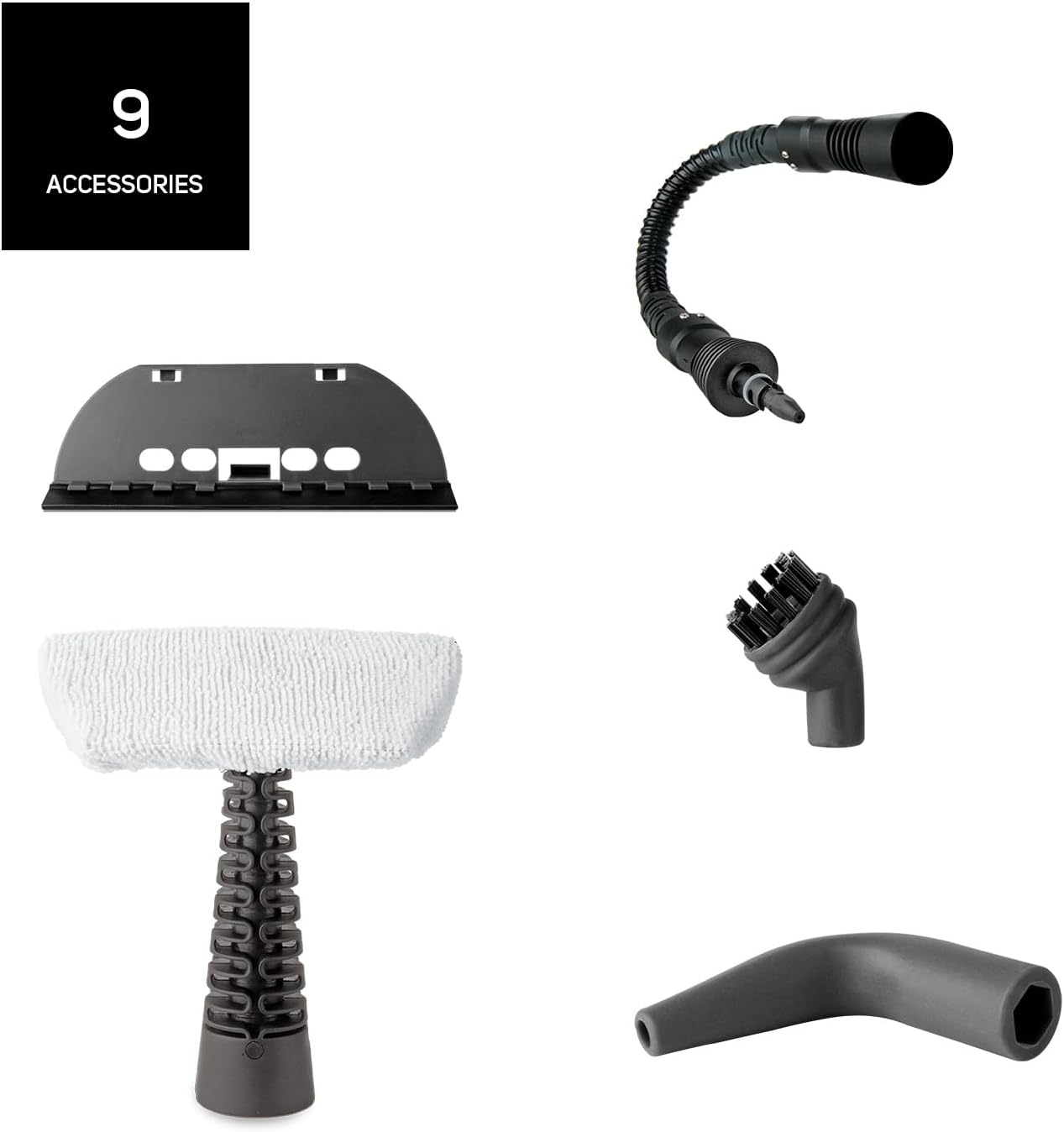
Picha: Maelezo ya kina view of the nine distinct accessories provided with the steam cleaner, designed for various cleaning tasks.
3. Kuweka
- Fungua Kifaa: Carefully remove the steam cleaner and all accessories from the packaging.
- Jaza Tangi la Maji: Unscrew the safety cap of the water tank. Using the provided measuring cup and funnel, fill the tank with up to 350 ml of clean tap water. Do not overfill. Screw the safety cap back on tightly.
- Ambatanisha Kifaa Kinachohitajika: Select the appropriate nozzle or brush for your cleaning task and securely attach it to the steam cleaner. For extended reach, connect the extendable hose first, then the desired accessory.
- Unganisha kwa Nishati: Plug the power cord into a suitable grounded electrical outlet. The indicator light will illuminate, signaling that the unit is heating up.
- Wakati wa joto: The steam cleaner will be ready for use in approximately 3 minutes. The indicator light will change or turn off when the optimal pressure is reached.
4. Maagizo ya Uendeshaji
Once the steam cleaner is heated and ready, you can begin cleaning. The unit provides 3 bar pressure and a steam flow of 30 g/min for effective cleaning.
- Initiate Steam: Bonyeza na ushikilie kichocheo cha mvuke ili kutoa mvuke. Kwa mvuke unaoendelea, baadhi ya mifumo inaweza kuwa na kitufe cha kufunga kwenye kichocheo.
- Nyuso za kusafisha: Direct the steam nozzle towards the surface you wish to clean. Move the nozzle slowly over the area to allow the steam to penetrate and loosen dirt.
- Kutumia Vifaa:
- Brashi ya Mviringo: Ideal for scrubbing stubborn dirt on tiles, grout, and oven racks.
- Conical/Angled Nozzle: Perfect for reaching tight corners, crevices, and detailed cleaning.
- Glass Accessory: Use for streak-free cleaning of windows, mirrors, and other glass surfaces.
- Mop Pad/Upholstery Cloth: Attach to the steam head for cleaning larger flat surfaces like floors, countertops, upholstery, and car seats.
- Futa Safi: After steaming, wipe the treated surface with a clean, dry cloth to remove loosened dirt and moisture.
- Kujaza tena: If the steam output decreases significantly or stops, the water tank may be empty. Unplug the appliance and allow it to cool down for several minutes before carefully unscrewing the safety cap and refilling.

Image: A collage demonstrating the versatility of the steam cleaner, showing it cleaning oven racks, upholstery, and wall tiles.

Image: The steam cleaner being used on a sofa, illustrating its effectiveness against bacteria and viruses through steam.
5. Matengenezo
Matengenezo ya mara kwa mara huhakikisha uimara na utendaji bora wa kisafishaji chako cha mvuke.
- Kusafisha nje: After each use, ensure the appliance is unplugged and cooled. Wipe the exterior with a soft, damp kitambaa. Usitumie visafishaji vya abrasive au vimumunyisho.
- Kumwaga tanki la maji: After each use, unplug the appliance and allow it to cool completely. Carefully unscrew the safety cap and empty any remaining water from the tank. This helps prevent mineral buildup.
- Vifaa vya Kusafisha: Wash removable accessories (brushes, cloths) with warm, soapy water and rinse thoroughly. Allow them to air dry completely before storing.
- Inashuka: Depending on your water hardness, mineral deposits may build up inside the tank over time. If you notice reduced steam output, descaling may be necessary. Consult the manufacturer's full manual for specific descaling instructions, typically involving a diluted vinegar solution.
- Hifadhi: Store the steam cleaner and its accessories in a cool, dry place, away from direct sunlight and out of reach of children.
6. Utatuzi wa shida
Ukikumbana na matatizo na kisafishaji chako cha mvuke, rejelea matatizo na suluhisho zifuatazo za kawaida:
| Tatizo | Sababu inayowezekana | Suluhisho |
|---|---|---|
| Hakuna mvuke au mvuke mdogo sana | Tangi la maji ni tupu Appliance not heated sufficiently Mineral buildup (scale) | Refill water tank (after cooling) Wait for 3 minutes until indicator light signals readiness Perform descaling procedure (refer to full manual) |
| Maji yanayovuja kutoka puani | Accessory not securely attached Overfilling the water tank Kifaa hakijapashwa joto kikamilifu | Ensure accessory is firmly clicked into place Do not exceed the MAX fill line Subiri kifaa kifikie halijoto kamili ya uendeshaji |
| Nuru ya kiashirio haijawashwa | Kifaa hakijaingizwa Suala la umeme Ubovu wa kifaa | Angalia muunganisho wa nguvu Jaribu soketi kwa kutumia kifaa kingine Wasiliana na usaidizi kwa wateja |
If the problem persists after attempting these solutions, please contact Taurus customer support.
7. Vipimo
- Jina la Mfano: Rapidissimo Clean Pro
- Chapa: TAURUS
- Wattage: 1050 W
- Shinikizo la Mvuke: Upau 3
- Steam Flow: 30 g kwa dakika
- Uwezo wa tanki la maji: 350 ml
- Wakati wa joto: Takriban dakika 3
- Uzito wa Kipengee: Kilo 1.6
- Kipengele cha Fomu: Mkononi
- Urefu wa Kebo: 3 meters (extra long)
- Rangi: Bluu
- Vipengele Maalum: Quick heating, improved performance, high steam flow

Image: A close-up of the steam cleaner's nozzle releasing powerful steam, highlighting its 3.5 bar pressure capability.
8. Udhamini na Msaada
For detailed warranty information, please refer to the warranty card included with your product or visit the official Taurus webtovuti. Weka uthibitisho wako wa ununuzi kwa madai yoyote ya udhamini.
If you require technical assistance, spare parts, or have any questions not covered in this manual, please contact Taurus customer support through their official channels. Contact information can typically be found on the product packaging or the manufacturer's webtovuti.