
CHEREEKI 8808
CHEREEKI Digital Alarm Clock User Manual
Mfano: 8808
Utangulizi
Asante kwa ununuziasing the CHEREEKI Digital Alarm Clock. This manual provides detailed instructions on how to set up, operate, and maintain your new alarm clock. Please read this manual carefully before use to ensure optimal performance and longevity of the product.

Picha: Mbele view of the CHEREEKI Digital Alarm Clock displaying time and temperature.
Yaliyomo kwenye Kifurushi
Tafadhali angalia yaliyomo kwenye kifurushi unapoondoa sanduku:
- 1 x LED Digital Alarm Clock
- 1 x USB Cable (adapter not included)
- 1 x Mwongozo wa Mtumiaji
Note: The alarm clock contains a built-in Lithium-polymer battery.
Sanidi
Kuwasha Kifaa
The CHEREEKI Digital Alarm Clock offers two power modes:
- USB Power (Recommended for continuous display):
Connect the alarm clock to a USB port or a 5V/1A or 5V/2A adapter using the provided USB cable. In this mode, the LED display will remain continuously on.

Image: Illustrations demonstrating connection to a USB port and a 5V/1A or 5V/2A adapter for continuous power.
- Built-in Battery Power:
When fully charged, the alarm clock can operate on its internal battery. In this mode, the LED display will automatically turn off after 6 seconds to conserve power. The display can be reactivated by sound (above 90 dB) or by pressing any button.

Image: Visual representation of the intelligent voice control function, where the display turns off after 6 seconds in battery mode and can be awakened by sound.
Mpangilio wa Awali
Upon first use or after a reset, you may need to set the time and other preferences.

Picha: Kina view of the alarm clock's top and bottom panels, highlighting buttons for time setting, alarm setting, volume, and switches for alarms.
Maagizo ya Uendeshaji
Kuweka Wakati
- Katika hali ya kawaida ya kuonyesha, bonyeza kitufe "TIME SET" button located on the bottom of the clock.
- Tumia "JUU" na "CHINI" vifungo kurekebisha saa.
- Bonyeza "TIME SET" again to move to minute adjustment, then use "JUU" na "CHINI".
- Bonyeza "TIME SET" one more time to confirm and exit.
- The clock supports both 12-hour (with AM/PM indicator) and 24-hour formats. To switch, press the "JUU" button during time setting.

Image: Illustration of the alarm clock displaying time in both 12-hour and 24-hour formats.
Setting Alarms (Alarm 1 & Alarm 2)
Saa ina kengele mbili huru.
- To set Alarm 1: Press the "SETI YA KERUMI" button once. The Alarm 1 icon will flash.
- Tumia "JUU" na "CHINI" kuweka saa, kisha bonyeza "SETI YA KERUMI" kuhamia kwa dakika.
- Rudia kwa dakika chache, kisha bonyeza "SETI YA KERUMI" kuthibitisha.
- To set Alarm 2: Press the "SETI YA KERUMI" button twice. The Alarm 2 icon will flash. Follow the same steps as Alarm 1.
- To activate/deactivate an alarm: In normal time display mode, press the "Alarm 1 Switch" or "Alarm 2 Switch" on the bottom of the clock. The corresponding alarm icon will appear/disappear on the display.

Image: A visual demonstrating the dual alarm functionality with different wake-up times and the snooze feature.
Ahirisha Kitendaji
- Kengele inapolia, bonyeza kubwa "SNOOZE / LIGHT" button on top of the clock to activate the 5-minute snooze function.
- Kengele italia tena baada ya dakika 5.
- To turn off the alarm completely, press any other button on the clock.

Image: A user enjoying extra sleep thanks to the 5-minute snooze feature.
Marekebisho ya Mwangaza
The clock offers both automatic and manual brightness control:
- Automatic Brightness (when USB powered): The display brightness adjusts automatically based on the time of day:
- 7:00 AM - 7:00 PM: High brightness
- 7:00 PM - 12:00 AM: Medium brightness
- 12:00 AM - 7:00 AM: Low brightness
- Mwangaza wa Mwongozo: Katika hali yoyote, bonyeza kitufe "SNOOZE / LIGHT" button on top of the clock to cycle through 4 levels of brightness (25%, 50%, 75%, 100%).
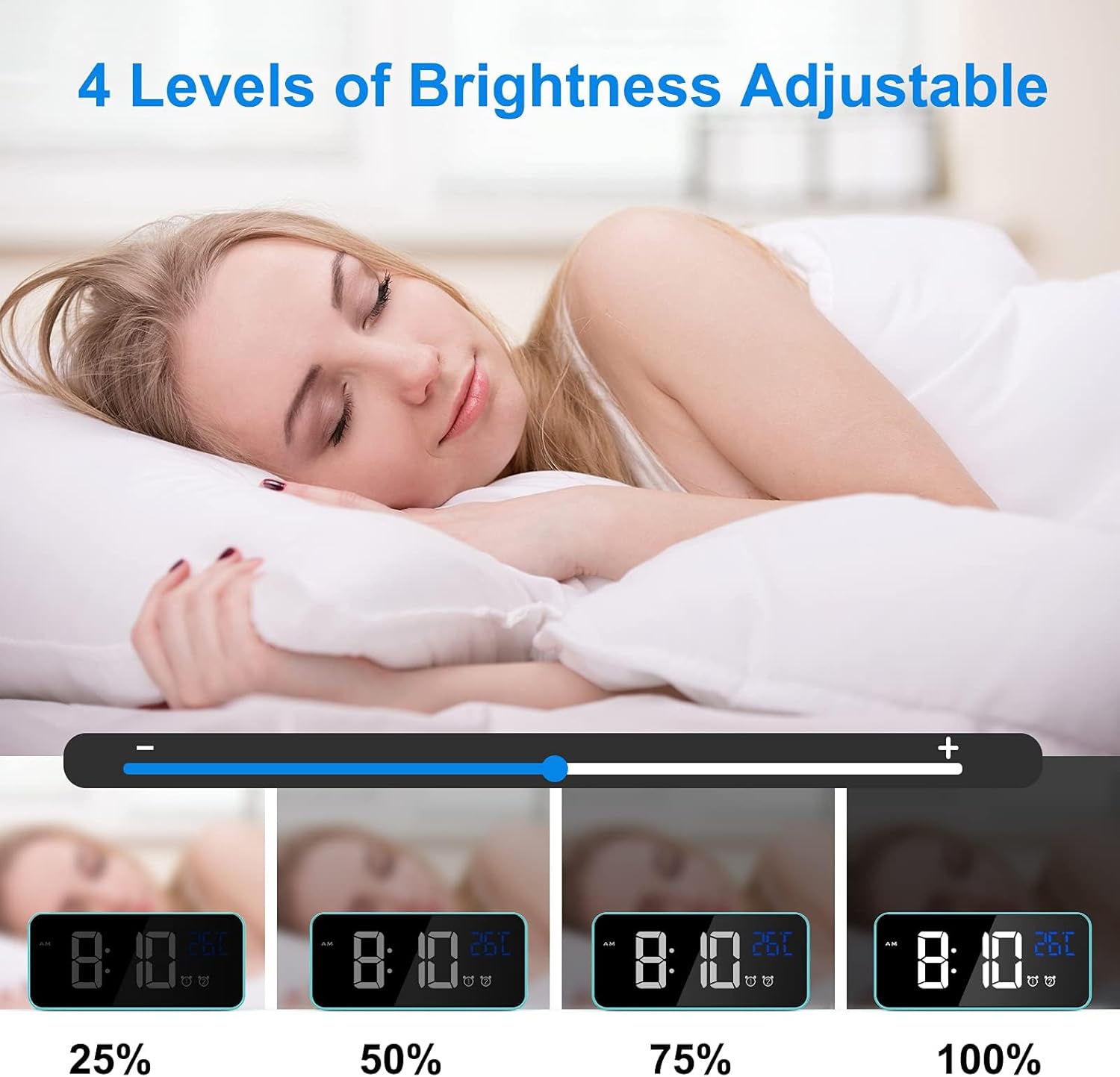
Image: Visual representation of the four adjustable brightness levels of the LED display.
Sauti na Sauti za simu
The alarm clock features 3 volume levels and 10 different ringtones.
- To adjust volume: During alarm setting, or when an alarm is sounding, press the "Volume" button on the bottom of the clock to cycle through the 3 volume levels.
- To change ringtone: During alarm setting, press the "JUU" or "CHINI" buttons when the ringtone selection is active (after setting time and minutes for the alarm).

Image: A user waking up to one of the 10 natural sounds, with an illustration of the four selectable volume levels.
Onyesho la Joto
- The clock displays the ambient temperature in Celsius (°C) by default.
- Ili kubadilisha kati ya Selsiasi (°C) na Fahrenheit (°F), bonyeza kitufe "CHINI" button in normal time display mode.

Image: Illustration of the temperature display switching between Celsius and Fahrenheit.
Makala Juuview
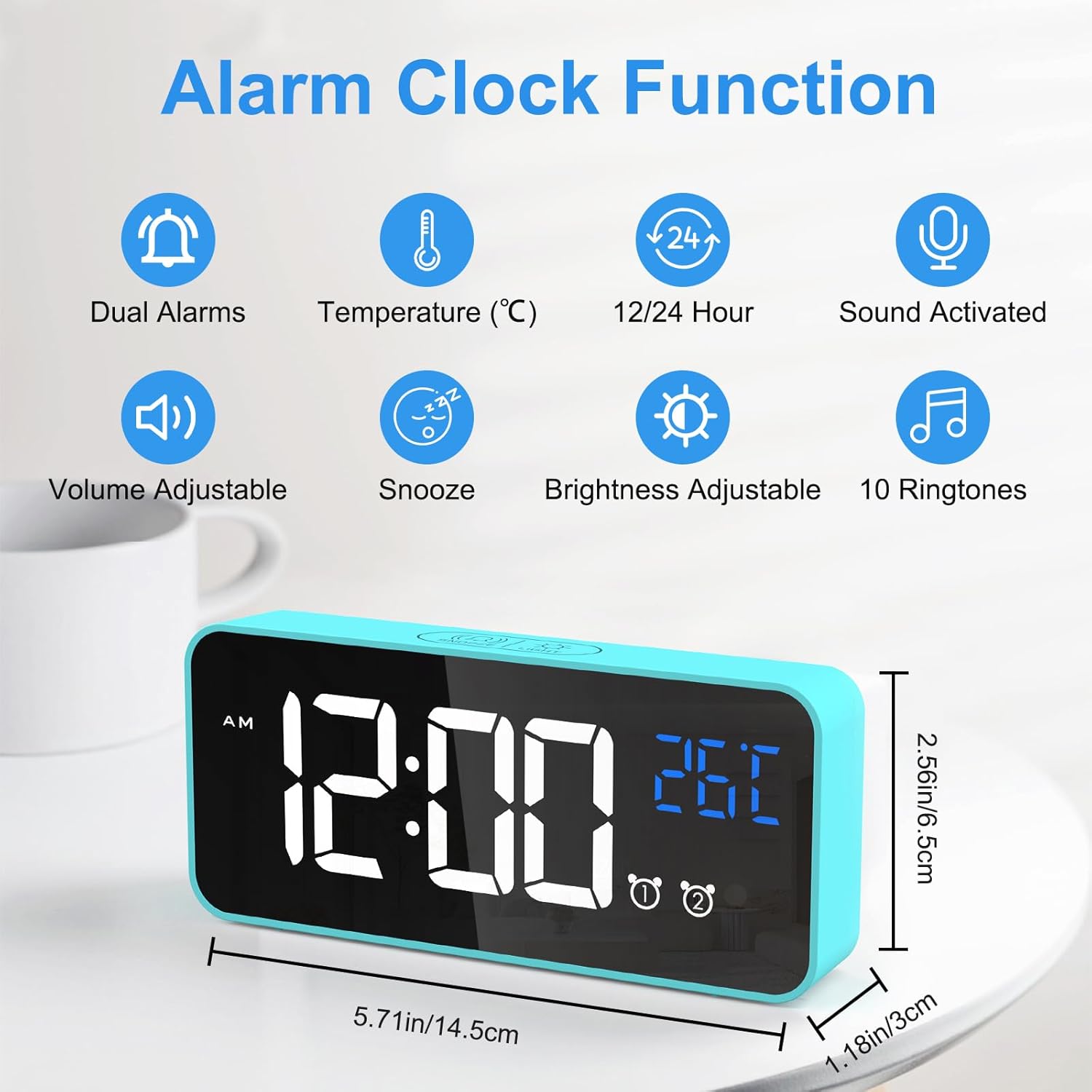
Image: An infographic highlighting the key functions of the alarm clock, including dual alarms, temperature display, 12/24 hour format, sound activation, volume adjustment, snooze, brightness adjustment, and 10 ringtones.
- Njia mbili za Nguvu: Operates via USB for continuous display or built-in battery for portable use with voice activation.
- Mwangaza Unaoweza Kubadilishwa: 4 manual levels and automatic adjustment when USB powered.
- Dual Alarms with Snooze: Set two independent alarms with a convenient 5-minute snooze function.
- Sauti Inayoweza Kubinafsishwa: Choose from 3 volume levels and 10 unique ringtones.
- Uanzishaji wa Sauti: In battery mode, the display activates for 6 seconds when sound exceeds 90 dB.
- Uonyesho wa Joto: Shows ambient temperature in Celsius or Fahrenheit.
- Kazi ya Kumbukumbu: Settings are retained even if power is lost or the clock is turned off and on again.

Image: A visual explanation of the memory function, showing that settings are retained even after power loss or restart.
Matengenezo
- Kusafisha: Tumia kitambaa laini na kikavu kusafisha uso wa saa ya kengele. Usitumie visafishaji au viyeyusho vya kukwaruza.
- Mazingira: Keep the alarm clock away from heat sources, direct sunlight, and high humidity environments.
- Hifadhi: If the alarm clock will not be used for an extended period, turn off the power switch to preserve battery life.
Kutatua matatizo
| Tatizo | Sababu inayowezekana | Suluhisho |
|---|---|---|
| Display is blank or scrambled. | Low battery, power issue, or internal error. | Connect to USB power. If the issue persists, use a pin to press the "RESET" button on the bottom of the clock. |
| Display turns off after 6 seconds. | Clock is operating on battery power. | This is normal behavior to conserve battery. Connect to USB power for a continuously lit display. |
| Kengele haisikiki. | Kengele haijawashwa au sauti ni ndogo sana. | Ensure the alarm switch (Alarm 1 or Alarm 2) is in the "ON" position. Check and adjust the alarm volume. |
| Time/settings are lost after power off. | This should not happen due to memory function. | Ensure the internal battery is charged. If the issue persists, perform a reset. |
Vipimo
| Kipengele | Maelezo |
|---|---|
| Chapa | CHEREEKI |
| Nambari ya Mfano | 8808 |
| Rangi | Bluu |
| Vipimo (L x W x H) | Sentimita 14.5 x 6.5 x 3 (inchi 5.71 x 2.56 x 1.18) |
| Uzito | Gramu 158 (pauni 0.35) |
| Nyenzo | Plastiki |
| Aina ya Kuonyesha | Digital LED |
| Chanzo cha Nguvu | USB Cable / Built-in Lithium-polymer Battery |
| Vipengele Maalum | Temperature Display, Snooze Function, Dual Alarms, Voice Activation, Adjustable Brightness, 10 Ringtones |
Udhamini na Msaada
CHEREEKI is committed to providing high-quality products and excellent customer service. If you have any questions or encounter issues with your alarm clock, please do not hesitate to contact our customer support team. We are dedicated to providing attentive after-sales service.
For support, please refer to the contact information provided with your purchase or visit the official CHEREEKI webtovuti.
Ask a question about this manual
Ask about setup, troubleshooting, compatibility, parts, safety, or missing instructions. Manuals+ will review the question and use this page’s manual context to help answer it.