
1. Utangulizi
This manual provides essential instructions for the safe and effective use of your Fujifilm INSTAX 210 Instant Wide Photo Camera. Please read this manual thoroughly before operating the camera and retain it for future reference. The INSTAX 210 is designed to produce instant wide-format photographs with ease.
2. Tahadhari za Usalama
To ensure safe operation and prevent damage to the camera or injury to yourself and others, observe the following precautions:
- Do not disassemble, modify, or attempt to repair the camera. This may cause electric shock or injury.
- Keep the camera away from water or other liquids. Do not operate with wet hands.
- Usiwaweke kamera kwenye halijoto kali, jua moja kwa moja kwa muda mrefu, au unyevunyevu mwingi.
- Use only specified batteries and film. Incorrect use can lead to leakage, overheating, or explosion.
- Weka betri na filamu mbali na watoto wadogo.
- Avoid direct eye contact with the flash.
3. Majina ya Sehemu na Kazi
Familiarize yourself with the main components of your INSTAX 210 camera.

Kielelezo 3.1: Mbele view of the Fujifilm INSTAX 210 Instant Wide Photo Camera.
This image shows a general front-side view of the Fujifilm INSTAX 210 Instant Wide Photo Camera, illustrating its overall design and the large lens assembly.
- Lenzi: Inakamata picha.
- Kitufe cha Kufunga: Bonyeza ili kupiga picha.
- Mweko: Inatoa mwanga katika hali ya chini ya mwanga.
- Viewmpataji: Used for framing your shots.
- Nafasi ya Kutoa Filamu: Ambapo picha zilizochapishwa hutoka.
- Jopo la Kudhibiti LCD: Displays focal distance, film count, and exposure settings.
- Kitufe cha Nguvu: Huwasha na kuzima kamera.
- Focus Range Button: Switches between 0.9-3m and 3m-Infinity focus modes.
- Lighten/Normal/Darken (L/N/D) Button: Adjusts exposure compensation.
4. Kuweka
4.1. Ufungaji wa Betri
The INSTAX 210 requires four AA-size alkaline batteries.
- Fungua kifuniko cha sehemu ya betri kilicho upande wa kamera.
- Insert four AA batteries, ensuring the correct polarity (+/-) as indicated inside the compartment.
- Funga kifuniko cha sehemu ya betri kwa usalama.
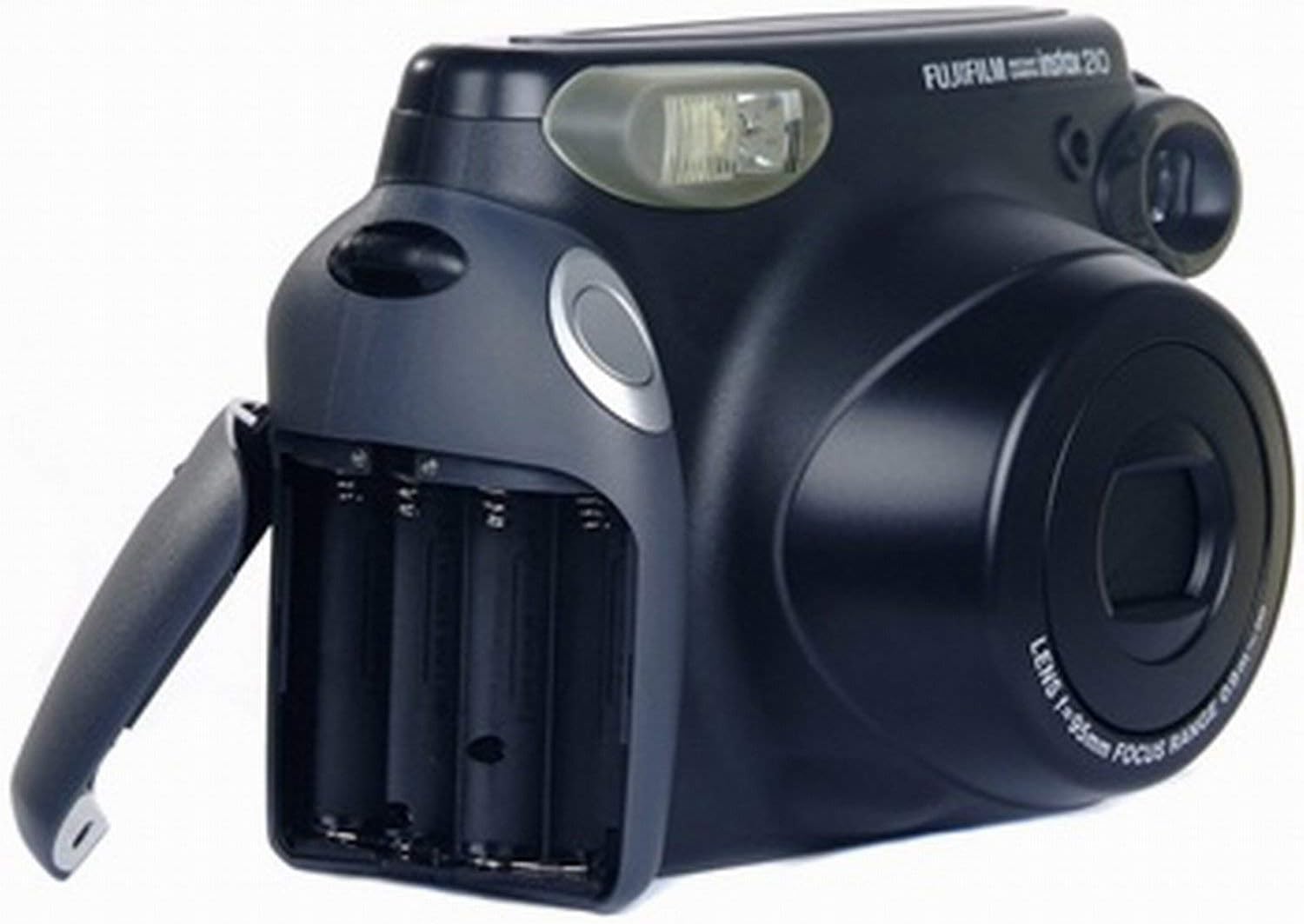
Figure 4.1: Battery compartment.
This image displays the Fujifilm INSTAX 210 camera from the side, with the battery compartment door open, showing the slots for AA batteries and their correct orientation.
4.2. Filamu Inapakia
Use only Fujifilm INSTAX Wide Instant Film.
- Bonyeza kitufe cha nguvu kuwasha kamera.
- Fungua kifuniko cha sehemu ya filamu nyuma ya kamera.
- Align the yellow mark on the film pack with the yellow mark on the camera body.
- Ingiza pakiti ya filamu moja kwa moja kwenye sehemu. Usibonyeze chini pakiti ya filamu.
- Close the film compartment cover. The camera will automatically eject the black film cover sheet.
- The film counter on the LCD panel will display "10", indicating 10 exposures are available.

Figure 4.2: Film compartment.
This image shows the Fujifilm INSTAX 210 camera with its rear film compartment door open, revealing the area where the instant film pack is inserted. The internal mechanism for film loading is visible.
5. Kuendesha Kamera
5.1. Kupiga Picha
- Turn on the camera by pressing the Power button. The lens will extend.
- Angalia kupitia viewkitafutaji ili kuiunda mada yako.
- Select the appropriate focus range using the Focus Range button (0.9-3m for close-ups, 3m-Infinity for landscapes).
- Adjust exposure compensation if needed using the L/N/D button (Lighten, Normal, Darken).
- Press the Shutter button firmly. The flash will fire automatically if required, and the photo will be ejected from the film slot.
- Ruhusu picha ikue kiasili. Usiitikise au kupinda chapa.

Figure 5.1: Control panel.
Picha hii inatoa upande view of the Fujifilm INSTAX 210 camera, highlighting the control panel with buttons for power, flash, focus range (0.9-3m and 3m-infinity), and exposure adjustment (Lighten, Normal, Darken). The LCD screen is also visible.
5.2. Automatic Flash
The INSTAX 210 features an automatic flash that fires in low-light conditions to ensure proper exposure. There is no manual flash override.
5.3. Focus Range Selection
The camera offers two focus ranges:
- Mita 0.9 - Mita 3: Use for subjects that are relatively close to the camera.
- 3m - Infinity: Use for subjects that are further away, such as landscapes or group shots.
Select the appropriate range using the dedicated button on the control panel.
5.4. Exposure Compensation
The L/N/D button allows you to adjust the brightness of your photos:
- L (Lighten): Makes the photo brighter. Useful for backlit subjects or darker environments.
- N (Normal): Standard exposure.
- D (Darken): Makes the photo darker. Useful for bright environments or to achieve a specific mood.
6. Matengenezo na Matunzo
- Kusafisha Lensi: Gently wipe the lens with a soft, dry, lint-free cloth. Do not use abrasive cleaners or solvents.
- Kusafisha Mwili wa Kamera: Wipe the camera body with a soft, dry cloth. For stubborn dirt, dampen the cloth slightly with water and then wipe dry.
- Hifadhi: When not in use, store the camera in a cool, dry place away from direct sunlight and extreme temperatures. Remove batteries if the camera will not be used for an extended period.
- Utunzaji wa Filamu: Store film packs in a cool, dry place. Do not expose film to high temperatures or direct sunlight before use.
7. Utatuzi wa shida
| Tatizo | Sababu / Suluhisho linalowezekana |
|---|---|
| Kamera haiwashi. |
|
| Filamu haitoi. |
|
| Picha ni nyeusi/nyepesi sana. |
|
| Picha hazina mwanga. |
|
8. Vipimo
| Kipengele | Maelezo |
|---|---|
| Muundo wa Filamu | Fujifilm INSTAX Wide Instant Film |
| Ukubwa wa Filamu | 108 x 86 mm (inchi 4.25 x 3.4) |
| Ukubwa wa Picha | 99 x 62 mm (inchi 3.9 x 2.4) |
| Lenzi | Retracting lens, 2 components, 2 elements, f=95mm, 1:14 |
| Kuzingatia | Motor-driven 2-range switching (0.9m - 3m / 3m - ∞) |
| Kasi ya Kufunga | Programmed electronic shutter, 1/64 - 1/200 sec. |
| Mwako | Built-in automatic electronic flash (Auto Exposure) |
| Udhibiti wa Mfiduo | Automatic, Interlocking range (ISO 800): LV 10.5 - LV 15. EV adjustment: ±2/3 EV |
| Ugavi wa Nguvu | Four AA-size 1.5V alkaline batteries |
| Vipimo (W x H x D) | 178.5 x 117.5 x 94.5 mm (inchi 7 x 4.6 x 3.7) |
| Uzito | 650g (excluding batteries, strap, and film pack) |
9. Udhamini na Msaada
This product is sold as "Renewed" and may come with a specific warranty from the seller or platform. Please refer to your purchase documentation for details regarding warranty coverage and return policies.
For technical support or service inquiries, please contact the retailer or the official Fujifilm support channels. Keep your proof of purchase for any warranty claims.
Note: As this is a renewed product, specific warranty terms may vary from new products.