
Foseal FO-01
Mwongozo wa Mtumiaji wa Kichanganuzi cha Foseal FO-01 OBD2
Zana ya Uchunguzi wa Magari
Utangulizi
The Foseal FO-01 OBD2 Scanner is a professional diagnostic tool designed to help vehicle owners and technicians quickly identify and resolve issues related to the On-Board Diagnostics (OBDII) system. This plug-and-play device provides essential information such as Diagnostic Trouble Codes (DTCs), freeze frame data, and I/M readiness status, enabling efficient vehicle maintenance and troubleshooting.
This manual provides detailed instructions on how to set up, operate, and maintain your Foseal FO-01 OBD2 Scanner, along with troubleshooting tips and product specifications.
Kuanzisha na Muunganisho
Follow these steps to connect your Foseal FO-01 OBD2 Scanner to your vehicle:
- Zima kichocheo cha kuwasha: Ensure the vehicle's ignition is in the OFF position. Do not connect or disconnect the scanner while the ignition is on or the engine is running.
- Locate the Data Link Connector (DLC): The 16-pin DLC is typically located under the dashboard on the driver's side. Refer to your vehicle's owner's manual if you cannot find it.
- Connect the scanner: Insert the OBDII cable from the Foseal FO-01 scanner firmly into the vehicle's DLC.
- Washa kichocheo cha kuwasha: Switch the vehicle's ignition to the ON position (engine can be off or running). The scanner will power on automatically.
- Initiate Diagnostic: Bonyeza kwa Return/Confirm button on the scanner to enter the diagnostic menu. The scanner will automatically detect the vehicle's protocol.
- Onyesho la Hali ya Mfumo: Once the vehicle protocol is detected, the system status (Malfunction Indicator Lamp status, DTC count, monitor status) will be displayed. Wait a few seconds or press any key to proceed to the diagnostic menu.

Image: The Foseal FO-01 OBD2 Scanner with its cable and OBDII connector, showing the main diagnostic menu on its screen. This illustrates the device's appearance and initial display.
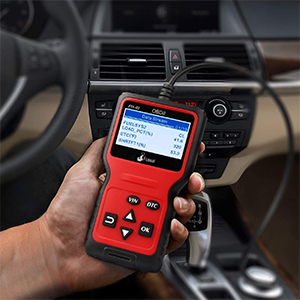
Image: A user holding the Foseal FO-01 scanner, demonstrating its compact size and ease of use when connected to a vehicle's OBDII port, typically located under the dashboard.
Maagizo ya Uendeshaji
The Foseal FO-01 scanner features a user-friendly interface with dedicated buttons for navigation and function selection.

Image: A visual guide to the Foseal FO-01 scanner's buttons, including VIN, DTC, Return, OK, and navigation arrows (Up/Down), along with its compact dimensions.
Kazi Muhimu:
- Soma Nambari: This function retrieves Diagnostic Trouble Codes (DTCs) from the vehicle's Engine Control Unit (ECU). These codes indicate specific issues detected by the vehicle's diagnostic system.

Image: The scanner screen showing a "P0115 Engine Coolant Temperature Sensor 1 Circuit" code, demonstrating the Read Codes function.
- Futa Nambari: After repairs are made, this function clears the DTCs from the ECU and turns off the Malfunction Indicator Lamp (MIL), pia inajulikana kama Taa ya Injini ya Kuangalia. Note: Ensure the underlying issue is resolved before erasing codes, as they may reappear if the problem persists.
- View Fanya Data ya Fremu: When an emission-related fault occurs, the ECU records certain vehicle operating conditions at that moment. This "freeze frame" data includes parameters like engine RPM, vehicle speed, mass air flow, engine load, fuel pressure, fuel trim, and engine coolant temperature, providing a snapshot of the vehicle's state when the fault was detected.

Image: The scanner displaying various data types, including Vehicle ID Number, Calibration ID, Real Time Curve (e.g., Engine Coolant Temperature, Engine RPM), and I/M Readiness status, illustrating its multifunctional capabilities.
- Utayari wa I / M: This function checks the status of the vehicle's emission-related monitoring systems. It indicates whether various monitors (e.g., misfire monitor, fuel system monitor, O2 sensor monitor, EVAP system monitor) have completed their diagnostic cycles. This is crucial for annual smog checks.
- Vehicle Information (VIN, Cal ID, CVN): Retrieve the Vehicle Identification Number (VIN), Calibration ID (Cal ID), and Calibration Verification Numbers (CVN) from the vehicle's ECU. This is useful for verifying vehicle details.
- Utiririshaji wa Data ya Moja kwa Moja: View real-time operational parameters of the vehicle, such as engine RPM, vehicle speed, coolant temperature, and fuel system status. This data can help diagnose intermittent problems.
Image: The scanner screen showing a live data stream with parameters like fuel system status, engine load percentage, engine coolant temperature, and short-term fuel trim, useful for real-time diagnostics.
- Utafutaji wa DTC The scanner includes a built-in DTC library to provide definitions for generic (P0, P2, P3, B0, C0, U0) and manufacturer-specific (P1, P3, B1, C1, U1) codes.

Image: A comprehensive visual summary of the Foseal FO-01's diagnostic capabilities, including reading and erasing codes, live data, I/M readiness, and more.
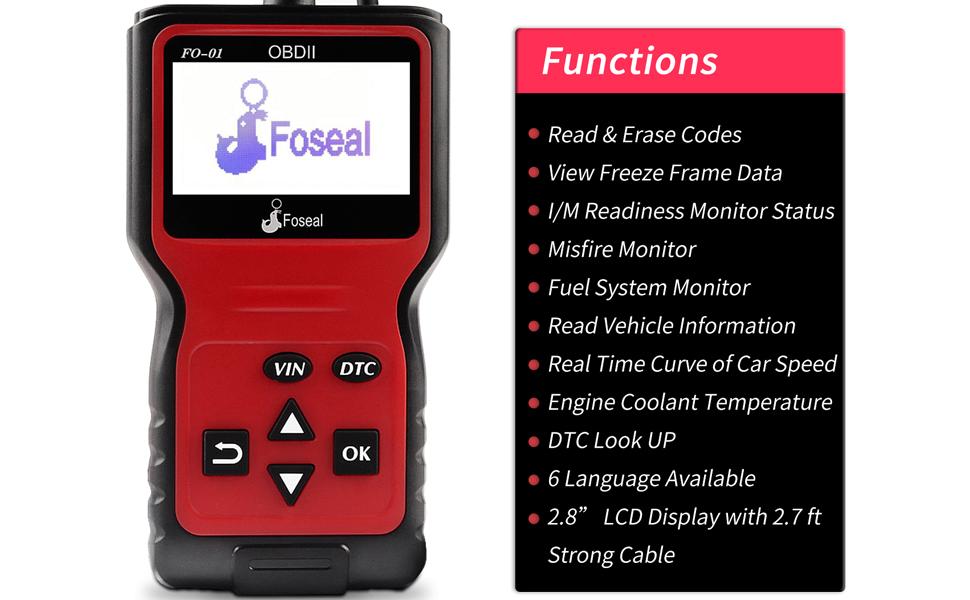
Image: The Foseal FO-01 scanner displayed alongside a detailed list of its primary functions and key specifications, such as display size and cable length.
Matengenezo
To ensure the longevity and optimal performance of your Foseal FO-01 OBD2 Scanner, follow these maintenance guidelines:
- Kusafisha: Tumia kitambaa laini na kikavu kusafisha kifaa cha kuchanganuaasing and screen. Avoid using abrasive cleaners or solvents that could damage the device.
- Hifadhi: Hifadhi kichanganuzi katika mazingira safi na makavu mbali na halijoto kali, jua moja kwa moja, na unyevu mwingi.
- Huduma ya Cable: Do not bend or crimp the OBDII cable excessively. Store the cable neatly to prevent damage.
- Epuka Matone: Handle the device with care to prevent accidental drops, which could damage internal components or the screen.
Kutatua matatizo
If you encounter issues while using your Foseal FO-01 OBD2 Scanner, refer to the following common problems and solutions:
"Connection Error" Message
If the scanner displays a "Connection Error" message, it indicates that the device cannot communicate with the vehicle's ECU. Perform the following checks:
- Hali ya Kuwaka: Confirm that the vehicle's ignition is in the ON position.
- Muunganisho wa Kebo: Verify that the scanner's OBDII connector is securely plugged into the vehicle's DLC.
- Utangamano wa Gari: Ensure your vehicle is OBDII compliant. Most vehicles in the US manufactured after 1996, and European/Asian vehicles after 2000, are OBDII compliant.
- Weka Upya Muunganisho: Turn off the ignition, wait approximately 10 seconds, and then turn the ignition back on before attempting to connect the scanner again.
If the "Connection Error" persists after these steps, there might be a communication issue between the scanner and the vehicle, or a problem with the vehicle's OBDII system. In such cases, please contact the manufacturer's support for assistance.
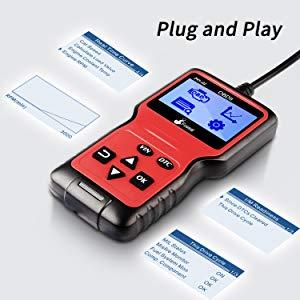
Image: The Foseal FO-01 scanner highlighting its simple plug-and-play operation, which minimizes setup complexities and potential connection issues.
Vipimo
| Kipengele | Vipimo |
|---|---|
| Chapa | kisukuku |
| Mfano | FO-01 |
| Vipimo (L x W x H) | Sentimita 15.5 x 8.5 x 2 cm (takriban inchi 6.1 x 3.3 x 0.8) |
| Uzito | Gramu 300 (takriban pauni 0.66) |
| Onyesho | LCD ya inchi 2.8 |
| Urefu wa Cable | Approx. 2.7 ft (82 cm) |
| Chanzo cha Nguvu | Vehicle OBDII Port (12V) |
| Itifaki Zinazotumika | KWP2000, ISO2000, ISO9141, J1850 VPW, J1850 PWM, CAN |
| Utangamano wa Gari | OBDII compliant vehicles (US: 1996 & newer; EU/Asia: 2000 & newer) |
| Lugha Zinazotumika | Kiingereza, Kijerumani, Kiholanzi, Kihispania, Kifaransa, Kiitaliano |
| UPC | 766832213086 |
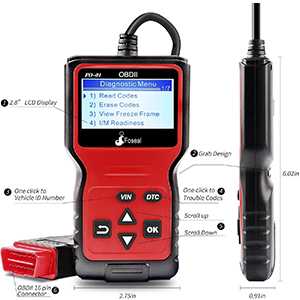
Picha: upande kwa upande view of the Foseal FO-01 scanner, illustrating its physical dimensions and the layout of its control buttons.

Image: This image highlights the wide vehicle compatibility of the Foseal FO-01 scanner, supporting various car models, and lists the multiple languages available for its interface.
Udhamini na Msaada
For warranty information, technical support, or any inquiries regarding your Foseal FO-01 OBD2 Scanner, please contact the manufacturer directly. Refer to the product packaging or the official Foseal webtovuti kwa maelezo ya mawasiliano.
Always ensure you are using the product as intended and refer to this manual for proper operation to avoid voiding any warranty.
Ask a question about this manual
Ask about setup, troubleshooting, compatibility, parts, safety, or missing instructions. Manuals+ will review the question and use this page’s manual context to help answer it.