
1. Utangulizi
Thank you for choosing the HYCHIKA 3.6V Cordless Screwdriver. This manual provides essential information for the safe and efficient operation, maintenance, and troubleshooting of your new tool. Please read these instructions carefully before use and retain them for future reference.
2. Maagizo ya Usalama
Daima zingatia tahadhari za kimsingi za usalama ili kupunguza hatari ya moto, mshtuko wa umeme na majeraha ya kibinafsi.
Usalama wa Zana ya Nguvu ya Jumla
- Usalama wa Eneo la Kazi: Weka eneo lako la kazi safi na lenye mwanga wa kutosha. Maeneo yenye vitu vingi au giza hukaribisha ajali.
- Usalama wa Umeme: Usifichue zana za nguvu kwa mvua au hali ya mvua. Maji yanayoingia kwenye chombo cha nguvu yataongeza hatari ya mshtuko wa umeme.
- Usalama wa Kibinafsi: Always wear appropriate personal protective equipment, such as safety glasses. Dress properly; avoid loose clothing or jewelry that can get caught in moving parts.
- Utunzaji na matumizi ya zana: Usilazimishe chombo cha nguvu. Tumia zana sahihi ya nishati kwa programu yako. Tenganisha plagi kutoka kwa chanzo cha nishati na/au ondoa kifurushi cha betri kutoka kwa zana ya nishati kabla ya kufanya marekebisho yoyote, kubadilisha vifuasi au kuhifadhi zana za nishati.
Usalama wa Betri
- Only charge the battery with the charger specified by the manufacturer.
- Do not incinerate the battery pack even if it is severely damaged. Batteries can explode in a fire.
- Usizungushe vituo vya betri kwa muda mfupi.
3. Yaliyomo kwenye Kifurushi
Thibitisha kuwa vipengee vyote vipo wakati wa kufungua:
- 1 x HYCHIKA 3.6V Cordless Screwdriver
- 36 x Accessories (various screwdriver bits, sockets, HSS drill bit, extension bar)
- Adapta ya kuchaji 1 x
- 1 x Kebo ya Kuchaji ya USB
- 1 x Mwongozo wa Maagizo
- 1 x Sanduku la Kuhifadhi

Kielelezo cha 3.1: Included accessories, featuring various bit types and sizes, sockets, an HSS drill bit, and an extension bar for diverse applications.
4. Bidhaa Imeishaview
Familiarize yourself with the components of your HYCHIKA Cordless Screwdriver.

Kielelezo cha 4.1: This diagram identifies key components: Self-locking chuck, Rotating button, Front LED light, Forward/Reverse buttons, On/Off switch, USB port, Charging indicator, Rear flashlight.
Sifa Muhimu:
- 6 Nm Max Torque: Provides sufficient power for various screwing and light drilling tasks.
- 2.0Ah Lithium-ion Battery: Offers long-lasting power and durability.
- Ncha ya Kuzungusha: Allows adjustment from a straight to a pistol grip for versatility and access in tight spaces.
- Front LED Light & Rear Flashlight: Illuminates the work area and provides general utility lighting.
- Quick-Release Chuck: Huwezesha mabadiliko ya biti haraka na rahisi.

Kielelezo cha 4.2: The screwdriver's handle can rotate for different working angles, enhancing usability in various situations.
5. Kuweka
Inserting Screwdriver Bits/Sockets
- Ensure the screwdriver is turned off and the forward/reverse switch is in the neutral (locked) position.
- Vuta chuck ya kutolewa haraka mbele.
- Insert the desired 6.35mm hex shank bit or socket firmly into the chuck.
- Release the chuck to lock the bit in place. Gently pull on the bit to ensure it is securely fastened.
- For longer reach, attach the extension bar first, then insert the bit into the extension bar.
6. Maagizo ya Uendeshaji
Powering On/Off and Direction Control
- To turn the screwdriver ON, press the On/Off switch. The tool will operate as long as the switch is pressed.
- To select the rotation direction (forward for tightening, reverse for loosening), slide the forward/reverse switch. The middle position locks the tool and prevents accidental activation.
Kutumia taa za LED
- The front LED light automatically illuminates when the On/Off switch is pressed, providing visibility to your work area.
- The rear flashlight can be activated independently by pressing the dedicated flashlight switch located at the base of the handle. This is useful for general illumination in dark spaces.

Kielelezo cha 6.1: The integrated front LED light illuminates the work area for improved visibility during operation.
Adjusting the Rotating Handle
- To change the handle position, press the 'LOCK' button (rotating button) located near the pivot point of the handle.
- Rotate the handle to the desired position (straight or pistol grip).
- Release the 'LOCK' button to secure the handle in place.
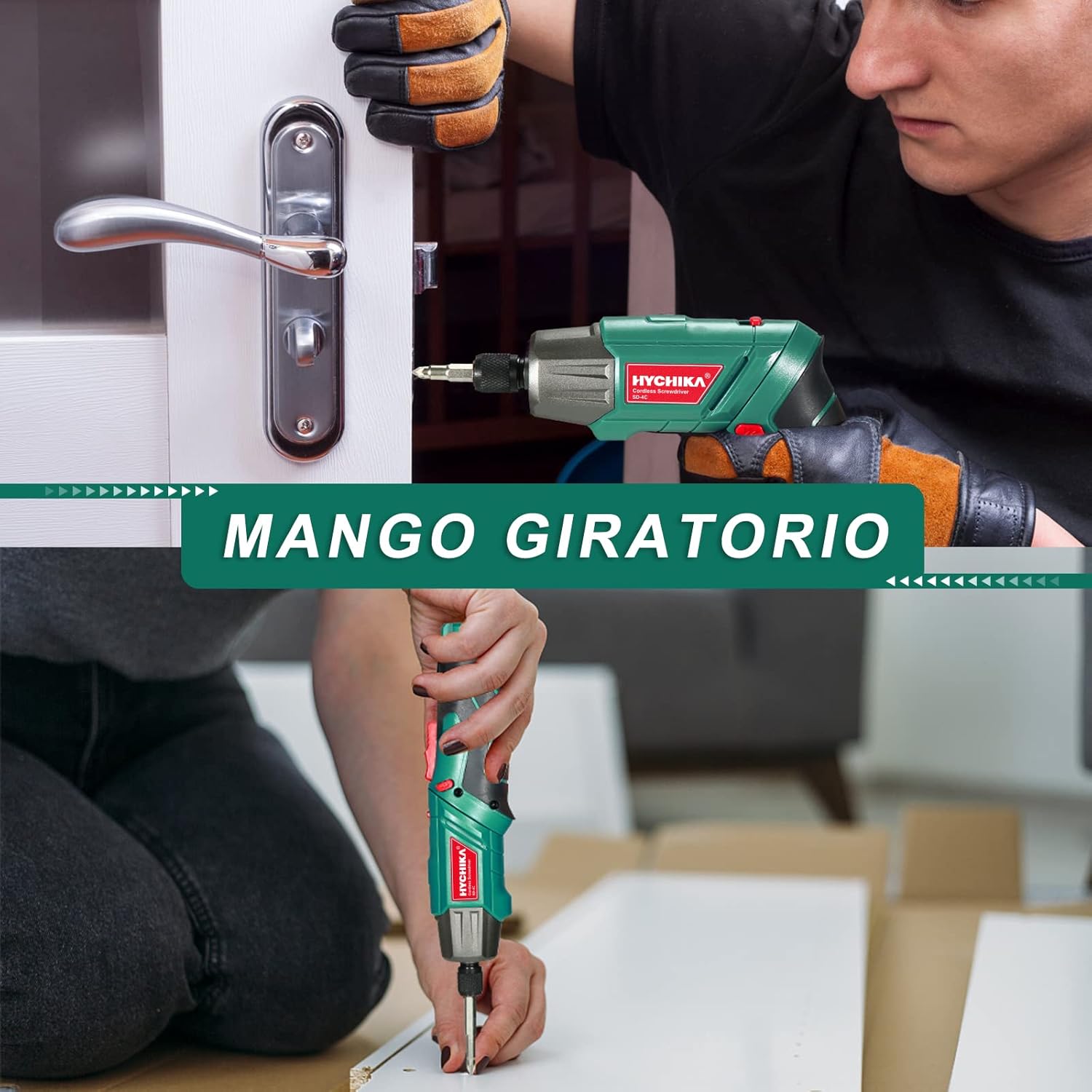
Kielelezo cha 6.2: The rotating handle allows the screwdriver to be used in a straight or pistol grip configuration, adapting to various working conditions.
Vidokezo vya Matumizi ya Jumla
- Always select the correct bit for the screw head to prevent stripping.
- Apply firm, steady pressure to the screwdriver to prevent cam-out.
- For delicate materials or small screws, start with a lower torque setting if available (this model has fixed torque, so apply less pressure).

Kielelezo cha 6.3: The versatile design supports multiple uses, from assembling furniture to minor household repairs.
7. Kuchaji
The screwdriver is equipped with a rechargeable 2.0Ah Lithium-ion battery.
- Connect the USB charging cable to the screwdriver's USB port.
- Connect the other end of the USB cable to the provided charging adapter, a computer USB port, or a power bank.
- The charging indicator light will show the charging status. Refer to the product overview diagram for its location.
- Disconnect the charger once the battery is fully charged. Avoid overcharging to prolong battery life.

Kielelezo cha 7.1: The screwdriver can be charged via USB from various sources like computers, power banks, or wall chargers.
8. Matengenezo
Kusafisha
- Keep the tool's ventilation slots clean to prevent overheating.
- Futa chombo na laini, damp kitambaa. Usitumie kemikali kali au visafishaji vya abrasive.
Hifadhi
- Store the screwdriver and accessories in the provided storage box in a dry, cool place, away from direct sunlight and moisture.
- Weka mbali na watoto.
Utunzaji wa Betri
- For optimal battery life, charge the battery fully before storing for extended periods.
- Recharge the battery every 3-6 months if not in regular use.
9. Utatuzi wa shida
If you encounter issues with your screwdriver, refer to the following table:
| Tatizo | Sababu inayowezekana | Suluhisho |
|---|---|---|
| Screwdriver haiwashi. | Betri imeisha. | Chaji betri kikamilifu. |
| Forward/reverse switch is in the neutral (locked) position. | Slide the switch to forward or reverse. | |
| Kiendesha bisibisi hakina nguvu. | Betri iko chini. | Chaji upya betri. |
| Kidogo slips au bidragen screw kichwa. | Incorrect bit size or type. | Use the correct bit for the screw. |
| Insufficient pressure or improper angle. | Apply firm, steady pressure and keep the bit straight. | |
| Betri haichaji. | Kebo ya kuchaji au adapta ina hitilafu. | Try a different USB cable or adapter. Ensure connections are secure. |
Tatizo likiendelea baada ya kujaribu suluhu hizi, tafadhali wasiliana na usaidizi kwa wateja.
10. Vipimo
| Kipengele | Vipimo |
|---|---|
| Nambari ya Mfano | SD-4C |
| Voltage | 3.6 Volts |
| Aina ya Betri | Lithium-ion |
| Uwezo wa Betri | 2.0 Ah |
| Max Torque | Newton-mita 6 (Nm) |
| Kasi isiyo na mzigo | 180 rpm |
| Ukubwa wa Chuck | 6.35 mm (1/4 inch) Hex |
| Chanzo cha Nguvu | Inaendeshwa na Betri |
| Vipimo vya Bidhaa (L x W x H) | 23.2 x 19.7 x 7.1 cm |
| Uzito | Gramu 375 |
| Nyenzo | Chuma |
11. Udhamini na Msaada
HYCHIKA products are manufactured to high-quality standards and are warranted against defects in materials and workmanship. For specific warranty details, including duration and coverage, please refer to the warranty card included with your purchase or visit the official HYCHIKA webtovuti.
For technical assistance, troubleshooting beyond this manual, or to inquire about replacement parts, please contact HYCHIKA customer support through the contact information provided on your warranty card or the official HYCHIKA webtovuti.