
1. Utangulizi
Thank you for choosing the Hoco E30 Wireless Earphone. This manual provides essential information for setting up, operating, and maintaining your earphone. Please read it carefully before use to ensure optimal performance and longevity of your device.
2. Taarifa za Usalama
To prevent damage to your device or injury to yourself and others, please observe the following safety precautions:
- Epuka mfiduo wa muda mrefu kwa viwango vya juu vya sauti ili kuzuia uharibifu wa kusikia.
- Do not use the earphone while driving or in situations where you need to be aware of your surroundings.
- Weka kifaa mbali na maji, unyevu na halijoto kali.
- Do not attempt to disassemble, repair, or modify the earphone. This will void the warranty.
- Tumia kebo na adapta za kuchaji zilizotolewa au zilizothibitishwa pekee.
- Weka mbali na watoto na kipenzi.
3. Yaliyomo kwenye Kifurushi
Tafadhali chagua kisanduku kwa vitu vifuatavyo:
- Hoco E30 Wireless Earphone
- Kebo ya Kuchaji ya USB
- Mwongozo wa Mtumiaji
4. Bidhaa Imeishaview
Familiarize yourself with the components of your Hoco E30 Wireless Earphone:

Kielelezo cha 4.1: Upande view of the Hoco E30 Wireless Earphone, highlighting its sleek design and ear hook.

Kielelezo cha 4.2: The Hoco E30 Wireless Earphone positioned next to a smartphone, illustrating its compact size and wireless connectivity.
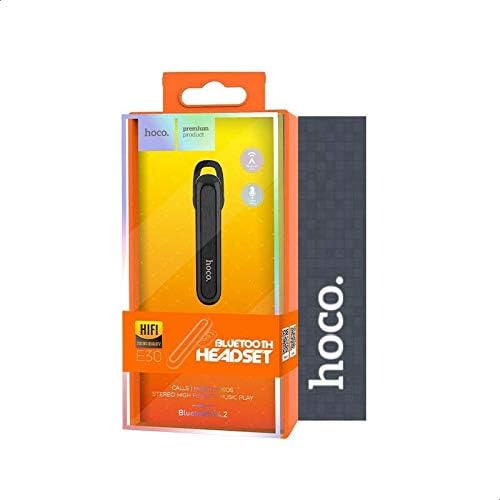
Kielelezo cha 4.3: The retail packaging for the Hoco E30 Wireless Earphone, displaying branding and key features.
5. Kuweka
5.1 Charging the Earphone
Before first use, fully charge your Hoco E30 earphone.
- Connect the provided USB charging cable to the charging port on the earphone.
- Connect the other end of the USB cable to a DC 5V power source (e.g., a USB wall adapter or computer USB port).
- Taa ya kiashiria cha kuchaji itawaka.
- Charging typically takes approximately 2 hours. The indicator light will change or turn off once charging is complete.
5.2 Kuoanisha na Kifaa
To connect your Hoco E30 earphone to your smartphone or other Bluetooth-enabled device:
- Ensure the earphone is fully charged and turned off.
- Press and hold the multi-function button on the earphone until the indicator light flashes red and blue alternately, indicating it is in pairing mode.
- Kwenye kifaa chako, washa Bluetooth na utafute vifaa vinavyopatikana.
- Chagua "Hoco E30" kutoka kwenye orodha ya vifaa vilivyopatikana.
- Once paired, the indicator light on the earphone will flash blue slowly, and you will hear a confirmation tone.
- The earphone has a transmission range of up to 10 meters (33 feet).
6. Maagizo ya Uendeshaji
6.1 Washa/Zima
- Washa: Press and hold the multi-function button for approximately 3 seconds until the blue indicator light flashes and you hear a power-on tone.
- Zima umeme: Press and hold the multi-function button for approximately 5 seconds until the red indicator light flashes and you hear a power-off tone.
6.2 Usimamizi wa Simu
- Jibu Simu: Briefly press the multi-function button when an incoming call rings.
- Maliza Simu: Briefly press the multi-function button during a call.
- Kataa Simu: Press and hold the multi-function button for 2 seconds when an incoming call rings.
- Piga tena Nambari ya Mwisho: Bonyeza mara mbili kitufe cha kazi nyingi ukiwa huna simu.
6.3 Uchezaji wa Muziki
- Cheza/Sitisha: Briefly press the multi-function button to play or pause music.
- Wimbo Ufuatao: Press and hold the multi-function button for 2 seconds to skip to the next track.
- Wimbo Uliopita: Press and hold the multi-function button for 2 seconds (during playback) to go to the previous track.
Note: The Hoco E30 supports A2DP and AVRCP protocols for high-quality audio streaming and remote control. Volume control is typically managed via the connected device.
6.4 Battery Status Display
The Hoco E30 earphone supports battery level display on compatible Apple iOS devices and some Android smartphones. Check your device's notification bar or Bluetooth settings for this feature.
7. Matengenezo
- Kusafisha: Use a soft, dry cloth to clean the earphone. Do not use harsh chemicals or abrasive materials.
- Hifadhi: Hifadhi kipaza sauti cha masikioni mahali pakavu na penye baridi mbali na jua moja kwa moja na halijoto kali.
- Utunzaji wa Betri: To prolong battery life, avoid fully discharging the earphone frequently. Charge it regularly, even if not in use for extended periods.
8. Utatuzi wa shida
If you encounter issues with your Hoco E30 earphone, try the following solutions:
| Tatizo | Suluhisho |
|---|---|
| Simu ya masikioni haiwaki. | Ensure the earphone is fully charged. Connect it to a power source and try again. |
| Haiwezi kuoanisha na kifaa. |
|
| Hakuna sauti au ubora duni wa sauti. |
|
| Kuchaji haifanyi kazi. |
|
9. Vipimo
| Kipengele | Maelezo |
|---|---|
| Mfano | E30 |
| Toleo la Bluetooth | V4.2 WT |
| Itifaki Zinazotumika | Vifaa vya sauti, isiyo na mikono, A2DP, AVRCP |
| Aina ya Maambukizi | Mita 10 (futi 33) |
| Masafa ya Usambazaji | GHz 2.4 |
| Kuchaji Voltage | DC 5V |
| Muda wa Kuchaji | Takriban. 2 masaa |
| Uwezo wa Betri | 60 mAh |
| Muda wa Maongezi | Takriban. 3.5 masaa |
| Wakati wa Uchezaji wa Muziki | Takriban. 3.5 masaa |
| Wakati wa Kusubiri | Takriban. 110 masaa |
| Uzito wa Bidhaa Net | gramu 6 |
| Vipimo (L x W x H) | 58mm x 14mm x 25mm |
| Nyenzo | Plastiki |
| Njia ya Kudhibiti | Gusa |
| Rangi | Nyeusi na Fedha |
10. Udhamini na Msaada
Hoco products are designed and manufactured to the highest quality standards. This product is covered by a limited warranty from the date of purchase. Please refer to the warranty card included in your package for specific terms and conditions.
For technical support or warranty claims, please contact your local Hoco distributor or visit the official Hoco webtovuti kwa habari zaidi.