
Utangulizi
This manual provides comprehensive instructions for the Mitel Wireless DECT Headset, designed for use with Mitel MiVoice 6930 and 6940 phones. It covers product components, setup procedures, operational guidelines, maintenance tips, and technical specifications to ensure optimal performance and user experience. This headset offers wireless connectivity, allowing users freedom of movement during calls.
Ni nini kwenye Sanduku
Carefully unpack your Mitel Wireless DECT Headset and verify that all components are present. The package typically includes the following items:
- Mitel Wireless DECT Headset
- Integrated Headset Charging Cradle
- Kitambaa cha kichwa
- Mwongozo wa Ufungaji
- Necessary connection cables/adapters
- Small tools (e.g., screwdriver) for installation
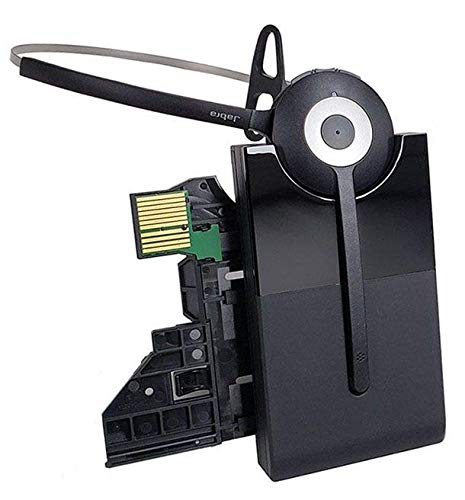
Image: All components included in the Mitel Wireless DECT Headset package. This includes the headset, charging cradle, headband, installation guide, and various small accessories for setup.
Maagizo ya Kuweka
Follow these steps to set up your Mitel Wireless DECT Headset with your compatible Mitel MiVoice phone.
- Utangamano Angalia: Ensure your Mitel MiVoice phone is a 6930 or 6940 model. The system requires MiVoice Business Release 8.0 SP1 or higher.
- Unganisha Kizio cha Kuchaji: The integrated headset charging cradle connects directly to your MiVoice 6930 or 6940 phone via its expansion port or a PKM expansion port. Refer to the included installation guide for specific connection diagrams.
- Chaji Headset: Place the wireless DECT headset into the charging cradle. The headset battery requires initial charging. A full charge provides up to 8 hours of talk time.
- Kuoanisha: The headset is designed for simplified deployment. Once connected and charged, the headset should automatically pair with the compatible Mitel phone. Consult the phone's user manual or the headset's installation guide for specific pairing instructions if automatic pairing does not occur.

Image: Detail from the installation guide, illustrating the connection process for the Mitel Integrated DECT charging base to the MiVoice 6930/6940 phone.
Maagizo ya Uendeshaji
Once your headset is set up, you can begin using it for calls. The headset offers crystal clear HD audio and a noise-cancelling microphone for effective communication.
- Kupiga/Kupokea Simu: Use the call control features on the headset to answer, end, or reject calls. Refer to the headset's specific buttons and their functions in the installation guide.
- Marekebisho ya Sauti: Adjust the call volume using the dedicated controls on the headset.
- Zima Kitendo: Activate the mute function on the headset's microphone when you need privacy during a call.
- Kuvinjari: Enjoy a roaming range of up to 300 feet (100 meters) from your desk phone, allowing you to move freely while on a call.
Matengenezo
Utunzaji sahihi huhakikisha uimara na utendaji bora wa vifaa vyako vya masikioni.
- Inachaji: Always return the headset to its charging cradle when not in use to ensure it is fully charged for your next call. The headset provides up to 8 hours of talk time on a full charge.
- Kusafisha: Use a soft, dry cloth to clean the headset and charging cradle. Avoid using harsh chemicals or abrasive materials.
- Hifadhi: Hifadhi vifaa vya sauti mahali pa baridi, pakavu mbali na jua moja kwa moja na joto kali.
- Betri: The headset contains a Lithium Polymer battery. Do not attempt to replace the battery yourself. Contact qualified service personnel if battery issues arise.
Kutatua matatizo
If you encounter issues with your Mitel Wireless DECT Headset, refer to the following common troubleshooting steps:
- Hakuna Sauti/Ubora Mbaya wa Sauti:
- Hakikisha vifaa vya sauti vimechajiwa kikamilifu.
- Verify the headset is properly paired with the phone.
- Check the volume settings on both the headset and the phone.
- Confirm the charging cradle is securely connected to the phone's expansion port.
- Vifaa vya Kusikia Havichaji:
- Ensure the headset is correctly seated in the charging cradle.
- Check the connection of the charging cradle to the phone.
- Verify the phone itself is powered on.
- Limited Roaming Range:
- Ensure there are no major obstructions (e.g., thick walls, large metal objects) between the headset and the phone.
- Epuka vyanzo vya mwingiliano mkubwa wa sumakuumeme.
- Headset Not Responding:
- Perform a soft reset by turning the headset off and then on again.
- If issues persist, consult the detailed troubleshooting section in the full installation guide or contact Mitel support.
Vipimo
| Kipengele | Maelezo |
|---|---|
| Jina la Mfano | Mitel Wireless DECT Headset |
| Nambari ya Mfano wa Kipengee | 930-65-509-105-MIT |
| Vifaa Sambamba | Mitel MiVoice 6930, 6940 Phones |
| Teknolojia ya Uunganisho | Waya (DECT) |
| Teknolojia ya Mawasiliano ya Wireless | DECT (also lists Bluetooth 4.0 with 100m range in source data) |
| Udhibiti wa Kelele | Active Noise Cancellation, Noise Cancelling Microphone |
| Aina ya Kiendesha Sauti | Dereva Mwenye Nguvu |
| Maisha ya Betri | Hadi Saa 8 (Muda wa Mazungumzo) |
| Muda wa Kuchaji | Saa 8 |
| Roaming Range | Hadi futi 300 (mita 100) |
| Aina ya Kudhibiti | Call Control (Remote) |
| Uzito wa Kipengee | 11.2 wakia |
| Chanzo cha Nguvu | Betri 1 ya Lithium Polymer (imejumuishwa) |
| Mtengenezaji | Jabra |
Video Rasmi za Bidhaa
Watch these official videos for additional guidance on your Mitel Wireless DECT Headset.
Video: Detailed overview of the Mitel Wireless DECT Headset features and functionality. (Duration: 12:45)
Video: Quick guide to setting up and using the Mitel Wireless DECT Headset. (Duration: 1:24)
Udhamini na Msaada
For warranty information, technical support, or service inquiries, please refer to the documentation included with your product or visit the official Mitel webtovuti. Hifadhi risiti yako ya ununuzi kwa madai ya udhamini.