
1. Utangulizi
This manual provides detailed instructions for the installation, operation, and maintenance of your HDView 4K 8MP PoE Dome IP Security Camera. Please read this manual thoroughly before using the product to ensure proper setup and functionality. Keep this manual for future reference.

Figure 1: HDView 4K 8MP PoE Dome IP Security Camera
HDView 4K 8MP PoE Dome IP Security Camera is designed for both indoor and outdoor surveillance, offering high-resolution video capture and advanced features for comprehensive security monitoring.
2. Bidhaa za Bidhaa
- Ubora wa 4K (8MP) Ultra HD: Captures video at 3840 x 2160 pixels for clear and detailed images.
- Nguvu juu ya Ethernet (PoE): Simplifies installation by providing power and data connectivity through a single Ethernet cable.
- Ukadiriaji wa IP66 Usioathiriwa na Hali ya Hewa: Ensures durability and reliable operation in various outdoor conditions.
- Maono ya Usiku ya Infrared: Equipped with infrared LEDs for clear surveillance in low-light or complete darkness, utilizing Night Color technology.
- Lenzi Isiyobadilika ya 3.6mm: Hutoa uwanja mpana wa view suitable for general surveillance.
- Advanced Video Compression (H.265/H.264): Supports H.265 for efficient storage and bandwidth usage, reducing file sizes by approximately 50% compared to H.264 while maintaining quality.
- Intelligent Video Analytics (VCA): Includes features like motion detection and object analysis for enhanced security monitoring.
- Image Enhancement Technologies: Features 3D Digital Noise Reduction (3D DNR), Digital Wide Dynamic Range (Digital WDR), Highlight Compensation (HLC), and Backlight Compensation (BLC) for optimized image quality in challenging lighting conditions.
- Region of Interest (ROI) Coding: Allows specific areas of the video feed to be encoded at higher quality, saving bandwidth for less critical areas.
- SMT LED and Black Film IR Lamp: Enhanced infrared performance for improved night vision and heat dissipation.

Figure 2: Comparison of H.265 and H.264 Video Compression Efficiency
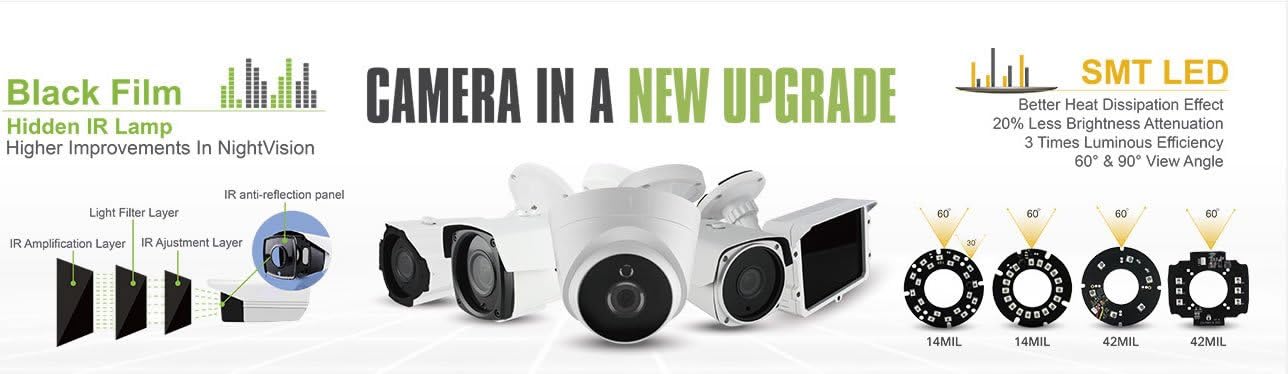
Figure 3: Advanced Infrared Lamp and LED Technology
3. Yaliyomo kwenye Kifurushi
Thibitisha kuwa vipengee vyote vipo kwenye kifurushi:
- HDView 4K 8MP PoE Dome IP Security Camera
- Vifaa vya Kuweka (screws, nanga)
- Mwongozo wa Kuanza Haraka (hati hii)
4. Mwongozo wa Kuweka
4.1 Ufungaji wa Kimwili
- Chagua Mahali: Select a suitable indoor or outdoor location for surveillance. The camera is designed for ceiling mount.
- Weka Kamera: Use the provided mounting hardware to securely attach the camera to the chosen surface. Ensure the camera is positioned to cover the desired area.
4.2 Network Connection (PoE)
Connect an Ethernet cable from your PoE-enabled network switch or PoE injector to the camera's Ethernet port. This single cable will provide both power and network connectivity to the camera.
4.3 Remote Access Setup
Ili kufikia kamera ukiwa mbali, fuata hatua hizi:
- Sakinisha Programu: Download and install the official HDView mobile application on your smartphone (iOS or Android).
- Changanua Nambari ya QR: Open the application and use the 'Scan QR Code' function to scan the unique QR code located on your camera or its packaging.
- View Kamera: Once the QR code is scanned and the camera is added, you can view the live feed and manage settings through the application.

Figure 4: Steps for Remote Camera Access via Mobile Application
5. Maagizo ya Uendeshaji
5.1 Accessing Live Feed
Access the live video feed through the mobile application or a compatible network video recorder (NVR) / PC software. Ensure your device is connected to the same network as the camera or has internet access for remote viewing.
5.2 Kuweka Ugunduzi wa Mwendo
The camera supports motion-only alerts. Configure motion detection settings via the mobile application or NVR interface. You can define detection zones, sensitivity levels, and notification preferences.
5.3 Using Intelligent Analytics (VCA)
The camera features Video Content Analysis (VCA) for advanced monitoring. This includes capabilities such as object detection and human detection, which can trigger alerts or recordings based on specific events within the camera's field of view.
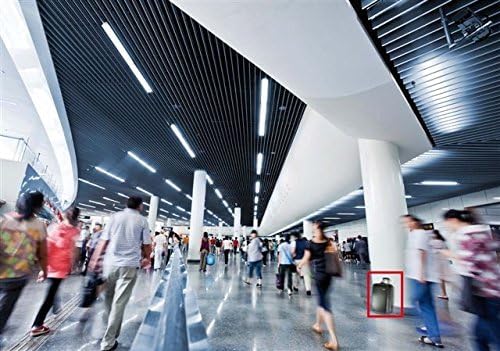
Kielelezo 5: Kutample of Object Detection by VCA

Kielelezo 6: Kutample of Human Detection by VCA
5.4 Kurekodi na kucheza tena
Video footage can be recorded to a compatible NVR or local storage (if supported). Recordings are typically in MP4 format. Use the playback function in your NVR or mobile application to review matukio yaliyorekodiwa.
5.5 Night Vision Operation
The camera automatically switches to infrared night vision mode in low-light conditions. Ensure the camera's view is not obstructed to maximize night vision effectiveness.
6. Matengenezo
- Kusafisha: Safisha lenzi ya kamera mara kwa mara kwa kitambaa laini na kikavu ili kuhakikisha ubora wa picha ni wazi. Epuka visafishaji vya kukwaruza.
- Sasisho za Firmware: Angalia mtengenezaji website or the mobile application periodically for firmware updates. Keeping the firmware updated ensures optimal performance and security.
- Mawazo ya Mazingira: While IP66 rated, avoid exposing the camera to extreme temperatures or direct high-pressure water jets.
7. Utatuzi wa shida
- Hakuna Nguvu: Ensure the Ethernet cable is securely connected to a PoE-enabled port or injector. Verify the PoE device is powered on.
- Hakuna Mlisho wa Video: Check network connectivity. Ensure the camera has an IP address and is accessible on the network. Verify firewall settings are not blocking communication.
- Ubora duni wa Picha: Safisha lenzi ya kamera. Angalia vizuizi katika uwanja wa view. Adjust camera settings (e.g., WDR, BLC) if lighting conditions are challenging.
- Masuala ya Ufikiaji wa Mbali: Ensure your mobile device has internet access. Verify the camera is connected to the internet and its network settings allow remote access.
- Utambuzi wa Mwendo haufanyi kazi: Check motion detection settings in the application/NVR. Ensure detection zones are correctly configured and sensitivity is appropriate.
8. Vipimo
| Chapa | HDView |
| Nambari ya Mfano | 8595754691 |
| Ufanisi Bado Azimio | MP 8 (4K) |
| Azimio la Kukamata Video | 4K |
| Kiwango cha Fremu | ramprogrammen 15, ramprogrammen 30 |
| Lenzi | 3.6 mm |
| Kipengele cha Fomu | Kuba |
| Ukadiriaji wa Ulinzi wa Kimataifa | IP66 |
| Teknolojia ya Uunganisho | Waya (PoE) |
| Itifaki ya Muunganisho | RTSP |
| Chanzo cha Nguvu | PoE (Nguvu juu ya Ethaneti) |
| Vipengele Maalum | Motion Sensor, Night Vision, Portable |
| Teknolojia ya Mwanga wa Chini | Rangi ya Usiku |
| Aina ya Tahadhari | Mwendo Pekee |
| Umbizo la Kukamata Video | MP4 |
| Aina ya Kuweka | Mlima wa dari |
| Uzito wa Kipengee | Pauni 1.7 |
| UPC | 732773383591 |
9. Udhamini na Msaada
For warranty information and technical support, please refer to the official HDView webtovuti au wasiliana na huduma kwa wateja wao moja kwa moja. Weka risiti yako ya ununuzi kama uthibitisho wa ununuzi.