
Utangulizi
Asante kwa ununuziasing the QUMOX L165U 2.4GHz Wireless Gamepad. This high-quality game controller is designed for use with PC and Android devices, offering a reliable 2.4GHz wireless connection for an enhanced gaming experience. Please read this manual carefully to ensure proper setup and operation of your new gamepad.

Figure 1: QUMOX L165U Gamepad with included USB adapter and OTG connection kit.
Yaliyomo kwenye Kifurushi
Hakikisha bidhaa zote zipo kwenye kifurushi chako:
- 1x QUMOX L165U Gamepad
- 1x 2.4GHz USB Wireless Adapter
- 1x OTG Connection Kit (Micro USB to USB-A adapter)
Sanidi
1. Ufungaji wa Betri
The QUMOX L165U Gamepad is powered by 2 AAA batteries (not included). To install the batteries:
- Locate the battery compartment on the back of the gamepad.
- Telezesha kidole fungua kifuniko cha betri.
- Ingiza betri 2 za AAA, hakikisha polarity sahihi (+/-).
- Funga kifuniko cha betri kwa usalama.

Figure 2: Open battery compartment for AAA battery installation.
2. Kuunganisha kwenye PC
- Plug the 2.4GHz USB Wireless Adapter into an available USB port on your PC.
- Turn on the gamepad by pressing the 'START' button. The gamepad will automatically attempt to connect.
- The PC should recognize the gamepad and install necessary drivers automatically.
- If the gamepad does not connect, press the 'MODE' button on the gamepad to cycle through connection modes until it is recognized by your PC.
3. Connecting to an Android Device (with OTG support)
- Connect the OTG Connection Kit to your Android device's Micro USB port.
- Plug the 2.4GHz USB Wireless Adapter into the USB-A end of the OTG Connection Kit.
- Turn on the gamepad by pressing the 'START' button. The gamepad will automatically attempt to connect.
- Your Android device should recognize the gamepad.
- If the gamepad does not connect, press the 'MODE' button on the gamepad to cycle through connection modes until it is recognized by your Android device.
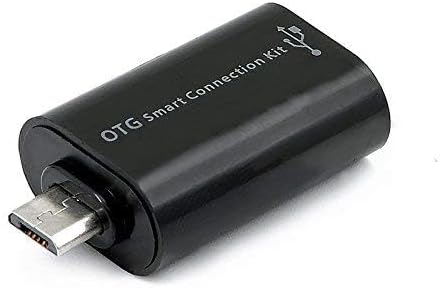
Figure 3: OTG Connection Kit for Android device connectivity.
Maagizo ya Uendeshaji
Once connected, your QUMOX L165U Gamepad is ready for use. The layout is standard for most game controllers.
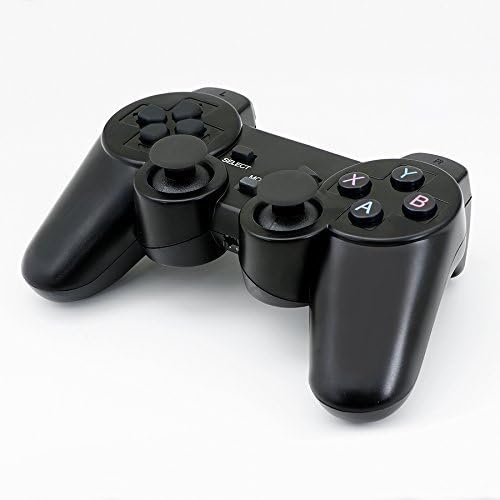
Kielelezo 4: Juu view of the QUMOX L165U Gamepad, highlighting button layout.
- Pedi ya Mwelekeo (D-Pad): Kwa pembejeo sahihi ya mwelekeo.
- Vijiti vya analogi: Two analog sticks for 360-degree movement and camera control.
- Vifungo vya Kitendo (A, B, X, Y): Vifungo vya kawaida vya kitendo kwa amri za ndani ya mchezo.
- Vifungo vya Mabega (L1, R1) na Vichochezi (L2, R2): Located on the top of the gamepad for additional actions.
- Kitufe cha CHAGUA/RUDI NYUMA: Kwa kawaida hutumika kwa ajili ya urambazaji wa menyu au vipengele maalum vya ndani ya mchezo.
- Kitufe cha ANZA: Hutumika kusitisha michezo au kuthibitisha chaguo.
- Kitufe cha MODE: Cycles through different operating modes (e.g., Android, PC) if automatic detection fails.
Maonyesho ya Video
Video 1: A seller-provided overview of a 2-pack wireless controller, demonstrating its features and compatibility. While showing a similar product, it illustrates general wireless controller usage and setup.
Matengenezo
- Kusafisha: Tumia kitambaa laini na kavu ili kusafisha gamepad. Epuka kutumia kemikali kali au vifaa vya abrasive.
- Hifadhi: Hifadhi gamepad mahali penye baridi, kavu mbali na jua moja kwa moja na joto kali.
- Utunzaji wa Betri: Ondoa betri ikiwa kidhibiti cha mchezo hakitatumika kwa muda mrefu ili kuzuia uvujaji.
Kutatua matatizo
| Tatizo | Sababu inayowezekana | Suluhisho |
|---|---|---|
| Gamepad does not connect. | Low batteries, incorrect mode, adapter not properly inserted. | Replace batteries. Press the 'MODE' button to cycle through modes. Ensure USB adapter is fully inserted into PC or OTG adapter. |
| Vifungo au vijiti vya kuchezea havijibu. | Connection issue, game incompatibility, physical damage. | Reconnect the gamepad. Check game settings for controller support. If issue persists, contact support. |
| Android device does not recognize gamepad. | Android device lacks OTG support, OTG adapter issue. | Verify your Android device supports OTG. Ensure OTG adapter is functioning correctly. |
Vipimo
| Kipengele | Maelezo |
|---|---|
| Nambari ya Mfano | L165U |
| Teknolojia ya Uunganisho | 2.4GHz Wireless (via USB Adapter) |
| Vifaa Sambamba | PC, Android (with OTG support) |
| Chanzo cha Nguvu | 2x Betri za AAA |
| Uzito wa Kipengee | 5.3 wakia |
| Vipimo vya Kifurushi | Inchi 8.07 x 5.63 x 2.95 |
| Rangi | Nyeusi |
Udhamini na Msaada
For warranty information or technical support, please refer to the contact details provided with your purchase or visit the official QUMOX webtovuti. Weka uthibitisho wako wa ununuzi kwa madai yoyote ya udhamini.