
1. Bidhaa Imeishaview
The Midiplus Studio M is a compact and high-performance USB audio interface designed for studio recording. It features one input and two outputs, supporting high-quality microphone input and 24-bit/192kHz high-precision sampling. The device is powered via PC USB and includes 48V phantom power for condenser microphones. Its small, exquisite design is compatible with both Mac and Windows operating systems, making it a versatile tool for musicians and producers.
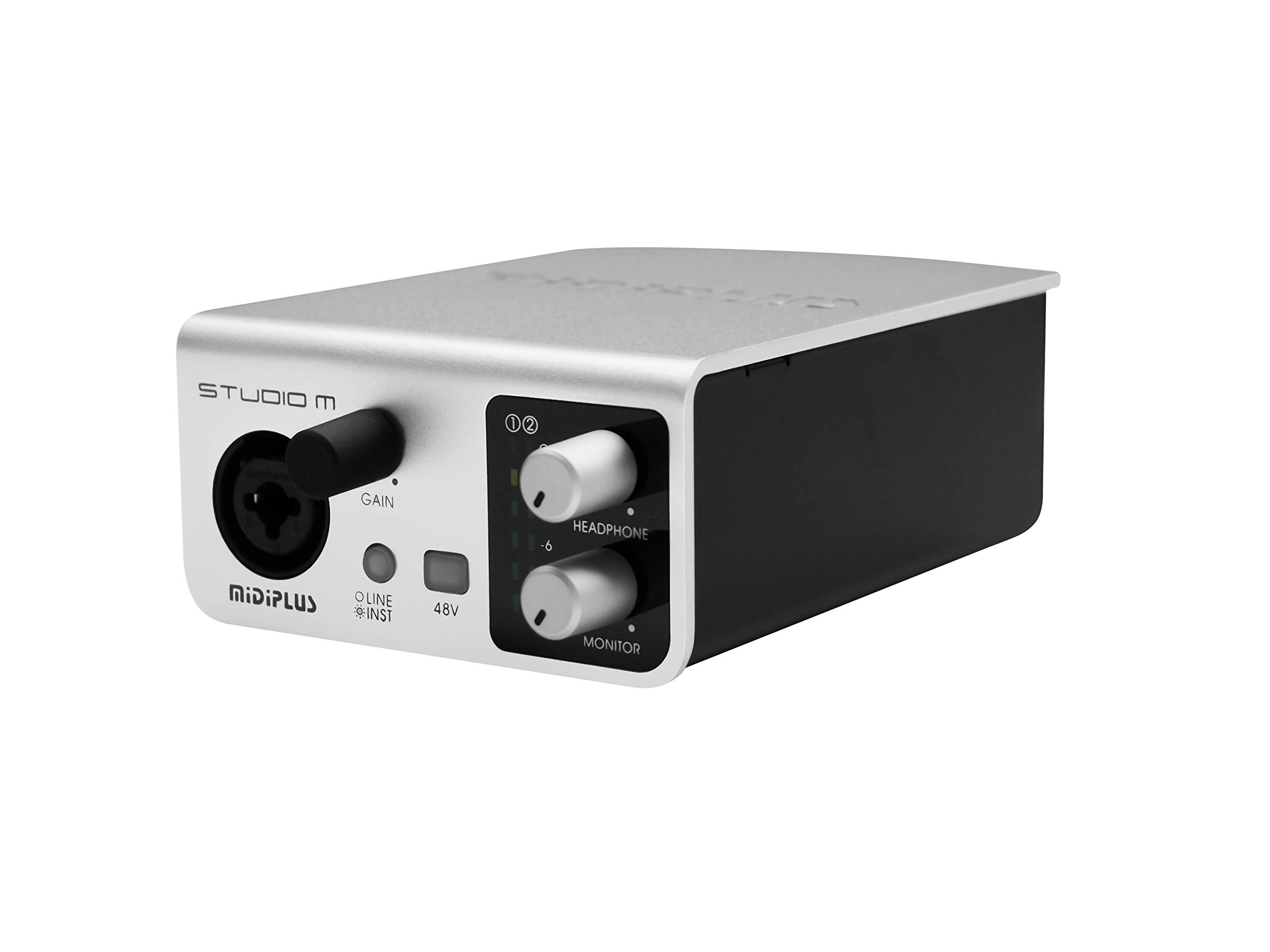
Kielelezo 1: Mbele na nyuma view of the Midiplus Studio M USB Audio Interface.
2. Mwongozo wa Kuweka
2.1 Yaliyomo kwenye Kifurushi
- Midiplus Studio M USB Audio Interface
- Kebo ya USB
- Mwongozo wa Mmiliki (hati hii)
- Kadi ya Habari
2.2 Mahitaji ya Mfumo
- Mfumo wa Uendeshaji: Windows, macOS
- Compatible Devices: Personal Computer with USB port
2.3 Kuunganisha Kifaa
- Connect the Midiplus Studio M to your computer using the provided USB cable. The device is USB-powered.
- Ensure your operating system (Windows or macOS) recognizes the device. Drivers may be required for optimal performance; refer to the Midiplus webtovuti kwa vipakuliwa vya hivi karibuni vya viendeshaji.
- Connect your microphone or instrument to the Input (MIC/Line/Hi-z) interface on the front panel.
- Connect your headphones to the headphone interface on the front panel, or your studio monitors to the Output interface (Left/Right) on the rear panel.

Figure 2: Midiplus Studio M connected to a computer, showing input and output cables.
3. Maagizo ya Uendeshaji
3.1 Vidhibiti vya Paneli ya Mbele
- Input Gain Control Knob: Adjusts the input level for the connected microphone or instrument.
- Switch (Mic/Instrument) Button: Toggles between microphone and instrument input modes.
- 48V Phantom Power ON/OFF: Activates or deactivates 48V phantom power for condenser microphones.
- Headphone Volume Control Button: Adjusts the output volume for connected headphones.
- Output Volume Control Button: Adjusts the main output volume for connected studio monitors.

Figure 3: Midiplus Studio M in a studio setup, demonstrating its compact size and integration.
3.2 Viunganisho vya Paneli ya Nyuma
- Kiolesura cha USB: USB2.0 port for connection to your computer and power supply.
- Output Interface (Left/Right): Connects to your studio monitors or other output devices.
- Extensible Device Interface: Provides additional connectivity options for other devices.
4. Matengenezo
- Weka kifaa safi kwa kuifuta kwa kitambaa laini na kavu. Epuka kutumia kemikali kali au vifaa vya abrasive.
- Hakikisha nyaya zote zimeunganishwa vizuri ili kuzuia upotevu au uharibifu wa mawimbi.
- Hifadhi kiolesura mahali pakavu na penye baridi mbali na jua moja kwa moja na halijoto kali.
- Epuka kuweka vitu vizito juu ya kitengo.
5. Utatuzi wa shida
5.1 Hakuna Pato la Sauti
- Check all cable connections (USB, input, output, headphones).
- Ensure the device is powered on and recognized by your computer.
- Verify that the output volume controls (headphone and main output) are turned up.
- Check your computer's sound settings to ensure the Midiplus Studio M is selected as the output device.
5.2 Input Signal Issues
- Adjust the Input Gain Control Knob.
- Ensure the correct input mode (Mic/Instrument) is selected.
- If using a condenser microphone, verify that 48V Phantom Power is enabled.
- Check the microphone/instrument cable for damage.
5.3 Kifaa Hakitambuliwi na Kompyuta
- Jaribu kuunganisha kebo ya USB kwenye mlango tofauti wa USB kwenye kompyuta yako.
- Anzisha tena kompyuta yako.
- Ensure the latest drivers for the Midiplus Studio M are installed from the official Midiplus webtovuti.
- Jaribu kwa kebo tofauti ya USB ikiwa inapatikana.
6. Maelezo ya kiufundi
| Kipengele | Maelezo |
|---|---|
| Nambari ya Mfano | Studio M |
| Chapa | Midiplus |
| Teknolojia ya Uunganisho | USB (USB2.0) |
| Azimio la Sauti | 24-bit / 192kHz |
| Ingizo | 1 (MIC/Line/Hi-z) |
| Matokeo | 2 (Left/Right) |
| Nguvu ya Phantom | 48V (switchable) |
| Mifumo Sambamba ya Uendeshaji | Windows, macOS |
| Vipimo vya Bidhaa | Inchi 5.28 x 3.54 x 1.89 |
| Uzito wa Kipengee | Wakia 14.1 (Kilo 0.4) |
7. Udhamini na Msaada
For warranty information and technical support, please refer to the official Midiplus website or contact your local dealer. Keep your purchase receipt as proof of purchase for any warranty claims.