
Utangulizi
This manual provides detailed instructions for the setup, operation, and maintenance of your Homtime C12PRO Docking Station Speaker. The C12PRO integrates a Bluetooth speaker, FM radio, alarm clock, and dual USB charging capabilities, designed for convenient everyday use.
Yaliyomo kwenye Kifurushi
Tafadhali thibitisha kuwa bidhaa zote zilizoorodheshwa hapa chini zimejumuishwa kwenye kifurushi chako:
- 1 x Homtime C12PRO Speaker Unit
- Adapta ya Nguvu 1 x
- 1 x Mwongozo wa Mtumiaji
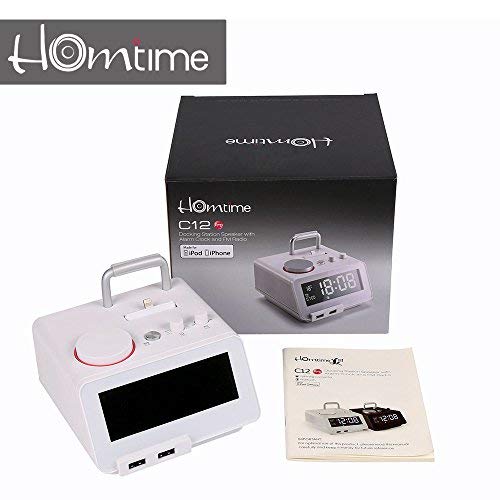
Picha: Contents of the Homtime C12PRO package, showing the main speaker unit, power adapter, and the user manual.
Bidhaa Imeishaview
Familiarize yourself with the various components and controls of your C12PRO unit.

Picha: Mbele view of the Homtime C12PRO with an iPhone docked. The large digital display shows time and temperature, and the front features dual USB charging ports.

Picha: Mbele view of the Homtime C12PRO without a phone docked. This image clearly shows the digital display, the docking connector, and the control buttons on the top surface.
Paneli ya Mbele na Onyesho
- Large 4.2-inch LCD Display: Shows time, alarm status, and room temperature (Celsius or Fahrenheit). Brightness is adjustable.
- Bandari mbili za Kuchaji za USB: Located at the front base for convenient charging of external devices.
Udhibiti wa Jopo la Juu
- Docking Connector: Apple Certified Lightning connector for iPod/iPhone.
- Control Buttons/Knobs: For setting time, alarm, volume, mode selection, and FM radio tuning.
Viunganisho vya Paneli ya Nyuma
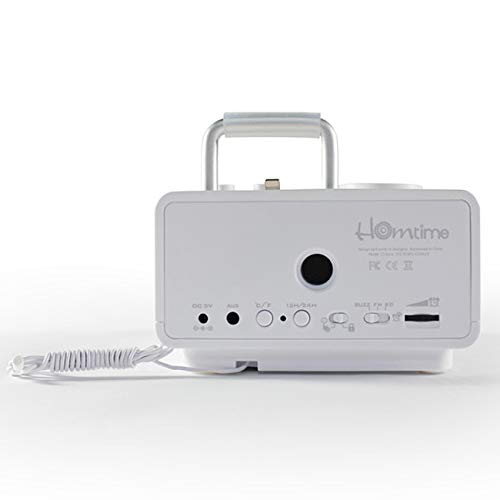
Picha: Nyuma view of the Homtime C12PRO. This image displays the DC 9V power input, AUX-in port, 12H/24H time format button, and other rear controls.
- Uingizaji wa Nguvu ya DC 9V: Unganisha adapta ya umeme iliyotolewa hapa.
- Bandari ya AUX: Jeki ya 3.5mm ya kuunganisha vyanzo vya sauti vya nje.
- Kitufe cha 12H/24H: Toggles between 12-hour and 24-hour time display formats.
- Vidhibiti Vingine: May include snooze/dimmer, alarm on/off, and FM antenna connection.
Sanidi
- Fungua Kitengo: Carefully remove the C12PRO speaker and all accessories from the packaging.
- Unganisha Nguvu: Insert the DC plug of the power adapter into the DC 9V input port on the rear of the unit. Plug the power adapter into a standard wall outlet. The display will illuminate.
- Mpangilio wa Muda wa Awali:
- Bonyeza na ushikilie MUDA WA KUWEKA button (location may vary, typically on top or rear).
- Tumia +/- buttons or rotary knob to adjust the hour. Press MUDA WA KUWEKA tena ili kuthibitisha.
- Rekebisha dakika kwa kutumia +/- buttons or rotary knob. Press MUDA WA KUWEKA ili kuthibitisha na kutoka kwenye hali ya kuweka muda.
- Ili kubadilisha kati ya umbizo la saa 12 na saa 24, bonyeza kitufe cha 12H/24H kifungo kwenye paneli ya nyuma.
- Rekebisha Mwangaza wa Onyesho: Bonyeza kwa KUSUA / KUPUNGUZA button (often combined) repeatedly to cycle through brightness levels.
- Weka Kitengo cha Halijoto: Ikiwezekana, bonyeza kitufe ° C / ° F button to switch between Celsius and Fahrenheit display for room temperature.
Maagizo ya Uendeshaji
Washa/Zima
Bonyeza kwa NGUVU button to turn the unit on or off. When off, the clock display remains active.
Kuweka Kengele
- Bonyeza na ushikilie SILAHA kitufe. Saa ya kengele itawaka.
- Tumia +/- buttons or rotary knob to adjust the alarm hour. Press SILAHA kuthibitisha.
- Adjust the alarm minute. Press SILAHA kuthibitisha.
- Select the alarm source (Buzzer, FM Radio, or Docked Device). Use +/- or rotary knob and press SILAHA kuthibitisha.
- Ili kuamsha/kuzima kengele, bonyeza kitufe cha ALARAMU IMEZIMA / IMEZIMWA kitufe. Aikoni ya kengele itaonekana kwenye onyesho itakapowashwa.
- Wakati kengele ikilia, bonyeza kitufe cha KUSUA button to temporarily silence it for a few minutes. Press NGUVU kuzima kengele ya siku hiyo.
Uendeshaji wa Redio ya FM
- Bonyeza kwa MODE kitufe hadi "FM" ionekane kwenye onyesho.
- For automatic station scanning, press and hold the CHEZA/SITISHA button (or a dedicated SAKATA button). The radio will scan and save available stations.
- Ili kuweka mwenyewe, tumia PREV / IJAYO buttons or rotary knob to adjust the frequency.
- To select a saved station, press the TAYARISHA kifungo na kisha kutumia PREV / IJAYO kuabiri.
- Rekebisha sauti kwa kutumia JUZUU kisu au vifungo.
Kuoanisha Bluetooth
- Bonyeza kwa MODE button until "BT" or "Bluetooth" appears on the display. The Bluetooth indicator will flash, indicating pairing mode.
- Kwenye kifaa chako cha mkononi, washa Bluetooth na utafute vifaa vipya.
- Select "Homtime C12PRO" from the list of available devices.
- Once paired, the Bluetooth indicator on the C12PRO will stop flashing and remain solid. You can now play audio wirelessly from your device.
- Adjust volume on both the C12PRO and your connected device.
Kutumia Kituo cha Docking
The C12PRO features an Apple Certified Lightning connector for compatible iPod/iPhone devices.
- Carefully align your iPhone/iPod with the Lightning connector on the top of the unit.
- Gently push down until the device is securely seated.
- The C12PRO will automatically charge your device and can play audio from it.
- Bonyeza kwa MODE button to select the docking station as the audio source.
Kuchaji USB
The unit includes dual USB ports for charging other devices.
- Connect your USB charging cable to one of the USB ports on the front of the C12PRO.
- Connect the other end of the cable to your device (e.g., Android phone, tablet).
- The C12PRO will provide power to charge your device.
AUX-in Connection
Connect external audio players via the 3.5mm AUX-in port.
- Connect a 3.5mm audio cable (not included) from your external audio device's headphone jack to the AUX-in port on the rear of the C12PRO.
- Bonyeza kwa MODE kitufe hadi "AUX" itaonekana kwenye onyesho.
- Play audio from your external device. Adjust volume on both the C12PRO and the external device.
Matengenezo
- Kusafisha: Disconnect the power adapter before cleaning. Use a soft, dry cloth to wipe the exterior surfaces. Do not use abrasive cleaners, waxes, or solvents.
- Hifadhi: Ikiwa kifaa kitahifadhi kwa muda mrefu, kiondoe kutoka kwa umeme na kihifadhi mahali pa baridi, kavu mbali na jua moja kwa moja na joto kali.
- Betri: The unit contains a CR2 battery (included) for clock memory backup. This battery is not user-replaceable for general operation and should only be replaced by qualified service personnel if necessary.
Kutatua matatizo
| Tatizo | Sababu inayowezekana | Suluhisho |
|---|---|---|
| Hakuna nguvu/Onyesho limezimwa | Adapta ya umeme haijaunganishwa au njia yenye hitilafu. | Hakikisha kuwa adapta ya umeme imechomekwa kwa usalama kwenye kitengo na plagi ya ukuta inayofanya kazi. |
| Hakuna sauti kutoka kwa spika | Volume too low; incorrect source selected; device not connected properly. | Ongeza sauti. Bonyeza MODE to select the correct audio source (BT, FM, Dock, AUX). Reconnect Bluetooth device or docked phone. |
| Uoanishaji wa Bluetooth umeshindwa | C12PRO not in pairing mode; device too far; interference. | Ensure C12PRO is in BT mode and flashing. Move device closer. Turn off other Bluetooth devices. |
| Redio ya FM haipatikani/haipatikani vizuri | Ishara dhaifu; antena haijapanuliwa. | Extend the FM antenna fully. Reposition the unit for better reception. Perform auto-scan again. |
| Kengele haisikiki | Alarm not activated; alarm volume too low. | Ensure the alarm icon is visible on the display. Check alarm volume settings. |
| Device not charging via USB/Dock | Cable issue; device not compatible; unit not powered. | Try a different USB cable. Ensure the C12PRO is powered on. Verify device compatibility with the Lightning dock. |
Vipimo

Picha: A table detailing the specifications of the Homtime C12PRO, including driver units, S/N ratio, Bluetooth version, range, radio frequency, power, and dimensions.
| Mfano | C12 Pro |
| Vitengo vya Madereva | 2x40 mm |
| Uwiano wa S/N | >70dB |
| Toleo la Bluetooth | 2.1 + EDR |
| Msururu wa Bluetooth | 10M |
| Masafa ya Mzunguko wa Redio | 87.5MHz - 108MHz |
| Vifaa Sambamba | iPad, iPhone, Android, Windows Phone, Computer |
| Adapta ya Nguvu | AC100-240V, 50/60Hz, DC 5V 3A |
| Nguvu ya Pato | 3W + 3W (6 Watts total) |
| Vipimo (LxWxH) | 12.8 x 12.9 x 10.7 cm |
| Uzito wa Kipengee | 800 g |
| Vyanzo vya Sauti | Apple Lightning, USB, Bluetooth, Aux-in |
| Aina ya Kuonyesha | Digital LCD (4.2 inches) |
| Betri | 1 CR2 battery required (included for clock memory) |
Udhamini na Msaada
Taarifa ya Udhamini
The Homtime C12PRO comes with a Udhamini Mdogo wa Miaka 1 from the date of purchase. This warranty covers manufacturing defects in materials and workmanship under normal use. It does not cover damage caused by misuse, accidents, unauthorized modifications, or external causes.
Tafadhali hifadhi uthibitisho wako wa ununuzi kwa madai ya udhamini.
Usaidizi wa Wateja
For technical assistance, troubleshooting not covered in this manual, or warranty inquiries, please contact Homtime customer support. Refer to the contact information provided with your product packaging or visit the official Homtime webtovuti kwa maelezo ya usaidizi yaliyosasishwa.