
Utangulizi
This manual provides detailed instructions for the installation, operation, and maintenance of your HDView 5MP Multi-Format Dome Security Camera. This camera is designed for both indoor and outdoor surveillance, offering high-resolution video and advanced features such as IR night vision and multi-format compatibility. Please read this manual thoroughly before installation and use to ensure proper functionality and safety.
Vipengele vya Bidhaa
- Azimio la Juu: Supports 5MP, 4MP, and 2MP video output.
- Multi-Format Compatibility: Compatible with HD-TVI, AHD, CVI, and 960H DVR systems. Note: Requires a DVR that supports 5MP or 4MP TVI cameras for full resolution.
- Kihisi cha Kina: Equipped with a 1/2.9" HD 5MP CMOS sensor and a 2.8mm fixed lens.
- Maono ya Usiku ya Infrared: Features 3 Matrix IR LEDs for up to 90 feet (27 meters) of night vision, with a built-in IR-Cut Filter.
- Muundo wa Kudumu: IP66 water resistance rating for outdoor use, with a 3-axis bracket for flexible mounting.
- Control Over Coax (CoC): Allows camera settings to be adjusted directly through the DVR.
- Kupunguza Kelele Dijitali (DNR): 2D DNR for clearer images in low light.
- Digital Wide Dynamic Range (DWDR): Huongeza uwazi wa picha katika matukio kwa kutumia mwangaza wa utofautishaji wa hali ya juu.
Sanidi
1. Kufungua na ukaguzi
Carefully remove the camera from its packaging. Inspect for any signs of damage. Ensure all components are present.
2. Mahitaji ya Nguvu
The camera requires a DC 12V ± 10% power supply. Connect the power adapter (not included) to the camera's power input.
3. DVR Compatibility
This camera is compatible with HD-TVI, AHD, CVI, and 960H DVRs. For 5MP or 4MP resolution, your DVR must specifically support 5MP or 4MP TVI cameras. Verify your DVR's specifications before connecting.
4. Kuweka Kamera
The camera features a 3-axis bracket for versatile mounting on ceilings or walls. Use appropriate screws and anchors for the mounting surface. Ensure the camera is securely fastened to prevent accidental detachment.

Image: The HDView dome camera, illustrating its compact design and the 3-axis bracket for flexible mounting on various surfaces.
5. Video Connection
Connect the camera's BNC video output (BNC x 1) to an available video input on your compatible DVR using a coaxial cable.
Maagizo ya Uendeshaji
1. Accessing Camera Settings (CoC)
This camera supports Control Over Coax (CoC), allowing you to adjust camera settings directly through your DVR's OSD (On-Screen Display) menu. Refer to your DVR's manual for instructions on accessing and navigating the CoC menu.
2. Day/Night Mode
The camera automatically switches between Day (color) and Night (black and white) modes based on ambient light conditions. You can typically configure this setting via the CoC menu to Auto, Color, BW (Black & White), or EXT (External trigger).
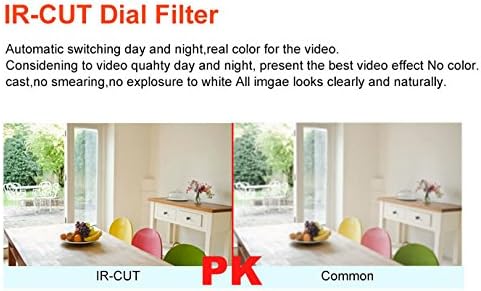
Image: Comparison showing the effect of an IR-CUT filter, which ensures accurate color reproduction during the day and enhanced night vision by filtering infrared light.
3. Digital Wide Dynamic Range (DWDR)
DWDR helps to balance areas of extreme brightness and darkness within the same image, providing clearer details in both. This feature can be enabled or disabled through the CoC menu.

Image: A visual comparison demonstrating the improvement in image quality when DWDR is enabled, showing better detail in both bright and dark areas of a scene.
4. Other Image Settings
Adjust settings such as Automatic Gain Control (AGC), Backlight Compensation (BLC), White Balance (Auto/Manual), and 2D Digital Noise Reduction (2D DNR) via the CoC menu to optimize image quality for your specific environment.
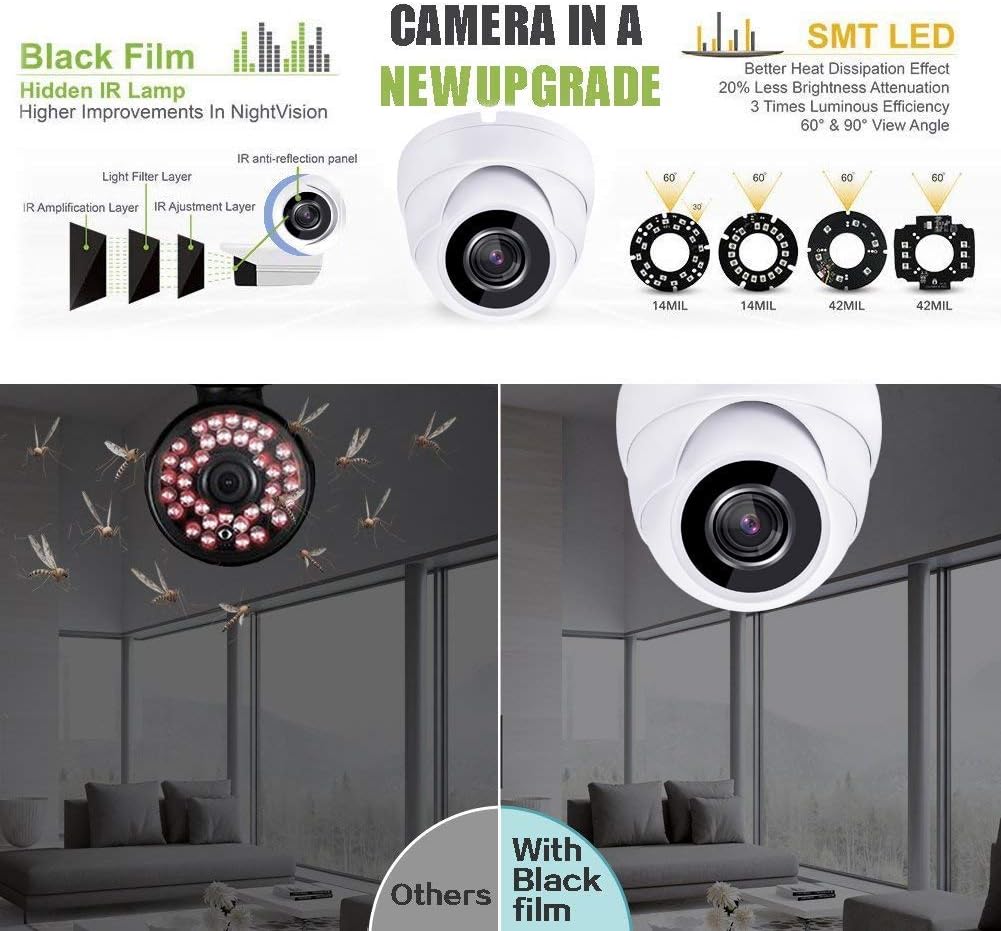
Image: An illustration detailing the camera's upgraded night vision technology, including hidden IR lamps with black film for improved performance and SMT LEDs for better heat dissipation and luminous efficiency.
5. Simu ya Mkononi Viewing
Ikiwa DVR yako inasaidia simu ya mkononi viewing, you can access the camera's live feed and recordings via compatible iPhone or Android applications. Refer to your DVR's manual for specific app recommendations and setup instructions.
Matengenezo
1. Kusafisha Kamera
To maintain optimal image quality, periodically clean the camera lens and housing. Use a soft, damp kitambaa. Epuka visafishaji au viyeyusho vinavyoweza kuharibu lenzi au umaliziaji.
2. Mazingatio ya Mazingira
The camera is rated IP66 for ingress protection, making it suitable for outdoor use. It operates within a temperature range of 14°F to 113°F (-10°C to +45°C). Ensure the camera is not exposed to conditions outside this range for prolonged periods.
3. Sasisho za Firmware
Angalia mtengenezaji website periodically for any available firmware updates for your camera or compatible DVR. Firmware updates can improve performance, add features, or resolve issues.
Kutatua matatizo
- Hakuna Toleo la Video:
- Ensure the camera is receiving power (DC 12V).
- Verify the BNC cable connection between the camera and DVR.
- Confirm your DVR supports the camera's video format (HD-TVI/AHD/CVI/960H) and resolution (5MP/4MP/2MP).
- Poor Image Quality (Pixelated, Off Colors):
- Angalia kebo ya video kwa uharibifu au miunganisho iliyolegea.
- Ensure your DVR is set to the correct video input type and resolution for the camera.
- Adjust image settings (White Balance, BLC, DNR) via the CoC menu.
- Safisha lensi ya kamera.
- Poor Night Vision / Halo Effect:
- Ensure there are no obstructions directly in front of the camera's IR LEDs (e.g., spiderwebs, dust).
- Check for highly reflective surfaces close to the camera that might cause IR reflection.
- Verify the Day/Night mode setting is on 'Auto' or 'BW' for optimal night performance.
- Camera Not Responding to CoC Commands:
- Ensure your DVR fully supports CoC functionality for this camera model.
- Check the coaxial cable for integrity.
Vipimo
| Kipengele | Maelezo |
|---|---|
| Nambari ya Mfano | 7.32773E+11 |
| Sensor ya Picha | 1/2.9" HD 5MP CMOS Sensor |
| Azimio la Video | 5MP (2592 × 1944), 4MP, 2MP |
| Video Frame Rate (NTSC) | 5MP@20FPS, 4MP@30FPS |
| Video Frame Rate (PAL) | 5MP@12.5FPS, 4MP@25FPS |
| Utangamano wa Video | HD-TVI / AHD / CVI / 960H |
| Lenzi | 2.8mm Taa zisizohamishika |
| Angle ya View | Horizontal Field view: 80° |
| Kiwango cha chini cha Mwangaza | 0.01Lux @ F1.2, 0Lux (IR on) |
| LED za IR | 3 Matrix IR (Hidden IR) |
| Umbali wa IR | futi 90 (m 27) |
| Mchana / Usiku | Auto / Color / BW / EXT |
| Wide Dynamic Safu | DDDR |
| Kupunguza Kelele za Dijiti | 2D DNR |
| Pato la Video | BNC x 1 |
| Ugavi wa Nguvu | DC 12V ± 10% |
| Matumizi ya Nguvu | 85mA (IR Off), 300mA (IR On) |
| Joto la Uendeshaji | 14°F ~ 113°F (-10°C ~ +45°C) |
| Ulinzi wa Ingress | IP66 |
| Vipimo | 3.9" x 2.8" (98 X 70mm) |
| Uzito | 0.77 Lbs (0.35KG) |
Taarifa ya Udhamini
Please refer to the warranty card included with your product or visit the official HDView webtovuti kwa masharti na masharti ya udhamini wa kina. Weka risiti yako ya ununuzi kama uthibitisho wa ununuzi kwa madai yoyote ya udhamini.
Usaidizi wa Wateja
For technical assistance, troubleshooting, or product inquiries, please contact HDView customer support. Contact information can typically be found on the product packaging or the official HDView website. When contacting support, please have your product model number and purchase details available.