
1. Utangulizi
This manual provides essential information for the safe and efficient operation, installation, and maintenance of your COTEK SP-1000-124 Pure Sine Wave Inverter. This device converts 24VDC battery power into 120VAC household electricity, suitable for sensitive electronics. Please read this manual thoroughly before use.
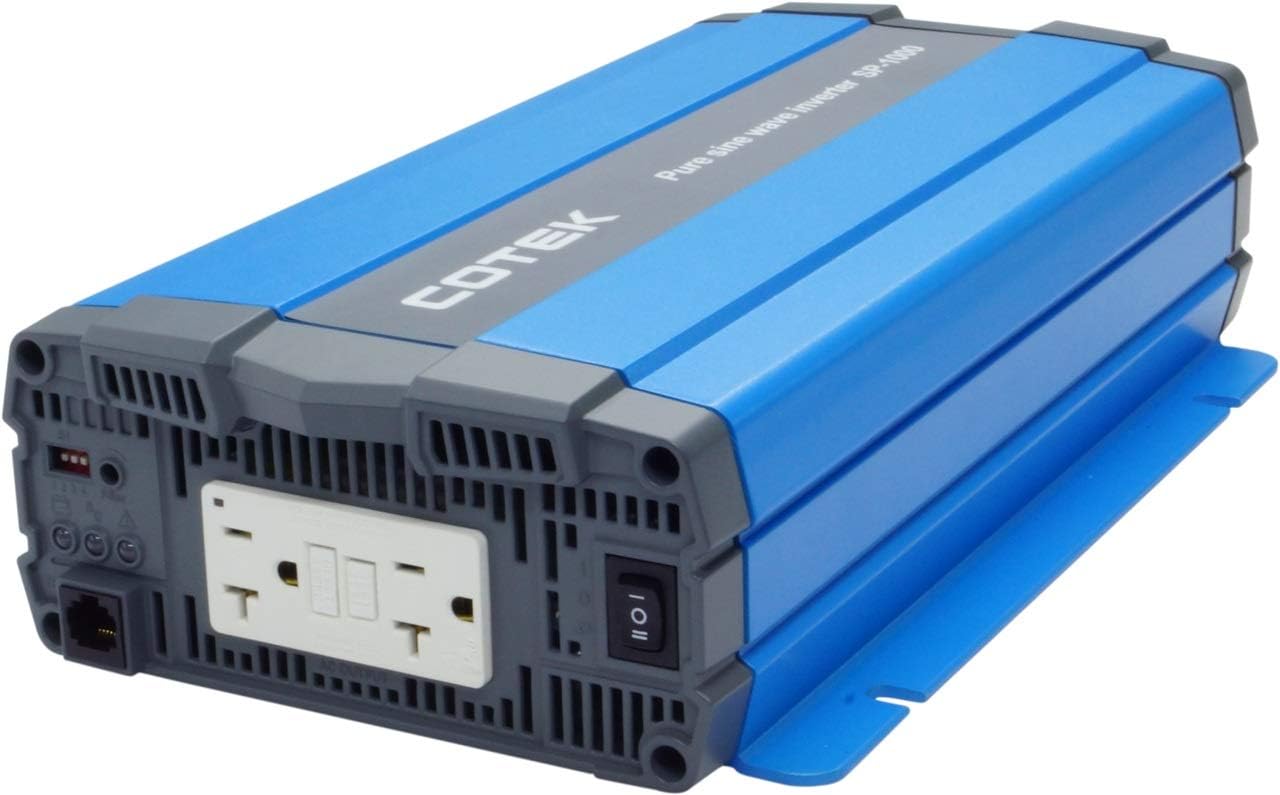
Picha 1.1: Mbele view of the COTEK SP-1000-124 Pure Sine Wave Inverter, showcasing muundo wake kompakt.
2. Taarifa za Usalama
Always observe the following safety precautions to prevent injury or damage to the inverter and connected equipment.
- Hatari ya Umeme: This inverter produces high voltage AC power. Treat the output terminals with the same caution as a standard AC wall outlet.
- Uingizaji hewa Sahihi: Ensure adequate airflow around the inverter. Do not block ventilation openings. Overheating can cause the inverter to shut down or be damaged.
- Usalama wa Betri: Work in a well-ventilated area when connecting to batteries. Batteries can produce explosive gases. Wear appropriate personal protective equipment.
- Kutuliza: The inverter must be properly grounded. Refer to local electrical codes for grounding requirements.
- Unyevu: Do not expose the inverter to rain, snow, spray, or any liquids. It is designed for indoor use (Type 1 Indoor Aluminum Enclosure).
- Wafanyakazi Waliohitimu: Ufungaji na huduma inapaswa kufanywa na wafanyikazi waliohitimu tu.

Picha 2.1: Kutample of recommended safety equipment for electrical work.
3. Bidhaa za Bidhaa
The COTEK SP-1000-124 Inverter offers the following key features:
- Pure sine wave output for compatibility with all AC loads, including sensitive electronics.
- Power ON / OFF remote control capability via a dedicated Green Terminal.
- Ingizo na matokeo vimetengwa kikamilifu kwa usalama ulioimarishwa.
- Temperature and load controlled cooling fan ensures optimal performance and extends unit lifespan.
- User-friendly interface for ease of operation.
- Type 1 Indoor Aluminum Enclosure for durability and protection.
4. Kuweka na Kuweka
Follow these steps for proper installation of your inverter.
4.1 Kuweka
Mount the inverter in a dry, well-ventilated area, away from direct sunlight, heat sources, and flammable materials. Ensure sufficient clearance around the unit for proper airflow, especially around the fan vents. Refer to the mechanical drawings for dimensions and mounting hole locations.

Image 4.1: Mechanical drawings illustrating the inverter's dimensions and mounting points.
4.2 Muunganisho wa Kuingiza Data wa DC
Connect the inverter directly to a 24VDC battery bank using appropriate gauge cables. Ensure correct polarity: connect the positive (+) terminal of the inverter to the positive (+) terminal of the battery, and the negative (-) terminal of the inverter to the negative (-) terminal of the battery. Use a fuse or circuit breaker on the positive DC line, close to the battery, as recommended by the inverter specifications.

Image 4.2: Rear panel of the inverter with DC input terminals clearly marked.
4.3 Muunganisho wa Pato la AC
The inverter features dual GFCI 120VAC outlets. Plug your AC appliances directly into these outlets. Ensure the total wattage of connected appliances does not exceed the inverter's continuous power rating of 1000W.

Image 4.3: Front panel of the inverter with dual GFCI AC outlets and the main power switch.
4.4 Remote Control Connection (Optional)
The inverter supports a remote ON/OFF control via the green terminal block. Connect a compatible remote switch or control system to this terminal for convenient power management.
5. Maagizo ya Uendeshaji
5.1 Kuwasha / Kuzima
To power on the inverter, ensure all DC connections are secure, then press the main power switch on the front panel to the 'ON' position. Alternatively, if a remote control is connected, use the remote switch. To power off, reverse this process.
5.2 Load Management
The SP-1000-124 provides 1000 watts of continuous power and can handle a surge power of up to 1750 watts for less than 3 seconds. Avoid exceeding the continuous power rating to prevent overload shutdowns. If the inverter shuts down due to overload, reduce the connected load and restart the unit.
Maduka 5.3 ya GFCI
The integrated Ground Fault Circuit Interrupter (GFCI) outlets provide enhanced safety by quickly cutting power in case of a ground fault. If a GFCI outlet trips, disconnect the appliance, reset the GFCI, and re-evaluate the appliance for faults before reconnecting.

Image 5.1: The inverter provides power for various AC loads, including lighting.
6. Matengenezo
Matengenezo ya mara kwa mara huhakikisha uimara na uendeshaji wa kuaminika wa inverter yako.
- Kusafisha: Periodically clean the inverter's exterior with a dry cloth. Ensure ventilation openings and the cooling fan are free from dust and debris. Do not use liquid cleaners.
- Viunganisho: Regularly check all DC and AC connections for tightness. Loose connections can cause overheating and poor performance.
- Afya ya Betri: Monitor the health of your battery bank. A weak or improperly maintained battery can affect inverter performance and lifespan.

Image 6.1: Proper battery maintenance is crucial for inverter performance.
7. Utatuzi wa shida
Sehemu hii inashughulikia masuala ya kawaida ambayo unaweza kukutana nayo na kibadilishaji chako cha umeme.
- Hakuna Nguvu ya Kutoa: Check DC input connections and battery voltage. Ensure the inverter is switched ON. Check for tripped GFCI outlets.
- Inverter Shuts Down: This often indicates an overload, low input voltage, or overheating. Reduce the load, check battery charge, and ensure proper ventilation. Allow the unit to cool if it's hot.
- GFCI Outlet Trips Frequently: This may indicate a fault in the connected appliance or wiring. Disconnect all appliances and test the GFCI. If it still trips, the inverter may require service. If it holds, connect appliances one by one to identify the faulty device.
- Feni Haifanyi Kazi: The cooling fan is temperature and load controlled. It will only activate when necessary. If the inverter is hot and the fan is not running, contact support.
8. Vipimo
Vipimo vya kina vya kiufundi vya COTEK SP-1000-124 Pure Sine Wave Inverter.
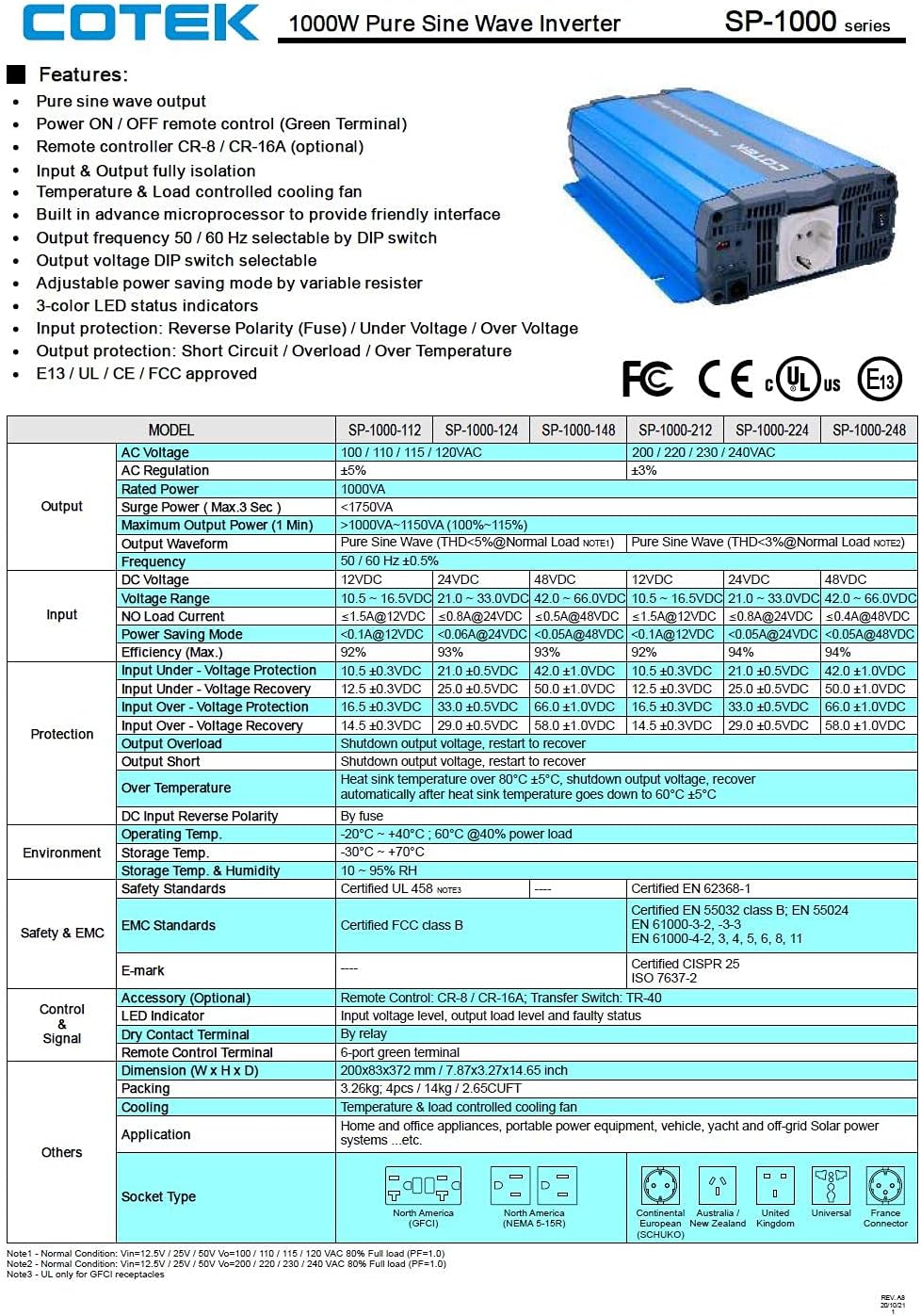
Image 8.1: Official specification sheet for the COTEK SP-1000 series inverters.
| Vipimo | Thamani |
|---|---|
| Chapa | COTEK |
| Jina la Mfano | SP-1000-124 (SP Series) |
| Wattage (Inaendelea) | 1000 Watts |
| Surge Power (Max 3 sec) | 1750 Watts |
| Uingizaji Voltage | 24 Volts DC |
| Pato Voltage | 120 Volts AC |
| Pato la Mawimbi | Safi ya Sine Wimbi |
| Mzunguko | 60 Hz |
| Idadi ya maduka | 2 (Dual GFCI) |
| Uzito wa Kipengee | Pauni 8.94 |
| Aina ya Uzio | Type 1 Indoor Aluminum |
| Kupoa | Temperature & load controlled fan |
9. Udhamini na Msaada
The COTEK SP-1000-124 Pure Sine Wave Inverter comes with a Udhamini wa Miaka 2 wa Mtengenezaji. This warranty covers defects in materials and workmanship under normal use. For warranty claims or technical support, please contact your authorized COTEK dealer or the manufacturer directly. Keep your purchase receipt as proof of purchase.